> ## Documentation Index
> Fetch the complete documentation index at: https://docs.suprsend.com/llms.txt
> Use this file to discover all available pages before exploring further.
# Overview
> Use the Amazon S3 v2 connector to export notification logs, delivery events, and analytics from SuprSend to S3 for debugging, reporting, and compliance audits.
**On the old S3 connector (v1.0)?** v1.0 will be deprecated over time. v2.0 exports all log types and notification analytics and closes gaps in error logging that exist in v1.0—see the [v1.0 doc](/docs/amazon_s3) for the migration path.
Export your SuprSend notification data directly to your S3 bucket. Build custom analytics dashboards, debug delivery issues, surface errors to your customers, or maintain compliance audit trails—all with data you fully own and control.
***
## How it works
SuprSend syncs your notification data to S3 every **5 minutes** as Parquet files, partitioned by hour. By default, each data point goes into its own top-level folder (the `per_type` path layout)—see [Compression and path layout](#compression-and-path-layout) for the exact folder structure and how to change it.
A few details worth knowing:
* **Updates rewrite files in place.** Each sync re-writes the hourly Parquet files whose data has changed. Query engines like Athena, Spark, and Presto see the new state automatically. For warehouses that don't overwrite rows (e.g., BigQuery), use the `updated_at` column to pick the latest version.
* **Parquet is read natively** by every common query engine and warehouse. For Athena specifically, see [Query with Athena](/docs/athena_s3_query).
* **Data is encrypted in transit** (TLS 1.2+) and **at rest** (SSE-S3 or SSE-KMS).
* **If you pause the sync, the pause period backfills automatically** when you resume.
***
## What you can export
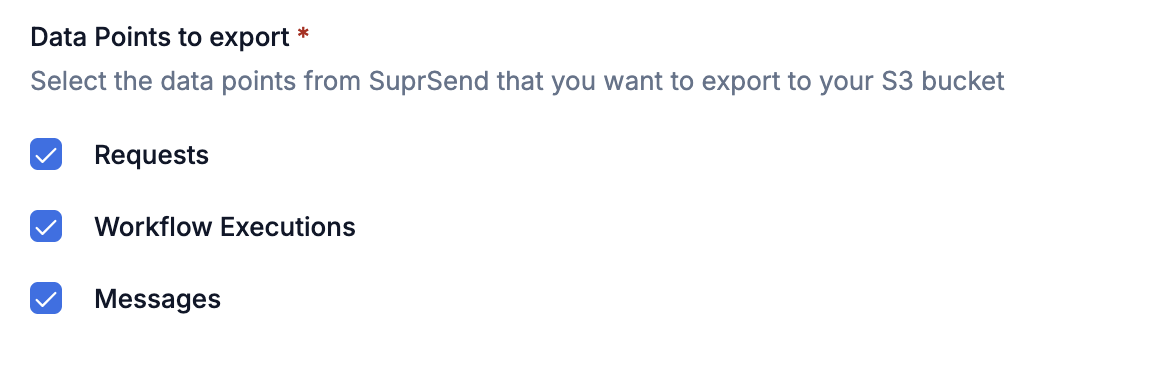
You can pick which data points to sync based on what you're trying to do. Most teams start with **Messages** (analytics and delivery troubleshooting) and add **Workflow Executions** and **Requests** when they need to debug end-to-end. Each data point maps to its own table in your warehouse or query engine.
### Data points
| Data point | What's in it | Use it for |
| ----------------------- | -------------------------------------------------- | --------------------------------------------------------------------- |
| **Messages** | Delivery status, engagement, vendor info, failures | Analytics, delivery troubleshooting |
| **Workflow Executions** | Step-by-step workflow logs | Debugging workflow level errors or computations like user preferences |
| **Requests** | API payloads and their responses | API debugging, Audit trails, Workflow Trigger level errors |
You'll choose which data points to export when you create the connector—open the SuprSend dashboard at [app.suprsend.com](https://app.suprsend.com) and go to **Connectors** → **Add connector** → **Amazon S3 v2.0** to see the selection panel:
 **Errors logged in each table:**
| Table | Errors |
| ------------------- | --------------------------------------------------------------------------------------------------------------------------------------------- |
| Requests | API level errors, workflow trigger level errors (condition mismatch, user not found, etc.) |
| Workflow Executions | Workflow level errors (dynamic variables in workflow could not be resolved, template rendering failed, webhook returned a 404 response, etc.) |
| Messages | Delivery failures |
### Table schema
Columns and types below match the Parquet files SuprSend writes to S3. Several semantically-typed fields (JSON, boolean, integer, timestamp) are stored as `string` in Parquet—they're called out in the description so you can cast them in your queries.
| Column name | Description | Datatype |
| ------------------ | ------------------------------------------------------------------------------------------------------------------------------------------------------------------------------ | --------------- |
| workspace\_key | SuprSend workspace identifier | string |
| created\_at | Time when the request was received by SuprSend (UTC) | timestamp |
| updated\_at | Time when this entry was last updated | timestamp |
| api\_type | Entity type for the API call | string |
| api\_name | Workflow, event, or broadcast name passed in the API call | string |
| wf\_trigger\_type | Workflow trigger type | string |
| distinct\_id\_list | List of user `distinct_id` values, or `object_type/id` for object recipients | `array` |
| actor | Actor passed in the event or workflow API request | string |
| tenant\_id | Tenant ID for which the API request was sent | string |
| payload | Input payload passed in the trigger, including API call details (JSON serialized as string) | string |
| response | HTTP API response (JSON serialized as string) | string |
| metadata | SDK, machine, and location information for the request (JSON serialized as string) | string |
| errors | Request-level errors. Each element has `error_code`, `error_description`, `error_type`, `severity`, `workflow_slug` | `array` |
| executions | Workflow or broadcast executions triggered by this API call. Each element has `distinct_id`, `exec_id`, `workflow_slug`. `exec_id` joins to `workflow_executions.execution_id` | `array` |
| idempotency\_key | Idempotency key passed in the API request. A UUID is generated if not provided | string |
| status | Status of the API request | string |
**status** can have these values:
* `completed`: request is successfully processed.
* `failure`: request failed to process due to some error.
* `partial_failure`: request has been partially processed with some failure or has an acceptable warning (like workflow conditions evaluated to false).
| Column name | Description | Datatype |
| ----------------------------- | ---------------------------------------------------------------------------------- | --------- |
| workspace\_key | SuprSend workspace identifier | string |
| created\_at | Time when the workflow execution started | timestamp |
| updated\_at | Time when the workflow step log was last updated | timestamp |
| execution\_id | Unique identifier for a workflow execution | string |
| recipient\_distinct\_id | User `distinct_id`; for objects, `object_type/id` | string |
| tenant\_id | Unique identifier of the tenant | string |
| idempotency\_key | Idempotency key passed in the API request. A UUID is generated if not provided | string |
| parent\_object\_execution\_id | Execution ID of the parent object when triggered on an object | string |
| parent\_object | Parent `object_type/id` when the workflow runs for subscribers | string |
| workflow\_slug | Unique slug of the workflow | string |
| workflow\_version | Version of the workflow | string |
| node\_id | Unique identifier of the node | string |
| node\_name | Name of the node | string |
| node\_type | Type of the node | string |
| execution\_stage | Current execution stage of the node | string |
| status | Log status of the step (`error`, `warning`, `info`) | string |
| message | Short description of the event or error at this stage | string |
| properties | Additional input or output data for the node execution (JSON serialized as string) | string |
| Column name | Description | Datatype |
| ----------------------------- | ---------------------------------------------------------------------------------------- | --------- |
| workspace\_key | SuprSend workspace identifier | string |
| created\_at | Time when this entry was created | timestamp |
| updated\_at | Time when the message status was last updated | timestamp |
| wf\_execution\_id | Workflow execution this message belongs to. Joins to `workflow_executions.execution_id` | string |
| broadcast\_execution\_id | Broadcast execution this message belongs to | string |
| message\_id | Message identifier; present only when there is no execution error | string |
| recipient\_distinct\_id | User `distinct_id`; for objects, `object_type/id` | string |
| tenant\_id | Unique identifier of the tenant | string |
| idempotency\_key | Idempotency key passed in the API request. A UUID is generated if not provided | string |
| parent\_object | Parent `object_type/id` when the workflow runs for subscribers | string |
| parent\_object\_execution\_id | Execution ID of the parent object when triggered on an object | string |
| workflow\_slug | Unique slug of the workflow | string |
| template\_name | Name of the template group | string |
| template\_slug | Unique slug of the template | string |
| message\_status | Delivery status of the message | string |
| message\_triggered\_at | Timestamp when SuprSend sent the message request to the vendor | timestamp |
| message\_delivered\_at | Timestamp when the vendor reported delivery | timestamp |
| message\_seen\_at | Timestamp when the message was seen by the user | timestamp |
| message\_clicked\_at | Timestamp when the message was clicked by the user | timestamp |
| node\_id | Unique identifier of the node | string |
| node\_name | Name of the node | string |
| node\_type | Type of the node | string |
| execution\_failure\_reason | Workflow-execution-level failure details with severity (JSON serialized as string) | string |
| delivery\_failure\_reason | Failure reason returned by the vendor | string |
| note | Additional note attached to the message | string |
| message\_id\_by\_vendor | Vendor-generated identifier for this message | string |
| vendor\_fallback\_applicable | Whether vendor fallback was enabled (`true` / `false` as string) | string |
| vendor\_fallback\_level | Order in which this vendor was used during fallback, starting at `0` (integer as string) | string |
| vendor\_nickname | Vendor nickname configured in SuprSend | string |
| vendor\_slug | Vendor identifier combining vendor type and channel | string |
| is\_smart | Whether the node used smart channel routing (`true` / `false` as string) | string |
| success\_metric | Success metric defined for smart channel routing | string |
| success\_achieved\_at | Timestamp when the success metric was achieved (ISO timestamp as string) | string |
| wait\_time\_in\_seconds | Wait time between channels for smart routing, in seconds (integer as string) | string |
| channel\_slug | Communication channel | string |
| channel\_value | Channel-specific value (for example, email address) | string |
| webhook\_data | Request and response payload for webhook nodes (JSON serialized as string) | string |
### Linking different data points
These data points are linked, so you can trace a notification from the initial API request all the way to final delivery. The `idempotency_key` is shared across all three tables and is the easiest way to follow a single request end to end—it's also the value you can pass in your API call and store on your side to correlate SuprSend logs with your internal ones.
```mermaid theme={"system"}
graph LR
A[Requests] -->|executions[].exec_id → execution_id| B[Workflow Executions]
B -->|execution_id → wf_execution_id| C[Messages]
A -->|idempotency_key| C
style A fill:#60a5fa,stroke:#93c5fd,color:#000000
style B fill:#fbbf24,stroke:#fcd34d,color:#000000
style C fill:#34d399,stroke:#6ee7b7,color:#000000
```
| From → To | Join on |
| ------------------------------ | ------------------------------------------------------------------------ |
| Requests → Workflow Executions | `UNNEST(requests.executions).exec_id = workflow_executions.execution_id` |
| Workflow Executions → Messages | `workflow_executions.execution_id = messages.wf_execution_id` |
| Requests → Messages (shortcut) | `requests.idempotency_key = messages.idempotency_key` |
## Compression and path layout
You can configure how Parquet files are written when you add or edit the connector. The defaults work for almost every use case—change them only if you have a specific need.
**Connectors created before 21 May 2026** still use the previous defaults—**`lz4` compression** and the **`shared` path layout**. New connectors default to `snappy` + `per_type`. Changing either setting on an existing connector only affects files written **after** the change; everything already in your bucket keeps its original codec and folder.
If you're on the old defaults and want to switch, write to [support@suprsend.com](mailto:support@suprsend.com)—we'll help you migrate and rewrite the historical files if you need them in the new layout.
### Compression
Parquet files are written with **`snappy`** by default, which works well for almost every query engine and warehouse. You can switch the codec to `lz4`, `gzip`, `zstd`, `brotli`, or `none` if you have a specific need.
Don't use `lz4` if you plan to query the data with Amazon Athena—Athena can't read `lz4`-compressed Parquet reliably (a known Athena limitation, not specific to SuprSend).
### Path layout
Two layouts are available for how files are organized inside your bucket. Both use Hive-style date partitions (`year=YYYY/month=MM/day=DD/hour=HH`).
Each data point gets its own top-level folder, then date-partitioned subfolders:
```
your-bucket/
├── messages/year=2025/month=01/day=15/hour=14/messages.parquet
├── workflow_executions/year=2025/month=01/day=15/hour=14/workflow_executions.parquet
└── requests/year=2025/month=01/day=15/hour=14/requests.parquet
```
**Recommended for every query engine and warehouse.** Each data point lives in its own prefix, so tables, schemas, and IAM scopes stay cleanly separated—a one-to-one mapping between table and folder. **Required if you're using Amazon Athena**—see [Query with Athena](/docs/athena_s3_query).
All data points share the same date-partitioned path, distinguished only by file name:
```
your-bucket/
├── year=2025/month=01/day=15/hour=14/messages.parquet
├── year=2025/month=01/day=15/hour=14/workflow_executions.parquet
└── year=2025/month=01/day=15/hour=14/requests.parquet
```
Works with BigQuery and DuckDB if you already consume data from a single date-partitioned prefix. **Not compatible with Amazon Athena.**
## Setup
### Step 1: Create your S3 bucket
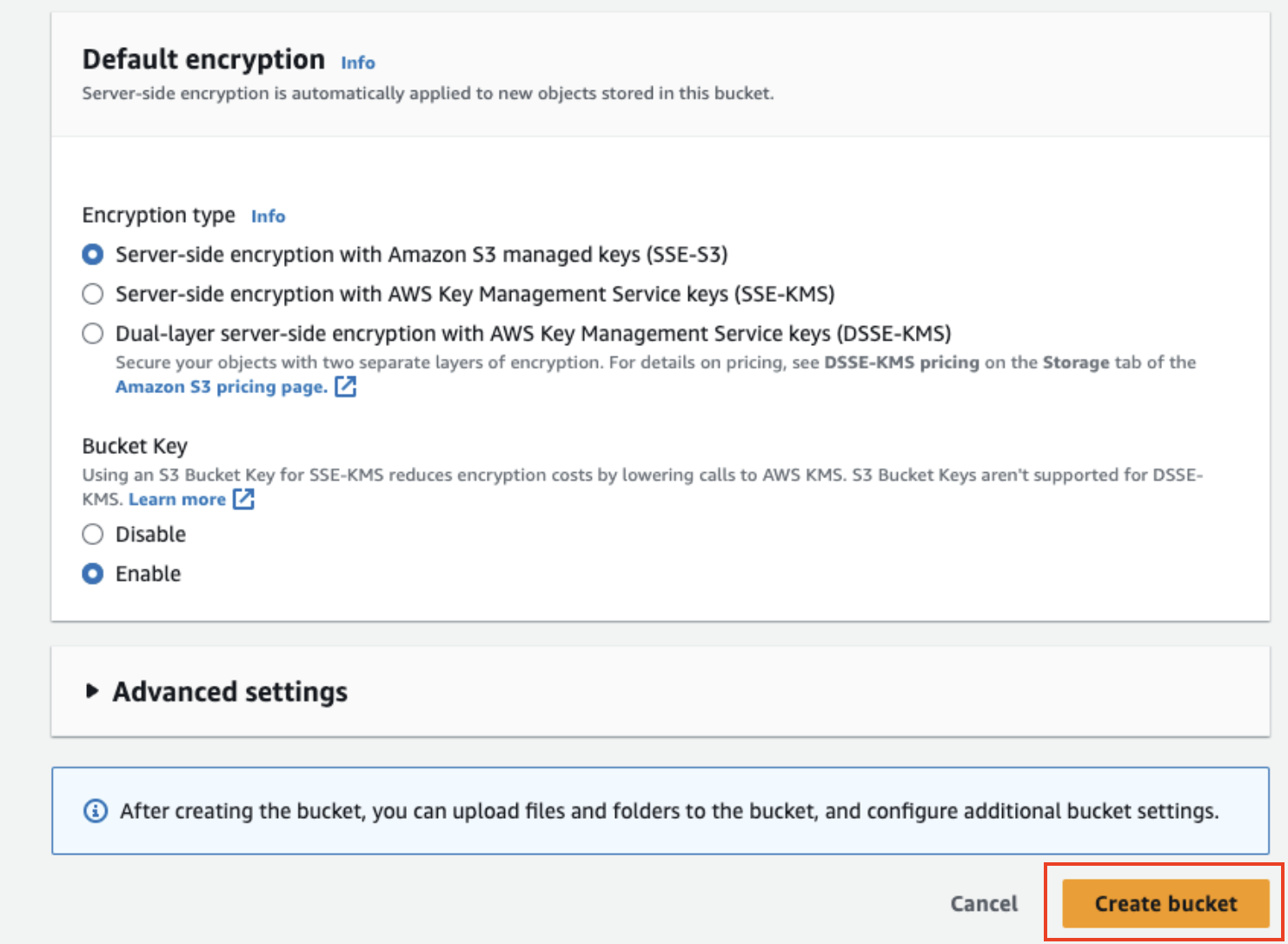
Open [AWS S3 Console](https://s3.console.aws.amazon.com/) and create a bucket with these settings:
**Errors logged in each table:**
| Table | Errors |
| ------------------- | --------------------------------------------------------------------------------------------------------------------------------------------- |
| Requests | API level errors, workflow trigger level errors (condition mismatch, user not found, etc.) |
| Workflow Executions | Workflow level errors (dynamic variables in workflow could not be resolved, template rendering failed, webhook returned a 404 response, etc.) |
| Messages | Delivery failures |
### Table schema
Columns and types below match the Parquet files SuprSend writes to S3. Several semantically-typed fields (JSON, boolean, integer, timestamp) are stored as `string` in Parquet—they're called out in the description so you can cast them in your queries.
| Column name | Description | Datatype |
| ------------------ | ------------------------------------------------------------------------------------------------------------------------------------------------------------------------------ | --------------- |
| workspace\_key | SuprSend workspace identifier | string |
| created\_at | Time when the request was received by SuprSend (UTC) | timestamp |
| updated\_at | Time when this entry was last updated | timestamp |
| api\_type | Entity type for the API call | string |
| api\_name | Workflow, event, or broadcast name passed in the API call | string |
| wf\_trigger\_type | Workflow trigger type | string |
| distinct\_id\_list | List of user `distinct_id` values, or `object_type/id` for object recipients | `array` |
| actor | Actor passed in the event or workflow API request | string |
| tenant\_id | Tenant ID for which the API request was sent | string |
| payload | Input payload passed in the trigger, including API call details (JSON serialized as string) | string |
| response | HTTP API response (JSON serialized as string) | string |
| metadata | SDK, machine, and location information for the request (JSON serialized as string) | string |
| errors | Request-level errors. Each element has `error_code`, `error_description`, `error_type`, `severity`, `workflow_slug` | `array` |
| executions | Workflow or broadcast executions triggered by this API call. Each element has `distinct_id`, `exec_id`, `workflow_slug`. `exec_id` joins to `workflow_executions.execution_id` | `array` |
| idempotency\_key | Idempotency key passed in the API request. A UUID is generated if not provided | string |
| status | Status of the API request | string |
**status** can have these values:
* `completed`: request is successfully processed.
* `failure`: request failed to process due to some error.
* `partial_failure`: request has been partially processed with some failure or has an acceptable warning (like workflow conditions evaluated to false).
| Column name | Description | Datatype |
| ----------------------------- | ---------------------------------------------------------------------------------- | --------- |
| workspace\_key | SuprSend workspace identifier | string |
| created\_at | Time when the workflow execution started | timestamp |
| updated\_at | Time when the workflow step log was last updated | timestamp |
| execution\_id | Unique identifier for a workflow execution | string |
| recipient\_distinct\_id | User `distinct_id`; for objects, `object_type/id` | string |
| tenant\_id | Unique identifier of the tenant | string |
| idempotency\_key | Idempotency key passed in the API request. A UUID is generated if not provided | string |
| parent\_object\_execution\_id | Execution ID of the parent object when triggered on an object | string |
| parent\_object | Parent `object_type/id` when the workflow runs for subscribers | string |
| workflow\_slug | Unique slug of the workflow | string |
| workflow\_version | Version of the workflow | string |
| node\_id | Unique identifier of the node | string |
| node\_name | Name of the node | string |
| node\_type | Type of the node | string |
| execution\_stage | Current execution stage of the node | string |
| status | Log status of the step (`error`, `warning`, `info`) | string |
| message | Short description of the event or error at this stage | string |
| properties | Additional input or output data for the node execution (JSON serialized as string) | string |
| Column name | Description | Datatype |
| ----------------------------- | ---------------------------------------------------------------------------------------- | --------- |
| workspace\_key | SuprSend workspace identifier | string |
| created\_at | Time when this entry was created | timestamp |
| updated\_at | Time when the message status was last updated | timestamp |
| wf\_execution\_id | Workflow execution this message belongs to. Joins to `workflow_executions.execution_id` | string |
| broadcast\_execution\_id | Broadcast execution this message belongs to | string |
| message\_id | Message identifier; present only when there is no execution error | string |
| recipient\_distinct\_id | User `distinct_id`; for objects, `object_type/id` | string |
| tenant\_id | Unique identifier of the tenant | string |
| idempotency\_key | Idempotency key passed in the API request. A UUID is generated if not provided | string |
| parent\_object | Parent `object_type/id` when the workflow runs for subscribers | string |
| parent\_object\_execution\_id | Execution ID of the parent object when triggered on an object | string |
| workflow\_slug | Unique slug of the workflow | string |
| template\_name | Name of the template group | string |
| template\_slug | Unique slug of the template | string |
| message\_status | Delivery status of the message | string |
| message\_triggered\_at | Timestamp when SuprSend sent the message request to the vendor | timestamp |
| message\_delivered\_at | Timestamp when the vendor reported delivery | timestamp |
| message\_seen\_at | Timestamp when the message was seen by the user | timestamp |
| message\_clicked\_at | Timestamp when the message was clicked by the user | timestamp |
| node\_id | Unique identifier of the node | string |
| node\_name | Name of the node | string |
| node\_type | Type of the node | string |
| execution\_failure\_reason | Workflow-execution-level failure details with severity (JSON serialized as string) | string |
| delivery\_failure\_reason | Failure reason returned by the vendor | string |
| note | Additional note attached to the message | string |
| message\_id\_by\_vendor | Vendor-generated identifier for this message | string |
| vendor\_fallback\_applicable | Whether vendor fallback was enabled (`true` / `false` as string) | string |
| vendor\_fallback\_level | Order in which this vendor was used during fallback, starting at `0` (integer as string) | string |
| vendor\_nickname | Vendor nickname configured in SuprSend | string |
| vendor\_slug | Vendor identifier combining vendor type and channel | string |
| is\_smart | Whether the node used smart channel routing (`true` / `false` as string) | string |
| success\_metric | Success metric defined for smart channel routing | string |
| success\_achieved\_at | Timestamp when the success metric was achieved (ISO timestamp as string) | string |
| wait\_time\_in\_seconds | Wait time between channels for smart routing, in seconds (integer as string) | string |
| channel\_slug | Communication channel | string |
| channel\_value | Channel-specific value (for example, email address) | string |
| webhook\_data | Request and response payload for webhook nodes (JSON serialized as string) | string |
### Linking different data points
These data points are linked, so you can trace a notification from the initial API request all the way to final delivery. The `idempotency_key` is shared across all three tables and is the easiest way to follow a single request end to end—it's also the value you can pass in your API call and store on your side to correlate SuprSend logs with your internal ones.
```mermaid theme={"system"}
graph LR
A[Requests] -->|executions[].exec_id → execution_id| B[Workflow Executions]
B -->|execution_id → wf_execution_id| C[Messages]
A -->|idempotency_key| C
style A fill:#60a5fa,stroke:#93c5fd,color:#000000
style B fill:#fbbf24,stroke:#fcd34d,color:#000000
style C fill:#34d399,stroke:#6ee7b7,color:#000000
```
| From → To | Join on |
| ------------------------------ | ------------------------------------------------------------------------ |
| Requests → Workflow Executions | `UNNEST(requests.executions).exec_id = workflow_executions.execution_id` |
| Workflow Executions → Messages | `workflow_executions.execution_id = messages.wf_execution_id` |
| Requests → Messages (shortcut) | `requests.idempotency_key = messages.idempotency_key` |
## Compression and path layout
You can configure how Parquet files are written when you add or edit the connector. The defaults work for almost every use case—change them only if you have a specific need.
**Connectors created before 21 May 2026** still use the previous defaults—**`lz4` compression** and the **`shared` path layout**. New connectors default to `snappy` + `per_type`. Changing either setting on an existing connector only affects files written **after** the change; everything already in your bucket keeps its original codec and folder.
If you're on the old defaults and want to switch, write to [support@suprsend.com](mailto:support@suprsend.com)—we'll help you migrate and rewrite the historical files if you need them in the new layout.
### Compression
Parquet files are written with **`snappy`** by default, which works well for almost every query engine and warehouse. You can switch the codec to `lz4`, `gzip`, `zstd`, `brotli`, or `none` if you have a specific need.
Don't use `lz4` if you plan to query the data with Amazon Athena—Athena can't read `lz4`-compressed Parquet reliably (a known Athena limitation, not specific to SuprSend).
### Path layout
Two layouts are available for how files are organized inside your bucket. Both use Hive-style date partitions (`year=YYYY/month=MM/day=DD/hour=HH`).
Each data point gets its own top-level folder, then date-partitioned subfolders:
```
your-bucket/
├── messages/year=2025/month=01/day=15/hour=14/messages.parquet
├── workflow_executions/year=2025/month=01/day=15/hour=14/workflow_executions.parquet
└── requests/year=2025/month=01/day=15/hour=14/requests.parquet
```
**Recommended for every query engine and warehouse.** Each data point lives in its own prefix, so tables, schemas, and IAM scopes stay cleanly separated—a one-to-one mapping between table and folder. **Required if you're using Amazon Athena**—see [Query with Athena](/docs/athena_s3_query).
All data points share the same date-partitioned path, distinguished only by file name:
```
your-bucket/
├── year=2025/month=01/day=15/hour=14/messages.parquet
├── year=2025/month=01/day=15/hour=14/workflow_executions.parquet
└── year=2025/month=01/day=15/hour=14/requests.parquet
```
Works with BigQuery and DuckDB if you already consume data from a single date-partitioned prefix. **Not compatible with Amazon Athena.**
## Setup
### Step 1: Create your S3 bucket
Open [AWS S3 Console](https://s3.console.aws.amazon.com/) and create a bucket with these settings:
 * **Bucket name**: Something like `suprsend-logs-production` (save this—you'll need it)
* **Region**: Pick one close to you
* **Block all public access**: Yes
* **Encryption**: SSE-S3 (or SSE-KMS for compliance)
* **Bucket name**: Something like `suprsend-logs-production` (save this—you'll need it)
* **Region**: Pick one close to you
* **Block all public access**: Yes
* **Encryption**: SSE-S3 (or SSE-KMS for compliance)
 ### Step 2: Create an IAM policy
This gives SuprSend permission to write to your bucket. In [IAM Console](https://console.aws.amazon.com/iam/), create a policy with this JSON:
```json theme={"system"}
{
"Version": "2012-10-17",
"Statement": [{
"Sid": "SuprSendS3ExportAccess",
"Effect": "Allow",
"Action": ["s3:PutObject", "s3:ListBucket", "s3:GetObject"],
"Resource": [
"arn:aws:s3:::YOUR_BUCKET_NAME/*",
"arn:aws:s3:::YOUR_BUCKET_NAME"
]
}]
}
```
Replace `YOUR_BUCKET_NAME` with your actual bucket name. Save it as something like `suprsend_s3_policy`.
### Step 3: Set up authentication
Two authentication methods are available:
| Method | When to use | We recommend |
| ------------ | -------------------------------------------- | ---------------------------------------------------------------------------- |
| **IAM Role** | Production, enterprise, multi-account setups | ✅ Yes—credentials rotate automatically, no secrets to manage |
| **IAM User** | Development, testing, quick POCs | Only if IAM Role isn't feasible. Requires manual key rotation every 90 days. |
**Use IAM Role when:**
* Running in production environments
* Security compliance requires no long-lived credentials
* You have multi-account AWS setups
* You want zero credential management overhead
**Steps to create IAM Role:**
1. In IAM Console → **Roles** → **Create Role**
2. Select **Another AWS Account** and enter SuprSend's account ID: `924219879248`
3. Attach the policy you just created
4. Name it (for example, `suprsend_s3_role`)
Now configure the trust relationship. Generate an External ID at [uuidgenerator.net](https://www.uuidgenerator.net/), then update the trust policy:
```json theme={"system"}
{
"Version": "2012-10-17",
"Statement": [{
"Effect": "Allow",
"Principal": { "AWS": "arn:aws:iam::924219879248:root" },
"Action": "sts:AssumeRole",
"Condition": { "StringEquals": { "sts:ExternalId": "YOUR_EXTERNAL_ID" }}
}]
}
```
**Save these for the next step:** Role ARN + External ID (case-sensitive, no extra spaces)
**Use IAM User when:**
* Setting up for development or testing
* Quick proof-of-concept needed
* IAM Role setup isn't feasible in your environment
IAM User credentials require manual rotation every 90 days for security compliance.
**Steps to create IAM User:**
1. In IAM Console → **Users** → **Add users**
2. Name it (for example, `suprsend-s3-connector`)
3. Attach your policy
4. Go to **Security credentials** → **Create access key** → **Third party service**
### Step 2: Create an IAM policy
This gives SuprSend permission to write to your bucket. In [IAM Console](https://console.aws.amazon.com/iam/), create a policy with this JSON:
```json theme={"system"}
{
"Version": "2012-10-17",
"Statement": [{
"Sid": "SuprSendS3ExportAccess",
"Effect": "Allow",
"Action": ["s3:PutObject", "s3:ListBucket", "s3:GetObject"],
"Resource": [
"arn:aws:s3:::YOUR_BUCKET_NAME/*",
"arn:aws:s3:::YOUR_BUCKET_NAME"
]
}]
}
```
Replace `YOUR_BUCKET_NAME` with your actual bucket name. Save it as something like `suprsend_s3_policy`.
### Step 3: Set up authentication
Two authentication methods are available:
| Method | When to use | We recommend |
| ------------ | -------------------------------------------- | ---------------------------------------------------------------------------- |
| **IAM Role** | Production, enterprise, multi-account setups | ✅ Yes—credentials rotate automatically, no secrets to manage |
| **IAM User** | Development, testing, quick POCs | Only if IAM Role isn't feasible. Requires manual key rotation every 90 days. |
**Use IAM Role when:**
* Running in production environments
* Security compliance requires no long-lived credentials
* You have multi-account AWS setups
* You want zero credential management overhead
**Steps to create IAM Role:**
1. In IAM Console → **Roles** → **Create Role**
2. Select **Another AWS Account** and enter SuprSend's account ID: `924219879248`
3. Attach the policy you just created
4. Name it (for example, `suprsend_s3_role`)
Now configure the trust relationship. Generate an External ID at [uuidgenerator.net](https://www.uuidgenerator.net/), then update the trust policy:
```json theme={"system"}
{
"Version": "2012-10-17",
"Statement": [{
"Effect": "Allow",
"Principal": { "AWS": "arn:aws:iam::924219879248:root" },
"Action": "sts:AssumeRole",
"Condition": { "StringEquals": { "sts:ExternalId": "YOUR_EXTERNAL_ID" }}
}]
}
```
**Save these for the next step:** Role ARN + External ID (case-sensitive, no extra spaces)
**Use IAM User when:**
* Setting up for development or testing
* Quick proof-of-concept needed
* IAM Role setup isn't feasible in your environment
IAM User credentials require manual rotation every 90 days for security compliance.
**Steps to create IAM User:**
1. In IAM Console → **Users** → **Add users**
2. Name it (for example, `suprsend-s3-connector`)
3. Attach your policy
4. Go to **Security credentials** → **Create access key** → **Third party service**
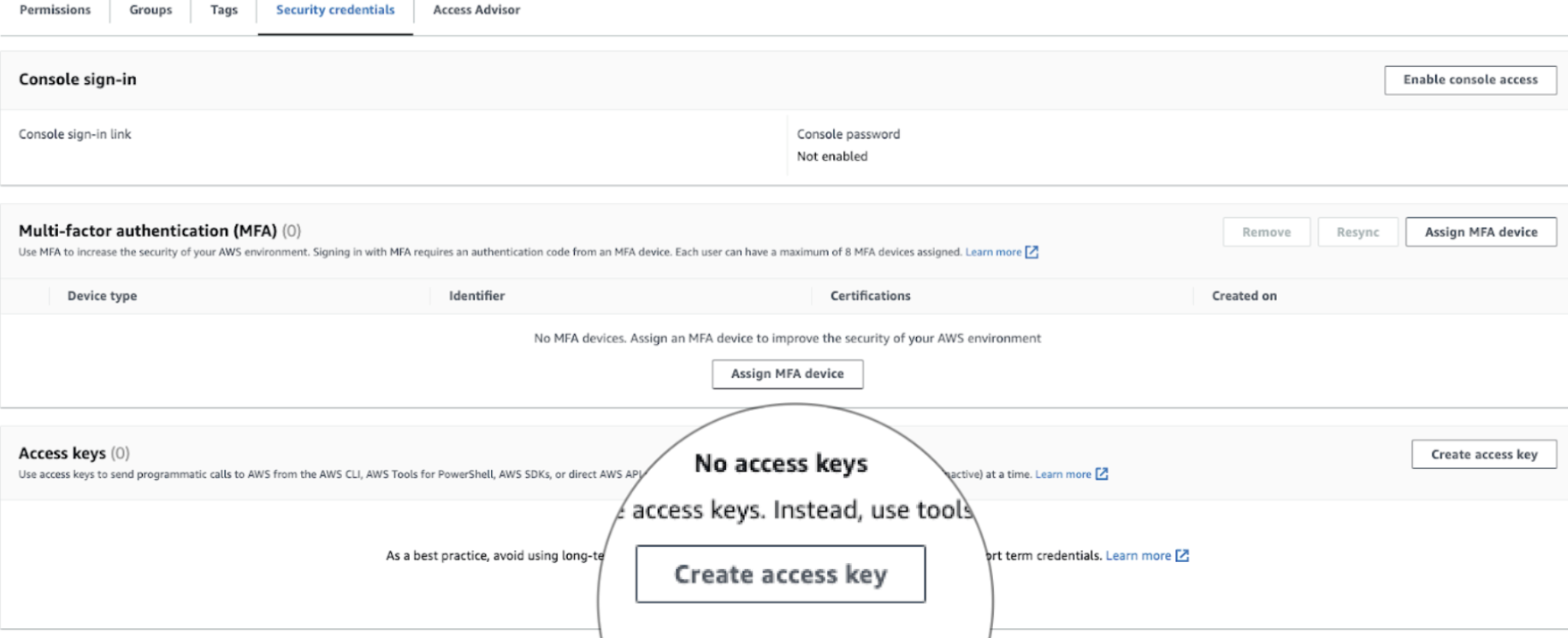 **Save immediately:** Access Key ID + Secret Access Key to add in the next step (AWS won't show the secret again)
### Step 4: Connect in SuprSend
In the SuprSend dashboard ([app.suprsend.com](https://app.suprsend.com)), go to **Connectors** → **Add connector** → **Amazon S3 v2.0**.
**Save immediately:** Access Key ID + Secret Access Key to add in the next step (AWS won't show the secret again)
### Step 4: Connect in SuprSend
In the SuprSend dashboard ([app.suprsend.com](https://app.suprsend.com)), go to **Connectors** → **Add connector** → **Amazon S3 v2.0**.
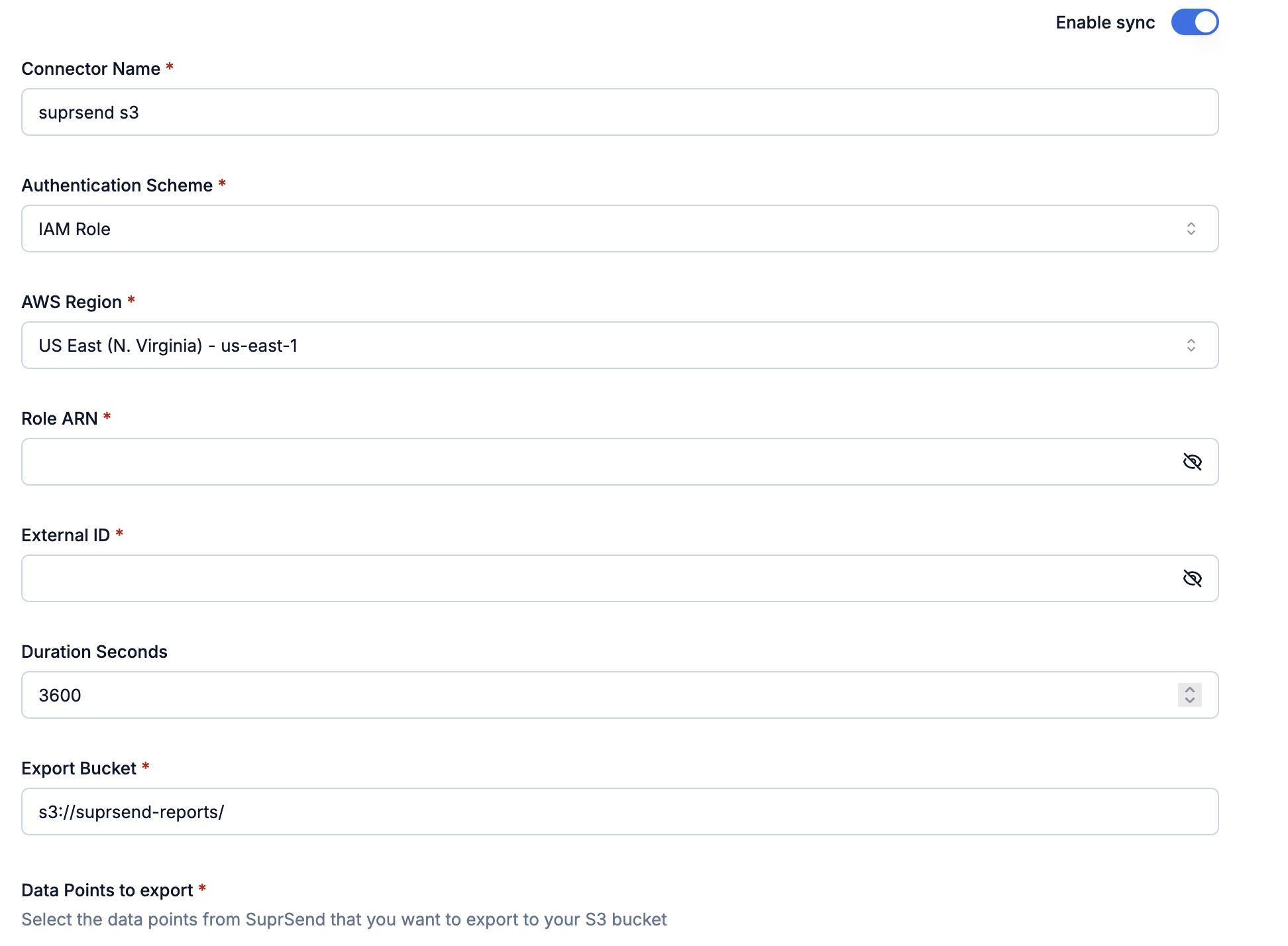
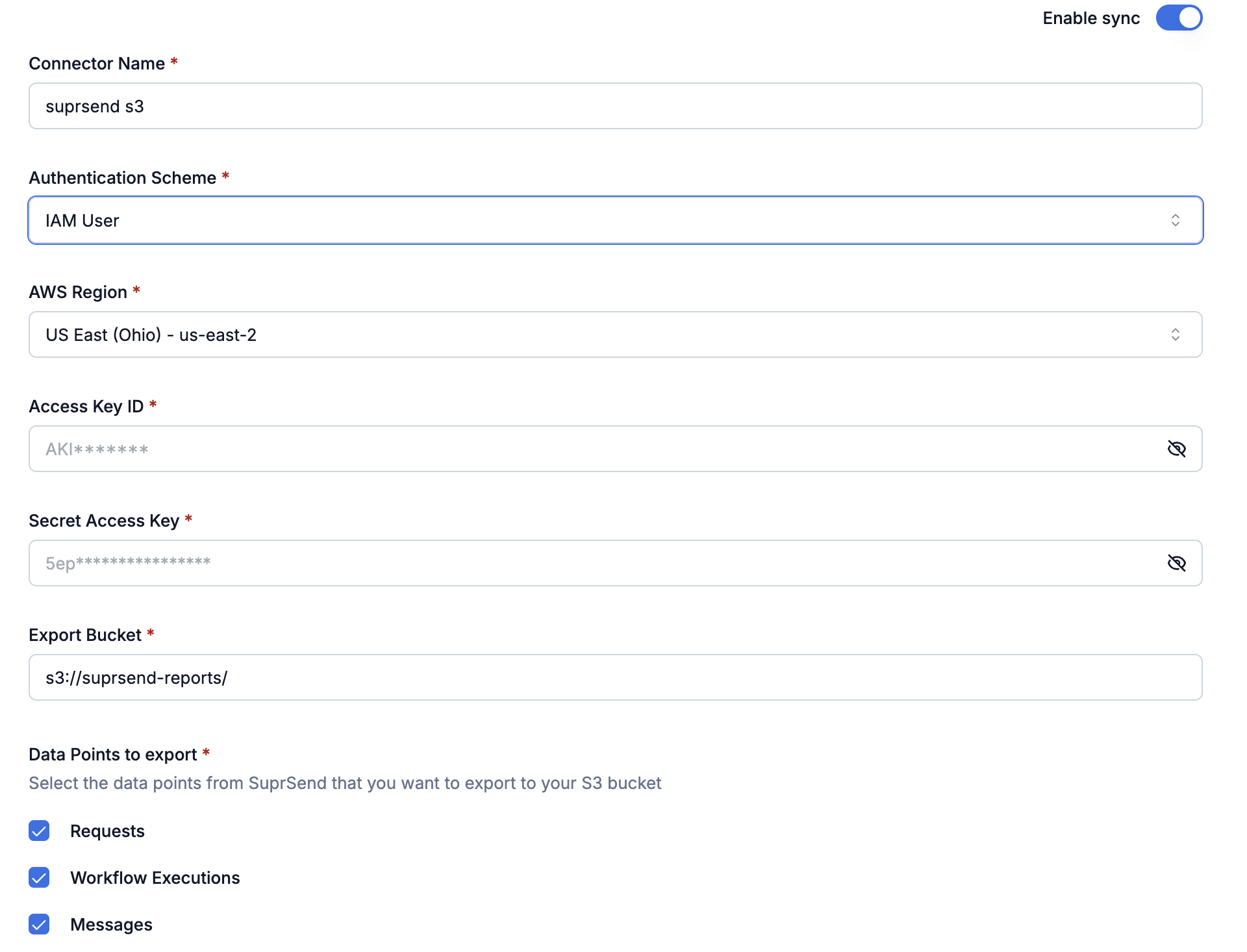 Enter your AWS credentials, select which data points to export, then **Save** and toggle **Enable sync**.
### Step 5: Verify it's working
Give it about 10 minutes, then check your S3 bucket. With the default `per_type` layout, you should see one folder per data point you enabled (`messages/`, `workflow_executions/`, `requests/`), each containing hourly partitions like `year=2025/month=01/day=15/hour=14/...`.
Nothing showing up? Jump to [FAQs](#faqs) for troubleshooting steps.
### Step 6: Query the data with Athena (optional)
If you want to run SQL on the exported data, [Amazon Athena](https://docs.aws.amazon.com/athena/latest/ug/what-is.html) reads the Parquet files in place—no warehouse to provision, no ingestion pipeline. The flow is:
1. **Set the Athena query result location** in the same region as your S3 bucket.
2. **Create a database**, e.g., `suprsend_db`.
3. **Register one external table per data point** (`ss_requests`, `ss_workflow_executions`, `ss_messages`) using partition projection on `year/month/day/hour`, so new hourly partitions show up automatically.
4. **Query**, always filtering on the partition columns to keep cost down.
For the full DDL, partition-projection settings, and example queries (including a join that traces a single request across all three tables), follow the [Query with Athena](/docs/athena_s3_query) guide.
***
## Best practices
* **Use an IAM Role in production**—credentials rotate automatically, with no long-lived secrets to manage.
* **Use an External ID on the role's trust policy** to prevent "confused deputy" attacks.
* If you must use an IAM User, **rotate the access keys every 90 days** and never commit them to git.
* **Assign policies to IAM groups rather than individual users** to keep permissions easy to manage.
* **Keep the bucket private**: block all public access and enable encryption (SSE-S3 or SSE-KMS).
* **Only sync the data points you need.** Messages alone covers analytics and delivery troubleshooting; add Workflow Executions and Requests when you need to debug end-to-end.
* **Filter on the partition columns first.** Engines like Athena scan only the matching `year`/`month`/`day`/`hour` folders, which keeps queries fast and cheap.
* **Use `updated_at` for incremental jobs.** Pulling only rows where `updated_at` is newer than your last checkpoint avoids re-scanning history.
* Files accumulate over time. Set up an S3 Lifecycle rule to transition or expire old partitions if you don't need them indefinitely.
***
## FAQs
Work through this checklist:
1. **Wait 10 minutes.** The first sync takes time.
2. **Bucket name** matches exactly in AWS and SuprSend (case-sensitive).
3. **Region** matches in both AWS and SuprSend.
4. **Credentials** are right—Role ARN + External ID, or Access Key + Secret.
5. **Policy** grants `s3:PutObject`, `s3:ListBucket`, and `s3:GetObject` on the correct bucket ARNs.
In the SuprSend dashboard, open **Connectors** → **Amazon S3 v2.0**. You should see:
* Sync toggle ON
* Status: **Active**
* At least one data point selected
* Data point might not be selected—check your export settings
* When setting up the connector first time, data points only export going forward (no historical backfill)
* Were notifications actually sent during that time?
* If sync was paused, data backfills when you resume
If you still find some gap in data, please contact support.
Yes—you can add or remove data points at any time. Here's how each action behaves:
| What you did | What happens |
| ------------------------------------------ | ------------------------------------------------------ |
| Paused then resumed the connector | Backfills everything from the pause window |
| Added a brand-new data point | Starts exporting going forward; no historical backfill |
| Removed a data point | Sync stops for it; data already in S3 stays there |
| Re-enabled a previously enabled data point | Backfills from when it was disabled |
Enter your AWS credentials, select which data points to export, then **Save** and toggle **Enable sync**.
### Step 5: Verify it's working
Give it about 10 minutes, then check your S3 bucket. With the default `per_type` layout, you should see one folder per data point you enabled (`messages/`, `workflow_executions/`, `requests/`), each containing hourly partitions like `year=2025/month=01/day=15/hour=14/...`.
Nothing showing up? Jump to [FAQs](#faqs) for troubleshooting steps.
### Step 6: Query the data with Athena (optional)
If you want to run SQL on the exported data, [Amazon Athena](https://docs.aws.amazon.com/athena/latest/ug/what-is.html) reads the Parquet files in place—no warehouse to provision, no ingestion pipeline. The flow is:
1. **Set the Athena query result location** in the same region as your S3 bucket.
2. **Create a database**, e.g., `suprsend_db`.
3. **Register one external table per data point** (`ss_requests`, `ss_workflow_executions`, `ss_messages`) using partition projection on `year/month/day/hour`, so new hourly partitions show up automatically.
4. **Query**, always filtering on the partition columns to keep cost down.
For the full DDL, partition-projection settings, and example queries (including a join that traces a single request across all three tables), follow the [Query with Athena](/docs/athena_s3_query) guide.
***
## Best practices
* **Use an IAM Role in production**—credentials rotate automatically, with no long-lived secrets to manage.
* **Use an External ID on the role's trust policy** to prevent "confused deputy" attacks.
* If you must use an IAM User, **rotate the access keys every 90 days** and never commit them to git.
* **Assign policies to IAM groups rather than individual users** to keep permissions easy to manage.
* **Keep the bucket private**: block all public access and enable encryption (SSE-S3 or SSE-KMS).
* **Only sync the data points you need.** Messages alone covers analytics and delivery troubleshooting; add Workflow Executions and Requests when you need to debug end-to-end.
* **Filter on the partition columns first.** Engines like Athena scan only the matching `year`/`month`/`day`/`hour` folders, which keeps queries fast and cheap.
* **Use `updated_at` for incremental jobs.** Pulling only rows where `updated_at` is newer than your last checkpoint avoids re-scanning history.
* Files accumulate over time. Set up an S3 Lifecycle rule to transition or expire old partitions if you don't need them indefinitely.
***
## FAQs
Work through this checklist:
1. **Wait 10 minutes.** The first sync takes time.
2. **Bucket name** matches exactly in AWS and SuprSend (case-sensitive).
3. **Region** matches in both AWS and SuprSend.
4. **Credentials** are right—Role ARN + External ID, or Access Key + Secret.
5. **Policy** grants `s3:PutObject`, `s3:ListBucket`, and `s3:GetObject` on the correct bucket ARNs.
In the SuprSend dashboard, open **Connectors** → **Amazon S3 v2.0**. You should see:
* Sync toggle ON
* Status: **Active**
* At least one data point selected
* Data point might not be selected—check your export settings
* When setting up the connector first time, data points only export going forward (no historical backfill)
* Were notifications actually sent during that time?
* If sync was paused, data backfills when you resume
If you still find some gap in data, please contact support.
Yes—you can add or remove data points at any time. Here's how each action behaves:
| What you did | What happens |
| ------------------------------------------ | ------------------------------------------------------ |
| Paused then resumed the connector | Backfills everything from the pause window |
| Added a brand-new data point | Starts exporting going forward; no historical backfill |
| Removed a data point | Sync stops for it; data already in S3 stays there |
| Re-enabled a previously enabled data point | Backfills from when it was disabled |