> ## Documentation Index
> Fetch the complete documentation index at: https://docs.suprsend.com/llms.txt
> Use this file to discover all available pages before exploring further.
# Broadcast execution logs
> Aggregate execution summary for broadcast campaigns — processing steps, user statistics, and delivery status across lists.
Broadcast execution logs track broadcast campaigns sent to user lists. Unlike workflow execution logs which are per-user, broadcast logs provide a summary of execution across a list of users, showing aggregate statistics and processing steps.
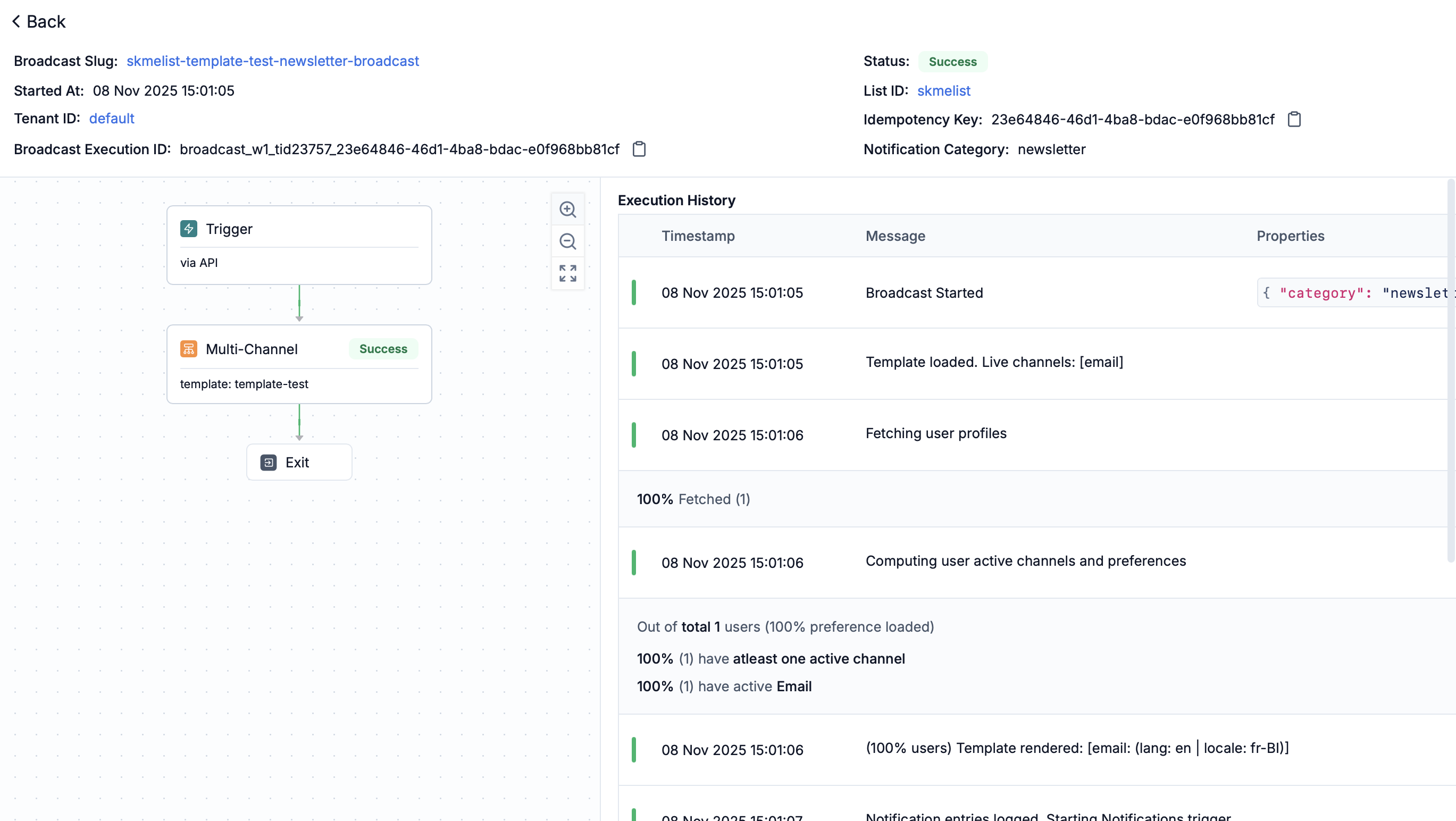 Each broadcast execution log entry includes these sections:
* **Overview**: Generic information about the broadcast execution:
* Broadcast slug, tenant ID and List ID (clickable)
* Broadcast Execution ID (share this with SuprSend support if you need help in debugging the broadcast or want to report an issue)
* Idempotency key (unique identifier of the request passed to SuprSend)
* Status (Triggered, Skipped, Failed)
* Start time (broadcast start timestamp)
* Preference category
* **Execution history**: Chronological logs of broadcast start, template loading, user profile fetching (with progress percentage), channel computation, template rendering, and notification triggering.
* **Aggregate statistics**: Summary of the broadcast performance:
* Total users processed (percentage and count) at each stage of the broadcast execution
* At delivery stage: Preference evaluation, messages triggered and delivery status (delivered, seen, clicked)
**Status indicators:**
| Status | Meaning |
| ---------------- | ----------------------------------------------------------------------- |
| 🟢 **Triggered** | Users who received notifications on at least one channel |
| 🟠 **Skipped** | Excluded due to missing channels or opt-out |
| 🔴 **Failed** | Trigger failed due to errors (for example, template rendering failures) |
**Common errors captured:**
| Error Type | Examples |
| ------------------------------- | -------------------------------------------------------------------------------------------------------- |
| **Template rendering failures** | Missing variables, syntax errors |
| **Channel computation issues** | No active channels, User Preference opt-outs, Tenant Preference opt-outs |
| **Vendor Config issue** | Vendor not configured for the channel and preference category or broadcast not supported for that vendor |
**Why execution is skipped:**
| Reason | Description |
| ------------------- | ------------------------------------------------------------------------------------------------------------------------------------------ |
| **Unsubscribed** | User has unsubscribed from that preference category or the required channel in the category |
| **Missing channel** | User does not have that channel or that is marked inactive due to hard bounce in the past (for example, no email address, no phone number) |
**Navigate from here:** Successful broadcasts will have delivery logs available in [Message logs](/docs/message-logs). Click "View all message logs" next to delivery step to navigate directly to individual message delivery status for all users in the broadcast.
Broadcast logs show processing up to trigger. For delivery details, see [Message logs](/docs/message-logs).
Each broadcast execution log entry includes these sections:
* **Overview**: Generic information about the broadcast execution:
* Broadcast slug, tenant ID and List ID (clickable)
* Broadcast Execution ID (share this with SuprSend support if you need help in debugging the broadcast or want to report an issue)
* Idempotency key (unique identifier of the request passed to SuprSend)
* Status (Triggered, Skipped, Failed)
* Start time (broadcast start timestamp)
* Preference category
* **Execution history**: Chronological logs of broadcast start, template loading, user profile fetching (with progress percentage), channel computation, template rendering, and notification triggering.
* **Aggregate statistics**: Summary of the broadcast performance:
* Total users processed (percentage and count) at each stage of the broadcast execution
* At delivery stage: Preference evaluation, messages triggered and delivery status (delivered, seen, clicked)
**Status indicators:**
| Status | Meaning |
| ---------------- | ----------------------------------------------------------------------- |
| 🟢 **Triggered** | Users who received notifications on at least one channel |
| 🟠 **Skipped** | Excluded due to missing channels or opt-out |
| 🔴 **Failed** | Trigger failed due to errors (for example, template rendering failures) |
**Common errors captured:**
| Error Type | Examples |
| ------------------------------- | -------------------------------------------------------------------------------------------------------- |
| **Template rendering failures** | Missing variables, syntax errors |
| **Channel computation issues** | No active channels, User Preference opt-outs, Tenant Preference opt-outs |
| **Vendor Config issue** | Vendor not configured for the channel and preference category or broadcast not supported for that vendor |
**Why execution is skipped:**
| Reason | Description |
| ------------------- | ------------------------------------------------------------------------------------------------------------------------------------------ |
| **Unsubscribed** | User has unsubscribed from that preference category or the required channel in the category |
| **Missing channel** | User does not have that channel or that is marked inactive due to hard bounce in the past (for example, no email address, no phone number) |
**Navigate from here:** Successful broadcasts will have delivery logs available in [Message logs](/docs/message-logs). Click "View all message logs" next to delivery step to navigate directly to individual message delivery status for all users in the broadcast.
Broadcast logs show processing up to trigger. For delivery details, see [Message logs](/docs/message-logs).