> ## Documentation Index
> Fetch the complete documentation index at: https://docs.suprsend.com/llms.txt
> Use this file to discover all available pages before exploring further.
# Android Push Setup (FCM)
> Step-by-step guide to setup FCM Push notifications in flutter android app.
Example integration project can be found [here](https://github.com/suprsend/suprsend-flutter-sdk/tree/main/example).
## Integration Steps
To start sending notifications from FCM, you'll have to first create a firebase project. Create a firebase project and application in [firebase console](https://firebase.google.com/) with your applications package name which you can find in *`AndroidManifest.xml`*
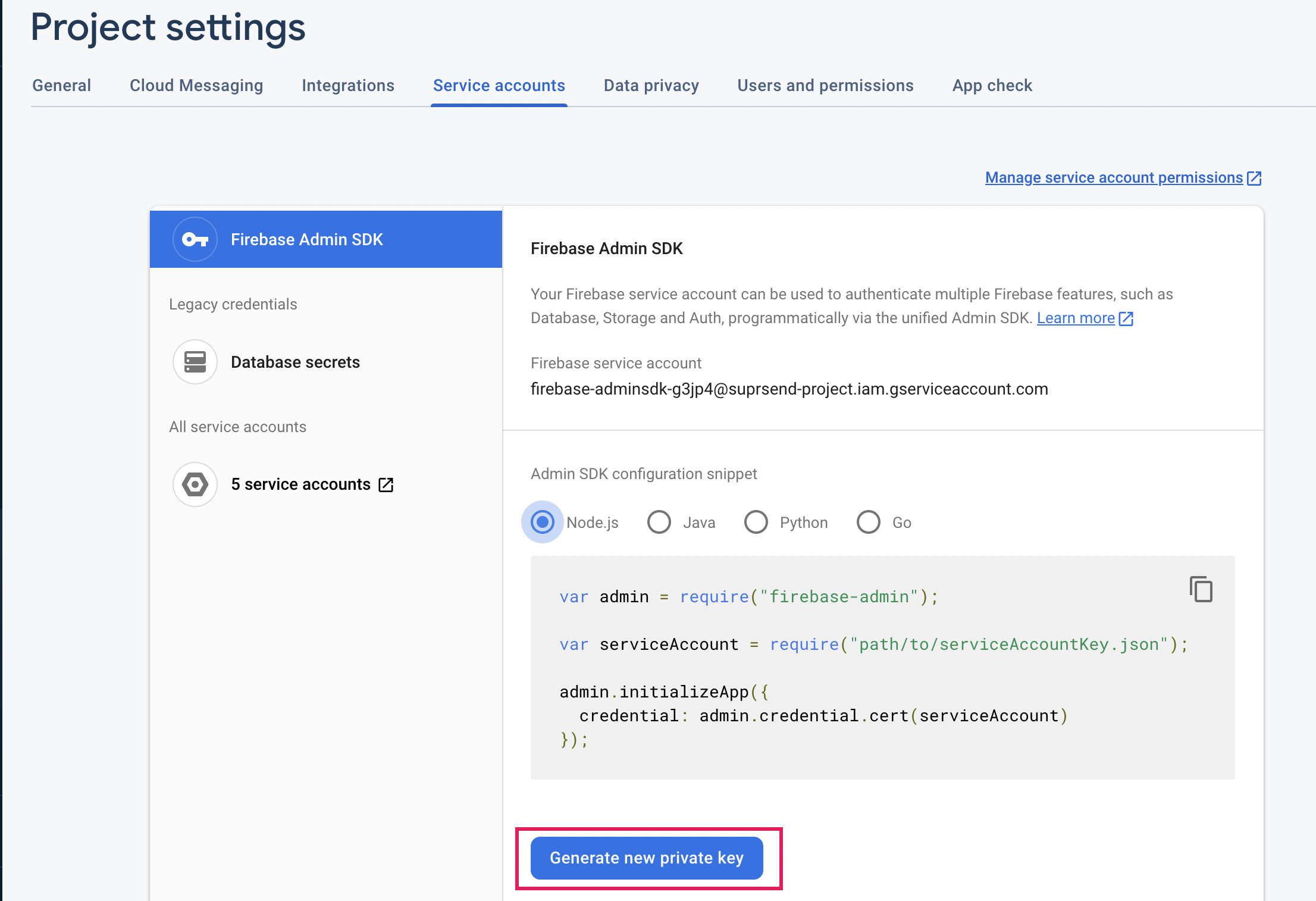
You can get your Service Account JSON from Firebase Console Project Settings. Download *google-services.json* and add the file inside your *android > app* folder.
 3.1. Add the below dependency inside projects *`build.gradle`* inside dependencies
```groovy Groovy (build.gradle) theme={"system"}
dependencies {
...
classpath 'com.google.gms:google-services:4.3.10' // or latest version
}
```
```kotlin Kotlin DSL (build.gradle.kts) theme={"system"}
plugins {
id("com.google.gms.google-services") version "4.3.10" // or latest version
}
```
3.2. Add the below plugin inside the app *`build.gradle`*
```groovy Groovy (build.gradle) theme={"system"}
apply plugin: 'com.google.gms.google-services'
```
```kotlin Kotlin DSL (build.gradle.kts) theme={"system"}
plugins {
id("com.google.gms.google-services")
}
```
3.3 Add the below dependency inside apps *`build.gradle`* inside dependencies
```groovy Groovy (build.gradle) theme={"system"}
implementation("com.google.firebase:firebase-messaging:22.0.0") // or latest version
```
```kotlin Kotlin DSL (build.gradle.kts) theme={"system"}
dependencies {
implementation("com.google.firebase:firebase-messaging:22.0.0") // or latest version
}
```
Push feature can be implemented in two ways:
You may use this option if all of your android push notifications are to be handled via SuprSend SDK. We recommend you use this method as it is just a single-step process to just register the service in your application manifest and everything else will be ready.
```xml AndroidManifest.xml theme={"system"}
```
Once you get a token from Firebase you can pass the token by using the below code
```javascript main.dart theme={"system"}
suprsend.setAndroidFcmPush(fcm_token);
```
When you get a push notification you will get a payload and it can be passed to the method provided by Suprsend Flutter SDK and the notification displaying part will be handled by SDK.
```javascript main.dart theme={"system"}
suprsend.showNotification(notification_payload);
```
## How to identify if notification is sent by SuprSend?
If notification payload contains key **supr\_send\_n\_pl** then simply consider this as payload sent from suprsend and pass the payload to suprsend sdk.
### Targeting Android 13 (API-33)
In Android13 (API 33) or higher [notification permission](https://developer.android.com/develop/ui/views/notifications/notification-permission) will be disabled by default so permission needs to be asked to enable notifications if you are targeting android 13 users. You can follow [this doc](https://developer.android.com/about/versions/13/setup-sdk) to update to support Andriod 13(API 33), if not already supported. Please test the application as well as upgrading to API 33 may causes breaking changes.
```xml AndroidManifest.xml theme={"system"}
...
```
You can use [permission\_handler](https://pub.dev/packages/permission_handler) or any other package to ask notification permission to user.
From v2.4.0, we have removed internal method to ask notification permission (`suprsend.askNotificationPermission`). You can use external package to ask notification permission.
Once notification permission is granted, users can be able to see push notifications.
***
3.1. Add the below dependency inside projects *`build.gradle`* inside dependencies
```groovy Groovy (build.gradle) theme={"system"}
dependencies {
...
classpath 'com.google.gms:google-services:4.3.10' // or latest version
}
```
```kotlin Kotlin DSL (build.gradle.kts) theme={"system"}
plugins {
id("com.google.gms.google-services") version "4.3.10" // or latest version
}
```
3.2. Add the below plugin inside the app *`build.gradle`*
```groovy Groovy (build.gradle) theme={"system"}
apply plugin: 'com.google.gms.google-services'
```
```kotlin Kotlin DSL (build.gradle.kts) theme={"system"}
plugins {
id("com.google.gms.google-services")
}
```
3.3 Add the below dependency inside apps *`build.gradle`* inside dependencies
```groovy Groovy (build.gradle) theme={"system"}
implementation("com.google.firebase:firebase-messaging:22.0.0") // or latest version
```
```kotlin Kotlin DSL (build.gradle.kts) theme={"system"}
dependencies {
implementation("com.google.firebase:firebase-messaging:22.0.0") // or latest version
}
```
Push feature can be implemented in two ways:
You may use this option if all of your android push notifications are to be handled via SuprSend SDK. We recommend you use this method as it is just a single-step process to just register the service in your application manifest and everything else will be ready.
```xml AndroidManifest.xml theme={"system"}
```
Once you get a token from Firebase you can pass the token by using the below code
```javascript main.dart theme={"system"}
suprsend.setAndroidFcmPush(fcm_token);
```
When you get a push notification you will get a payload and it can be passed to the method provided by Suprsend Flutter SDK and the notification displaying part will be handled by SDK.
```javascript main.dart theme={"system"}
suprsend.showNotification(notification_payload);
```
## How to identify if notification is sent by SuprSend?
If notification payload contains key **supr\_send\_n\_pl** then simply consider this as payload sent from suprsend and pass the payload to suprsend sdk.
### Targeting Android 13 (API-33)
In Android13 (API 33) or higher [notification permission](https://developer.android.com/develop/ui/views/notifications/notification-permission) will be disabled by default so permission needs to be asked to enable notifications if you are targeting android 13 users. You can follow [this doc](https://developer.android.com/about/versions/13/setup-sdk) to update to support Andriod 13(API 33), if not already supported. Please test the application as well as upgrading to API 33 may causes breaking changes.
```xml AndroidManifest.xml theme={"system"}
...
```
You can use [permission\_handler](https://pub.dev/packages/permission_handler) or any other package to ask notification permission to user.
From v2.4.0, we have removed internal method to ask notification permission (`suprsend.askNotificationPermission`). You can use external package to ask notification permission.
Once notification permission is granted, users can be able to see push notifications.
***