> ## Documentation Index
> Fetch the complete documentation index at: https://docs.suprsend.com/llms.txt
> Use this file to discover all available pages before exploring further.
# Integrate Android SDK
> SDK integration steps to enable Android push notifications in your native Android app with SuprSend, covering Gradle setup, FCM tokens, and user subscribe.
## Installation
```groovy Add it in your root build.gradle at the end of repositories theme={"system"}
allprojects {
repositories {
...
mavenCentral()
}
}
```
Add following line of code inside dependencies in app build.gradle
```java build.gradle theme={"system"}
dependencies {
implementation("com.suprsend:native:1.0.1")
}
```
## Initialization
To integrate SuprSend in your Android app, initialise the Suprsend android sdk in MainApplication inside `onCreate` method and just above `super.onCreate()` line.
```kotlin kotlin theme={"system"}
class MyApplication : Application() {
override fun onCreate() {
SSApi.init(this,"WORKSPACE KEY", "WORKSPACE SECRET")
super.onCreate()
}
}
```
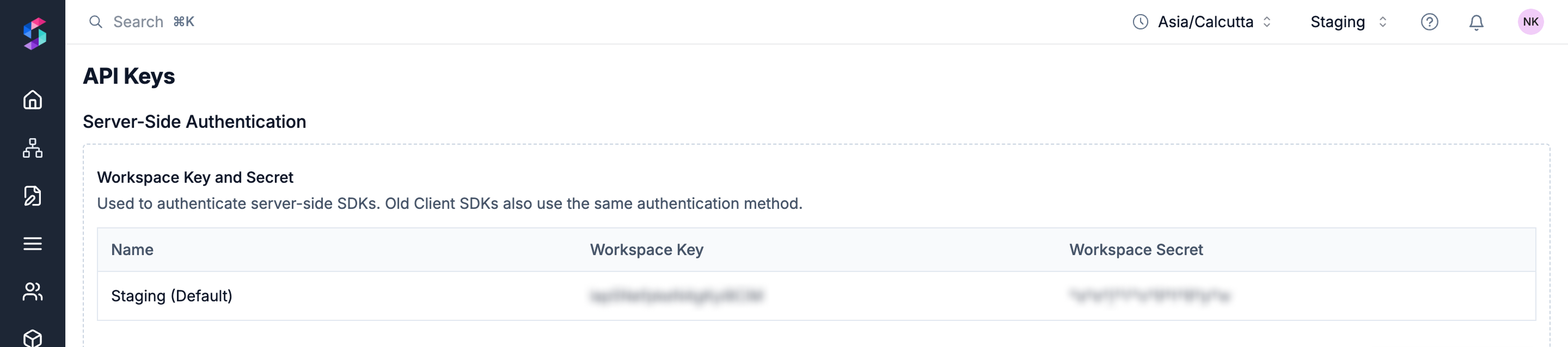
Replace **`WORKSPACE KEY`** and **`WORKSPACE SECRET`** with your workspace values. You will get both the tokens from [Suprsend API Keys ](https://app.suprsend.com/en/demo/developers/api-keys)[page ](https://app.suprsend.com/en/demo/developers/api-keys)***` (Settings page -> "API Keys"`***` section)`
 ```kotlin kotlin theme={"system"}
val ssApi = SSApi.getInstance()
```
## Logging
By default the logs of SuprSend SDK are disabled. We recommend you to enable the SDK logs by setting its value to VERBOSE. You can enable the logs just in debug mode while in development by below condition.
```kotlin kotlin theme={"system"}
ssApi.setLogLevel(level: LogLevel)
if (BuildConfig.DEBUG)
ssApi.setLogLevel(LogLevel.VERBOSE)
or
//You can send the SDK exception to your Crashlytics server
SSApi.setLogger(object : LoggerCallback {
override fun i(tag: String, message: String) {
// you will receive SDK info messages here
}
override fun e(tag: String, message: String, throwable: Throwable?) {
throwable ?: return
//Ex - FirebaseCrashlytics.getInstance().recordException(throwable)
}
})
```
## ProGuard Rules (For release build)
For creating a release build you will need to add these below pro-guard rules:
```yaml yaml theme={"system"}
# SuprSend Sdk
-dontwarn app.suprsend.**
-keep class app.suprsend.**{*;}
# Xiaomi
-keep class app.suprsend.xiaomi.SSXiaomiReceiver {*;}
#SDK has been obfuscated and compressed to avoid class not found error due to re-obfuscation.
-keep class com.xiaomi.**
#If the compiling Android version you are using is 23, you can prevent getting a false warning which makes it impossible to compile.
-dontwarn com.xiaomi.push.**
-keep class com.xiaomi.mipush.sdk.MiPushMessage {*;}
-keep class com.xiaomi.mipush.sdk.MiPushCommandMessage {*;}
-keep class com.xiaomi.mipush.sdk.PushMessageReceiver {*;}
-keep class com.xiaomi.mipush.sdk.MessageHandleService {*;}
-keep class com.xiaomi.push.service.XMJobService {*;}
-keep class com.xiaomi.push.service.XMPushService {*;}
-keep class com.xiaomi.mipush.sdk.PushMessageHandler {*;}
-keep class com.xiaomi.push.service.receivers.NetworkStatusReceiver {*;}
-keep class com.xiaomi.push.service.receivers.PingReceiver {*;}
-keep class com.xiaomi.mipush.sdk.NotificationClickedActivity {*;}
```
***
```kotlin kotlin theme={"system"}
val ssApi = SSApi.getInstance()
```
## Logging
By default the logs of SuprSend SDK are disabled. We recommend you to enable the SDK logs by setting its value to VERBOSE. You can enable the logs just in debug mode while in development by below condition.
```kotlin kotlin theme={"system"}
ssApi.setLogLevel(level: LogLevel)
if (BuildConfig.DEBUG)
ssApi.setLogLevel(LogLevel.VERBOSE)
or
//You can send the SDK exception to your Crashlytics server
SSApi.setLogger(object : LoggerCallback {
override fun i(tag: String, message: String) {
// you will receive SDK info messages here
}
override fun e(tag: String, message: String, throwable: Throwable?) {
throwable ?: return
//Ex - FirebaseCrashlytics.getInstance().recordException(throwable)
}
})
```
## ProGuard Rules (For release build)
For creating a release build you will need to add these below pro-guard rules:
```yaml yaml theme={"system"}
# SuprSend Sdk
-dontwarn app.suprsend.**
-keep class app.suprsend.**{*;}
# Xiaomi
-keep class app.suprsend.xiaomi.SSXiaomiReceiver {*;}
#SDK has been obfuscated and compressed to avoid class not found error due to re-obfuscation.
-keep class com.xiaomi.**
#If the compiling Android version you are using is 23, you can prevent getting a false warning which makes it impossible to compile.
-dontwarn com.xiaomi.push.**
-keep class com.xiaomi.mipush.sdk.MiPushMessage {*;}
-keep class com.xiaomi.mipush.sdk.MiPushCommandMessage {*;}
-keep class com.xiaomi.mipush.sdk.PushMessageReceiver {*;}
-keep class com.xiaomi.mipush.sdk.MessageHandleService {*;}
-keep class com.xiaomi.push.service.XMJobService {*;}
-keep class com.xiaomi.push.service.XMPushService {*;}
-keep class com.xiaomi.mipush.sdk.PushMessageHandler {*;}
-keep class com.xiaomi.push.service.receivers.NetworkStatusReceiver {*;}
-keep class com.xiaomi.push.service.receivers.PingReceiver {*;}
-keep class com.xiaomi.mipush.sdk.NotificationClickedActivity {*;}
```
***