> ## Documentation Index
> Fetch the complete documentation index at: https://docs.suprsend.com/llms.txt
> Use this file to discover all available pages before exploring further.
# Invoke Workflow
> Trigger another workflow as a step in running workflow.
Use this node to trigger a workflow from within another workflow. It is typically used when the recipient list or data context changes between workflow steps. A common example is escalation workflows, where if a team member doesn't take action, the workflow escalates to notify their manager.
The payload for the triggered workflow is dynamically computed using data from the current workflow run. All fields support variables in [JSONNET](https://jsonnet.org/ref/language.html) format.
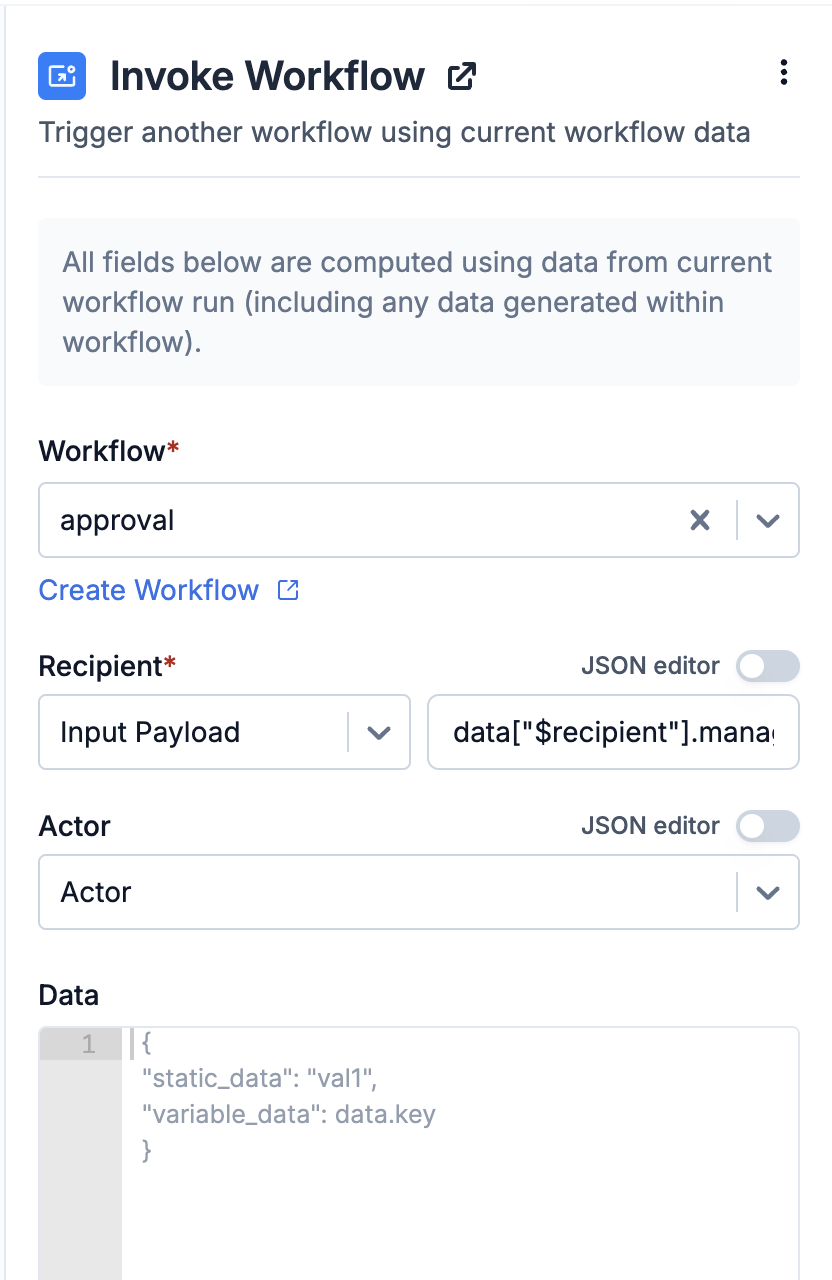 ## Constructing Workflow Payload
### Recipient
Recipient refers to the recipient of the target workflow. It can be:
* The current workflow's **recipient** or **actor**
* Any key from the node's **input data**, including data added or modified during the workflow run (e.g. from fetch or webhook nodes).
📘 Please note Data modifications after a batch or digest node will not affect the invoke node's variables, which means `$batched...` variables will not be available in this node's input.
You can refer to input data variables in JSONNET format, prefixed by `data` key. The same format is followed for adding variable in actor and data field as well. Following data types are available in workflow:
| Data Type | Referring in JSONNET | Description |
| ------------- | ------------------------------------------- | ------------------------------------------------------------------------------------------------------------------------------------------------------------------------------------------------------------------------------------ |
| Input Payload | pass as `data.` | This includes the data from your trigger payload and any data modified or added by nodes such as data transform, or webhook/fetch nodes before the invoke node. |
| Actor | pass as `data["$actor"].` | Actor properties. In case of event trigger, `distinct_id` works both as actor and recipient and for inline workflow trigger, it is the `distinct_id` in actor object. |
| Recipient | pass as `data["$recipient"].` | Recipient properties. It is the `distinct_id` in your event trigger or the key value defined in [override recipient](/docs/override-recipient-list) field. For inline workflow trigger, it is the `distinct_id` in recipient object. |
| Tenant | pass as`data["$brand"].` | Tenant properties corresponding to the tenant\_id passed in workflow trigger. |
### Actor
The actor defines the user who performed the action in the target workflow. It can be:
* The current workflow's **actor** or **recipient**.
* Any key from the node's **input data**, referred in the same format as in the [recipient](/docs/invoke-workflow#recipient) field.
### Data
This defines the data context for the target workflow, which is used to render templates and workflow variables. By default, data from the current workflow run is passed.
* To exclude the current workflow data, uncheck the `Append current workflow execution data` option.
* Additional data can be provided in the data JSON field, using the node's input data in JSONNET format, referred in the same format as in the [recipient](/docs/invoke-workflow#recipient) field.
#### Merge strategy
We use a shallow merge strategy to combine extra input data (defined in data JSON field) with the current workflow execution data. If the same key exists in both, the value from data JSON field will override the value in existing workflow data.
***
Built with [Mintlify](https://mintlify.com).
## Constructing Workflow Payload
### Recipient
Recipient refers to the recipient of the target workflow. It can be:
* The current workflow's **recipient** or **actor**
* Any key from the node's **input data**, including data added or modified during the workflow run (e.g. from fetch or webhook nodes).
📘 Please note Data modifications after a batch or digest node will not affect the invoke node's variables, which means `$batched...` variables will not be available in this node's input.
You can refer to input data variables in JSONNET format, prefixed by `data` key. The same format is followed for adding variable in actor and data field as well. Following data types are available in workflow:
| Data Type | Referring in JSONNET | Description |
| ------------- | ------------------------------------------- | ------------------------------------------------------------------------------------------------------------------------------------------------------------------------------------------------------------------------------------ |
| Input Payload | pass as `data.` | This includes the data from your trigger payload and any data modified or added by nodes such as data transform, or webhook/fetch nodes before the invoke node. |
| Actor | pass as `data["$actor"].` | Actor properties. In case of event trigger, `distinct_id` works both as actor and recipient and for inline workflow trigger, it is the `distinct_id` in actor object. |
| Recipient | pass as `data["$recipient"].` | Recipient properties. It is the `distinct_id` in your event trigger or the key value defined in [override recipient](/docs/override-recipient-list) field. For inline workflow trigger, it is the `distinct_id` in recipient object. |
| Tenant | pass as`data["$brand"].` | Tenant properties corresponding to the tenant\_id passed in workflow trigger. |
### Actor
The actor defines the user who performed the action in the target workflow. It can be:
* The current workflow's **actor** or **recipient**.
* Any key from the node's **input data**, referred in the same format as in the [recipient](/docs/invoke-workflow#recipient) field.
### Data
This defines the data context for the target workflow, which is used to render templates and workflow variables. By default, data from the current workflow run is passed.
* To exclude the current workflow data, uncheck the `Append current workflow execution data` option.
* Additional data can be provided in the data JSON field, using the node's input data in JSONNET format, referred in the same format as in the [recipient](/docs/invoke-workflow#recipient) field.
#### Merge strategy
We use a shallow merge strategy to combine extra input data (defined in data JSON field) with the current workflow execution data. If the same key exists in both, the value from data JSON field will override the value in existing workflow data.
***
Built with [Mintlify](https://mintlify.com).