> ## Documentation Index
> Fetch the complete documentation index at: https://docs.suprsend.com/llms.txt
> Use this file to discover all available pages before exploring further.
# APNS Push Integration
> Configure APNS push notifications in your iOS Swift app with SuprSend by uploading your auth key, setting bundle ID, and registering device tokens.
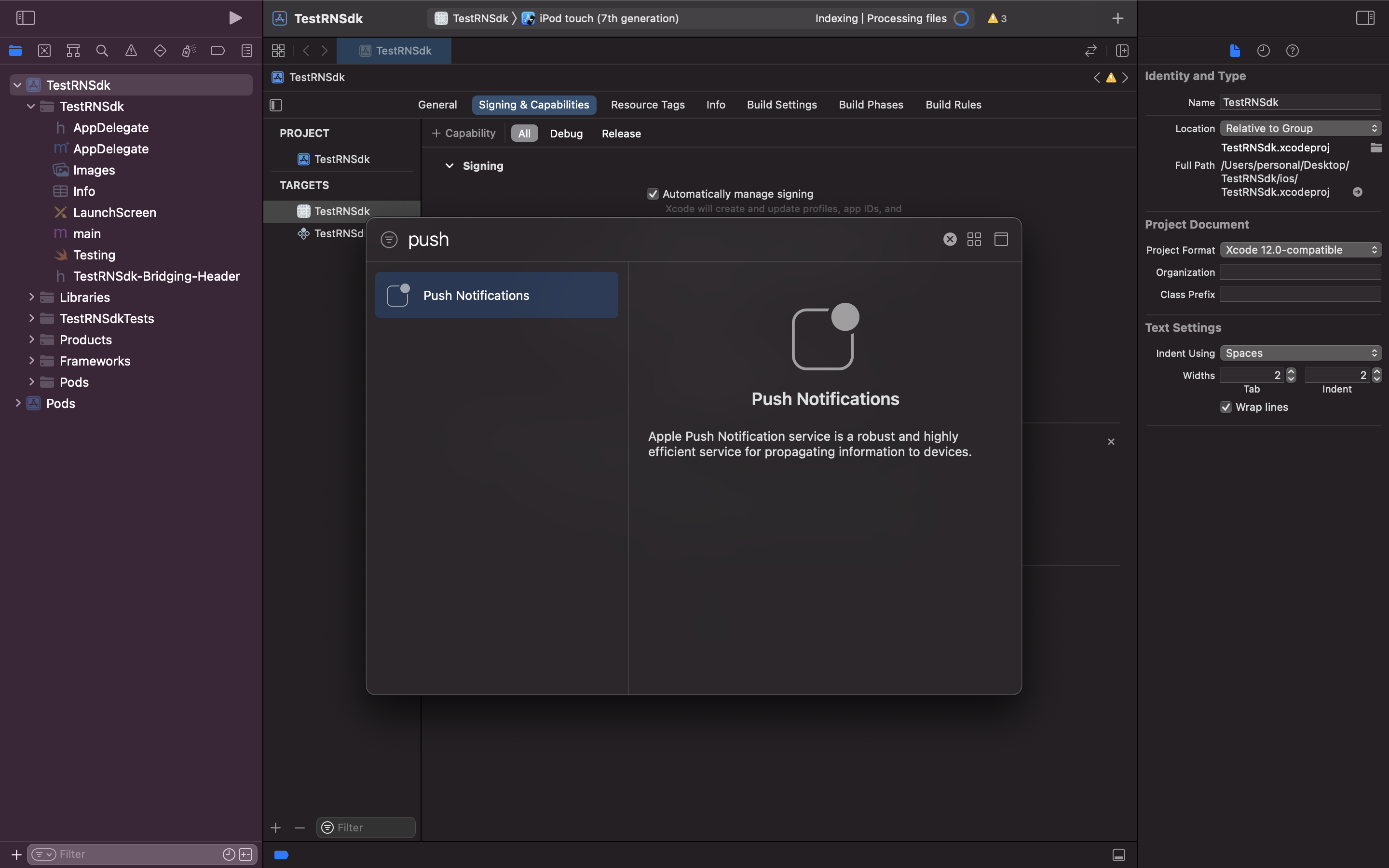
## Adding push capability
1. Inside your Target select **signing and capabilities**
2. Click on **+capabilities** and select **Push Notifications**
 ## Registering for push notifications
AppDelegate should implement `UNUserNotificationCenterDelegate` from `UserNotifications` and then add `registerForPush` method to AppDelegate and call that method inside `application(_:didFinishLaunchingWithOptions:)`.
```swift AppDelegate.swift theme={"system"}
import UserNotifications // Add this
class AppDelegate: NSObject, UNUserNotificationCenterDelegate { // implement UNUserNotificationCenterDelegate
func application(
_ application: UIApplication,
didFinishLaunchingWithOptions launchOptions: [UIApplication.LaunchOptionsKey: Any]? = nil
) -> Bool {
SuprSend.shared.configure(publicKey: "PUBLIC_KEY")
registerForPush() // add this
return true
}
// add this method
func registerForPush() {
UNUserNotificationCenter.current().delegate = self // this willregister push delegate
// ask user for permission
// options = [.sound, .badge, .alert] for explicit authorization
// options = [.badge, .alert, .sound, .provisional] for provisional authorization
UNUserNotificationCenter.current().requestAuthorization(
options: [.sound, .badge, .alert],
completionHandler: { granted, error in
if granted {
DispatchQueue.main.async {
UIApplication.shared.registerForRemoteNotifications()
}
}
})
}
}
```
### Asking user permission
Explicit authorization allows you to display alerts, add a badge to the app icon, or play sounds whenever a notification is delivered. In this type of authorization, the request is made the first time user launches your app. If the user denies the request, you can't send subsequent prompts to send the notification.
## Registering for push notifications
AppDelegate should implement `UNUserNotificationCenterDelegate` from `UserNotifications` and then add `registerForPush` method to AppDelegate and call that method inside `application(_:didFinishLaunchingWithOptions:)`.
```swift AppDelegate.swift theme={"system"}
import UserNotifications // Add this
class AppDelegate: NSObject, UNUserNotificationCenterDelegate { // implement UNUserNotificationCenterDelegate
func application(
_ application: UIApplication,
didFinishLaunchingWithOptions launchOptions: [UIApplication.LaunchOptionsKey: Any]? = nil
) -> Bool {
SuprSend.shared.configure(publicKey: "PUBLIC_KEY")
registerForPush() // add this
return true
}
// add this method
func registerForPush() {
UNUserNotificationCenter.current().delegate = self // this willregister push delegate
// ask user for permission
// options = [.sound, .badge, .alert] for explicit authorization
// options = [.badge, .alert, .sound, .provisional] for provisional authorization
UNUserNotificationCenter.current().requestAuthorization(
options: [.sound, .badge, .alert],
completionHandler: { granted, error in
if granted {
DispatchQueue.main.async {
UIApplication.shared.registerForRemoteNotifications()
}
}
})
}
}
```
### Asking user permission
Explicit authorization allows you to display alerts, add a badge to the app icon, or play sounds whenever a notification is delivered. In this type of authorization, the request is made the first time user launches your app. If the user denies the request, you can't send subsequent prompts to send the notification.
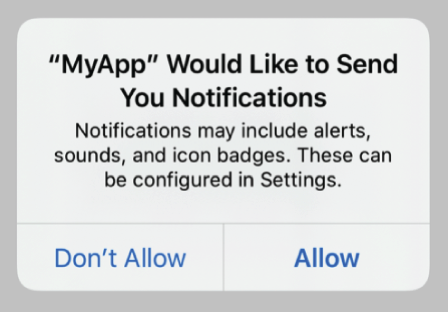 Explicit authorization is default authorization method as it automatically sets alert, sound and badge as soon as the user allows this request.
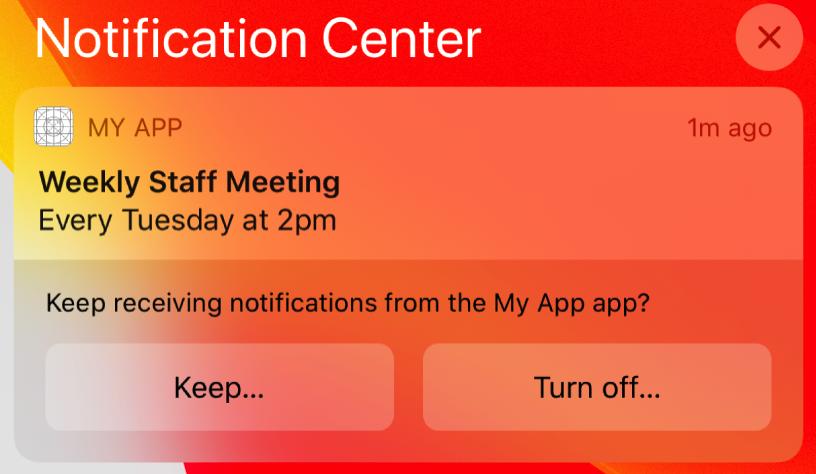
Provisional Authorization (Supported in iOS 12.0 and above) are sent quietly to the users -they don’t interrupt the user with a sound or banner. Also, they will not be shown when your app is in foreground. First time this type of notifications are sent, user is asked to "Keep" or "Turn off" the notifications. Further notifications continue to be sent if they click on "Keep".
Explicit authorization is default authorization method as it automatically sets alert, sound and badge as soon as the user allows this request.
Provisional Authorization (Supported in iOS 12.0 and above) are sent quietly to the users -they don’t interrupt the user with a sound or banner. Also, they will not be shown when your app is in foreground. First time this type of notifications are sent, user is asked to "Keep" or "Turn off" the notifications. Further notifications continue to be sent if they click on "Keep".
 ## Adding delegate methods for push handling
```swift AppDelegate.swift theme={"system"}
func application(
_ application: UIApplication, didRegisterForRemoteNotificationsWithDeviceToken deviceToken: Data
) {
let tokenParts = deviceToken.map { data in String(format: "%02.2hhx", data) }
let token = tokenParts.joined()
Task {
await SuprSend.shared.user.addPush(token)
}
}
func application(
_ application: UIApplication, didReceiveRemoteNotification userInfo: [AnyHashable: Any],
fetchCompletionHandler completionHandler: @escaping (UIBackgroundFetchResult) -> Void
) {
SuprSend.shared.push.application(
application, didReceiveRemoteNotification: userInfo, fetchCompletionHandler: completionHandler)
completionHandler(.newData)
}
func userNotificationCenter(
_ center: UNUserNotificationCenter, didReceive response: UNNotificationResponse,
withCompletionHandler completionHandler: @escaping () -> Void
) {
SuprSend.shared.push.userNotificationCenter(
center, didReceive: response, withCompletionHandler: completionHandler)
completionHandler()
}
func userNotificationCenter(
_ center: UNUserNotificationCenter, willPresent notification: UNNotification,
withCompletionHandler completionHandler: @escaping (UNNotificationPresentationOptions) -> Void
) {
SuprSend.shared.push.userNotificationCenter(
center, willPresent: notification, withCompletionHandler: completionHandler)
if #available(iOS 14.0, *) {
completionHandler([.banner, .badge, .sound])
} else {
// Fallback on earlier versions
completionHandler([.alert, .badge, .sound])
}
}
```
## Changes in Notification Service Extension
### Adding Notification Service Extension
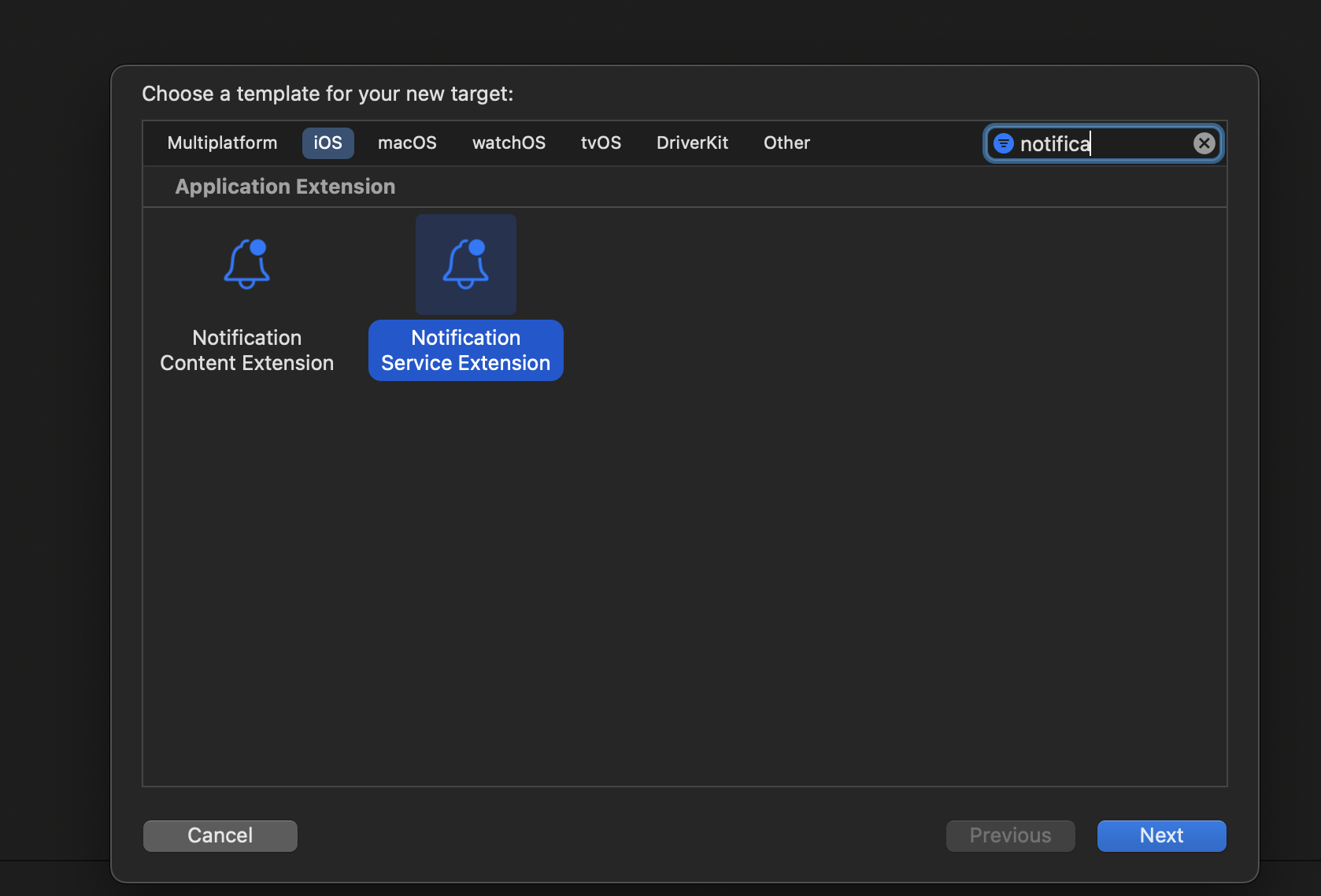
1. In Xcode go to **File > New > Target**.
2. Select Notification Service Extension from the template list.
3. Then in Next popup give it any product name, select your team, select swift language and click finish.
## Adding delegate methods for push handling
```swift AppDelegate.swift theme={"system"}
func application(
_ application: UIApplication, didRegisterForRemoteNotificationsWithDeviceToken deviceToken: Data
) {
let tokenParts = deviceToken.map { data in String(format: "%02.2hhx", data) }
let token = tokenParts.joined()
Task {
await SuprSend.shared.user.addPush(token)
}
}
func application(
_ application: UIApplication, didReceiveRemoteNotification userInfo: [AnyHashable: Any],
fetchCompletionHandler completionHandler: @escaping (UIBackgroundFetchResult) -> Void
) {
SuprSend.shared.push.application(
application, didReceiveRemoteNotification: userInfo, fetchCompletionHandler: completionHandler)
completionHandler(.newData)
}
func userNotificationCenter(
_ center: UNUserNotificationCenter, didReceive response: UNNotificationResponse,
withCompletionHandler completionHandler: @escaping () -> Void
) {
SuprSend.shared.push.userNotificationCenter(
center, didReceive: response, withCompletionHandler: completionHandler)
completionHandler()
}
func userNotificationCenter(
_ center: UNUserNotificationCenter, willPresent notification: UNNotification,
withCompletionHandler completionHandler: @escaping (UNNotificationPresentationOptions) -> Void
) {
SuprSend.shared.push.userNotificationCenter(
center, willPresent: notification, withCompletionHandler: completionHandler)
if #available(iOS 14.0, *) {
completionHandler([.banner, .badge, .sound])
} else {
// Fallback on earlier versions
completionHandler([.alert, .badge, .sound])
}
}
```
## Changes in Notification Service Extension
### Adding Notification Service Extension
1. In Xcode go to **File > New > Target**.
2. Select Notification Service Extension from the template list.
3. Then in Next popup give it any product name, select your team, select swift language and click finish.
 After clicking on "Finish", a folder will be created with your given product name.
### Installing SuprSend SDK in Notification Service
In Xcode, go to File > AddPackages to add a new dependency.
In that search bar, add suprsend-swift-sdk project github url `https://github.com/suprsend/suprsend-swift-sdk` and keep the default version settings and click `Add Package` button.
In second dialog box, select your Notification Service target from dropdown and click `Add Package` button.
**For SDK version `1.1.0` onwards**, add the SDK to your Podfile as a dependency to the Notification Service Extension using the GitHub source and run `pod install`:
```ruby Podfile theme={"system"}
target '' do
pod 'SuprSendSwift', :git => 'https://github.com/suprsend/suprsend-swift-sdk.git', :tag => '1.1.0'
end
```
**For SDK versions till `1.0.1`**, add the SuprSendSwift SDK to your Podfile as a dependency to the Notification Service Extension like below and then run `pod install`:
```ruby Podfile theme={"system"}
target '' do
pod "SuprSendSwift"
end
```
### Adding code in Notification Service
Paste the below code in NotificationService.swift file. Replace `YOUR_PUBLIC_KEY` with your public key.
```swift NotificationService.swift theme={"system"}
import UIKit
import UserNotifications
import SuprSendSwift
class NotificationService: SuprSendNotificationService {
override func publicKey() -> String { "YOUR_PUBLIC_KEY" }
}
```
## Handling deep links
By default SDK will handle only http deeplinks. If you want to handle custom deeplinks, implement `SuprSendDeepLinkDelegate` in AppDelegate class and add the below code.
```swift AppDelegate.swift theme={"system"}
// implement SuprSendDeepLinkDelegate
class AppDelegate: NSObject, UNUserNotificationCenterDelegate, SuprSendDeepLinkDelegate {
func application(
_ application: UIApplication,
didFinishLaunchingWithOptions launchOptions: [UIApplication.LaunchOptionsKey: Any]? = nil
) -> Bool {
SuprSend.shared.configure(publicKey: "YOUR_PUBLIC_KEY")
SuprSend.shared.setDeepLinkDelegate(self) // Add this
registerForPush()
return true
}
func shouldHandleSuprSendDeepLink(_ url: URL) -> Bool {
print("Handling URL: \(url)") // write your linking logic here and return false
return false
}
}
```
## Final AppDelegate.swift file
Example of `AppDelegate.swift` file with all the above code.
```swift AppDelegate.swift theme={"system"}
import Foundation
import SuprSend
import UIKit
class AppDelegate: NSObject, UIApplicationDelegate, UNUserNotificationCenterDelegate,
SuprSendDeepLinkDelegate
{
func application(
_ application: UIApplication,
didFinishLaunchingWithOptions launchOptions: [UIApplication.LaunchOptionsKey: Any]? = nil
) -> Bool {
SuprSend.shared.enableLogging()
SuprSend.shared.configure(publicKey: "Testing")
SuprSend.shared.setDeepLinkDelegate(self)
registerForPush()
return true
}
func registerForPush() {
UNUserNotificationCenter.current().delegate = self
UNUserNotificationCenter.current().requestAuthorization(
options: [.sound, .badge, .alert],
completionHandler: { granted, error in
if granted {
DispatchQueue.main.async {
UIApplication.shared.registerForRemoteNotifications()
}
}
})
}
func application(
_ application: UIApplication, didRegisterForRemoteNotificationsWithDeviceToken deviceToken: Data
) {
let tokenParts = deviceToken.map { data in String(format: "%02.2hhx", data) }
let token = tokenParts.joined()
Task {
await SuprSend.shared.user.addiOSPush(token)
}
}
func application(
_ application: UIApplication, didReceiveRemoteNotification userInfo: [AnyHashable: Any],
fetchCompletionHandler completionHandler: @escaping (UIBackgroundFetchResult) -> Void
) {
SuprSend.shared.push.application(
application, didReceiveRemoteNotification: userInfo, fetchCompletionHandler: completionHandler
)
completionHandler(.newData)
}
func userNotificationCenter(
_ center: UNUserNotificationCenter, didReceive response: UNNotificationResponse,
withCompletionHandler completionHandler: @escaping () -> Void
) {
SuprSend.shared.push.userNotificationCenter(
center, didReceive: response, withCompletionHandler: completionHandler)
completionHandler()
}
func userNotificationCenter(
_ center: UNUserNotificationCenter, willPresent notification: UNNotification,
withCompletionHandler completionHandler: @escaping (UNNotificationPresentationOptions) -> Void
) {
SuprSend.shared.push.userNotificationCenter(
center, willPresent: notification, withCompletionHandler: completionHandler)
if #available(iOS 14.0, *) {
completionHandler([.banner, .badge, .sound])
} else {
// Fallback on earlier versions
completionHandler([.alert, .badge, .sound])
}
}
func shouldHandleSuprSendDeepLink(_ url: URL) -> Bool {
print("Handling URL: \(url)")
UIApplication.shared.open(url, options: [:], completionHandler: nil)
return false
}
}
```
After clicking on "Finish", a folder will be created with your given product name.
### Installing SuprSend SDK in Notification Service
In Xcode, go to File > AddPackages to add a new dependency.
In that search bar, add suprsend-swift-sdk project github url `https://github.com/suprsend/suprsend-swift-sdk` and keep the default version settings and click `Add Package` button.
In second dialog box, select your Notification Service target from dropdown and click `Add Package` button.
**For SDK version `1.1.0` onwards**, add the SDK to your Podfile as a dependency to the Notification Service Extension using the GitHub source and run `pod install`:
```ruby Podfile theme={"system"}
target '' do
pod 'SuprSendSwift', :git => 'https://github.com/suprsend/suprsend-swift-sdk.git', :tag => '1.1.0'
end
```
**For SDK versions till `1.0.1`**, add the SuprSendSwift SDK to your Podfile as a dependency to the Notification Service Extension like below and then run `pod install`:
```ruby Podfile theme={"system"}
target '' do
pod "SuprSendSwift"
end
```
### Adding code in Notification Service
Paste the below code in NotificationService.swift file. Replace `YOUR_PUBLIC_KEY` with your public key.
```swift NotificationService.swift theme={"system"}
import UIKit
import UserNotifications
import SuprSendSwift
class NotificationService: SuprSendNotificationService {
override func publicKey() -> String { "YOUR_PUBLIC_KEY" }
}
```
## Handling deep links
By default SDK will handle only http deeplinks. If you want to handle custom deeplinks, implement `SuprSendDeepLinkDelegate` in AppDelegate class and add the below code.
```swift AppDelegate.swift theme={"system"}
// implement SuprSendDeepLinkDelegate
class AppDelegate: NSObject, UNUserNotificationCenterDelegate, SuprSendDeepLinkDelegate {
func application(
_ application: UIApplication,
didFinishLaunchingWithOptions launchOptions: [UIApplication.LaunchOptionsKey: Any]? = nil
) -> Bool {
SuprSend.shared.configure(publicKey: "YOUR_PUBLIC_KEY")
SuprSend.shared.setDeepLinkDelegate(self) // Add this
registerForPush()
return true
}
func shouldHandleSuprSendDeepLink(_ url: URL) -> Bool {
print("Handling URL: \(url)") // write your linking logic here and return false
return false
}
}
```
## Final AppDelegate.swift file
Example of `AppDelegate.swift` file with all the above code.
```swift AppDelegate.swift theme={"system"}
import Foundation
import SuprSend
import UIKit
class AppDelegate: NSObject, UIApplicationDelegate, UNUserNotificationCenterDelegate,
SuprSendDeepLinkDelegate
{
func application(
_ application: UIApplication,
didFinishLaunchingWithOptions launchOptions: [UIApplication.LaunchOptionsKey: Any]? = nil
) -> Bool {
SuprSend.shared.enableLogging()
SuprSend.shared.configure(publicKey: "Testing")
SuprSend.shared.setDeepLinkDelegate(self)
registerForPush()
return true
}
func registerForPush() {
UNUserNotificationCenter.current().delegate = self
UNUserNotificationCenter.current().requestAuthorization(
options: [.sound, .badge, .alert],
completionHandler: { granted, error in
if granted {
DispatchQueue.main.async {
UIApplication.shared.registerForRemoteNotifications()
}
}
})
}
func application(
_ application: UIApplication, didRegisterForRemoteNotificationsWithDeviceToken deviceToken: Data
) {
let tokenParts = deviceToken.map { data in String(format: "%02.2hhx", data) }
let token = tokenParts.joined()
Task {
await SuprSend.shared.user.addiOSPush(token)
}
}
func application(
_ application: UIApplication, didReceiveRemoteNotification userInfo: [AnyHashable: Any],
fetchCompletionHandler completionHandler: @escaping (UIBackgroundFetchResult) -> Void
) {
SuprSend.shared.push.application(
application, didReceiveRemoteNotification: userInfo, fetchCompletionHandler: completionHandler
)
completionHandler(.newData)
}
func userNotificationCenter(
_ center: UNUserNotificationCenter, didReceive response: UNNotificationResponse,
withCompletionHandler completionHandler: @escaping () -> Void
) {
SuprSend.shared.push.userNotificationCenter(
center, didReceive: response, withCompletionHandler: completionHandler)
completionHandler()
}
func userNotificationCenter(
_ center: UNUserNotificationCenter, willPresent notification: UNNotification,
withCompletionHandler completionHandler: @escaping (UNNotificationPresentationOptions) -> Void
) {
SuprSend.shared.push.userNotificationCenter(
center, willPresent: notification, withCompletionHandler: completionHandler)
if #available(iOS 14.0, *) {
completionHandler([.banner, .badge, .sound])
} else {
// Fallback on earlier versions
completionHandler([.alert, .badge, .sound])
}
}
func shouldHandleSuprSendDeepLink(_ url: URL) -> Bool {
print("Handling URL: \(url)")
UIApplication.shared.open(url, options: [:], completionHandler: nil)
return false
}
}
```