> ## Documentation Index
> Fetch the complete documentation index at: https://docs.suprsend.com/llms.txt
> Use this file to discover all available pages before exploring further.

# Preferences

> Step-by-Step Guide to add SuprSend notification preference centre in javascript websites like React, Vue, and Next.js.

### Pre-Requisites

* Integration of [JavaScript SDK](/docs/integrate-javascript-sdk)

* [Configure notification categories](/docs/user-preferences#create-notification-category) on SuprSend dashboard

## Understanding preference structure

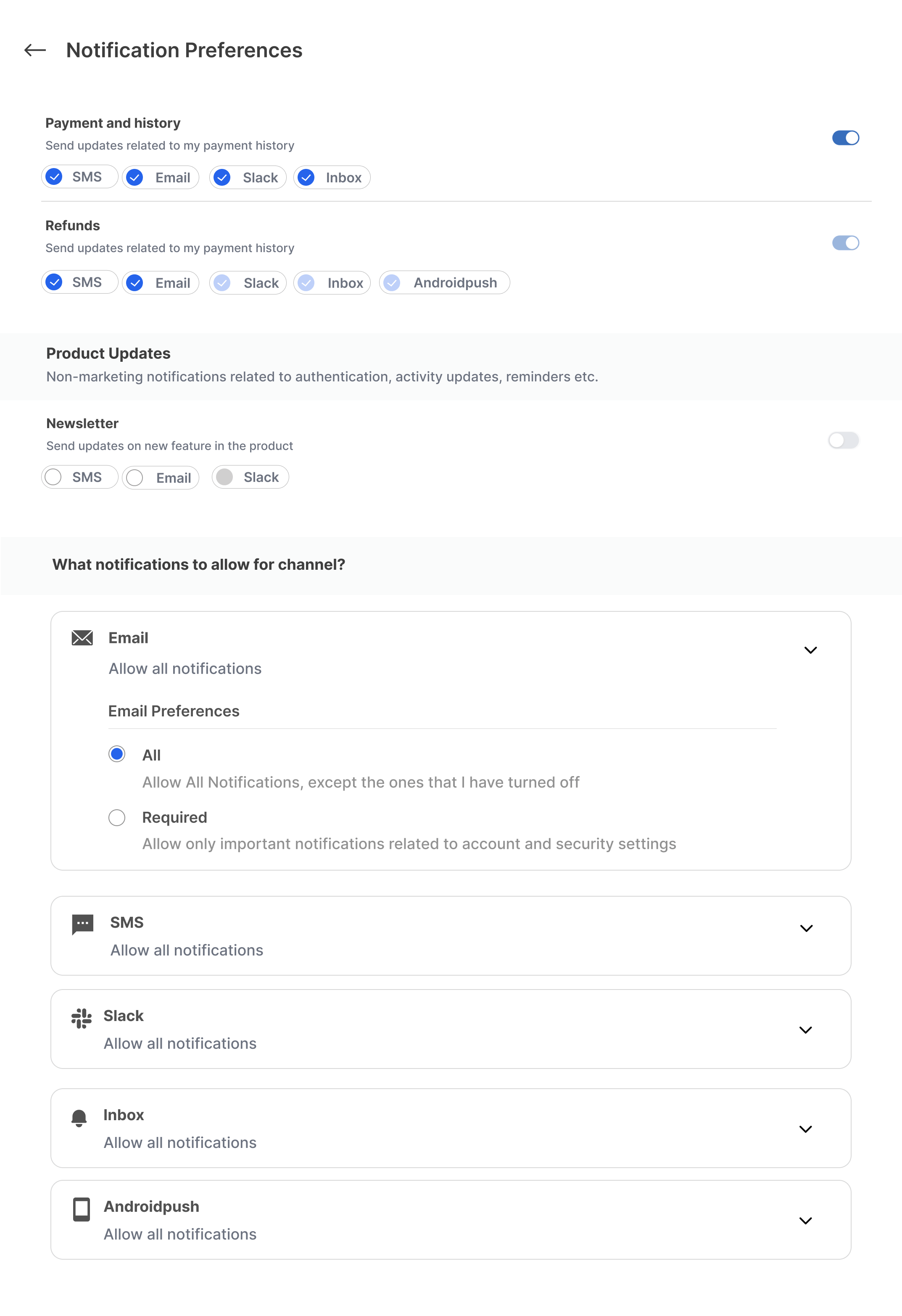
This is how a typical preference page will look like:

<Frame>
  <img src="https://mintcdn.com/suprsend/JOwfEC79k-vs3tUR/images/docs/9204517-full_preferences.png?fit=max&auto=format&n=JOwfEC79k-vs3tUR&q=85&s=897b05e3a355be86571157338b193fad" width="2146" height="3132" data-path="images/docs/9204517-full_preferences.png" />
</Frame>

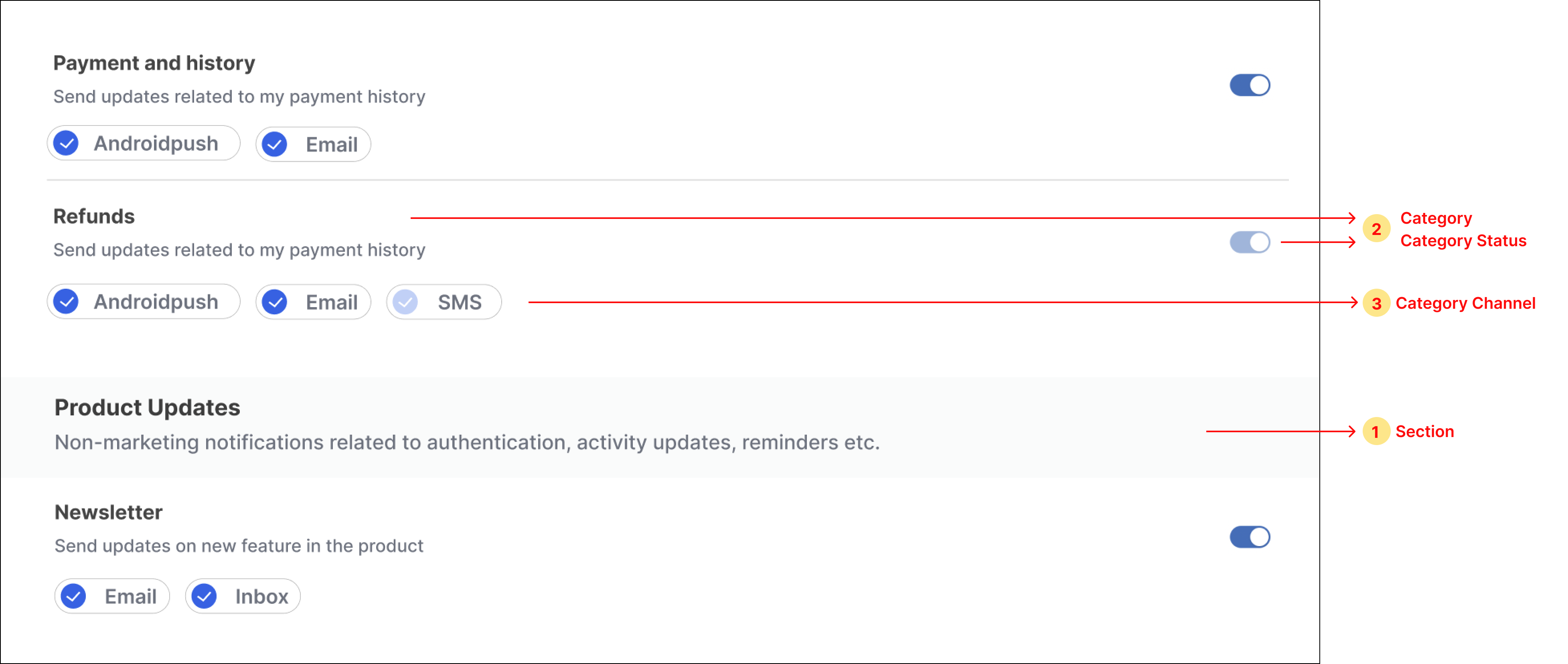
Preference Page contains 2 sections:

1. Category-level preference settings (Sections)

   * [Sections](/docs/js-preferences#11-sections)

   * [Categories](/docs/js-preferences#12-categories-sections---sub-categories)

   * [Category Channel](/docs/js-preferences#13-category-channels-sections---sub-categories---channels)
     <Frame>
       <img src="https://mintcdn.com/suprsend/dnAGb1CmSRGCSyT3/images/docs/4476752-sections.png?fit=max&auto=format&n=dnAGb1CmSRGCSyT3&q=85&s=b024e56290ab3a107110078532b25687" width="3910" height="1656" data-path="images/docs/4476752-sections.png" />
     </Frame>

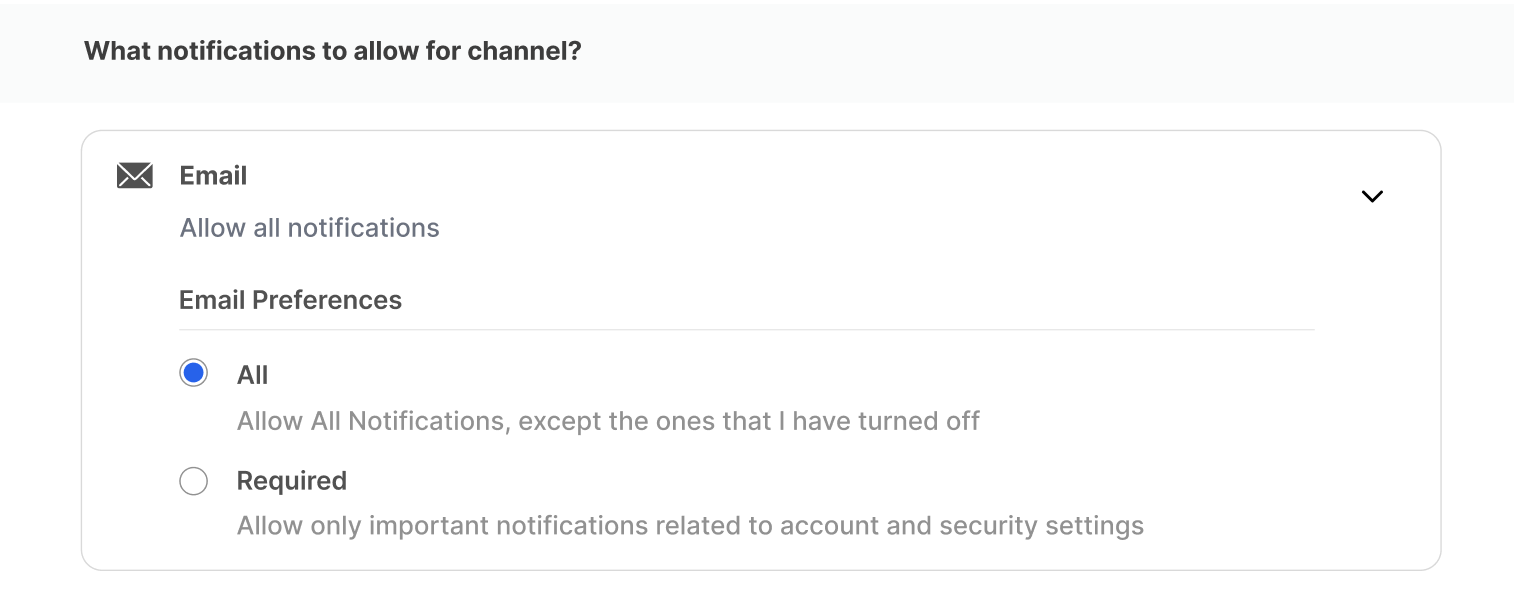
2. [Overall Channel-level preference](/docs/js-preferences#2-overall-channel-preferences)
<Frame>
  <img src="https://mintcdn.com/suprsend/3ix_OjxB_ZGM-pa-/images/docs/3063a30-overallChannel.png?fit=max&auto=format&n=3ix_OjxB_ZGM-pa-&q=85&s=ae87dc47e793ee11389890ad7d4fedd4" width="1514" height="594" data-path="images/docs/3063a30-overallChannel.png" />
</Frame>

### Preferences data structure

<CodeGroup>
  ```typescript Preferences Types theme={"system"}
  interface PreferenceData {
    sections: Section[] | null;
    channel_preferences: ChannelPreference[] | null;
  }

  interface ChannelPreference {
    channel: string;
    is_restricted: boolean;
  }

  interface Section {
    name?: string | null;
    description?: string | null;
    subcategories?: Category[] | null;
  }

  interface Category {
    name: string;
    category: string;
    description?: string | null;
    preference: PreferenceOptions;
    is_editable: boolean;
    channels?: CategoryChannel[] | null;
  }

  interface CategoryChannel {
    channel: string;
    preference: PreferenceOptions;
    is_editable: boolean;
  }

  enum PreferenceOptions {
    OPT_IN = "opt_in",
    OPT_OUT = "opt_out",
  }

  enum ChannelLevelPreferenceOptions {
    ALL = "all",
    REQUIRED = "required",
  }
  ```

  ```typescript Example theme={"system"}
  {
    "sections": [
      {
        "name": null,
        "subcategories": [
          {
            "name": "Payment and History",
            "category": "payment-and-history",
            "description": "Send updates related to my payment history.",
            "preference": "opt_in",
            "is_editable": false,
            "channels": [
              {
                "channel": "androidpush",
                "preference": "opt_in",
                "is_editable": true
              },
              {
                "channel": "email",
                "preference": "opt_in",
                "is_editable": false
              }
            ]
          }
        ]
      },
      {
        "name": "Product Updates",
        "description": "Non-marketing notifications related to authentication, activity updates, reminders etc.",
        "subcategories": [
          {
            "name": "Newsletter",
            "category": "newsletter",
            "description": "Send updates on new feature in the product",
            "preference": "opt_in",
            "is_editable": true,
            "channels": [
              {
                "channel": "androidpush",
                "preference": "opt_in",
                "is_editable": true
              },
              {
                "channel": "email",
                "preference": "opt_out",
                "is_editable": false
              }
            ]
          }
        ]
      }
    ],
    "channel_preferences": [
      {
        "channel": "androidpush",
        "is_restricted": false
      },
      {
        "channel": "email",
        "is_restricted": true
      }
    ]
  }
  ```
</CodeGroup>

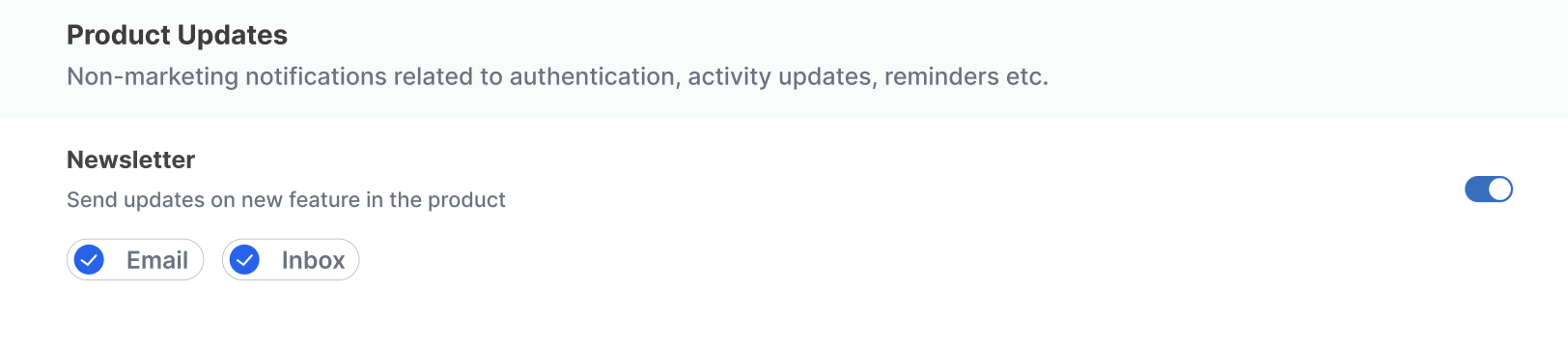
### 1.1 Sections

This contains the name, description, and subcategories. We have to loop through the sections list and for every section item if there is a name and description present, then show the heading, and if a subcategories list is present, loop through that subcategories list and show all subcategories under that section heading.

Subcategories can exist without sections as the section is an optional field. In that case, the section's name will not be available. For sections where the name is not present, you can directly show its subcategories list without showing Heading for the section in UI.

<Frame>
  <img src="https://mintcdn.com/suprsend/jhGzZpggWCp1KSgu/images/docs/e65f303-section.png?fit=max&auto=format&n=jhGzZpggWCp1KSgu&q=85&s=718ab7b6801c10ca552c74199569a3bf" width="1624" height="362" data-path="images/docs/e65f303-section.png" />
</Frame>

<CodeGroup>
  ```typescript syntax theme={"system"}
  interface Section {
    name?: string | null;
    description?: string | null;
    subcategories?: Category[] | null;
  }
  ```
</CodeGroup>

| Property      | Description                                               |
| ------------- | --------------------------------------------------------- |
| name          | name of the section                                       |
| description   | description of the section                                |
| subcategories | data of all sub-categories to be shown inside the section |

### 1.2 Categories (sections -> sub-categories)

This is the place where the user sets his category-level preferences. While looping through the subcategories list for every subcategory item, show the name and description in UI.

<Frame>
  <img src="https://mintcdn.com/suprsend/3ix_OjxB_ZGM-pa-/images/docs/2317beb-subcategories.png?fit=max&auto=format&n=3ix_OjxB_ZGM-pa-&q=85&s=40f4a79f77639d4859827e7ec2d78d77" width="2424" height="298" data-path="images/docs/2317beb-subcategories.png" />
</Frame>

<CodeGroup>
  ```typescript syntax theme={"system"}
  interface Category {
    name: string;
    category: string;
    description?: string | null;
    preference: PreferenceOptions;
    is_editable: boolean;
    channels?: CategoryChannel[] | null;
  }
  ```
</CodeGroup>

| Property     | Description                                                                                                                                        |
| ------------ | -------------------------------------------------------------------------------------------------------------------------------------------------- |
| category     | This key is the id of the category which is used while updating the preference.                                                                    |
| name         | name of the category to be shown on the UI                                                                                                         |
| description  | description of the category to be shown on the UI                                                                                                  |
| preference   | This key indicates if the category's preference switch is on or off. Get **OPT\_IN** when the switch is on and **OPT\_OUT** when the switch is off |
| is\_editable | Indicates if the preference switch button is disabled or not. If its value is false then the preference setting for that category can't be edited  |
| channels     | data of all category channels to be shown below the sub-category. Loop through it to show checkboxes under every subcategory item.                 |

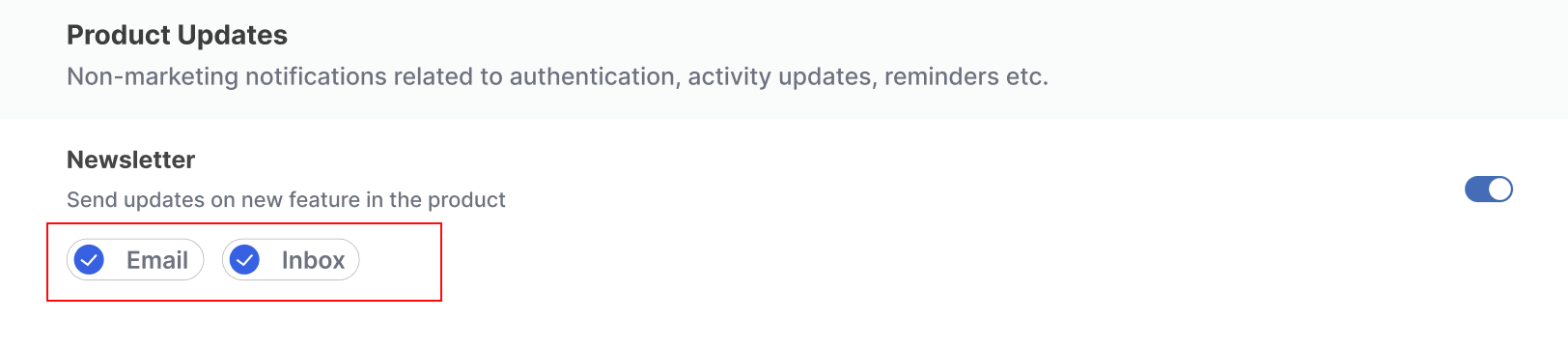
### 1.3 Category channels (sections -> sub-categories -> channels)

This contains a list of channels, channel preference status and whether it's editable or not. While looping through the subcategory list for every subcategory item we have to loop through its channels list and for every channel to show channel level checkbox.

<Frame>
  <img src="https://mintcdn.com/suprsend/09Y8zJBSaqwwb23r/images/docs/74de834-channelCategory.png?fit=max&auto=format&n=09Y8zJBSaqwwb23r&q=85&s=2e4130e2900188749dd797db0ecfee77" width="1624" height="362" data-path="images/docs/74de834-channelCategory.png" />
</Frame>

<CodeGroup>
  ```typescript syntax theme={"system"}
  interface CategoryChannel {
    channel: string;
    preference: PreferenceOptions;
    is_editable: boolean;
  }
  ```
</CodeGroup>

| Property     | Description                                                                                                                                 |
| ------------ | ------------------------------------------------------------------------------------------------------------------------------------------- |
| channel      | name of the channel to be shown on UI. The same key will be used as id of the channel while updating the preference.                        |
| preference   | This key indicates if the channel's preference switch is on or off. Get OPT\_IN when the switch is on and OPT\_OUT when the switch is off   |
| is\_editable | Indicates if the preference checkbox is disabled or not. If its value is false then the preference setting for that channel can't be edited |

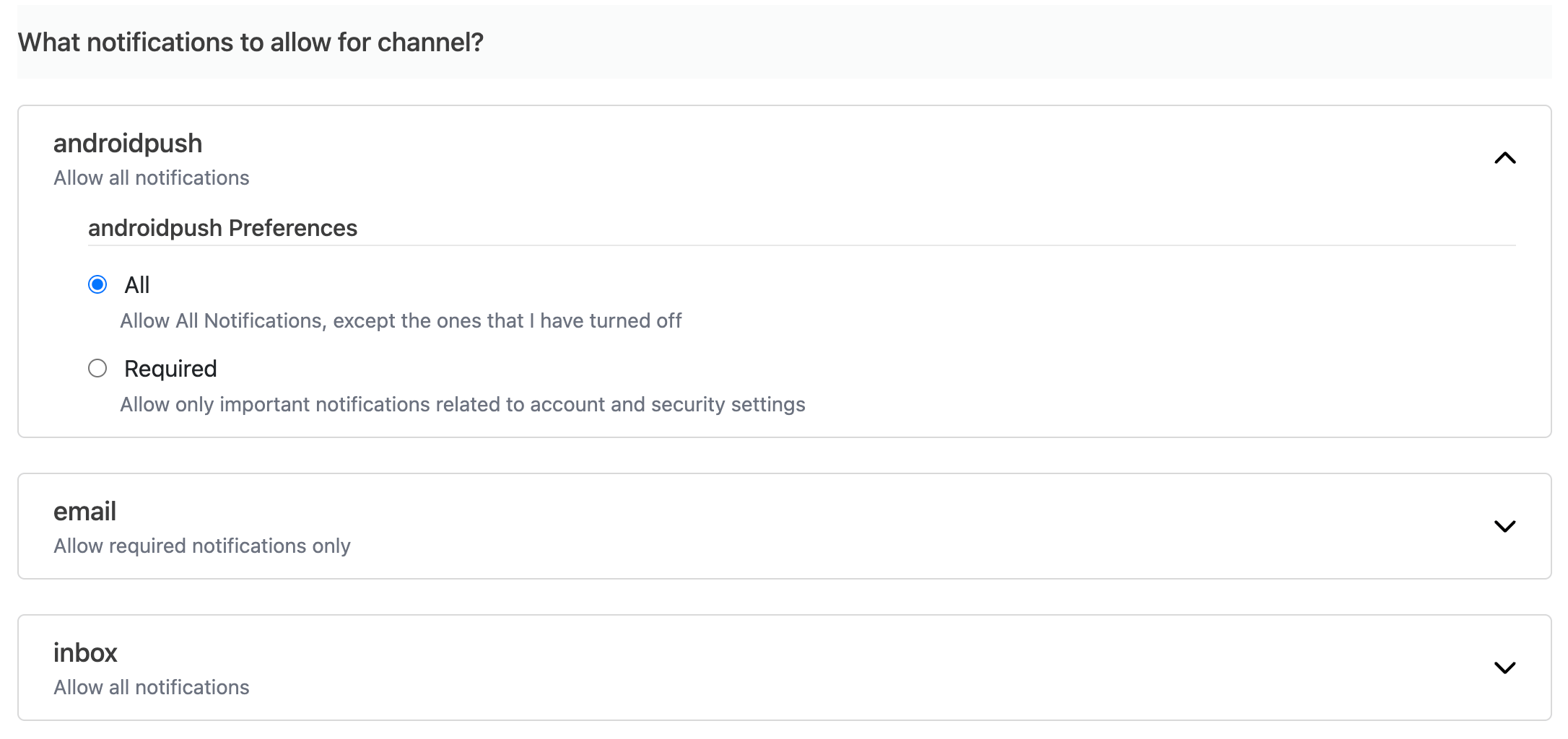
### 2. Overall channel preferences

It's a list of all channel-level preferences. We have to loop through the list and for each item, show the UI as given in the below image.

<Frame>
  <img src="https://mintcdn.com/suprsend/JOwfEC79k-vs3tUR/images/docs/7ffb4c5-overallChannelPref.png?fit=max&auto=format&n=JOwfEC79k-vs3tUR&q=85&s=519c6607804dd1e05160d992c658aad5" width="2172" height="1024" data-path="images/docs/7ffb4c5-overallChannelPref.png" />
</Frame>

<CodeGroup>
  ```typescript syntax theme={"system"}
  interface ChannelPreference {
    channel: string;
    is_restricted: boolean;
  }
  ```
</CodeGroup>

| Property       | Description                                                                                                                                                                                                                                                                                    |
| -------------- | ---------------------------------------------------------------------------------------------------------------------------------------------------------------------------------------------------------------------------------------------------------------------------------------------- |
| channel        | name of the channel to be shown on UI. The same key will be used as id of the channel while updating the preference.                                                                                                                                                                           |
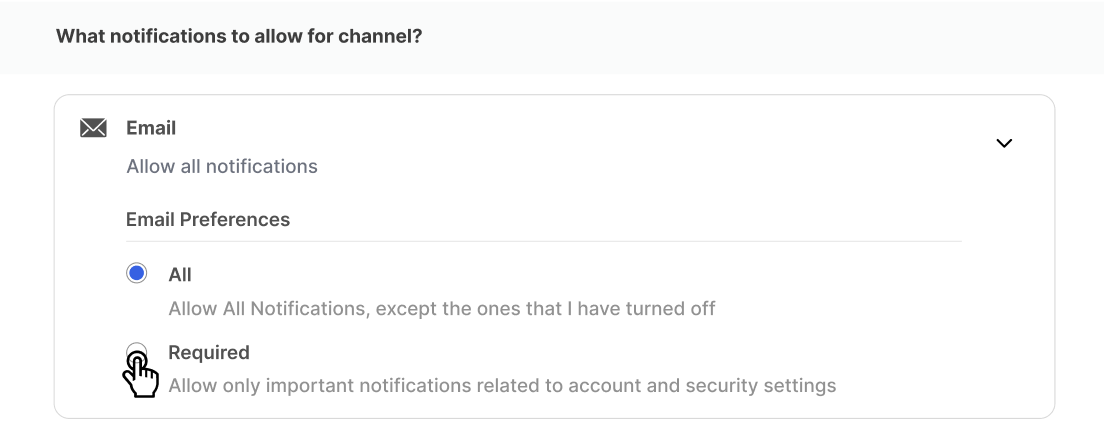
| is\_restricted | This key indicates the restriction level of channel. If restricted, notification will only be sent in the category where this channel is added as mandatory in notification category settings. **True** means Required radio button is selected. **False** means All radio button is selected. |

## Integration

### Get preferences data

Use this method to get preferences data and create the preferences UI by following the above sections. This method should be called first before any update preference methods.

<CodeGroup>
  ```typescript syntax theme={"system"}
  const preferencesResp = await suprSendClient.user.preferences.getPreferences(args?: {tenantId?: string, tags?: string | Dictionary, locale?: string});
  ```
</CodeGroup>

| Argument (optional) | Description                                                                                                                                                                                                                                                                                                                                                                                                          |
| ------------------- | -------------------------------------------------------------------------------------------------------------------------------------------------------------------------------------------------------------------------------------------------------------------------------------------------------------------------------------------------------------------------------------------------------------------- |
| `tenantId`          | Tenant identifier for loading per-tenant preferences                                                                                                                                                                                                                                                                                                                                                                 |
| `tags`              | Filter categories by tags. Used to filter preference categories based on user's roles, department or teams. (see [Tags](/docs/notification-category#tags))                                                                                                                                                                                                                                                           |
| `locale`            | Locale code (for example, `es`, `fr`, `de`, `es-AR`) to fetch preference translations in user's locale. When provided, category names and descriptions will be returned in the specified locale. If a translation is missing for the requested locale, the system automatically falls back in this order: `locale-region` (for example, `es-AR`) → `locale` (for example, `es`) → `en` (English - always available). |

**Returns:** `Promise<ApiResponse>`

### Update category preference

Calling this method will opt-in/opt-out user from that category. When the category is editable and the switch is toggled you can call this method.

<CodeGroup>
  ```typescript syntax theme={"system"}
  const updatedPreferencesResp = await suprSendClient.user.preferences.updateCategoryPreference(category: string, preference: PreferenceOptions);

  enum PreferenceOptions {
    OPT_IN = "opt_in",
    OPT_OUT = "opt_out"
  }
  ```
</CodeGroup>

**Returns:** `Promise<ApiResponse>`

<Frame>
  <img src="https://mintcdn.com/suprsend/JOwfEC79k-vs3tUR/images/docs/90acce7-update1.png?fit=max&auto=format&n=JOwfEC79k-vs3tUR&q=85&s=e3aa7fe56cbd3c6a652859b83365113d" width="1582" height="202" data-path="images/docs/90acce7-update1.png" />
</Frame>

### Update channel preference in category

Calling this method will opt-in/opt-out users from that category-level channel. When the category's channel checkbox is editable and the user clicks on the checkbox you can call this method.

<CodeGroup>
  ```typescript syntax theme={"system"}
  const updatedPreferencesResp = await suprSendClient.user.preferences.updateChannelPreferenceInCategory(channel: string, preference: PreferenceOptions, category: string);

  enum PreferenceOptions {
    OPT_IN = "opt_in",
    OPT_OUT = "opt_out"
  }
  ```
</CodeGroup>

**Returns:** `Promise<ApiResponse>`

<Frame>
  <img src="https://mintcdn.com/suprsend/ftswjUsq0JlUh-RL/images/docs/068dbe0-update2.png?fit=max&auto=format&n=ftswjUsq0JlUh-RL&q=85&s=95a8e614dd72d58436ac2edfcb2cafd1" width="1582" height="242" data-path="images/docs/068dbe0-update2.png" />
</Frame>

### Update overall channel preference

This method updated the channel-level preference of the user.
<CodeGroup>
  ```typescript syntax theme={"system"}
  const updatedPreferencesResp = await suprSendClient.user.preferences.updateOverallChannelPreference(channel: string, preference: ChannelLevelPreferenceOptions);

  enum ChannelLevelPreferenceOptions {
    ALL = "all",
    REQUIRED = "required"
  }
  ```
</CodeGroup>

**Returns:** `Promise<ApiResponse>`

<Frame>
  <img src="https://mintcdn.com/suprsend/iZJ8XgyTL4NrLVtX/images/docs/a3249bd-update3.png?fit=max&auto=format&n=iZJ8XgyTL4NrLVtX&q=85&s=379c47e2ce4b82cda0435b6a5de8fea2" width="1104" height="434" data-path="images/docs/a3249bd-update3.png" />
</Frame>

### Event listeners

All preferences update api's are optimistic updates. Actual API call will happen in background with 1 second debounce. Since its a background task SDK provides event listeners to get updated preference data based on API call status. Listen to this event listeners and update the UI accordingly.

<CodeGroup>
  ```typescript syntax theme={"system"}
  suprSendClient.emitter.on('preferences_updated', (preferenceDataResp: ApiResponse) => void);
  suprSendClient.emitter.on('preferences_error', (errorResponse: ApiResponse) => void);
  ```
</CodeGroup>

Example Usage:

For **preferences\_error** event you could show error toast.

For **preferences\_updated** event you could update UI with latest data returned in as param in callback function.

## Example

For understanding purpose we have added simple example of preferences implementation in React. You could refer this headless example and design the preferences in your Angular or Vue.js etc. If you want to implement in react please refer [@suprsend/react](https://docs.suprsend.com/docs/preferences-1).

```javascript Example.js theme={"system"}
import { useState, useEffect } from "react";
import Switch from "react-switch";
import {
  SuprSend,
  ChannelLevelPreferenceOptions,
  PreferenceOptions,
} from "@suprsend/web-sdk";

// -------------- Category Level Preferences -------------- //

const handleCategoryPreferenceChange = async ({
  data,
  subcategory,
  setPreferenceData,
}) => {
  const resp = await suprSendClient.user.preferences.updateCategoryPreference(
    subcategory.category,
    data ? PreferenceOptions.OPT_IN : PreferenceOptions.OPT_OUT
  );
  if (resp.status === "error") {
    console.log(resp.error.message);
  } else {
    setPreferenceData({ ...resp.body });
  }
};

const handleChannelPreferenceInCategoryChange = async ({
  channel,
  subcategory,
  setPreferenceData,
}) => {
  if (!channel.is_editable) return;

  const resp =
    await suprSendClient.user.preferences.updateChannelPreferenceInCategory(
      channel.channel,
      channel.preference === PreferenceOptions.OPT_IN
        ? PreferenceOptions.OPT_OUT
        : PreferenceOptions.OPT_IN,
      subcategory.category
    );
  if (resp.status === "error") {
    console.log(resp.error.message);
  } else {
    setPreferenceData({ ...resp.body });
  }
};

function NotificationCategoryPreferences({
  preferenceData,
  setPreferenceData,
}) {
  if (!preferenceData.sections) {
    return null;
  }
  return preferenceData.sections?.map((section, index) => {
    return (
      <div style={{ marginBottom: 24 }} key={index}>
        {section?.name && (
          <div
            style={{
              backgroundColor: "#FAFBFB",
              paddingTop: 12,
              paddingBottom: 12,
              marginBottom: 18,
            }}
          >
            <p
              style={{
                fontSize: 18,
                fontWeight: 500,
                color: "#3D3D3D",
              }}
            >
              {section.name}
            </p>
            <p style={{ color: "#6C727F" }}>{section.description}</p>
          </div>
        )}

        {section?.subcategories?.map((subcategory, index) => {
          return (
            <div
              key={index}
              style={{
                borderBottom: "1px solid #D9D9D9",
                paddingBottom: 12,
                marginTop: 18,
              }}
            >
              <div
                style={{
                  display: "flex",
                  justifyContent: "space-between",
                  alignItems: "center",
                }}
              >
                <div>
                  <p
                    style={{
                      fontSize: 16,
                      fontWeight: 600,
                      color: "#3D3D3D",
                    }}
                  >
                    {subcategory.name}
                  </p>
                  <p style={{ color: "#6C727F", fontSize: 14 }}>
                    {subcategory.description}
                  </p>
                </div>
                <Switch
                  disabled={!subcategory.is_editable}
                  onChange={(data) => {
                    handleCategoryPreferenceChange({
                      data,
                      subcategory,
                      setPreferenceData,
                    });
                  }}
                  uncheckedIcon={false}
                  checkedIcon={false}
                  height={20}
                  width={40}
                  onColor="#2563EB"
                  checked={subcategory.preference === PreferenceOptions.OPT_IN}
                />
              </div>

              <div style={{ display: "flex", gap: 10, marginTop: 12 }}>
                {subcategory?.channels.map((channel, index) => {
                  return (
                    <Checkbox
                      key={index}
                      value={channel.preference}
                      title={channel.channel}
                      disabled={!channel.is_editable}
                      onClick={() => {
                        handleChannelPreferenceInCategoryChange({
                          channel,
                          subcategory,
                          setPreferenceData,
                        });
                      }}
                    />
                  );
                })}
              </div>
            </div>
          );
        })}
      </div>
    );
  });
}

// -------------- Channel Level Preferences -------------- //

const handleOverallChannelPreferenceChange = async ({
  channel,
  status,
  setPreferenceData,
}) => {
  const resp =
    await suprSendClient.user.preferences.updateOverallChannelPreference(
      channel.channel,
      status
    );
  if (resp.status === "error") {
    console.log(resp.error.message);
  } else {
    setPreferenceData({ ...resp.body });
  }
};

function ChannelLevelPreferernceItem({ channel, setPreferenceData }) {
  const [isActive, setIsActive] = useState(false);

  return (
    <div
      style={{
        border: "1px solid #D9D9D9",
        borderRadius: 5,
        padding: "12px 24px",
        marginBottom: 24,
      }}
    >
      <div
        style={{
          cursor: "pointer",
        }}
        onClick={() => setIsActive(!isActive)}
      >
        <p
          style={{
            fontSize: 18,
            fontWeight: 500,
            color: "#3D3D3D",
          }}
        >
          {channel.channel}
        </p>
        <p style={{ color: "#6C727F", fontSize: 14 }}>
          {channel.is_restricted
            ? "Allow required notifications only"
            : "Allow all notifications"}
        </p>
      </div>
      {isActive && (
        <div style={{ marginTop: 12, marginLeft: 24 }}>
          <p
            style={{
              color: "#3D3D3D",
              fontSize: 16,
              fontWeight: 500,
              marginTop: 12,
              borderBottom: "1px solid #E8E8E8",
            }}
          >
            {channel.channel} Preferences
          </p>
          <div style={{ marginTop: 12 }}>
            <div style={{ marginBottom: 8 }}>
              <div
                style={{
                  display: "flex",
                  alignItems: "center",
                }}
              >
                <div>
                  <input
                    type="radio"
                    name={`all- ${channel.channel}`}
                    value={true}
                    id={`all- ${channel.channel}`}
                    checked={!channel.is_restricted}
                    onChange={() => {
                      handleOverallChannelPreferenceChange({
                        channel,
                        status: ChannelLevelPreferenceOptions.ALL,
                        setPreferenceData,
                      });
                    }}
                  />
                </div>
                <label
                  htmlFor={`all- ${channel.channel}`}
                  style={{ marginLeft: 12 }}
                >
                  All
                </label>
              </div>
              <p style={{ color: "#6C727F", fontSize: 14, marginLeft: 22 }}>
                Allow All Notifications, except the ones that I have turned off
              </p>
            </div>
            <div>
              <div style={{ display: "flex", alignItems: "center" }}>
                <div>
                  <input
                    type="radio"
                    name={`required- ${channel.channel}`}
                    value={true}
                    id={`required- ${channel.channel}`}
                    checked={channel.is_restricted}
                    onChange={() => {
                      handleOverallChannelPreferenceChange({
                        channel,
                        status: ChannelLevelPreferenceOptions.REQUIRED,
                        setPreferenceData,
                      });
                    }}
                  />
                </div>
                <label
                  htmlFor={`required- ${channel.channel}`}
                  style={{ marginLeft: 12 }}
                >
                  Required
                </label>
              </div>
              <p style={{ color: "#6C727F", fontSize: 14, marginLeft: 22 }}>
                Allow only important notifications related to account and
                security settings
              </p>
            </div>
          </div>
        </div>
      )}
    </div>
  );
}

function ChannelLevelPreferences({ preferenceData, setPreferenceData }) {
  return (
    <div>
      <div
        style={{
          backgroundColor: "#FAFBFB",
          paddingTop: 12,
          paddingBottom: 12,
          marginBottom: 18,
        }}
      >
        <p
          style={{
            fontSize: 18,
            fontWeight: 500,
            color: "#3D3D3D",
          }}
        >
          What notifications to allow for channel?
        </p>
      </div>
      <div>
        {preferenceData.channel_preferences ? (
          <div>
            {preferenceData.channel_preferences?.map((channel, index) => {
              return (
                <ChannelLevelPreferernceItem
                  key={index}
                  channel={channel}
                  setPreferenceData={setPreferenceData}
                />
              );
            })}
          </div>
        ) : (
          <p>No Data</p>
        )}
      </div>
    </div>
  );
}

// -------------- Main component -------------- //

const suprSendClient = new SuprSend(publicApiKey); // create suprsend client

export default function Preferences() {
  const [preferenceData, setPreferenceData] = useState();

  const getPreferencesData = async () => {
    suprSendClient.user.preferences.getPreferences().then((resp) => {
      if (resp.status === "error") {
        console.log(resp.error.message);
      } else {
        setPreferenceData({ ...resp.body });
      }
    });

    // listen for update in preferences data
    suprSendClient.emitter.on("preferences_updated", (preferenceData) => {
      setPreferenceData({ ...preferenceData.body });
    });

    // listen for errors
    suprSendClient.emitter.on("preferences_error", (response) => {
      console.log("ERROR:", response?.error?.message);
    });
  };

  useEffect(() => {
    // autheticate user to suprsend
    suprSendClient.identify(distinctId).then((resp) => {
      // call suprsend.identify method before getting preferences
      getPreferencesData();
    });
  }, []);

  if (!preferenceData) return <p>Loading...</p>;
  return (
    <div style={{ margin: 24 }}>
      <h3 style={{ marginBottom: 24 }}>Notification Preferences</h3>
      <NotificationCategoryPreferences
        preferenceData={preferenceData}
        setPreferenceData={setPreferenceData}
      />
      <ChannelLevelPreferences
        preferenceData={preferenceData}
        setPreferenceData={setPreferenceData}
      />
    </div>
  );
}

// -------------- Custom Checkbox Component -------------- //

function Checkbox({ title, value, onClick, disabled }) {
  const selected = value === PreferenceOptions.OPT_IN;

  return (
    <div
      style={{
        border: "0.5px solid #B5B5B5",
        display: "inline-flex",
        padding: "0px 20px 0px 4px",
        borderRadius: 30,
        cursor: disabled ? "not-allowed" : "pointer",
      }}
      onClick={onClick}
    >
      <Circle selected={selected} disabled={disabled} />
      <p
        style={{
          marginLeft: 8,
          color: "#6C727F",
          marginTop: 1,
          fontWeight: 500,
          paddingBottom: 4,
        }}
      >
        {title}
      </p>
    </div>
  );
}

function Circle({ selected, disabled }) {
  const bgColor = selected
    ? disabled
      ? "#BDCFF8"
      : "#2463EB"
    : disabled
    ? "#D0CFCF"
    : "#FFF";

  return (
    <div
      style={{
        height: 20,
        width: 20,
        borderRadius: 100,
        border: "0.5px solid #A09F9F",
        backgroundColor: bgColor,
        marginTop: 3.6,
      }}
    />
  );
}

```

***