> ## Documentation Index
> Fetch the complete documentation index at: https://docs.suprsend.com/llms.txt
> Use this file to discover all available pages before exploring further.
# JSONNET
> JSONNET syntax reference for Slack Block Kit and MS Teams Adaptive Card templates in SuprSend - variables, conditionals, arrays, and batched events.
[JSONNET](https://jsonnet.org/) is a data templating language that extends JSON with variables, conditionals, and functions. SuprSend uses JSONNET as the templating language for rich [Slack Block Kit](https://api.slack.com/block-kit) and [MS Teams Adaptive Card](https://adaptivecards.io/) templates.
All trigger payload data, recipient properties, tenant properties, and batched event data are available under the `data` object.
## Variable syntax
| Variable type | Syntax | Example |
| ----------------------------------- | -------------------------------- | ----------------------------------------------------- |
| Top-level key | `data.key` | `data.order_id` |
| Nested object | `data.parent.child` | `data.order.address.city` |
| Special characters or spaces in key | `data['key']` | `data['$recipient'].name`, `data.event['first name']` |
| Array element at index | `data.array[index]` | `data.items[0].product_name` |
| Recipient property | `data['$recipient'].key` | `data['$recipient'].name` |
| Actor property | `data['$actor'].key` | `data['$actor'].name` |
| Tenant property | `data['$brand'].key` | `data['$brand'].brand_name` |
| Batched event count | `data['$batched_events_count']` | |
| Batched event item | `data['$batched_events'][0].key` | `data['$batched_events'][0].title` |
The `{{variable}}` Handlebars syntax does **not** work in JSONNET editors. Use `data.key` syntax only. Similarly, the Adaptive Card `${variable}` syntax is not supported - use `data.key` instead.
## Iterating over arrays
Use JSONNET `for` loops to repeat blocks for each item in an array:
```json theme={"system"}
{
"blocks": [
{
"type": "section",
"fields": [
{
"type": "plain_text",
"text": item.name + ": " + item.description
}
for item in data.items
]
}
]
}
```
For batched events (from [batch](/docs/batch) or [digest](/docs/digest) nodes):
```json theme={"system"}
{
"blocks": [
{
"type": "section",
"fields": [
{
"type": "plain_text",
"text": event.title + " (" + event.status + ")"
}
for event in data["$batched_events"]
]
}
]
}
```
## Conditional logic
Use `if/then/else` for conditional content:
```json theme={"system"}
{
"type": "section",
"text": {
"type": "mrkdwn",
"text": if "is_new_org" in data then
"New Organization"
else
"Existing Organization"
}
}
```
## String formatting
JSONNET supports Python-style string interpolation with `%`:
```json theme={"system"}
{
"type": "section",
"text": {
"type": "mrkdwn",
"text": "*<%(link)s|%(name)s>* requested by %(requester)s" % {
link: data.document_link,
name: data.document_name,
requester: data.requester_name
}
}
}
```
Or use string concatenation with `+`:
```json theme={"system"}
"text": "Order " + data.order_id + " has shipped to " + data['$recipient'].name
```
## Slack Block Kit examples
Design visually in the [Slack Block Kit Builder](https://app.slack.com/block-kit-builder/), then adapt the JSON into JSONNET by replacing hardcoded values with `data.key` references.
**Slack templates must be wrapped in `{"blocks": [...]}`.**
The SuprSend JSONNET editor for Slack only accepts the `{"blocks": [...]}` object format. A bare array (e.g., `[{"type": "section", ...}]`) will not render - wrap your blocks inside a top-level object with a `blocks` key.
The [Block Kit Builder](https://app.slack.com/block-kit-builder/) also outputs this `{"blocks": [...]}` shape by default, so you can copy its output directly and replace hardcoded values with `data.key` references.
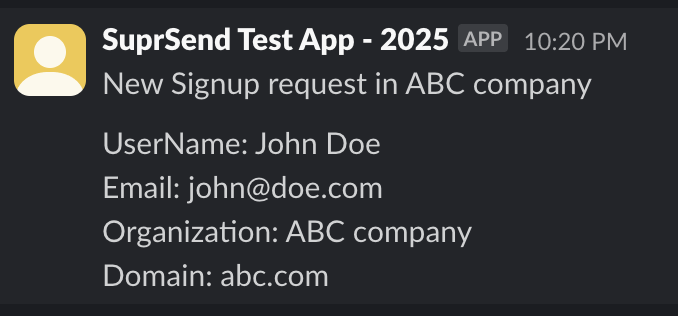 ```json JSONNET Template theme={"system"}
{
"blocks": [
{
"type": "section",
"text": {
"type": "mrkdwn",
"text": "New Signup on ABC company"
}
},
{
"type": "section",
"text": {
"type": "mrkdwn",
"text": ">_UserName_: *%(user_name)s*\n>_Email_: *%(email)s*\n>_Organization_: *%(org_name)s*\n>_Domain_: *%(domain)s*" % {
user_name: data.user_name,
email: data.user_email,
org_name: data.org.name,
domain: data.org.domain
}
}
},
{
"type": "divider"
}
]
}
```
```json Mock Data theme={"system"}
{
"user_name": "John Doe",
"user_email": "john@doe.com",
"org": {
"name": "ABC company",
"domain": "abc.com"
}
}
```
```json JSONNET Template theme={"system"}
{
"blocks": [
{
"type": "section",
"text": {
"type": "mrkdwn",
"text": "New Signup on ABC company"
}
},
{
"type": "section",
"text": {
"type": "mrkdwn",
"text": ">_UserName_: *%(user_name)s*\n>_Email_: *%(email)s*\n>_Organization_: *%(org_name)s*\n>_Domain_: *%(domain)s*" % {
user_name: data.user_name,
email: data.user_email,
org_name: data.org.name,
domain: data.org.domain
}
}
},
{
"type": "divider"
}
]
}
```
```json Mock Data theme={"system"}
{
"user_name": "John Doe",
"user_email": "john@doe.com",
"org": {
"name": "ABC company",
"domain": "abc.com"
}
}
```
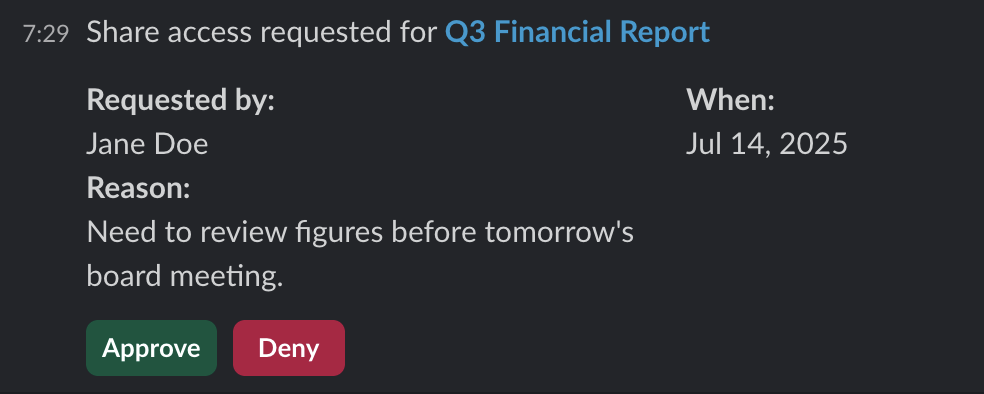 ```json Template theme={"system"}
{
"blocks": [
{
"type": "section",
"text": {
"type": "mrkdwn",
"text": "Share access requested for *<%(document_link)s|%(document_name)s>*" % {
document_link: data.document_link,
document_name: data.document_name
}
}
},
{
"type": "section",
"fields": [
{
"type": "mrkdwn",
"text": "*Requested by:*\n" + data.requester_name
},
{
"type": "mrkdwn",
"text": "*When:*\n" + data.submitted_at
},
{
"type": "mrkdwn",
"text": "*Reason:*\n" + data.access_reason
}
]
},
{
"type": "actions",
"elements": [
{
"type": "button",
"text": { "type": "plain_text", "text": "Approve" },
"style": "primary",
"value": "approve_access"
},
{
"type": "button",
"text": { "type": "plain_text", "text": "Deny" },
"style": "danger",
"value": "deny_access"
}
]
}
]
}
```
```json Mock Data theme={"system"}
{
"access_type": "View",
"submitted_at": "Jul 14, 2025",
"access_reason": "Need to review figures before tomorrow's board meeting.",
"document_link": "https://docs.company.com/12345",
"document_name": "Q3 Financial Report",
"requester_name": "Jane Doe"
}
```
```json Template theme={"system"}
{
"blocks": [
{
"type": "section",
"text": {
"type": "mrkdwn",
"text": "Share access requested for *<%(document_link)s|%(document_name)s>*" % {
document_link: data.document_link,
document_name: data.document_name
}
}
},
{
"type": "section",
"fields": [
{
"type": "mrkdwn",
"text": "*Requested by:*\n" + data.requester_name
},
{
"type": "mrkdwn",
"text": "*When:*\n" + data.submitted_at
},
{
"type": "mrkdwn",
"text": "*Reason:*\n" + data.access_reason
}
]
},
{
"type": "actions",
"elements": [
{
"type": "button",
"text": { "type": "plain_text", "text": "Approve" },
"style": "primary",
"value": "approve_access"
},
{
"type": "button",
"text": { "type": "plain_text", "text": "Deny" },
"style": "danger",
"value": "deny_access"
}
]
}
]
}
```
```json Mock Data theme={"system"}
{
"access_type": "View",
"submitted_at": "Jul 14, 2025",
"access_reason": "Need to review figures before tomorrow's board meeting.",
"document_link": "https://docs.company.com/12345",
"document_name": "Q3 Financial Report",
"requester_name": "Jane Doe"
}
```
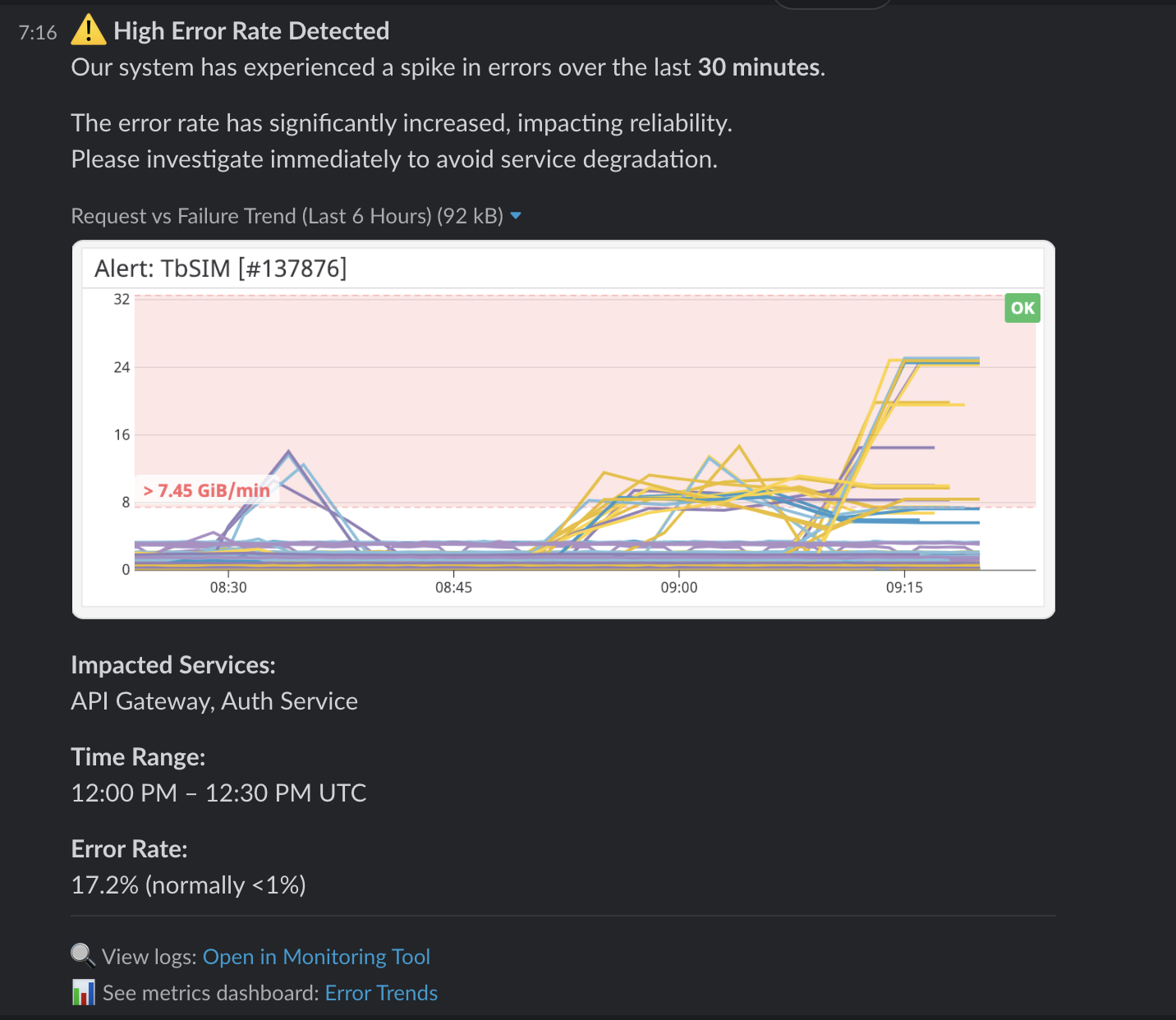 ```json Template theme={"system"}
{
"blocks": [
{
"type": "section",
"text": {
"type": "mrkdwn",
"text": ":warning: *High Error Rate Detected*\nOur system has experienced a spike in errors over the last *30 minutes*."
}
},
{
"type": "image",
"title": { "type": "plain_text", "text": "Request vs Failure Trend (Last 6 Hours)" },
"image_url": data.image_url,
"alt_text": "Graph showing high error rate spike"
},
{
"type": "section",
"fields": [
{ "type": "mrkdwn", "text": "*Impacted Services:*\n" + data.impacted_services },
{ "type": "mrkdwn", "text": "*Error Rate:*\n" + data.error_rate }
]
},
{
"type": "context",
"elements": [
{
"type": "mrkdwn",
"text": ":mag: View logs: <%(log_url)s|Open in Monitoring Tool>" % { log_url: data.log_url }
}
]
}
]
}
```
```json Mock Data theme={"system"}
{
"log_url": "https://monitoring.company.com/logs",
"image_url": "https://datadog-docs.imgix.net/images/dashboards/widgets/alert_graph/alert_graph.png",
"error_rate": "17.2% (normally <1%)",
"impacted_services": "API Gateway, Auth Service"
}
```
```json Template theme={"system"}
{
"blocks": [
{
"type": "section",
"text": {
"type": "mrkdwn",
"text": ":warning: *High Error Rate Detected*\nOur system has experienced a spike in errors over the last *30 minutes*."
}
},
{
"type": "image",
"title": { "type": "plain_text", "text": "Request vs Failure Trend (Last 6 Hours)" },
"image_url": data.image_url,
"alt_text": "Graph showing high error rate spike"
},
{
"type": "section",
"fields": [
{ "type": "mrkdwn", "text": "*Impacted Services:*\n" + data.impacted_services },
{ "type": "mrkdwn", "text": "*Error Rate:*\n" + data.error_rate }
]
},
{
"type": "context",
"elements": [
{
"type": "mrkdwn",
"text": ":mag: View logs: <%(log_url)s|Open in Monitoring Tool>" % { log_url: data.log_url }
}
]
}
]
}
```
```json Mock Data theme={"system"}
{
"log_url": "https://monitoring.company.com/logs",
"image_url": "https://datadog-docs.imgix.net/images/dashboards/widgets/alert_graph/alert_graph.png",
"error_rate": "17.2% (normally <1%)",
"impacted_services": "API Gateway, Auth Service"
}
```
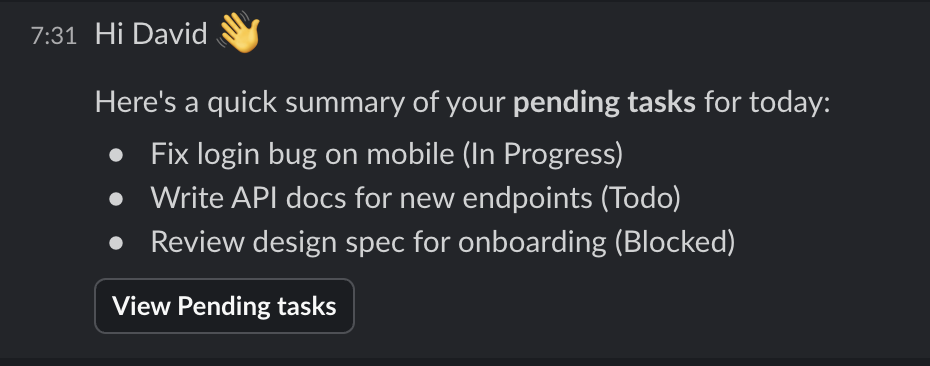 ```json Template theme={"system"}
{
"blocks": [
{
"type": "section",
"text": {
"type": "mrkdwn",
"text": "Hi " + data["$recipient"].name + " :wave:\nYou have " + data["$batched_events_count"] + " *pending tasks* for today:"
}
},
{
"type": "rich_text",
"elements": [
{
"type": "rich_text_list",
"style": "bullet",
"elements": [
{
"type": "rich_text_section",
"elements": [
{ "type": "text", "text": task.title + " (" + task.status + ")" }
]
}
for task in data["$batched_events"]
]
}
]
},
{
"type": "actions",
"elements": [
{
"type": "button",
"text": { "type": "plain_text", "text": "View Pending tasks" },
"url": "https://app.company.com/tasks"
}
]
}
]
}
```
```json Mock Data theme={"system"}
{
"$batched_events_count": 3,
"$batched_events": [
{ "title": "Fix login bug on mobile", "status": "In Progress" },
{ "title": "Write API docs for new endpoints", "status": "Todo" },
{ "title": "Review design spec for onboarding", "status": "Blocked" }
]
}
```
## MS Teams Adaptive Card examples
Design visually in the [Adaptive Cards Designer](https://adaptivecards.io/designer/), then adapt the JSON into JSONNET.
```json theme={"system"}
{
"$schema": "http://adaptivecards.io/schemas/adaptive-card.json",
"type": "AdaptiveCard",
"version": "1.6",
"body": [
{
"type": "TextBlock",
"text": "Expense Report Approval",
"weight": "Bolder",
"size": "Medium"
},
{
"type": "FactSet",
"facts": [
{"title": "Submitted by", "value": data.requester_name},
{"title": "Amount", "value": data.amount},
{"title": "Category", "value": data.category},
{"title": "Date", "value": data.submitted_date}
]
}
],
"actions": [
{ "type": "Action.OpenUrl", "title": "Approve", "url": data.approve_url },
{ "type": "Action.OpenUrl", "title": "Reject", "url": data.reject_url }
]
}
```
Use `FactSet` for key-value data and `Action.OpenUrl` for CTA buttons.
```json theme={"system"}
{
"$schema": "http://adaptivecards.io/schemas/adaptive-card.json",
"type": "AdaptiveCard",
"version": "1.6",
"body": [
{
"text": product.name + " at " + product.price,
"type": "TextBlock",
"wrap": true
}
for product in data.products
]
}
```
## Debugging
* **Preview not loading** - ensure all `data.key` variables have values in the Variables panel. Missing mock data causes render errors.
* **Syntax error in preview** - check for missing commas, unmatched brackets, or using `{{}}` instead of `data.key`.
* **Slack message not rendering** - make sure your template is wrapped in `{"blocks": [...]}`. A bare array (`[...]`) is not valid for the SuprSend Slack JSONNET editor.
* **Slack silently drops blocks** - validate your output in the [Block Kit Builder](https://app.slack.com/block-kit-builder/) before committing.
* **Teams renders differently than designer** - always test in an actual Teams chat. The [Adaptive Cards Designer](https://adaptivecards.io/designer/) is an approximation, not exact.
**AI prompt - debug JSONNET:** *"Fix this JSONNET error from the SuprSend editor. Error: \[paste error]. Code: \[paste JSONNET]. Variables are accessed as data.key or data\['\$special\_key']."*
```json Template theme={"system"}
{
"blocks": [
{
"type": "section",
"text": {
"type": "mrkdwn",
"text": "Hi " + data["$recipient"].name + " :wave:\nYou have " + data["$batched_events_count"] + " *pending tasks* for today:"
}
},
{
"type": "rich_text",
"elements": [
{
"type": "rich_text_list",
"style": "bullet",
"elements": [
{
"type": "rich_text_section",
"elements": [
{ "type": "text", "text": task.title + " (" + task.status + ")" }
]
}
for task in data["$batched_events"]
]
}
]
},
{
"type": "actions",
"elements": [
{
"type": "button",
"text": { "type": "plain_text", "text": "View Pending tasks" },
"url": "https://app.company.com/tasks"
}
]
}
]
}
```
```json Mock Data theme={"system"}
{
"$batched_events_count": 3,
"$batched_events": [
{ "title": "Fix login bug on mobile", "status": "In Progress" },
{ "title": "Write API docs for new endpoints", "status": "Todo" },
{ "title": "Review design spec for onboarding", "status": "Blocked" }
]
}
```
## MS Teams Adaptive Card examples
Design visually in the [Adaptive Cards Designer](https://adaptivecards.io/designer/), then adapt the JSON into JSONNET.
```json theme={"system"}
{
"$schema": "http://adaptivecards.io/schemas/adaptive-card.json",
"type": "AdaptiveCard",
"version": "1.6",
"body": [
{
"type": "TextBlock",
"text": "Expense Report Approval",
"weight": "Bolder",
"size": "Medium"
},
{
"type": "FactSet",
"facts": [
{"title": "Submitted by", "value": data.requester_name},
{"title": "Amount", "value": data.amount},
{"title": "Category", "value": data.category},
{"title": "Date", "value": data.submitted_date}
]
}
],
"actions": [
{ "type": "Action.OpenUrl", "title": "Approve", "url": data.approve_url },
{ "type": "Action.OpenUrl", "title": "Reject", "url": data.reject_url }
]
}
```
Use `FactSet` for key-value data and `Action.OpenUrl` for CTA buttons.
```json theme={"system"}
{
"$schema": "http://adaptivecards.io/schemas/adaptive-card.json",
"type": "AdaptiveCard",
"version": "1.6",
"body": [
{
"text": product.name + " at " + product.price,
"type": "TextBlock",
"wrap": true
}
for product in data.products
]
}
```
## Debugging
* **Preview not loading** - ensure all `data.key` variables have values in the Variables panel. Missing mock data causes render errors.
* **Syntax error in preview** - check for missing commas, unmatched brackets, or using `{{}}` instead of `data.key`.
* **Slack message not rendering** - make sure your template is wrapped in `{"blocks": [...]}`. A bare array (`[...]`) is not valid for the SuprSend Slack JSONNET editor.
* **Slack silently drops blocks** - validate your output in the [Block Kit Builder](https://app.slack.com/block-kit-builder/) before committing.
* **Teams renders differently than designer** - always test in an actual Teams chat. The [Adaptive Cards Designer](https://adaptivecards.io/designer/) is an approximation, not exact.
**AI prompt - debug JSONNET:** *"Fix this JSONNET error from the SuprSend editor. Error: \[paste error]. Code: \[paste JSONNET]. Variables are accessed as data.key or data\['\$special\_key']."*