> ## Documentation Index
> Fetch the complete documentation index at: https://docs.suprsend.com/llms.txt
> Use this file to discover all available pages before exploring further.
# Message logs
> Individual message delivery status, engagement tracking (delivered, seen, clicked), message preview, and vendor error details.
**Message logs show individual notification messages, their delivery errors and engagement status**. You'll see 1 log entry corresponding to each delivery node or webhook node in the workflow or broadcast execution. Use this to track the delivery errors, notification engagement status, webhook request and response details or any other errors that happen for deivery node during the workflow or broadcast execution.
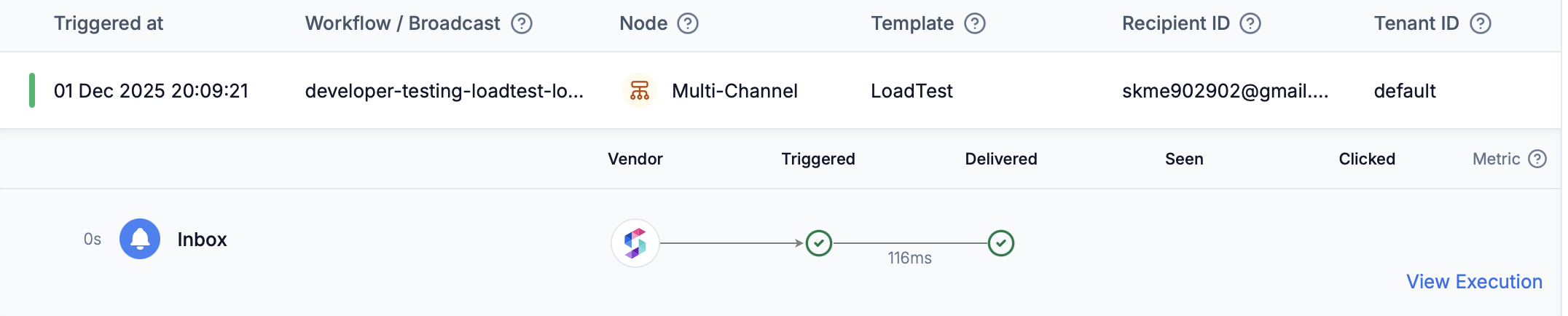 Each message log entry includes:
* **Overview**: Generic information about the message:
* Triggered at timestamp, workflow/broadcast name, node (for example, Multi-Channel, Email, SMS, Mobile Push, Inbox), template, recipient ID, and tenant ID.
* **Notification Status**: Triggered, Delivered, Seen, Clicked, Failed
* **Message Preview**: View the fully rendered message content — the exact output delivered to the recipient, with all variables resolved and templates applied. Useful for debugging, verifying personalization, and auditing communications.
Available for messages sent from 14 June 2026 onwards. In staging and sandbox workspaces, all members can view message previews. In production, access is restricted to admin users only to prevent exposing user PII.
* **Delivery errors**: Delivery errors if any
* **Delivery timeline**: Delivery timeline for the message
* **Webhook request and response**: Webhook request and response details if any
* **Execution Error**: Workflow execution error for delivery or webhook node if any
**Status indicators:**
| Status | Log Level | Meaning |
| ---------------------- | ----------- | --------------------------------------------------------------------------------------------------------------------------------------------------------------------------- |
| 🟢 **Completed** | **INFO** | **Notification was successfully delivered to user on all channels or handed off to the vendor if we're not able to track the delivery status** |
| 🟠 **Partial Failure** | **WARNING** | **Notification was partially delivered on some channels or failed on other or message were not delivered due to warnings like preference opt-outs etc.** |
| 🔴 **Failed** | **ERROR** | \*\*Notification failed to be delivered to the end user on all channels or there was an error in workflow execution for some channels like template rendering failures \*\* |
| 🔵 **In Progress** | **INFO** | **Notifications are still in progress.** Final status will result in one of the above 3 statuses. |
**Notification delivery and engagement status:**
| Stage | Details |
| ------------- | ---------------------------------------------------------------------------------------------- |
| **Triggered** | ✅ (success) or ❌ (failed) - whether the notification was successfully handed off to the vendor |
| **Delivered** | ✅ (success) or ❌ (failed) - whether the notification was delivered to the end user |
| **Seen** | Whether the notification was seen/opened by the user |
| **Clicked** | Whether the notification was clicked/interacted with |
Hover over status indicators to see the timestamp of each stage and if failed, the reason for failure.
**Engagement status tracked across channels:**
| Channel | Delivered | Seen | Clicked |
| ------------ | --------- | ---- | ------- |
| Email | ✅ | ✅ | ✅ |
| SMS | ✅ | ❌ | ❌ |
| WhatsApp | ✅ | ✅ | ❌ |
| Android Push | ✅ | ✅ | ✅ |
| iOS Push | ✅ | ✅ | ✅ |
| Web Push | ✅ | ✅ | ✅ |
| Inbox | ✅ | ✅ | ✅ |
| Slack | ✅ | ❌ | ❌ |
| MS Teams | ✅ | ❌ | ❌ |
Configure `https://hub.suprsend.com/webhook/*` in your vendor dashboard to track delivery, seen, and click events for email, SMS and WhatsApp.
**Common errors captured:**
| Error Type | Examples |
| ------------------------------- | -------------------------------------------------------------------------------------------------------- |
| **Delivery errors** | Delivery failures reported by vendor |
| **Template rendering failures** | Missing variables, syntax errors |
| **Channel computation issues** | No active channels, User Preference opt-outs, Tenant Preference opt-outs |
| **Vendor Config issue** | Vendor not configured for the channel and preference category or broadcast not supported for that vendor |
**Delay in updating the status:** Some events (delivery/seen/click) depend on vendor callbacks and may appear with delay.
**Navigate from here:** Use "View Execution" link to navigate to the corresponding [Workflow execution logs](/docs/workflow-execution-logs).
Each message log entry includes:
* **Overview**: Generic information about the message:
* Triggered at timestamp, workflow/broadcast name, node (for example, Multi-Channel, Email, SMS, Mobile Push, Inbox), template, recipient ID, and tenant ID.
* **Notification Status**: Triggered, Delivered, Seen, Clicked, Failed
* **Message Preview**: View the fully rendered message content — the exact output delivered to the recipient, with all variables resolved and templates applied. Useful for debugging, verifying personalization, and auditing communications.
Available for messages sent from 14 June 2026 onwards. In staging and sandbox workspaces, all members can view message previews. In production, access is restricted to admin users only to prevent exposing user PII.
* **Delivery errors**: Delivery errors if any
* **Delivery timeline**: Delivery timeline for the message
* **Webhook request and response**: Webhook request and response details if any
* **Execution Error**: Workflow execution error for delivery or webhook node if any
**Status indicators:**
| Status | Log Level | Meaning |
| ---------------------- | ----------- | --------------------------------------------------------------------------------------------------------------------------------------------------------------------------- |
| 🟢 **Completed** | **INFO** | **Notification was successfully delivered to user on all channels or handed off to the vendor if we're not able to track the delivery status** |
| 🟠 **Partial Failure** | **WARNING** | **Notification was partially delivered on some channels or failed on other or message were not delivered due to warnings like preference opt-outs etc.** |
| 🔴 **Failed** | **ERROR** | \*\*Notification failed to be delivered to the end user on all channels or there was an error in workflow execution for some channels like template rendering failures \*\* |
| 🔵 **In Progress** | **INFO** | **Notifications are still in progress.** Final status will result in one of the above 3 statuses. |
**Notification delivery and engagement status:**
| Stage | Details |
| ------------- | ---------------------------------------------------------------------------------------------- |
| **Triggered** | ✅ (success) or ❌ (failed) - whether the notification was successfully handed off to the vendor |
| **Delivered** | ✅ (success) or ❌ (failed) - whether the notification was delivered to the end user |
| **Seen** | Whether the notification was seen/opened by the user |
| **Clicked** | Whether the notification was clicked/interacted with |
Hover over status indicators to see the timestamp of each stage and if failed, the reason for failure.
**Engagement status tracked across channels:**
| Channel | Delivered | Seen | Clicked |
| ------------ | --------- | ---- | ------- |
| Email | ✅ | ✅ | ✅ |
| SMS | ✅ | ❌ | ❌ |
| WhatsApp | ✅ | ✅ | ❌ |
| Android Push | ✅ | ✅ | ✅ |
| iOS Push | ✅ | ✅ | ✅ |
| Web Push | ✅ | ✅ | ✅ |
| Inbox | ✅ | ✅ | ✅ |
| Slack | ✅ | ❌ | ❌ |
| MS Teams | ✅ | ❌ | ❌ |
Configure `https://hub.suprsend.com/webhook/*` in your vendor dashboard to track delivery, seen, and click events for email, SMS and WhatsApp.
**Common errors captured:**
| Error Type | Examples |
| ------------------------------- | -------------------------------------------------------------------------------------------------------- |
| **Delivery errors** | Delivery failures reported by vendor |
| **Template rendering failures** | Missing variables, syntax errors |
| **Channel computation issues** | No active channels, User Preference opt-outs, Tenant Preference opt-outs |
| **Vendor Config issue** | Vendor not configured for the channel and preference category or broadcast not supported for that vendor |
**Delay in updating the status:** Some events (delivery/seen/click) depend on vendor callbacks and may appear with delay.
**Navigate from here:** Use "View Execution" link to navigate to the corresponding [Workflow execution logs](/docs/workflow-execution-logs).