> ## Documentation Index
> Fetch the complete documentation index at: https://docs.suprsend.com/llms.txt
> Use this file to discover all available pages before exploring further.
# Send Teams notifications with your customer's bot
> Route Teams DMs and channel posts through a bot registered in the customer's Entra tenant, using a tenant-level vendor in SuprSend.
This page covers the case where the Azure bot is **the customer's**, not yours. Destinations still live on objects and users; only the credentials change at send time.
Let's say you sell to a hospital system or a bank. Their security team will not install a third-party bot into Entra. They will register *their* Teams app in *their* directory, give you the client id and secret, and expect every Teams message for that account to come from that app.
In SuprSend that's a [tenant-level vendor](/docs/tenant-vendor) on the tenant you already created for them (`acme`). If a tenant has no Teams vendor, the default workspace vendor is used — which would be *your* bot, the thing they rejected.
The modeling is the same as [Send as your bot](/docs/microsoft-teams-customer-workspaces): channels on [objects](/docs/objects), DMs on [users](/docs/users) (per-tenant profiles when someone belongs to more than one customer), and a SuprSend [tenant](/docs/tenants) per customer account. This page only changes who owns the bot.
It assumes you know how to [create a Teams app](/docs/microsoft-teams-create-app). Here, *they* run those steps in their Azure tenant (or you run them in a subscription they own).
## 1. They create the app in their directory
Point their IT at [Create a Teams app](/docs/microsoft-teams-create-app). Differences:
* Entra **supported account types** can stay single-directory (`AzureADMyOrg`). This bot does not need to leave their tenant.
* Azure Bot **App Type** is still **Single tenant** for anything created after 31 July 2025.
* They send you **Application (client) ID**, **client secret**, **Directory (tenant) ID**, and the Teams app package (so their admins can install it from *their* org catalog).
You can automate that provisioning in a subscription they grant you access to, with `--sign-in-audience AzureADMyOrg` and `--app-type SingleTenant`. The CLI on the setup page applies; swap the audience.
They still have to install the app in the team that owns `#incidents` and, for DMs, in personal scope. `BotNotInConversationRoster` is the same @mention fix.
## 2. Put their credentials on a tenant vendor
Create the SuprSend tenant for this customer if it doesn't exist.
```python theme={"system"}
supr_client.tenants.upsert("acme", { "tenant_name": "Acme Health" })
```
Then open **Vendors → Microsoft Teams** with **that tenant selected** in the tenant switcher ([open vendors](https://app.suprsend.com/en/staging/vendors/)). Paste *their* client id, secret, App Type, and *their* Directory (tenant) ID.
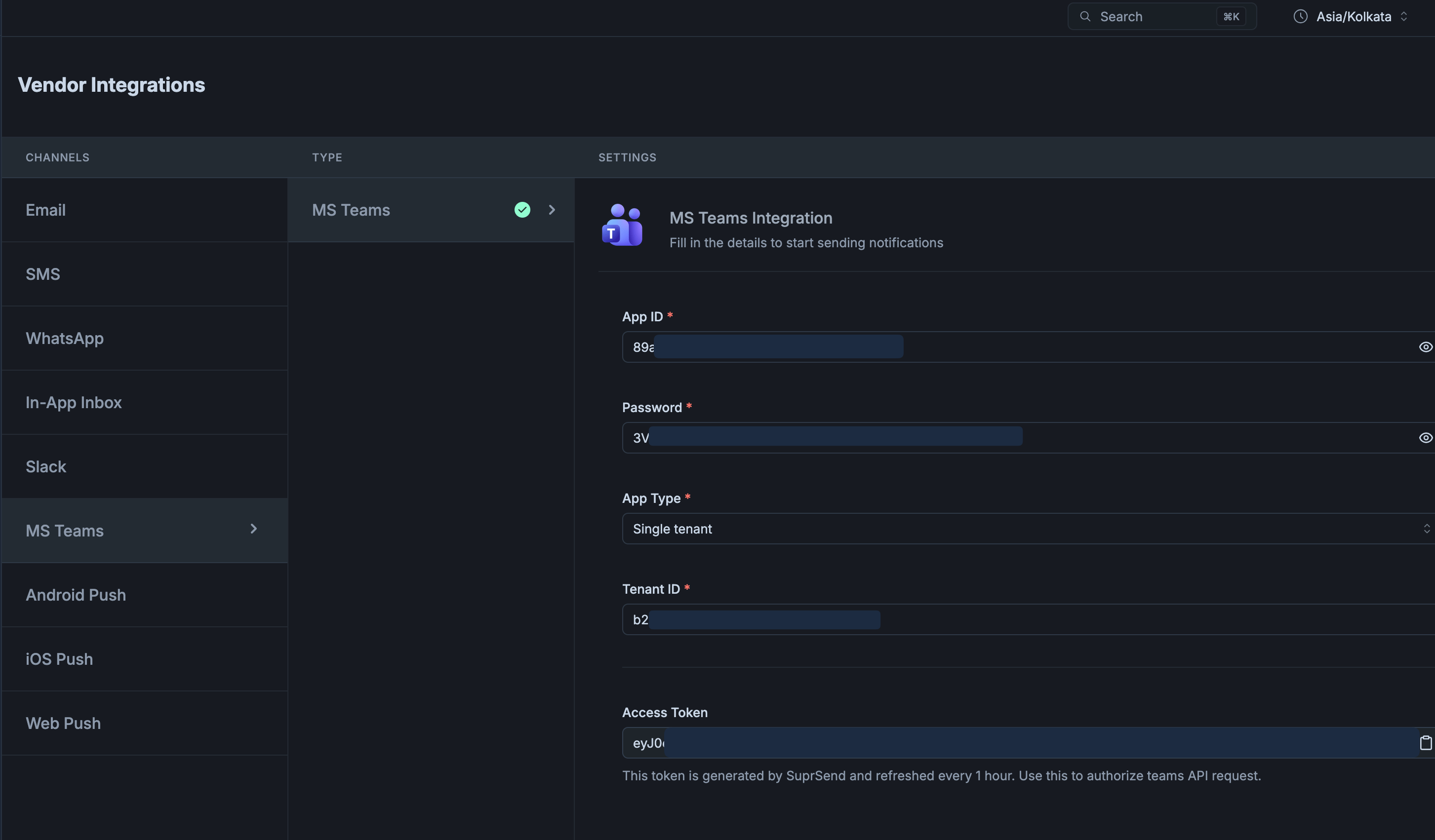 | Field | Value |
| --------------------------- | ---------------------------------------------------------- |
| **Application (client) ID** | Their bot |
| **Password** | Their client secret |
| **App Type** | Matches **their** Azure Bot (`Single tenant` for new bots) |
| **Tenant ID** | **Their** home directory |
There isn't a public API for this vendor form today. Set it in the dashboard. Tenant-vendor API access is beta — email [support@suprsend.com](mailto:support@suprsend.com) if you need it.
Save and check **Access Token**. Empty + `AADSTS700016` means the Tenant ID isn't the directory the bot is registered in. A filled token plus `401` on send usually means App Type is wrong.
The workspace (default tenant) vendor can stay as *your* bot for customers who install your app. Only accounts that bring their own bot get a tenant vendor. At send time, passing `tenant_id: "acme"` selects Acme's vendor.
## 3. Store destinations the same way
Channels on the service object, DMs on the user. Because every send for this tenant goes through *their* vendor, whose home Tenant ID is their directory, `tenant_id` on `$ms_teams` is optional here — if you leave it out, SuprSend picks it up from that vendor. Including it is harmless and keeps the entries identical to the your-bot path. For a first test, copy `conversation_id` from **⋯ → Copy link** on `#incidents` (decode `%3A` and `%40`) and Maya's Entra object ID for a DM.
```python Python theme={"system"}
from suprsend import Suprsend
supr_client = Suprsend("WORKSPACE_KEY", "WORKSPACE_SECRET")
entra_id = "c1981ab2-9aaf-4f36-8c1e-7d2a54e0b3f9"
supr_client.objects.upsert("services", "api-prod", {
"name": "API production",
"$ms_teams": [{
"tenant_id": entra_id,
"conversation_id": "19:abc123def@thread.tacv2"
}]
})
```
```javascript Node.js theme={"system"}
const { Suprsend } = require("@suprsend/node-sdk");
const supr_client = new Suprsend("WORKSPACE_KEY", "WORKSPACE_SECRET");
const service = supr_client.objects.get_instance("services", "api-prod");
service.add_ms_teams({
tenant_id: "c1981ab2-9aaf-4f36-8c1e-7d2a54e0b3f9",
conversation_id: "19:abc123def@thread.tacv2"
});
supr_client.objects.edit(service).then((res) => console.log(res));
```
Maya's DM, scoped to Acme:
```bash theme={"system"}
curl -X POST "https://hub.suprsend.com/v1/user/maya/tenant/acme/" \
--header "Authorization: Bearer __API_KEY__" \
--header "Content-Type: application/json" \
--data '{
"$ms_teams": [{
"tenant_id": "c1981ab2-9aaf-4f36-8c1e-7d2a54e0b3f9",
"user_id": "3fa85f64-5717-4562-b3fc-2c963f66afa6"
}]
}'
```
Copy-link screenshots and roster notes: [Send as your bot](/docs/microsoft-teams-customer-workspaces#4-store-destinations).
Don't put `incoming_webhook` on these recipients. Webhooks ignore tenant vendors and fire for every URL on the profile.
## 4. Trigger with that tenant
```json theme={"system"}
{
"workflow": "new-incident",
"tenant_id": "acme",
"recipients": [
{ "object_type": "services", "id": "api-prod" },
"maya"
],
"data": { "severity": "high" }
}
```
SuprSend authenticates as Acme's bot (tenant vendor), posts to the channel on `api-prod`, and DMs Maya using her per-tenant `$ms_teams`.
The message in `#incidents` comes from **their** app name, not yours. **Logs → Messages** shows the tenant as `acme`.
## If something fails
The trigger didn't pass `tenant_id`, or that tenant has no Teams vendor. Without a tenant vendor, SuprSend uses the default workspace vendor.
App Type on *their* tenant vendor doesn't match *their* Azure bot. New bots are single-tenant.
Tenant ID on the vendor form isn't the directory where they registered the bot.
## Next
How per-tenant credentials override the default vendor.
Store Maya's Teams identity on Acme only.
| Field | Value |
| --------------------------- | ---------------------------------------------------------- |
| **Application (client) ID** | Their bot |
| **Password** | Their client secret |
| **App Type** | Matches **their** Azure Bot (`Single tenant` for new bots) |
| **Tenant ID** | **Their** home directory |
There isn't a public API for this vendor form today. Set it in the dashboard. Tenant-vendor API access is beta — email [support@suprsend.com](mailto:support@suprsend.com) if you need it.
Save and check **Access Token**. Empty + `AADSTS700016` means the Tenant ID isn't the directory the bot is registered in. A filled token plus `401` on send usually means App Type is wrong.
The workspace (default tenant) vendor can stay as *your* bot for customers who install your app. Only accounts that bring their own bot get a tenant vendor. At send time, passing `tenant_id: "acme"` selects Acme's vendor.
## 3. Store destinations the same way
Channels on the service object, DMs on the user. Because every send for this tenant goes through *their* vendor, whose home Tenant ID is their directory, `tenant_id` on `$ms_teams` is optional here — if you leave it out, SuprSend picks it up from that vendor. Including it is harmless and keeps the entries identical to the your-bot path. For a first test, copy `conversation_id` from **⋯ → Copy link** on `#incidents` (decode `%3A` and `%40`) and Maya's Entra object ID for a DM.
```python Python theme={"system"}
from suprsend import Suprsend
supr_client = Suprsend("WORKSPACE_KEY", "WORKSPACE_SECRET")
entra_id = "c1981ab2-9aaf-4f36-8c1e-7d2a54e0b3f9"
supr_client.objects.upsert("services", "api-prod", {
"name": "API production",
"$ms_teams": [{
"tenant_id": entra_id,
"conversation_id": "19:abc123def@thread.tacv2"
}]
})
```
```javascript Node.js theme={"system"}
const { Suprsend } = require("@suprsend/node-sdk");
const supr_client = new Suprsend("WORKSPACE_KEY", "WORKSPACE_SECRET");
const service = supr_client.objects.get_instance("services", "api-prod");
service.add_ms_teams({
tenant_id: "c1981ab2-9aaf-4f36-8c1e-7d2a54e0b3f9",
conversation_id: "19:abc123def@thread.tacv2"
});
supr_client.objects.edit(service).then((res) => console.log(res));
```
Maya's DM, scoped to Acme:
```bash theme={"system"}
curl -X POST "https://hub.suprsend.com/v1/user/maya/tenant/acme/" \
--header "Authorization: Bearer __API_KEY__" \
--header "Content-Type: application/json" \
--data '{
"$ms_teams": [{
"tenant_id": "c1981ab2-9aaf-4f36-8c1e-7d2a54e0b3f9",
"user_id": "3fa85f64-5717-4562-b3fc-2c963f66afa6"
}]
}'
```
Copy-link screenshots and roster notes: [Send as your bot](/docs/microsoft-teams-customer-workspaces#4-store-destinations).
Don't put `incoming_webhook` on these recipients. Webhooks ignore tenant vendors and fire for every URL on the profile.
## 4. Trigger with that tenant
```json theme={"system"}
{
"workflow": "new-incident",
"tenant_id": "acme",
"recipients": [
{ "object_type": "services", "id": "api-prod" },
"maya"
],
"data": { "severity": "high" }
}
```
SuprSend authenticates as Acme's bot (tenant vendor), posts to the channel on `api-prod`, and DMs Maya using her per-tenant `$ms_teams`.
The message in `#incidents` comes from **their** app name, not yours. **Logs → Messages** shows the tenant as `acme`.
## If something fails
The trigger didn't pass `tenant_id`, or that tenant has no Teams vendor. Without a tenant vendor, SuprSend uses the default workspace vendor.
App Type on *their* tenant vendor doesn't match *their* Azure bot. New bots are single-tenant.
Tenant ID on the vendor form isn't the directory where they registered the bot.
## Next
How per-tenant credentials override the default vendor.
Store Maya's Teams identity on Acme only.