> ## Documentation Index
> Fetch the complete documentation index at: https://docs.suprsend.com/llms.txt
> Use this file to discover all available pages before exploring further.
# Send Teams DMs and channel posts as your bot
> Let customers install your Teams app so you can DM people and post in their channels — channels on objects, DMs on users, and the customer's Entra tenant id on each $ms_teams entry.
This page covers sending as **your** Microsoft Teams bot into a customer's tenant: direct messages to people, and posts in channels. It assumes you have already [created the Teams app and added the vendor](/docs/microsoft-teams-create-app).
Let's say you are building an incident product like PagerDuty. When an alert fires on Acme's `api-prod` service, two things should happen in *their* Teams:
* Maya, who is on call, gets a **DM** from your bot.
* `#incidents` gets the same alert, so the rest of the team can see it.
People should also be able to @mention the bot in a channel (or open a DM with it) the way they would with a support or on-call bot. That inbound experience is your bot runtime; SuprSend sends the outbound notifications.
SuprSend does not ship a Connect UI. You build admin consent, install, and the channel/user picker in your product, then write the IDs you collected.
If the customer will only grant a single channel and never DMs, a [webhook](/docs/microsoft-teams-incoming-webhook) is enough. If they insist the bot live in *their* Azure directory, see [Send with their bot](/docs/microsoft-teams-customer-bot).
## Key concepts
The channel or person to notify is stored as an `$ms_teams` channel on a [user](/docs/users) or an [object](/docs/objects). A [tenant](/docs/tenants) identifies which customer account a send belongs to.
### Tenants identify the customer account
[Tenants](/docs/tenants) in SuprSend map to accounts, organizations, or workspaces in your product. Create one tenant per customer (`acme`) and pass its `tenant_id` on every workflow trigger for that customer so branding, preferences, and vendor routing apply.
The SuprSend tenant does not hold the customer's Microsoft Entra tenant ID. SuprSend reads that from each `$ms_teams` entry, so keep the Entra ID in your own database against the customer account and write it into every entry you store for them.
### Each `$ms_teams` entry names the customer's Entra directory
Your bot is installed into many customer directories, and one SuprSend workspace serves all of them. That's the case where `tenant_id` on `$ms_teams` matters: it tells SuprSend which directory to deliver into. If you leave it out, SuprSend falls back to the home Tenant ID saved on the vendor — *your* bot's directory — and the send never reaches Acme. Include the customer's Entra tenant ID on every entry you write for them.
### Objects hold channels
A Teams channel is a connection on a resource in your product, not on a person. For the incident example, each monitored **service** is an object in a `services` type. `$ms_teams` on that object is `#incidents` (or whichever channel Acme picked for that service).
When you trigger a workflow with the service as recipient, SuprSend posts to the channel stored on the object.
### Users hold DMs
If Maya should get a DM, store her Teams `user_id` (prefer the Entra object ID) on her SuprSend user. If Maya also uses your product under Northwind, put Acme's Teams identity on her [per-tenant profile](/docs/user-tenant-mapping) so a Northwind incident doesn't DM her Acme chat.
### Merging at send time
Trigger with the object or user as recipient **and** `tenant_id: "acme"`. SuprSend uses:
* The destination (`conversation_id` or `user_id`) on the recipient
* The Entra `tenant_id` on that destination
* The workspace vendor (your bot), unless a [tenant vendor](/docs/tenant-vendor) overrides it
```json theme={"system"}
{
"workflow": "new-incident",
"tenant_id": "acme",
"recipients": [
{ "object_type": "services", "id": "api-prod" },
"maya"
],
"data": { "severity": "high", "summary": "API p99 > 2s" }
}
```
## 1. Finish the app for other tenants
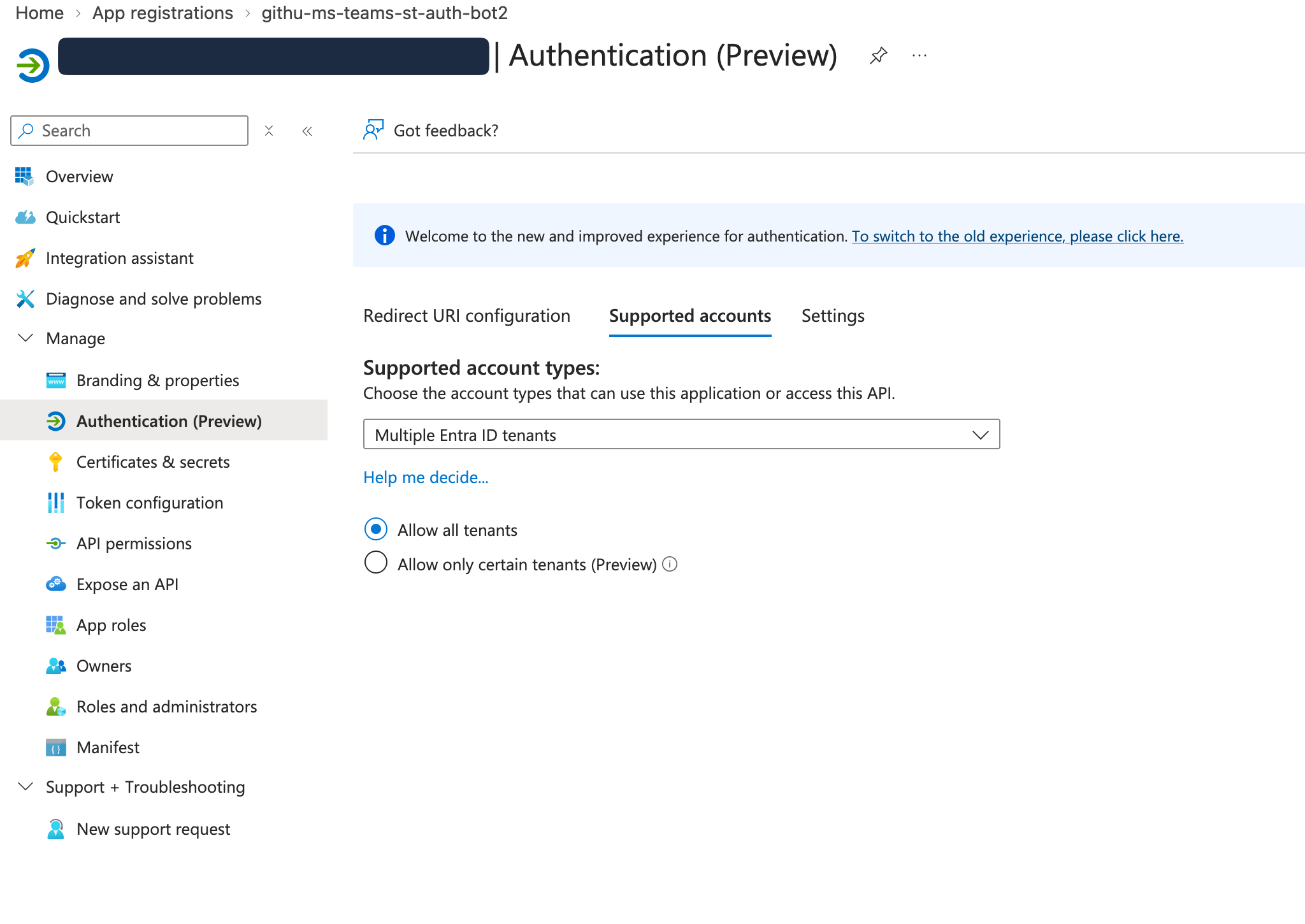
On [Create a Teams app](/docs/microsoft-teams-create-app), keep Azure Bot **App Type** as **Single tenant**. In Azure **App registrations → your app → Authentication**, set **Supported account types** to **Multiple Entra ID tenants** so Acme's admin can consent. That is not the vendor App Type.
 Add **personal** and **team** bot scopes in the manifest if you'll both DM and post in channels.
```json theme={"system"}
{
"bots": [
{
"botId": "{{YOUR_BOT_ID}}",
"scopes": ["personal", "team", "groupChat"]
}
]
}
```
## 2. How Acme's admin installs the app
Put this in Settings → Integrations → Microsoft Teams. An Entra / Teams admin has to click.
| How they get the app | When it fits |
| ------------------------------------------ | ------------------------------------------------------------------ |
| Upload the `.zip` (sideload) | Pilots, a few enterprise deals, testing while Store review is open |
| Their org catalog, via Graph after consent | Connect should finish without an IT ticket to upload a zip |
| Teams Store | Self-serve, many tenants |
Microsoft owns Store review. Sideload while that's in flight: download the zip from the [Developer Portal](https://dev.teams.microsoft.com/), then in Acme's tenant **Teams admin center → Teams apps → Manage apps → Upload new app**. An administrator in that organization has to approve it. Until your app registration has a verified publisher (MPN ID), their end users cannot consent themselves.
Installing the app in a catalog does not put it in front of anyone.
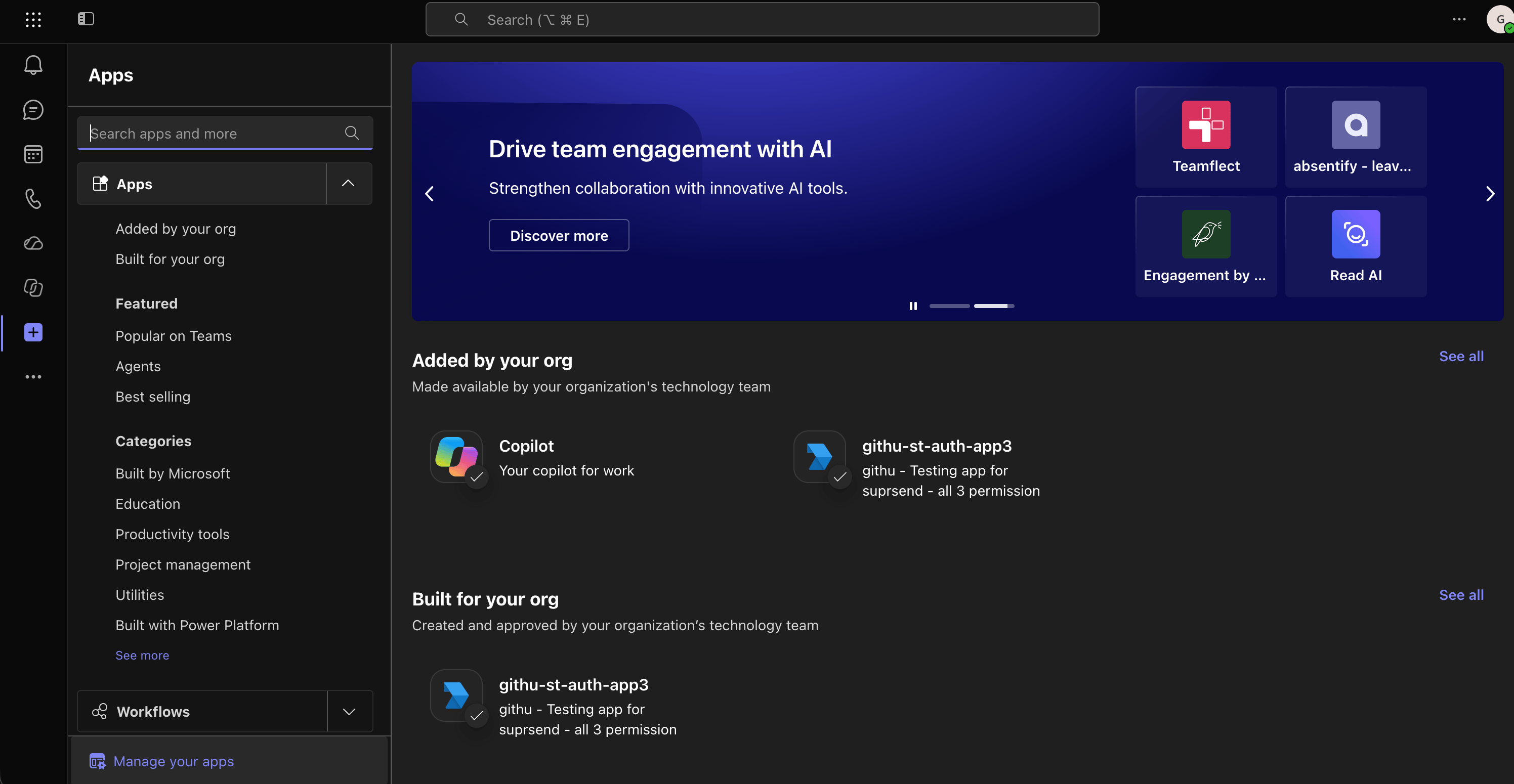
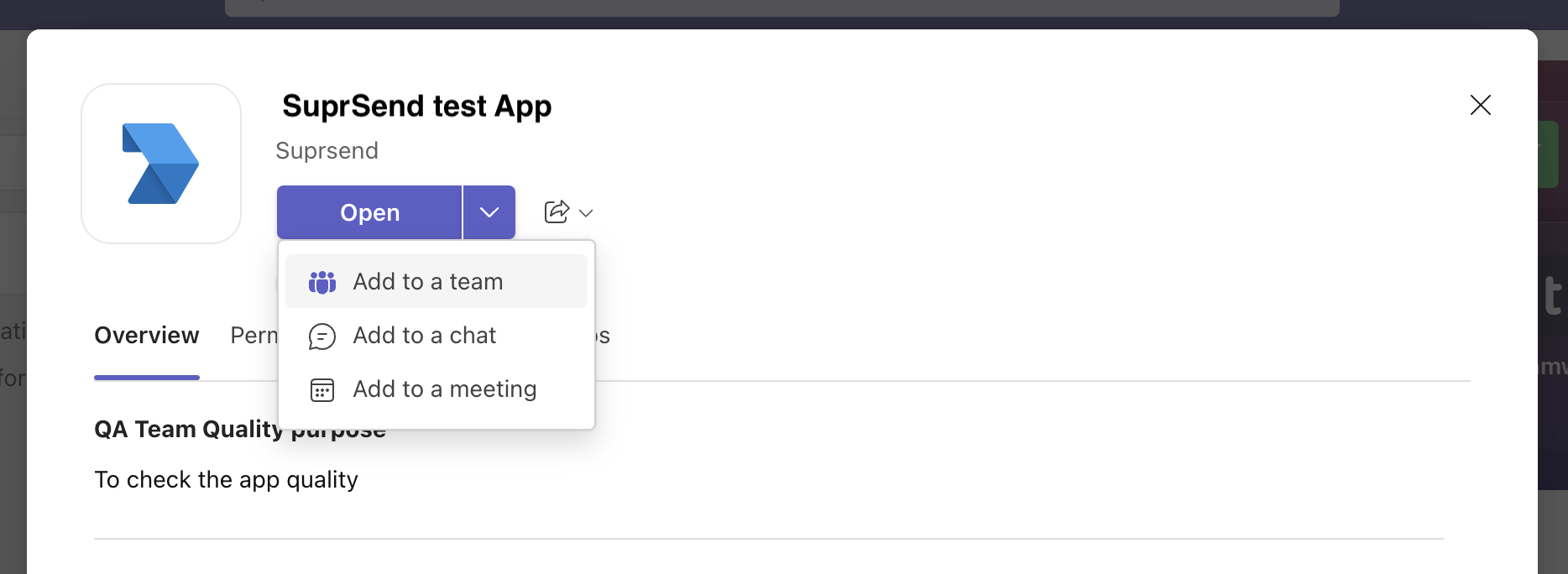
**For channels** — in [Teams](https://teams.cloud.microsoft/), open **Apps** from the left rail and find your app under **Added by your org** or **Built for your org**. Open it, choose **Add to a team**, then pick the team that owns `#incidents`. Then **@mention the bot once in the channel**. Adding the app is not enough on its own; the mention puts the bot in the channel roster. It applies team-wide afterwards.
Add **personal** and **team** bot scopes in the manifest if you'll both DM and post in channels.
```json theme={"system"}
{
"bots": [
{
"botId": "{{YOUR_BOT_ID}}",
"scopes": ["personal", "team", "groupChat"]
}
]
}
```
## 2. How Acme's admin installs the app
Put this in Settings → Integrations → Microsoft Teams. An Entra / Teams admin has to click.
| How they get the app | When it fits |
| ------------------------------------------ | ------------------------------------------------------------------ |
| Upload the `.zip` (sideload) | Pilots, a few enterprise deals, testing while Store review is open |
| Their org catalog, via Graph after consent | Connect should finish without an IT ticket to upload a zip |
| Teams Store | Self-serve, many tenants |
Microsoft owns Store review. Sideload while that's in flight: download the zip from the [Developer Portal](https://dev.teams.microsoft.com/), then in Acme's tenant **Teams admin center → Teams apps → Manage apps → Upload new app**. An administrator in that organization has to approve it. Until your app registration has a verified publisher (MPN ID), their end users cannot consent themselves.
Installing the app in a catalog does not put it in front of anyone.
**For channels** — in [Teams](https://teams.cloud.microsoft/), open **Apps** from the left rail and find your app under **Added by your org** or **Built for your org**. Open it, choose **Add to a team**, then pick the team that owns `#incidents`. Then **@mention the bot once in the channel**. Adding the app is not enough on its own; the mention puts the bot in the channel roster. It applies team-wide afterwards.
 **For DMs** — the app must be installed for each user in *personal* scope. Admins can push this to everyone through Teams admin center → **Teams apps → Setup policies → Installed apps**.
### Automate install
Admin consent:
```text theme={"system"}
https://login.microsoftonline.com/{acme-entra-tenant-id}/adminconsent?client_id={YOUR_APP_ID}
```
Then, with a token that can write the catalog **in Acme's tenant**:
```bash theme={"system"}
curl -X POST "https://graph.microsoft.com/v1.0/appCatalogs/teamsApps" \
-H "Authorization: Bearer $GRAPH_TOKEN" \
-H "Content-Type: application/zip" \
--data-binary @acme-alerts.zip
curl -X POST "https://graph.microsoft.com/v1.0/teams/$TEAM_ID/installedApps" \
-H "Authorization: Bearer $GRAPH_TOKEN" \
-H "Content-Type: application/json" \
-d "{
\"grace.l@example.com\": \"https://graph.microsoft.com/v1.0/appCatalogs/teamsApps('$TEAMS_APP_ID')\"
}"
```
`$TEAMS_APP_ID` is the catalog id from the upload, which can differ from your Entra client id.
## 3. Confirm the vendor is your bot
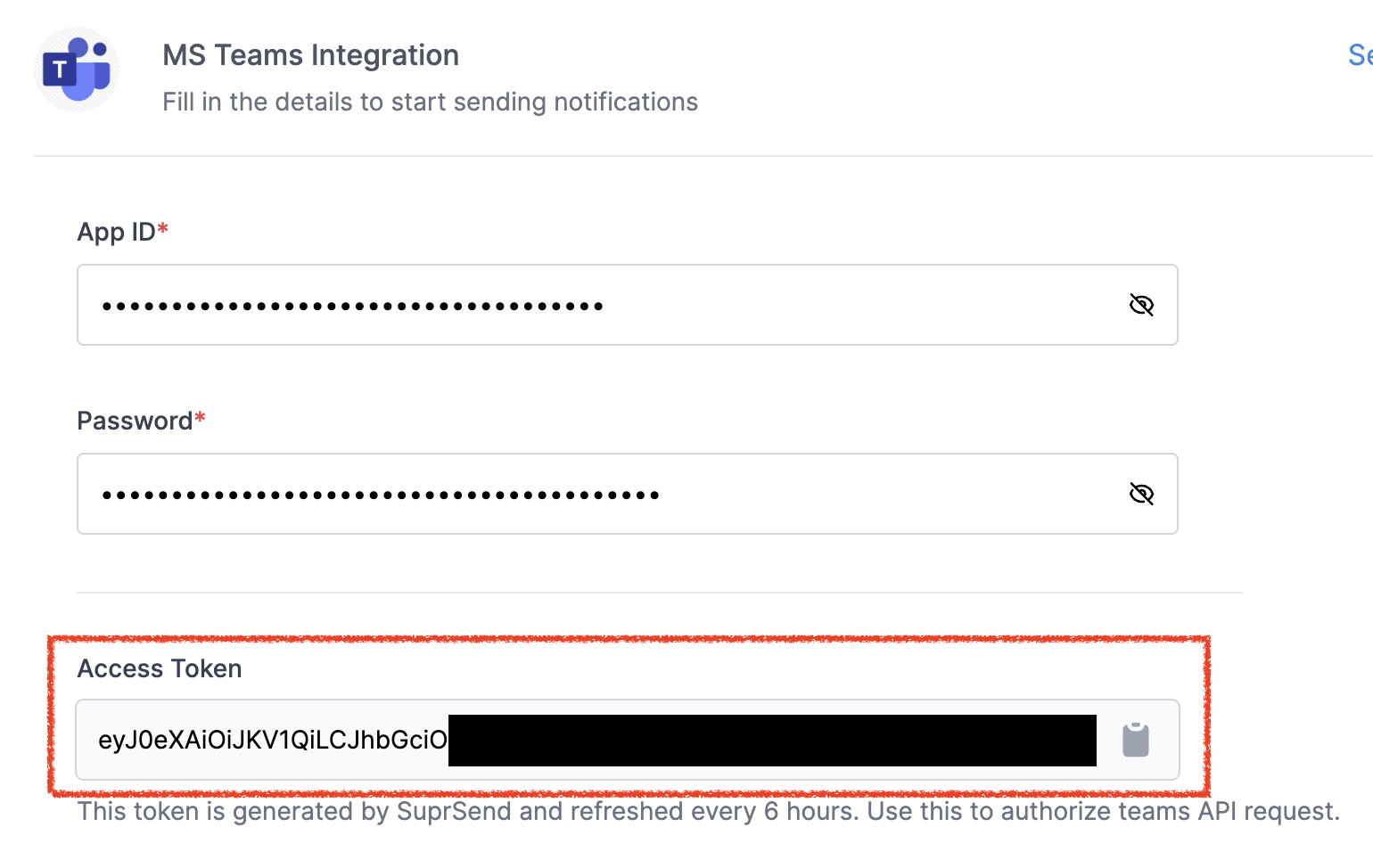
**Vendors → Microsoft Teams** should already have *your* Application (client) ID, secret, App Type, and **your** home Tenant ID. That's the bot Acme is installing. Acme's Entra id does not go on this form.
Empty Access Token + `AADSTS700016` → wrong home Tenant ID. Token present but send `401` → App Type doesn't match the Azure Bot, or a destination is missing the **recipient's** `tenant_id` and fell back to the vendor's directory.
One MS Teams vendor serves every organization — same App ID, same password, same vendor **Tenant ID** (your bot's own directory). What changes per customer is the `$ms_teams.tenant_id` on the user or object.
Details: [Add the vendor in SuprSend](/docs/microsoft-teams-create-app#add-the-vendor-in-suprsend).
## 4. Store destinations
### For a first test, copy IDs by hand
You don't need a picker to prove the bot can post in Acme's tenant.
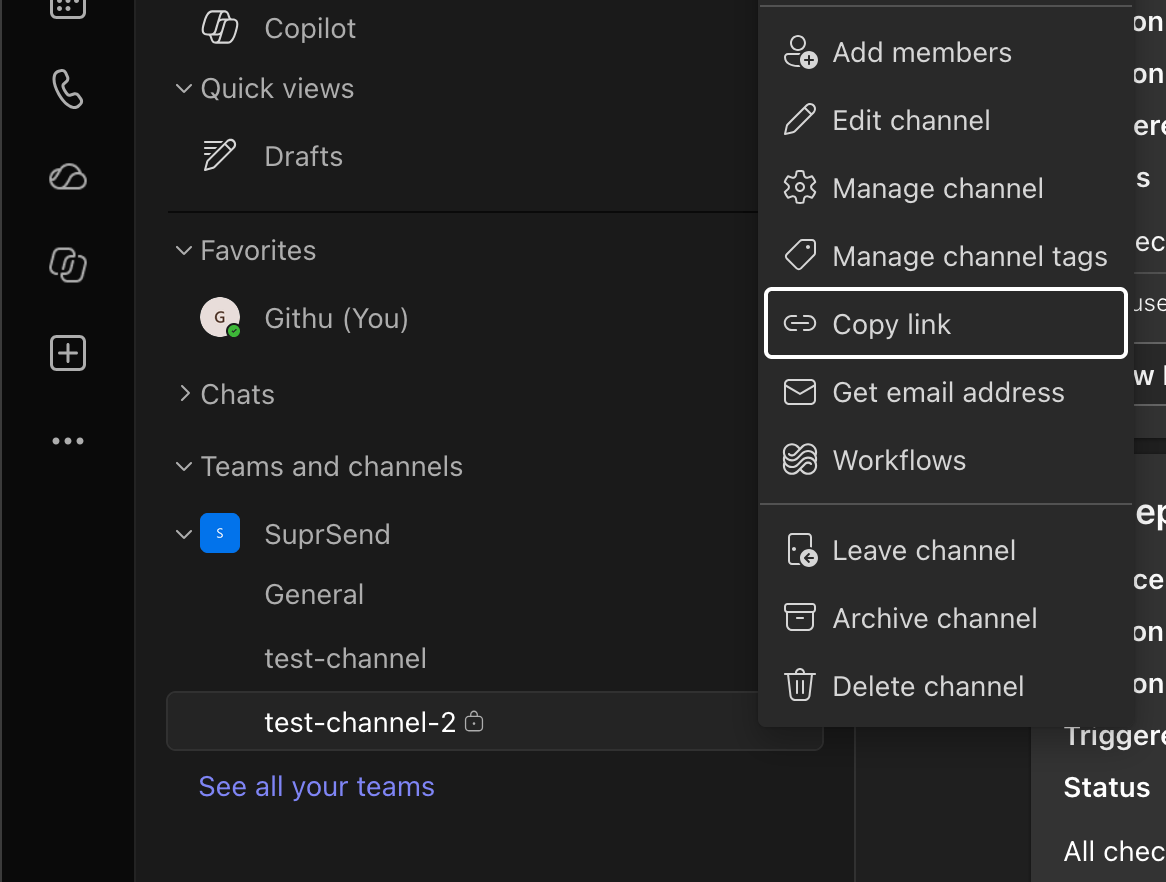
1. In Acme's Teams, hover `#incidents` → **⋯** → **Copy link**.
2. Decode `%3A` → `:` and `%40` → `@`. That's `conversation_id`.
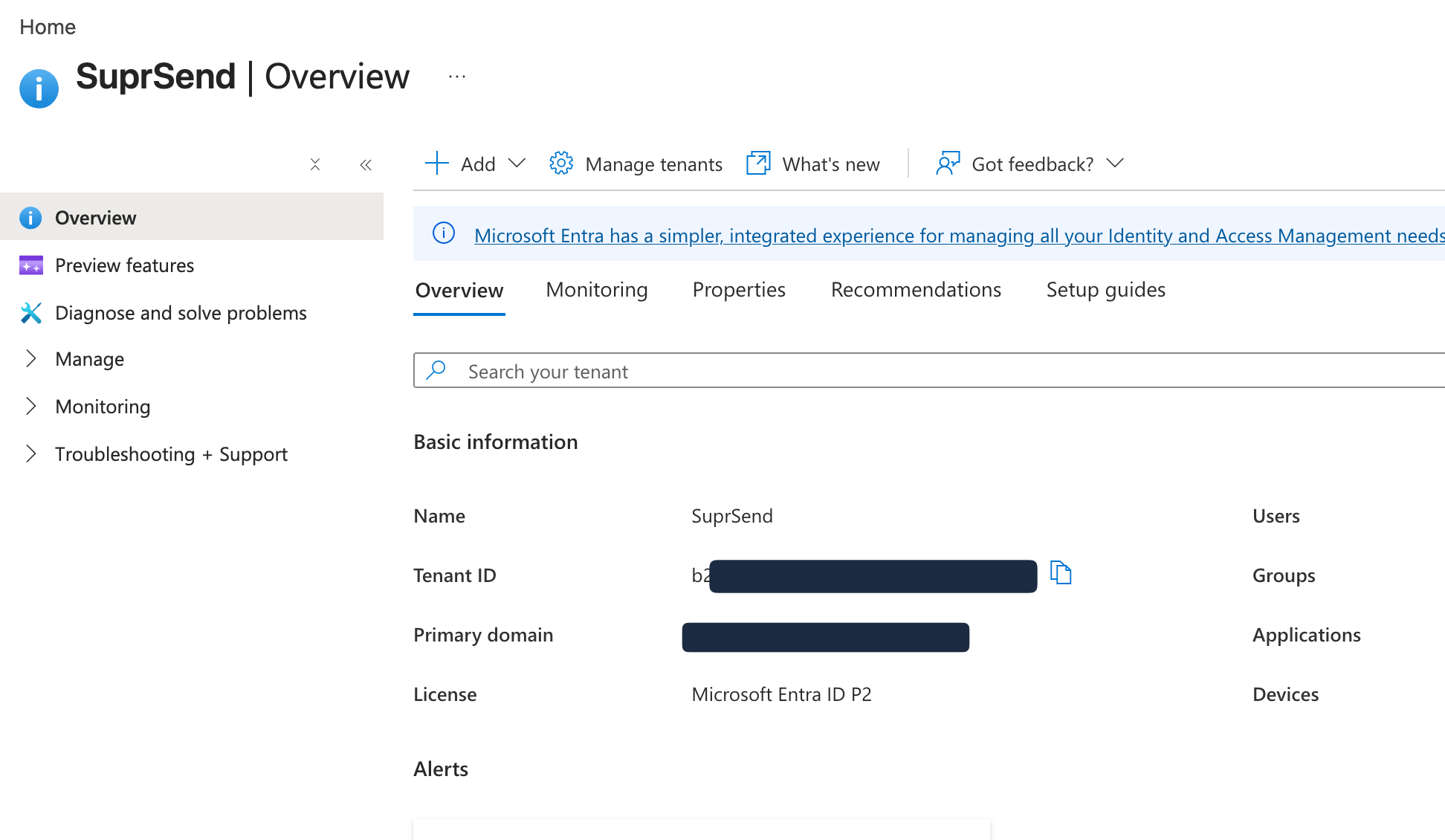
3. The link's `tenantId=` query param is Acme's Entra id — the value you write as `tenant_id` on each `$ms_teams` entry. You can also copy it from the [Azure portal](https://portal.azure.com/) under **Microsoft Entra ID → Overview** in *their* directory.
**For DMs** — the app must be installed for each user in *personal* scope. Admins can push this to everyone through Teams admin center → **Teams apps → Setup policies → Installed apps**.
### Automate install
Admin consent:
```text theme={"system"}
https://login.microsoftonline.com/{acme-entra-tenant-id}/adminconsent?client_id={YOUR_APP_ID}
```
Then, with a token that can write the catalog **in Acme's tenant**:
```bash theme={"system"}
curl -X POST "https://graph.microsoft.com/v1.0/appCatalogs/teamsApps" \
-H "Authorization: Bearer $GRAPH_TOKEN" \
-H "Content-Type: application/zip" \
--data-binary @acme-alerts.zip
curl -X POST "https://graph.microsoft.com/v1.0/teams/$TEAM_ID/installedApps" \
-H "Authorization: Bearer $GRAPH_TOKEN" \
-H "Content-Type: application/json" \
-d "{
\"grace.l@example.com\": \"https://graph.microsoft.com/v1.0/appCatalogs/teamsApps('$TEAMS_APP_ID')\"
}"
```
`$TEAMS_APP_ID` is the catalog id from the upload, which can differ from your Entra client id.
## 3. Confirm the vendor is your bot
**Vendors → Microsoft Teams** should already have *your* Application (client) ID, secret, App Type, and **your** home Tenant ID. That's the bot Acme is installing. Acme's Entra id does not go on this form.
Empty Access Token + `AADSTS700016` → wrong home Tenant ID. Token present but send `401` → App Type doesn't match the Azure Bot, or a destination is missing the **recipient's** `tenant_id` and fell back to the vendor's directory.
One MS Teams vendor serves every organization — same App ID, same password, same vendor **Tenant ID** (your bot's own directory). What changes per customer is the `$ms_teams.tenant_id` on the user or object.
Details: [Add the vendor in SuprSend](/docs/microsoft-teams-create-app#add-the-vendor-in-suprsend).
## 4. Store destinations
### For a first test, copy IDs by hand
You don't need a picker to prove the bot can post in Acme's tenant.
1. In Acme's Teams, hover `#incidents` → **⋯** → **Copy link**.
2. Decode `%3A` → `:` and `%40` → `@`. That's `conversation_id`.
3. The link's `tenantId=` query param is Acme's Entra id — the value you write as `tenant_id` on each `$ms_teams` entry. You can also copy it from the [Azure portal](https://portal.azure.com/) under **Microsoft Entra ID → Overview** in *their* directory.
 For a DM, copy the personal-chat URL, or look up Maya's Entra object ID. Prefer that object ID as `user_id`. Roster `29:` ids are tied to this bot registration; recreate the bot and they die. Object IDs come back `null` on the roster unless the manifest includes RSC such as `TeamMember.Read.Group`.

 ### Channel on the service object
```python Python theme={"system"}
from suprsend import Suprsend
supr_client = Suprsend("WORKSPACE_KEY", "WORKSPACE_SECRET")
entra_id = "c1981ab2-9aaf-4f36-8c1e-7d2a54e0b3f9"
supr_client.objects.upsert("services", "api-prod", {
"name": "API production",
"$ms_teams": [{
"tenant_id": entra_id,
"conversation_id": "19:abc123def@thread.tacv2"
}]
})
```
```javascript Node.js theme={"system"}
const { Suprsend } = require("@suprsend/node-sdk");
const supr_client = new Suprsend("WORKSPACE_KEY", "WORKSPACE_SECRET");
const service = supr_client.objects.get_instance("services", "api-prod");
service.add_ms_teams({
tenant_id: "c1981ab2-9aaf-4f36-8c1e-7d2a54e0b3f9",
conversation_id: "19:abc123def@thread.tacv2"
});
supr_client.objects.edit(service).then((res) => console.log(res));
```
`service_url` is optional. Omit it to use `https://smba.trafficmanager.net/teams`, unless you're on GCC High or DoD.
### DM on the user (per-tenant profile)
```bash theme={"system"}
curl -X POST "https://hub.suprsend.com/v1/user/maya/tenant/acme/" \
--header "Authorization: Bearer __API_KEY__" \
--header "Content-Type: application/json" \
--data '{
"$ms_teams": [{
"tenant_id": "c1981ab2-9aaf-4f36-8c1e-7d2a54e0b3f9",
"user_id": "3fa85f64-5717-4562-b3fc-2c963f66afa6"
}]
}'
```
That route writes Maya's Teams identity on the **Acme** profile only, so a Northwind incident doesn't use this DM. See [User-tenant mapping](/docs/user-tenant-mapping). If you call `user.add_ms_teams` without a tenant, it writes the global profile instead.
### What to build instead of copy-link
After install, your settings screen should list channels the app can post to, and/or **DM this user**. Save the channel on the service (object). Save the DM on the user (per-tenant).
```bash theme={"system"}
curl -X GET "https://graph.microsoft.com/v1.0/teams/$TEAM_ID/channels" \
-H "Authorization: Bearer $GRAPH_TOKEN"
```
Graph's channel `id` is the `conversation_id` you store (already decoded).
## 5. Send a test
Create the [Teams template](/docs/ms-teams-template). Trigger `new-incident` with `tenant_id: "acme"`, the `api-prod` object, and Maya.
Then trigger the same workflow for a second customer.
Acme's `#incidents` and Maya's DM show the post. Northwind's send uses Northwind's tenant and destinations, not Acme's.
## If something fails
Vendor App Type doesn't match the Azure bot. A new single-tenant bot saved as `Multi tenant` gets a token and a `401` on send.
The app isn't installed there, or `$ms_teams.tenant_id` is missing or still your directory. Write Acme's Entra id as `tenant_id` on the `$ms_teams` entry.
App is in the tenant but not in that channel. Add it to the team and @mention the bot once.
The bot registration was recreated. Collect Entra object IDs and write those as `user_id`.
## Next
Markdown or Adaptive Card content.
Same objects and users; credentials live on a tenant vendor.
### Channel on the service object
```python Python theme={"system"}
from suprsend import Suprsend
supr_client = Suprsend("WORKSPACE_KEY", "WORKSPACE_SECRET")
entra_id = "c1981ab2-9aaf-4f36-8c1e-7d2a54e0b3f9"
supr_client.objects.upsert("services", "api-prod", {
"name": "API production",
"$ms_teams": [{
"tenant_id": entra_id,
"conversation_id": "19:abc123def@thread.tacv2"
}]
})
```
```javascript Node.js theme={"system"}
const { Suprsend } = require("@suprsend/node-sdk");
const supr_client = new Suprsend("WORKSPACE_KEY", "WORKSPACE_SECRET");
const service = supr_client.objects.get_instance("services", "api-prod");
service.add_ms_teams({
tenant_id: "c1981ab2-9aaf-4f36-8c1e-7d2a54e0b3f9",
conversation_id: "19:abc123def@thread.tacv2"
});
supr_client.objects.edit(service).then((res) => console.log(res));
```
`service_url` is optional. Omit it to use `https://smba.trafficmanager.net/teams`, unless you're on GCC High or DoD.
### DM on the user (per-tenant profile)
```bash theme={"system"}
curl -X POST "https://hub.suprsend.com/v1/user/maya/tenant/acme/" \
--header "Authorization: Bearer __API_KEY__" \
--header "Content-Type: application/json" \
--data '{
"$ms_teams": [{
"tenant_id": "c1981ab2-9aaf-4f36-8c1e-7d2a54e0b3f9",
"user_id": "3fa85f64-5717-4562-b3fc-2c963f66afa6"
}]
}'
```
That route writes Maya's Teams identity on the **Acme** profile only, so a Northwind incident doesn't use this DM. See [User-tenant mapping](/docs/user-tenant-mapping). If you call `user.add_ms_teams` without a tenant, it writes the global profile instead.
### What to build instead of copy-link
After install, your settings screen should list channels the app can post to, and/or **DM this user**. Save the channel on the service (object). Save the DM on the user (per-tenant).
```bash theme={"system"}
curl -X GET "https://graph.microsoft.com/v1.0/teams/$TEAM_ID/channels" \
-H "Authorization: Bearer $GRAPH_TOKEN"
```
Graph's channel `id` is the `conversation_id` you store (already decoded).
## 5. Send a test
Create the [Teams template](/docs/ms-teams-template). Trigger `new-incident` with `tenant_id: "acme"`, the `api-prod` object, and Maya.
Then trigger the same workflow for a second customer.
Acme's `#incidents` and Maya's DM show the post. Northwind's send uses Northwind's tenant and destinations, not Acme's.
## If something fails
Vendor App Type doesn't match the Azure bot. A new single-tenant bot saved as `Multi tenant` gets a token and a `401` on send.
The app isn't installed there, or `$ms_teams.tenant_id` is missing or still your directory. Write Acme's Entra id as `tenant_id` on the `$ms_teams` entry.
App is in the tenant but not in that channel. Add it to the team and @mention the bot once.
The bot registration was recreated. Collect Entra object IDs and write those as `user_id`.
## Next
Markdown or Adaptive Card content.
Same objects and users; credentials live on a tenant vendor.