> ## Documentation Index
> Fetch the complete documentation index at: https://docs.suprsend.com/llms.txt
> Use this file to discover all available pages before exploring further.
# Post to a Teams channel with a webhook
> Let a customer map a resource in your product to one Teams channel by pasting a Workflows webhook URL. You still save app credentials on the Microsoft Teams vendor; Workflows posts the message.
This page covers posting into a single Microsoft Teams channel using a Workflows incoming webhook.
You still [create the Teams app and save the vendor](/docs/microsoft-teams-create-app) — App ID, password, App Type, and Tenant ID. SuprSend does not send Teams without those credentials, including on this path.
What you skip is installing your app in the customer's tenant. The destination is a webhook URL. Microsoft's **Workflows** app (the flow bot, powered by Power Automate) is what posts in the channel — usually as Workflows, or on behalf of the person who created the flow, not as your product.
Let's say you are building a product like GitHub. Acme wants deploy events for the `acme/api` repository to land in their `#deploys` channel, and that's all they want — no DMs from your app. An admin who can edit `#deploys` creates a webhook and pastes the URL into your product.
In SuprSend, that channel is a connection on an [object](/docs/objects) that models the repository. The object is the recipient of the workflow.
If you also need to DM people, post in several channels as a bot they can @mention, or appear as an installed app, use [Send as your bot](/docs/microsoft-teams-customer-workspaces) instead.
## Teams channels are connections on objects
[Objects](/docs/objects) let you model any resource in your system — a repository, a project, a service. Each object lives in a type (think of it as a table) and has an id unique inside that type.
For this GitHub-style flow, each repository becomes an object in a `repositories` type. The webhook URL is stored as `$ms_teams` on that object, not on a human user. If Maya leaves Acme, `#deploys` should still receive `acme/api` events.
```python theme={"system"}
from suprsend import Suprsend
supr_client = Suprsend("WORKSPACE_KEY", "WORKSPACE_SECRET")
supr_client.objects.upsert("repositories", "acme/api", {
"name": "API",
"full_name": "acme/api",
})
```
You don't need a SuprSend [tenant](/docs/tenants) for a webhook. The URL is self-contained. Reach for a tenant when you later add a bot, branding, or [tenant vendors](/docs/tenant-vendor) for that customer.
## 1. Save the vendor
Follow [Create a Teams app and add the vendor](/docs/microsoft-teams-create-app) through **Add the vendor in SuprSend**. You need the same App ID, password, App Type, and Tenant ID as a bot send.
## 2. Create a Workflows webhook in Teams
Office 365 connectors are retired. Create the URL with **Workflows**.
In `#deploys`, open **⋯** → **Workflows**.
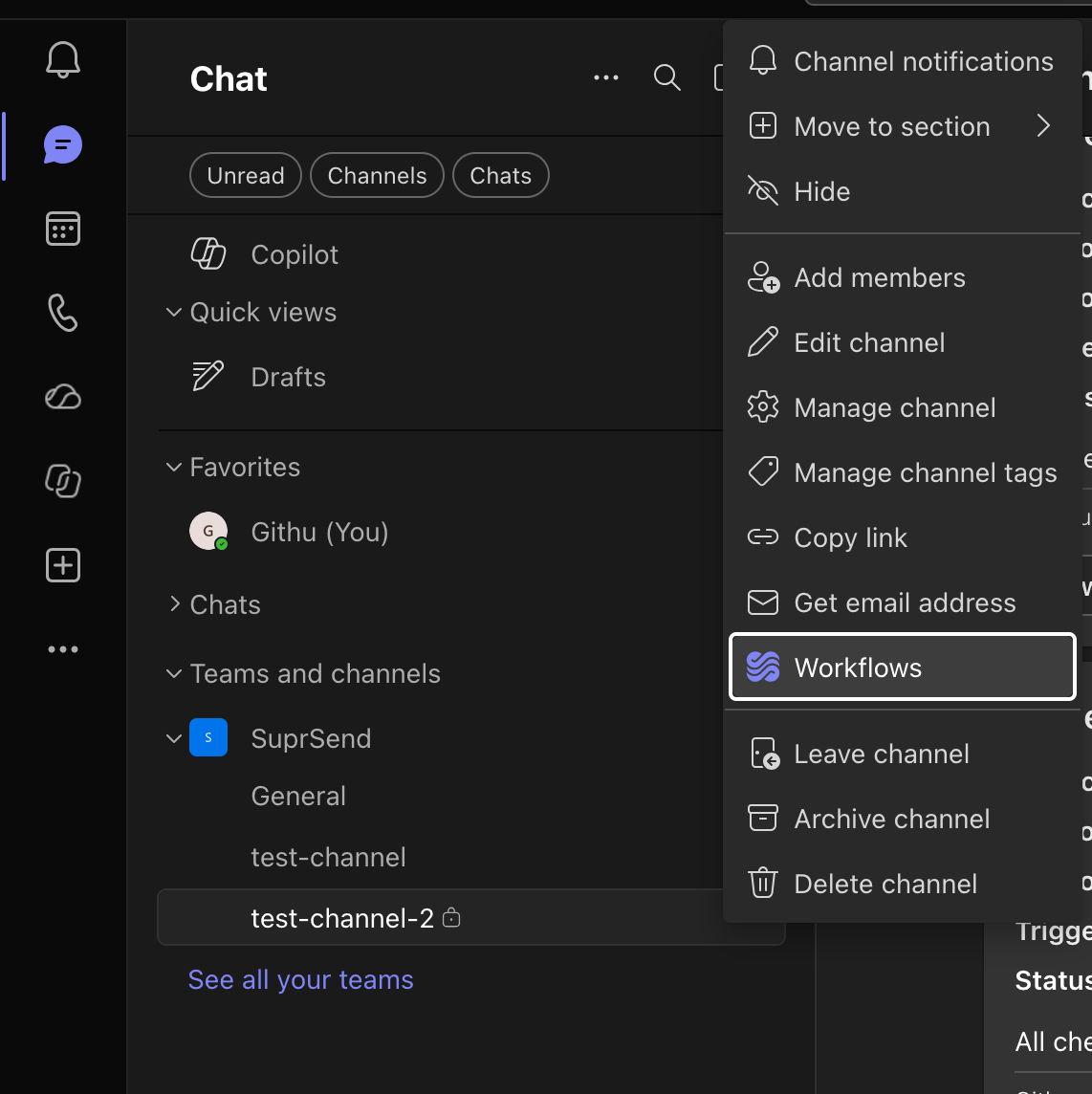 Search for **webhook** and pick **Send webhook alerts to a channel**. Choose the channel, save, then **Copy webhook link**.
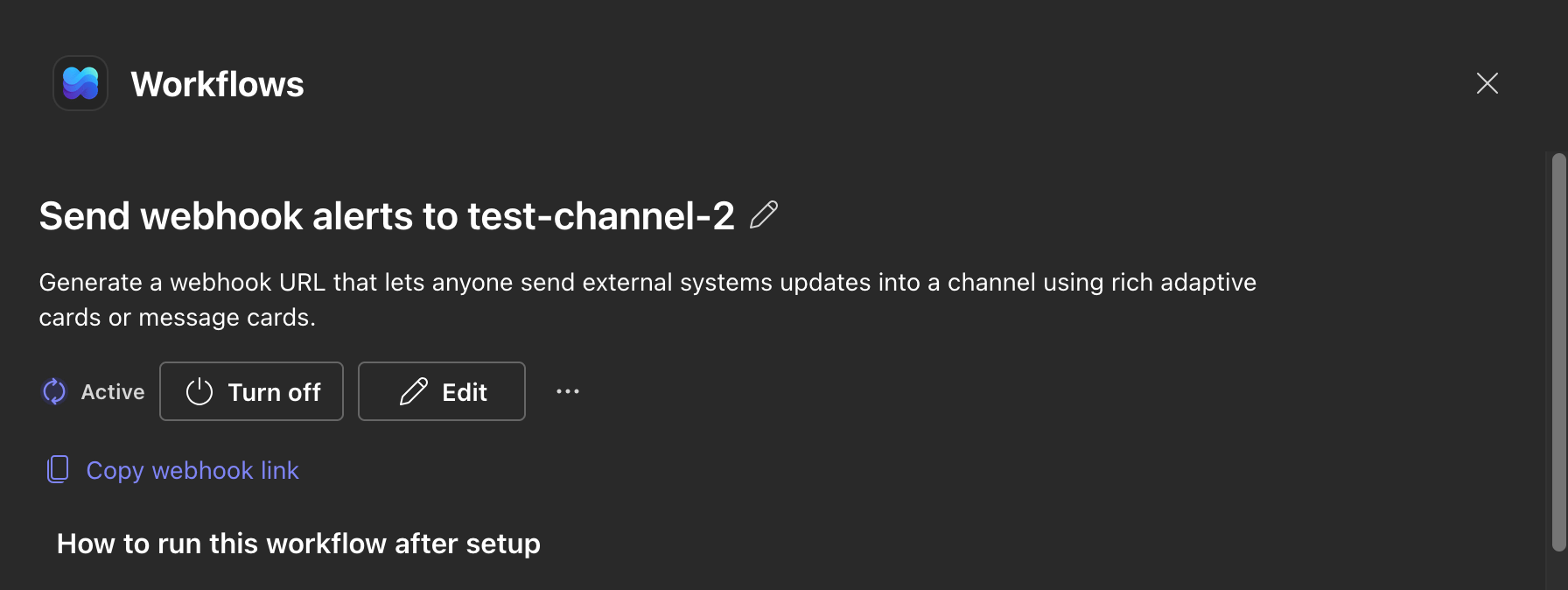 Copy it while it's on screen. The URL embeds a `sig=` and is usually shown once. These templates don't need a premium Power Automate licence.
In your product this is a settings field: "Paste your Teams webhook URL." You are not building OAuth.
## 3. Store the URL on the object
```python Python theme={"system"}
from suprsend import Suprsend
supr_client = Suprsend("WORKSPACE_KEY", "WORKSPACE_SECRET")
supr_client.objects.upsert("repositories", "acme/api", {
"name": "API",
"$ms_teams": [{
"incoming_webhook": {
"url": "https://defaultXXXX.XX.environment.api.powerplatform.com/powerautomate/automations/direct/workflows/XXXX/triggers/manual/paths/invoke?api-version=1&sig=XXXX"
}
}]
})
```
```javascript Node.js theme={"system"}
const { Suprsend } = require("@suprsend/node-sdk");
const supr_client = new Suprsend("WORKSPACE_KEY", "WORKSPACE_SECRET");
const repo = supr_client.objects.get_instance("repositories", "acme/api");
repo.add_ms_teams({
incoming_webhook: {
url: "https://defaultXXXX.XX.environment.api.powerplatform.com/powerautomate/automations/direct/workflows/XXXX/triggers/manual/paths/invoke?api-version=1&sig=XXXX"
}
});
supr_client.objects.edit(repo).then((res) => console.log(res));
```
If `add_ms_teams` includes a webhook URL *and* bot fields (`conversation_id`, `user_id`), only the webhook is kept. Precedence is `incoming_webhook.url` > `conversation_id` > `user_id`. Don't mix them on the same object.
Incoming webhooks are not bound to a [tenant vendor](/docs/tenant-vendor). If the same users belong to multiple tenants and you route other channels through each customer's own providers, don't put webhooks on those shared profiles — SuprSend posts to every webhook on the recipient, regardless of tenant vendor. Keep the URL on the repository object instead.
## 4. Trigger a workflow with the object as recipient
Add a Microsoft Teams step to a workflow such as `new-deploy`. The object is the recipient, so template variables like `{{recipient.name}}` resolve against the repository.
A Workflows webhook accepts **Adaptive Cards only**. Plain text and MessageCard are not rendered, so the MS Teams template must produce an Adaptive Card on this path.
Use **Adaptive Card version 1.4 or 1.5**. Version 1.6 renders through the bot but fails silently through a Workflows webhook — the request is accepted and nothing appears in the channel.
Copy it while it's on screen. The URL embeds a `sig=` and is usually shown once. These templates don't need a premium Power Automate licence.
In your product this is a settings field: "Paste your Teams webhook URL." You are not building OAuth.
## 3. Store the URL on the object
```python Python theme={"system"}
from suprsend import Suprsend
supr_client = Suprsend("WORKSPACE_KEY", "WORKSPACE_SECRET")
supr_client.objects.upsert("repositories", "acme/api", {
"name": "API",
"$ms_teams": [{
"incoming_webhook": {
"url": "https://defaultXXXX.XX.environment.api.powerplatform.com/powerautomate/automations/direct/workflows/XXXX/triggers/manual/paths/invoke?api-version=1&sig=XXXX"
}
}]
})
```
```javascript Node.js theme={"system"}
const { Suprsend } = require("@suprsend/node-sdk");
const supr_client = new Suprsend("WORKSPACE_KEY", "WORKSPACE_SECRET");
const repo = supr_client.objects.get_instance("repositories", "acme/api");
repo.add_ms_teams({
incoming_webhook: {
url: "https://defaultXXXX.XX.environment.api.powerplatform.com/powerautomate/automations/direct/workflows/XXXX/triggers/manual/paths/invoke?api-version=1&sig=XXXX"
}
});
supr_client.objects.edit(repo).then((res) => console.log(res));
```
If `add_ms_teams` includes a webhook URL *and* bot fields (`conversation_id`, `user_id`), only the webhook is kept. Precedence is `incoming_webhook.url` > `conversation_id` > `user_id`. Don't mix them on the same object.
Incoming webhooks are not bound to a [tenant vendor](/docs/tenant-vendor). If the same users belong to multiple tenants and you route other channels through each customer's own providers, don't put webhooks on those shared profiles — SuprSend posts to every webhook on the recipient, regardless of tenant vendor. Keep the URL on the repository object instead.
## 4. Trigger a workflow with the object as recipient
Add a Microsoft Teams step to a workflow such as `new-deploy`. The object is the recipient, so template variables like `{{recipient.name}}` resolve against the repository.
A Workflows webhook accepts **Adaptive Cards only**. Plain text and MessageCard are not rendered, so the MS Teams template must produce an Adaptive Card on this path.
Use **Adaptive Card version 1.4 or 1.5**. Version 1.6 renders through the bot but fails silently through a Workflows webhook — the request is accepted and nothing appears in the channel.
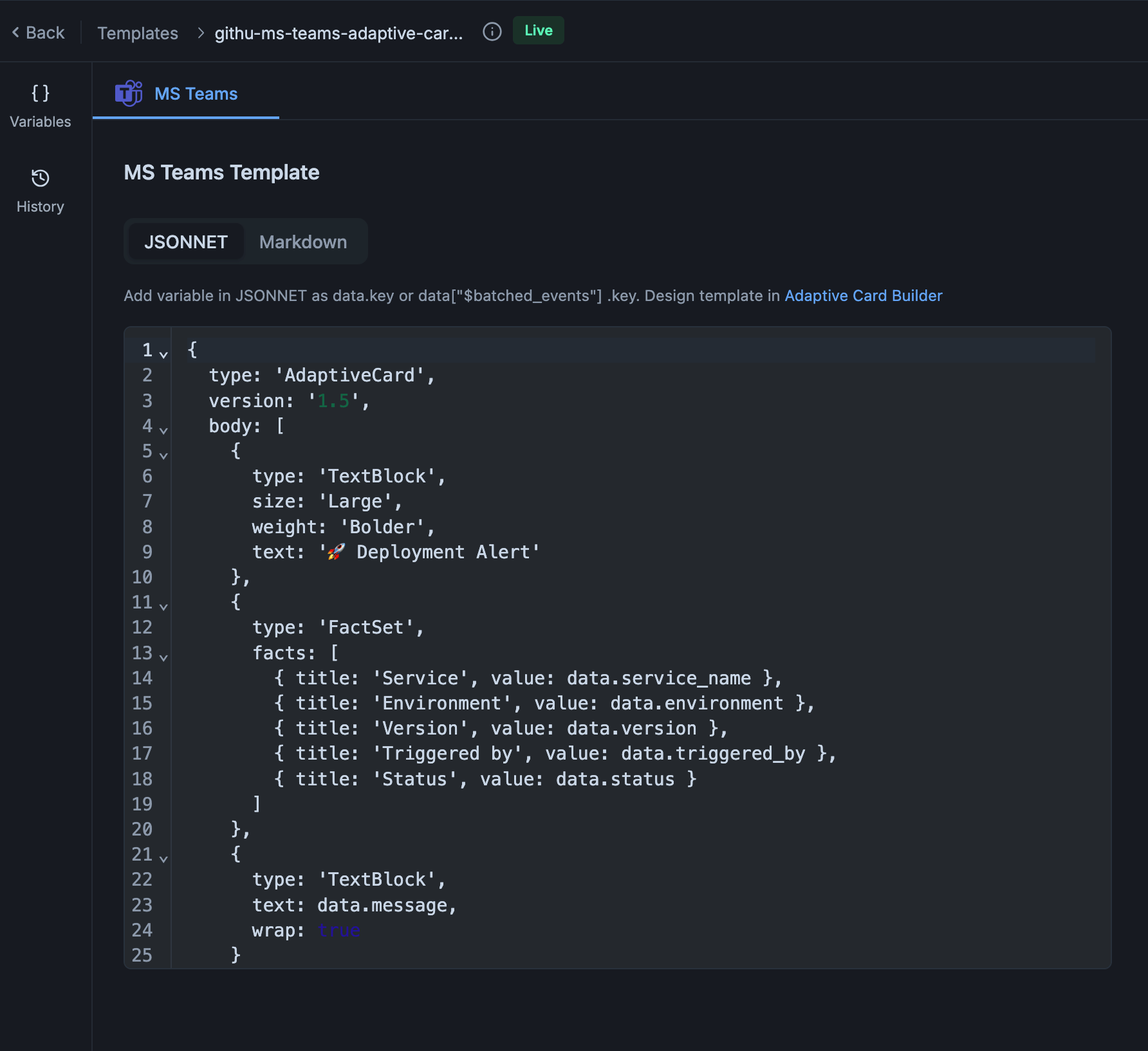 If you already have a plain-text template, wrap it in a single `TextBlock` so the same template works over the bot and the webhook:
```json theme={"system"}
{
"type": "AdaptiveCard",
"version": "1.5",
"body": [{ "type": "TextBlock", "text": "Deployment finished", "wrap": true }]
}
```
Or build the Workflows flow yourself with a condition on the incoming payload — cards one way, text the other:
If you already have a plain-text template, wrap it in a single `TextBlock` so the same template works over the bot and the webhook:
```json theme={"system"}
{
"type": "AdaptiveCard",
"version": "1.5",
"body": [{ "type": "TextBlock", "text": "Deployment finished", "wrap": true }]
}
```
Or build the Workflows flow yourself with a condition on the incoming payload — cards one way, text the other:
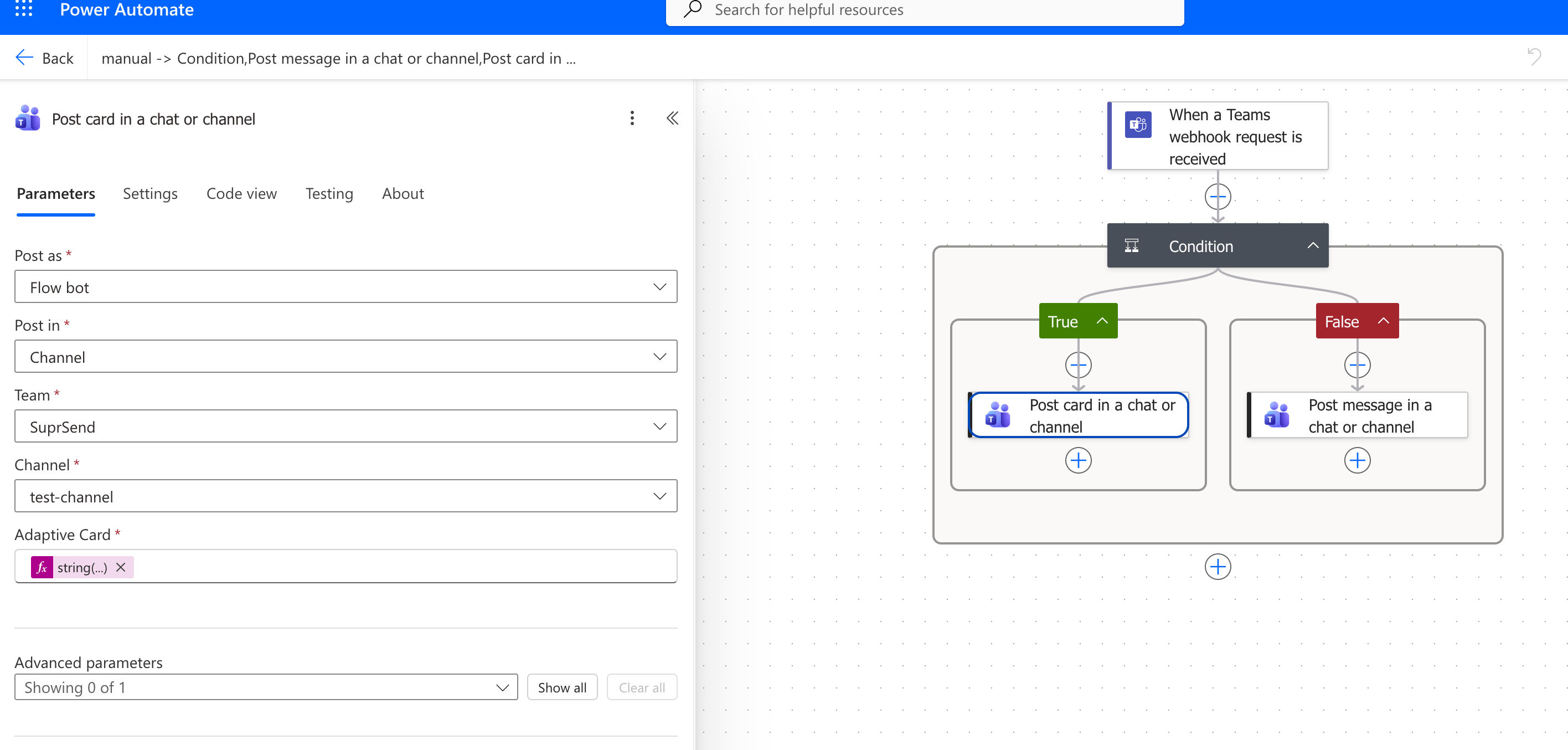 1. Trigger: **When a Teams webhook request is received**
2. Add a **Condition**, with this expression on the left and *is greater than* `0` on the right:
```
length(coalesce(triggerBody()?['attachments'], json('[]')))
```
3. **If yes** — **Post card in a chat or channel**, set **Adaptive Card** to:
```
string(first(triggerBody()?['attachments'])?['content'])
```
4. **If no** — **Post message in a chat or channel**, set the message to:
```
triggerBody()?['text']
```
The condition counts `attachments` on the request. SuprSend sends a card there and plain text in `text`. `coalesce` supplies an empty array when `attachments` is absent, which stops the expression erroring on a text-only payload.
See [MS Teams templates](/docs/ms-teams-template) for authoring.
```python Python theme={"system"}
from suprsend import Suprsend, WorkflowTriggerRequest
supr_client = Suprsend("WORKSPACE_KEY", "WORKSPACE_SECRET")
w = WorkflowTriggerRequest(body={
"workflow": "new-deploy",
"recipients": [{
"object_type": "repositories",
"id": "acme/api",
}],
"data": {
"sha": "a1b2c3d",
"environment": "production",
},
})
print(supr_client.workflows.trigger(w))
```
```javascript Node.js theme={"system"}
const { Suprsend, WorkflowTriggerRequest } = require("@suprsend/node-sdk");
const supr_client = new Suprsend("WORKSPACE_KEY", "WORKSPACE_SECRET");
const w = new WorkflowTriggerRequest({
workflow: "new-deploy",
recipients: [{ object_type: "repositories", id: "acme/api" }],
data: { sha: "a1b2c3d", environment: "production" },
});
supr_client.workflows.trigger(w).then((res) => console.log(res));
```
`#deploys` shows the post. **Logs → Messages** has the Teams delivery for the `acme/api` object.
## If something fails
That's a retired Office 365 connector. Microsoft began the rollout on **18 May 2026**. Create a Workflows webhook and replace `incoming_webhook.url` on the object. The field accepts either URL shape, so migration is a URL swap. You don't have to rewrite the card.
Confirm the Workflows flow is on `#deploys`, the URL includes `sig=`, and the workflow triggered the `acme/api` object. Check **Logs → Messages**.
Don't create new Office 365 connector URLs. The `incoming_webhook` field accepts either URL shape, so migration is a URL swap — but the template still has to be an Adaptive Card 1.4 or 1.5.
## Next
Markdown or Adaptive Card for the webhook post.
Register a bot and store channels on objects, people on users.
1. Trigger: **When a Teams webhook request is received**
2. Add a **Condition**, with this expression on the left and *is greater than* `0` on the right:
```
length(coalesce(triggerBody()?['attachments'], json('[]')))
```
3. **If yes** — **Post card in a chat or channel**, set **Adaptive Card** to:
```
string(first(triggerBody()?['attachments'])?['content'])
```
4. **If no** — **Post message in a chat or channel**, set the message to:
```
triggerBody()?['text']
```
The condition counts `attachments` on the request. SuprSend sends a card there and plain text in `text`. `coalesce` supplies an empty array when `attachments` is absent, which stops the expression erroring on a text-only payload.
See [MS Teams templates](/docs/ms-teams-template) for authoring.
```python Python theme={"system"}
from suprsend import Suprsend, WorkflowTriggerRequest
supr_client = Suprsend("WORKSPACE_KEY", "WORKSPACE_SECRET")
w = WorkflowTriggerRequest(body={
"workflow": "new-deploy",
"recipients": [{
"object_type": "repositories",
"id": "acme/api",
}],
"data": {
"sha": "a1b2c3d",
"environment": "production",
},
})
print(supr_client.workflows.trigger(w))
```
```javascript Node.js theme={"system"}
const { Suprsend, WorkflowTriggerRequest } = require("@suprsend/node-sdk");
const supr_client = new Suprsend("WORKSPACE_KEY", "WORKSPACE_SECRET");
const w = new WorkflowTriggerRequest({
workflow: "new-deploy",
recipients: [{ object_type: "repositories", id: "acme/api" }],
data: { sha: "a1b2c3d", environment: "production" },
});
supr_client.workflows.trigger(w).then((res) => console.log(res));
```
`#deploys` shows the post. **Logs → Messages** has the Teams delivery for the `acme/api` object.
## If something fails
That's a retired Office 365 connector. Microsoft began the rollout on **18 May 2026**. Create a Workflows webhook and replace `incoming_webhook.url` on the object. The field accepts either URL shape, so migration is a URL swap. You don't have to rewrite the card.
Confirm the Workflows flow is on `#deploys`, the URL includes `sig=`, and the workflow triggered the `acme/api` object. Check **Logs → Messages**.
Don't create new Office 365 connector URLs. The `incoming_webhook` field accepts either URL shape, so migration is a URL swap — but the template still has to be an Adaptive Card 1.4 or 1.5.
## Next
Markdown or Adaptive Card for the webhook post.
Register a bot and store channels on objects, people on users.