> ## Documentation Index
> Fetch the complete documentation index at: https://docs.suprsend.com/llms.txt
> Use this file to discover all available pages before exploring further.
# Preference Evaluation
> Understand how SuprSend evaluates user, tenant, and category preferences during workflow runs to decide whether to send each notification through a channel.
This guide explains how preferences are evaluated when workflows trigger notifications. For an overview of preferences, see [User Preferences](/docs/user-preferences).
## How preferences are evaluated
When a workflow triggers, SuprSend evaluates preferences for each recipient before each delivery node.
If user preferences aren't set, the system picks the default preference setting. Once a user sets a preference for a category, future changes to default preferences do **not** override the user's choice.
If you are triggering notifications for a tenant, [tenant default preferences](/docs/tenant-preference#per-tenant-default-preference) override category-level default preferences.
The order of precedence is always `user > tenant > category default`. However, if you turn off notifications in a category from the [tenant page](https://app.suprsend.com/en/demo/tenants), users will not receive notifications in that category, even if they previously opted in.
User preferences may change over time. When debugging a workflow run, you can inspect the exact preferences that were active at that moment. You can view this using the step-by-step debugger in [workflow executions](https://app.suprsend.com/en/demo/logs/executions/?last_n_minutes=1440).
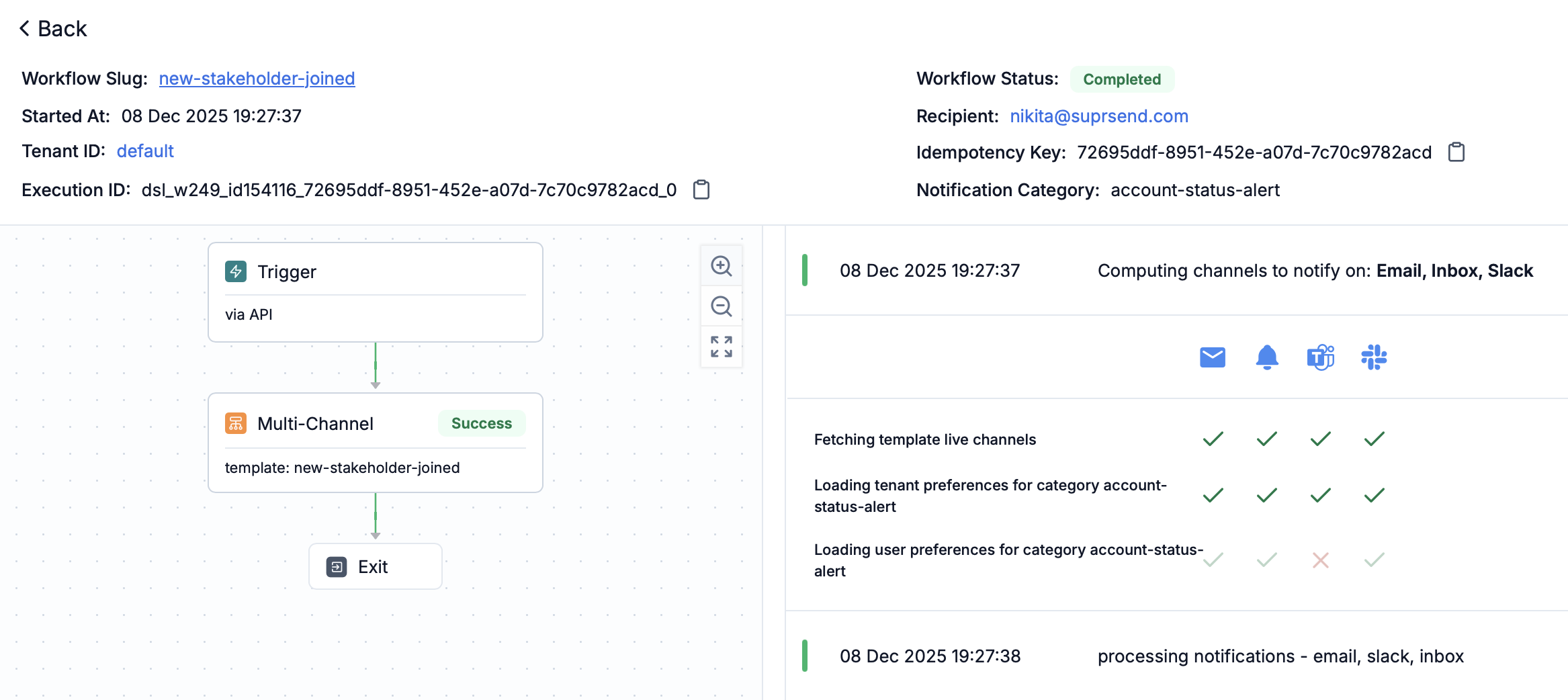 Use the "Preference Evaluation" panel in each workflow step to see what preference blocked or allowed the notification.
You can also track when a user updated their preference by filtering on `Subscriber preference update` in [request logs](https://app.suprsend.com/en/demo/logs/api/?last_n_minutes=1440).
## Preference precedence order
The system evaluates preferences in this order:
1. **User preference** - Individual user's explicit preference setting
2. **Tenant default preference** - Default preference set at tenant level
3. **Category default preference** - Default preference set at the category level
If a user has explicitly set a preference, that takes precedence. If not, the system checks tenant defaults, and finally falls back to category-level defaults.
Channel-level opt-outs (for example, email unsubscribe, SMS STOP, mobile OS push opt-out) override all category and tenant preferences.
## Resolving digest schedule and condition values
When a workflow references a category's [digest schedule](/docs/managing-notification-categories#configuring-digest-schedule) or a [condition property](/docs/managing-notification-categories#configuring-condition-properties), SuprSend resolves the value at trigger time using the **same precedence** as preferences:
1. **User value** — the option or value the recipient selected.
2. **Tenant default** — the tenant-level override, if the user hasn't set one.
3. **Category default** — the default configured on the sub-category.
* **Digest schedule:** a [Digest node](/docs/digest) with schedule type `category_digest_schedule` batches each recipient's notifications on their resolved cadence, in the recipient's timezone. If the category has no digest schedule enabled, the notification is sent immediately without batching.
* **Condition properties:** referenced in [branch conditions](/docs/branch) as `$category.properties.`, the resolved value is used to decide which branch a recipient takes. If a dynamic condition has no value at runtime, it resolves to `null` — handle that case in your branch logic.
Use the "Preference Evaluation" panel in each workflow step to see what preference blocked or allowed the notification.
You can also track when a user updated their preference by filtering on `Subscriber preference update` in [request logs](https://app.suprsend.com/en/demo/logs/api/?last_n_minutes=1440).
## Preference precedence order
The system evaluates preferences in this order:
1. **User preference** - Individual user's explicit preference setting
2. **Tenant default preference** - Default preference set at tenant level
3. **Category default preference** - Default preference set at the category level
If a user has explicitly set a preference, that takes precedence. If not, the system checks tenant defaults, and finally falls back to category-level defaults.
Channel-level opt-outs (for example, email unsubscribe, SMS STOP, mobile OS push opt-out) override all category and tenant preferences.
## Resolving digest schedule and condition values
When a workflow references a category's [digest schedule](/docs/managing-notification-categories#configuring-digest-schedule) or a [condition property](/docs/managing-notification-categories#configuring-condition-properties), SuprSend resolves the value at trigger time using the **same precedence** as preferences:
1. **User value** — the option or value the recipient selected.
2. **Tenant default** — the tenant-level override, if the user hasn't set one.
3. **Category default** — the default configured on the sub-category.
* **Digest schedule:** a [Digest node](/docs/digest) with schedule type `category_digest_schedule` batches each recipient's notifications on their resolved cadence, in the recipient's timezone. If the category has no digest schedule enabled, the notification is sent immediately without batching.
* **Condition properties:** referenced in [branch conditions](/docs/branch) as `$category.properties.`, the resolved value is used to decide which branch a recipient takes. If a dynamic condition has no value at runtime, it resolves to `null` — handle that case in your branch logic.