> ## Documentation Index
> Fetch the complete documentation index at: https://docs.suprsend.com/llms.txt
> Use this file to discover all available pages before exploring further.

# Angular

> Integration guide to add notification preference centre in Angular website.

<Warning>
  \*\*Preferences changes in  `@suprsend/web-sdk` version >=2.0.0

  In `@suprsend/web-sdk@2.0.0` we have revamped SDK. The whole structure of preferences have been changed from SDK side. Please upgrade to newer versions. Old version of documentation for preference is available [here](/docs/preferences-angular).
</Warning>

## Pre-Requisites

* [Integrate JavaScript SDK](https://docs.suprsend.com/docs/integrate-javascript-sdk)
* [Identify user on login](https://docs.suprsend.com/docs/integrate-javascript-sdk#2-authenticate-user) and [reset on logout](https://docs.suprsend.com/docs/integrate-javascript-sdk#3-reset-user) to ensure that preference changes are tagged to the correct user
* [Configure notification categories](/docs/user-preferences#create-notification-category) on SuprSend dashboard
* [Understanding of the preference data structure and methods](https://docs.suprsend.com/docs/js-preferences)

## Example implementation

GitHub Repository for this example implementation can be found here: ("[https://github.com/suprsend/angular-example](https://github.com/suprsend/angular-example)")

## Integration

There will be 3 components in example implementation:

* preference
* channel-level-preferences
* category-level-preferences

### Preference component setup

**preference** will be the main component and inside it, there will be a property (preferencesData) that contains full user preference data. Whenever there's an update we will update the latest preference data in the preferencesData so that component to rerender. We already created [SuprSend service ](https://github.com/suprsend/angular-example/blob/master/src/app/suprsend.service.ts)to access SuprSend client everywhere in the application which is used to call methods.

Call [getPreferences](https://docs.suprsend.com/docs/js-preferences#get-preferences-data) method to get the preferences data for the already identified user. This method is used to get full user preferences data from the SuprSend. This method should be called first before any update methods. Calling this method will make an API call and returns a preference response, which you can store in your instance property **preferenceData** if there is no error.

**Note:** Category translations work automatically-no additional configuration required. Since the Angular SDK is built on the web SDK, the locale is automatically passed through the underlying web SDK, and all embeddable SDKs in the preference centre inherit this behavior. Category names and descriptions are automatically displayed in the user's locale.

After that we configure 2 [event listeners](https://docs.suprsend.com/docs/js-preferences#event-listeners) `preferences_updated` and `preferences_error` to listen to updates in preference data and errors.

Our Main component **preference** has 2 child components one for Category-level preference section and other for Overall Channel-level preference section.

```javascript preference.component.ts theme={"system"}
import { SuprsendService } from '../suprsend.service';

@Component({...})
export class PreferenceComponent implements OnInit {
  preferencesData: any = null;

  constructor(private router: Router, private ssService: SuprsendService) {}

  ngOnInit(): void {
    // before getting preferences make sure to call identify method
    // Translations work automatically - locale is passed by the web SDK automatically
    this.ssService.ssClient.user.preferences.getPreferences({ locale: 'en' }).then((resp) => {
      if (resp.status === 'error') {
        console.log(resp.error);
      } else {
        this.preferencesData = resp.body;
      }
    });

    // listen for update in preferences data
    this.ssService.ssClient.emitter.on(
      'preferences_updated',
      (preferenceData) => { this.preferencesData = { ...preferenceData.body } } );

    // listen for errors
    this.ssService.ssClient.emitter.on('preferences_error', (error) => {
      console.log('ERROR:', error);
    });
  }
}
```

```typescript preference.component.html theme={"system"}
<p *ngIf="!this.preferencesData">Loading...</p>

<div *ngIf="this.preferencesData" class="main-div">
  <h3 class="main-header">Notification Preferences</h3>

  <!-- notification category level preferences -->
  <app-category-level-preferences [preferencesData]="this.preferencesData"></app-category-level-preferences>

  <!-- overall channel level preferences -->
  <app-channel-level-preferences [preferencesData]="this.preferencesData"></app-channel-level-preferences>
</div>
```

```css preference.component.css theme={"system"}
.main-div {
  margin: 24px;
}

.main-header {
  margin-bottom: 24px;
}

p,
h3 {
  margin: 0;
  padding: 0;
  font-family: Arial, Helvetica, sans-serif;
}

```

### Category level Preference section

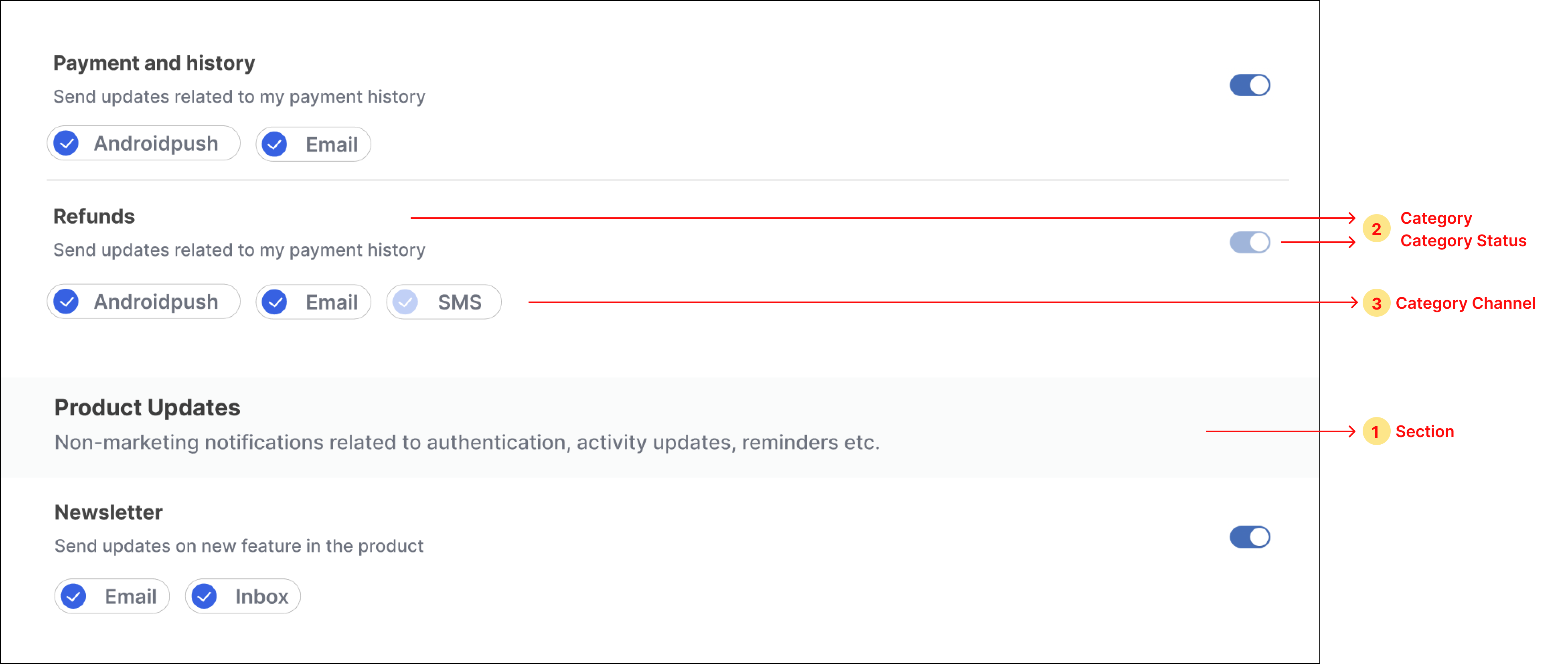
In category-level preferences, you'll have to fetch the data from 3 parts:

* **[Section](https://docs.suprsend.com/docs/js-preferences#11-sections)**-to show sections like "Product Updates" in below example
* **[Category](https://docs.suprsend.com/docs/js-preferences#12-categories-sections---sub-categories)**-to show categories and their overall status like "Refunds" in below example
* **[CategoryChannel](https://docs.suprsend.com/docs/js-preferences#13-category-channels-sections---sub-categories---channels)**-to show communication channels inside the category and their status

<Frame>
  <img src="https://mintcdn.com/suprsend/dnAGb1CmSRGCSyT3/images/docs/3b8ee51-image.png?fit=max&auto=format&n=dnAGb1CmSRGCSyT3&q=85&s=48c6e091119bd287c51c0404961a1796" width="3910" height="1656" data-path="images/docs/3b8ee51-image.png" />
</Frame>

Below are the steps to render category preference UI:

1. Loop through the property ***preferenceData.sections***  for showing sections, show sub-categories inside each section, and show subcategory's channels inside each sub-category.
2. Add a  ***switch*** button next to each sub-category for opting in and out of the category. Add ***checkbox*** components in sub-category channels for opting in and out of category-channel. You can use any third-party npm package to import these components or design your own component.
3. To update category preference on the click of the switch button, call **[updateCategoryPreference](https://docs.suprsend.com/docs/js-preferences#update-category-preference)** method and if no error is received in response, update the latest data in the instance property. For preference state `opt-in` set the switch state as **on** and **off** for the `opt-out` state.

<Frame>
  <img src="https://mintcdn.com/suprsend/3ix_OjxB_ZGM-pa-/images/docs/1742b8c-image.png?fit=max&auto=format&n=3ix_OjxB_ZGM-pa-&q=85&s=f814525b67865ee115767d7ea4f1ce82" width="1582" height="202" data-path="images/docs/1742b8c-image.png" />
</Frame>

4. To update category-channel preference on the click of checkbox next to each channel, call the **[updateChannelPreferenceInCategory](https://docs.suprsend.com/docs/js-preferences#update-channel-preference-in-category)** method. Update the latest data in the instance property if no error is received in response. For preference state `opt-in` set the checkbox state as **checked** and **unchecked** for the `opt-out` state.

<Frame>
  <img src="https://mintcdn.com/suprsend/iZJ8XgyTL4NrLVtX/images/docs/a0cf6ad-image.png?fit=max&auto=format&n=iZJ8XgyTL4NrLVtX&q=85&s=4baa8f3ce0d142986b71b954c43fc54a" width="1582" height="242" data-path="images/docs/a0cf6ad-image.png" />
</Frame>

```typescript category-level-preferences.component.ts theme={"system"}
import { Component, Input } from '@angular/core';
import { PreferenceOptions } from '@suprsend/web-sdk';
import { SuprsendService } from '../suprsend.service';

@Component({
  selector: 'app-category-level-preferences',
  templateUrl: './category-level-preferences.component.html',
  styleUrls: ['./category-level-preferences.component.css'],
})
export class CategoryLevelPreferencesComponent {
  @Input() public preferencesData: any;

  constructor(private ssService: SuprsendService) {}

  async handleCategoryPreferenceChange(e: boolean, subcategory: string) {
    const resp =
      await this.ssService.ssClient.user.preferences.updateCategoryPreference(
        subcategory,
        e ? PreferenceOptions.OPT_IN : PreferenceOptions.OPT_OUT
      );
    if (resp.error) {
      console.log(resp.error);
    } else {
      this.preferencesData = { ...resp.body };
    }
  }

  async handleChannelPreferenceInCategoryChange(
    channel: any,
    category: string
  ) {
    if (!channel.is_editable) return;

    const resp =
      await this.ssService.ssClient.user.preferences.updateChannelPreferenceInCategory(
        channel.channel,
        channel.preference === PreferenceOptions.OPT_IN
          ? PreferenceOptions.OPT_OUT
          : PreferenceOptions.OPT_IN,
        category
      );
    if (resp.status === 'error') {
      console.log(resp.error);
    } else {
      this.preferencesData = { ...resp.body };
    }
  }
}
```

<CodeGroup>
  ```typescript category-level-preferences.component.html theme={"system"}
  <div
    *ngFor="let section of this.preferencesData.sections"
    class="cat-container"
  >
    <div *ngIf="section.name">
      <div class="section-name-container">
        <p class="section-name-text">{{ section.name }}</p>
        <p class="section-description-text">{{ section.description }}</p>
      </div>
    </div>
    <div *ngFor="let subcategory of section.subcategories">
      <div class="subcategory-container">
        <div class="subcategory-top-div">
          <div>
            <p class="subcategory-name">{{ subcategory.name }}</p>
            <p class="subcategory-description">{{ subcategory.description }}</p>
          </div>
          <ui-switch
            size="small"
            color="#2463eb"
            [disabled]="!subcategory.is_editable"
            [checked]="subcategory.preference === 'opt_in'"
            (change)="
              handleCategoryPreferenceChange($event, subcategory.category)
            "
          ></ui-switch>
        </div>

        <div class="subcategory-channel-container">
          <div
            *ngFor="let channel of subcategory.channels"
            class="category-channel-checkbox"
          >
            <input
              type="checkbox"
              [id]="subcategory.category + '-' + channel.channel"
              [disabled]="!channel.is_editable"
              [checked]="channel.preference === 'opt_in'"
              (change)="
                handleChannelPreferenceInCategoryChange(
                  channel,
                  subcategory.category
                )
              "
            />
            <label
              class="category-channel-label"
              [for]="subcategory.category + '-' + channel.channel"
              >{{ channel.channel }}</label
            >
          </div>
        </div>
      </div>
    </div>
  </div>

  ```
</CodeGroup>

```css category-level-preferences.component.css theme={"system"}
.cat-container {
  margin-bottom: 24px;
}

.section-name-container {
  background-color: #fafbfb;
  padding-top: 12px;
  padding-bottom: 12px;
  margin-bottom: 18px;
}

.section-name-text {
  font-size: 18px;
  font-weight: 500;
  color: #3d3d3d;
}

.section-description-text {
  color: #6c727f;
}

p,
label {
  margin: 0;
  padding: 0;
  font-family: Arial, Helvetica, sans-serif;
}

.subcategory-channel-container {
  display: flex;
  gap: 10;
  margin-top: 12px;
}

.subcategory-name {
  font-size: 16px;
  font-weight: 600;
  color: #3d3d3d;
}

.subcategory-top-div {
  display: flex;
  justify-content: space-between;
  align-items: center;
}

.subcategory-container {
  border-bottom: 1px solid #d9d9d9;
  padding-bottom: 12px;
  margin-top: 18px;
}

.subcategory-description {
  color: #6c727f;
  font-size: 14px;
  margin-top: 6px;
}

.category-channel-checkbox {
  margin-right: 20px;
}

.category-channel-label {
  margin-left: 4px;
  cursor: pointer;
}

```

### Channel level Preference section

Below are the steps to render channel preference UI:

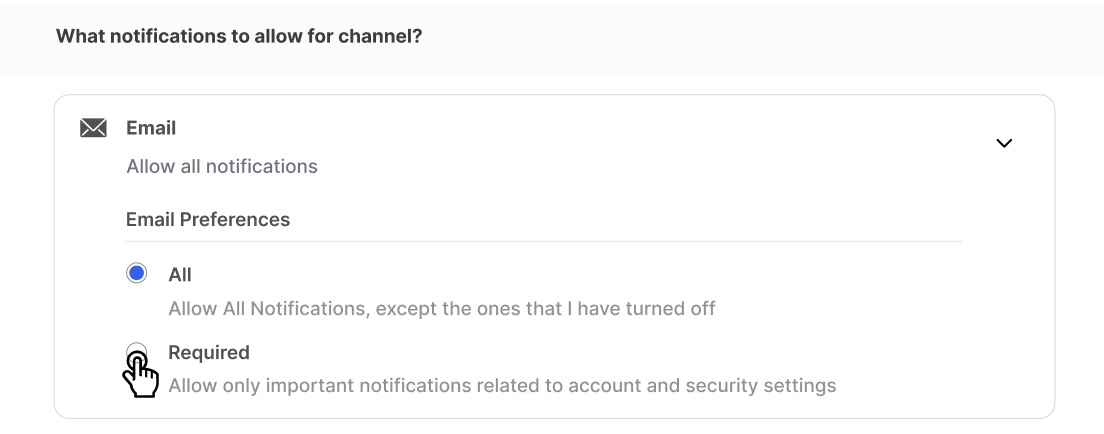
1. Loop through the property **preferenceData.channel\_preferences** for showing channels and for every channel item we will show an option to select preference using radio buttons.
2. Add a  radio button next, against channel level options for switching from `all` to `required` preference in channel.
3. To update channel preference on the click of the radio button, call **[updateOverallChannelPreference](https://docs.suprsend.com/docs/js-preferences#update-overall-channel-preference)** method, and if no error is received in response, update the latest data in the state.

<Frame>
  <img src="https://mintcdn.com/suprsend/09Y8zJBSaqwwb23r/images/docs/5574d6f-channel-update_1.png?fit=max&auto=format&n=09Y8zJBSaqwwb23r&q=85&s=694f14acabbde2e16fc4766ea72afe85" width="1104" height="434" data-path="images/docs/5574d6f-channel-update_1.png" />
</Frame>

```typescript channel-level-preferences.component.ts theme={"system"}
import { Component, Input } from '@angular/core';
import { ChannelLevelPreferenceOptions } from '@suprsend/web-sdk';
import { SuprsendService } from '../suprsend.service';

@Component({
  selector: 'app-channel-level-preferences',
  templateUrl: './channel-level-preferences.component.html',
  styleUrls: ['./channel-level-preferences.component.css'],
})
export class ChannelLevelPreferencesComponent {
  @Input() public preferencesData: any;

  constructor(private ssService: SuprsendService) {}

  async handleChange(channel: string, preference: string) {
    const preferenceStatus =
      preference === 'ALL'
        ? ChannelLevelPreferenceOptions.ALL
        : ChannelLevelPreferenceOptions.REQUIRED;
    const resp =
      await this.ssService.ssClient.user.preferences.updateOverallChannelPreference(
        channel,
        preferenceStatus
      );
    if (resp.status === 'error') {
      console.log(resp.error);
    } else {
      this.preferencesData = { ...resp.body };
    }
  }
}

```

```typescript channel-level-preferences.component.html theme={"system"}
<div>
  <div class="channel-header-div">
    <p class="channel-header-p">What notifications to allow for channel?</p>
  </div>
  <div>
    <div *ngFor="let channel of this.preferencesData.channel_preferences">
      <div class="channel-container">
        <p class="channel-channel-text">{{ channel.channel }}</p>
        <p
          class="channel-help-text"
          *ngIf="channel.is_restricted; else allText"
        >
          Allow required notifications only
        </p>
        <ng-template #allText
          ><p class="channel-help-text">Allow all notifications</p>
        </ng-template>

        <div class="channel-radio-container">
          <p class="channel-radio-pref-text">
            {{ channel.channel }} Preferences
          </p>
          <div class="radio-grp">
            <div class="radio-grp-2">
              <div class="radio-grp-container">
                <div>
                  <input
                    type="radio"
                    [checked]="!channel.is_restricted"
                    name="all-{{ channel.channel }}"
                    id="all-{{ channel.channel }}"
                    (change)="handleChange(channel.channel, 'ALL')"
                  />
                </div>
                <label class="all-label" for="all-{{ channel.channel }}">
                  All
                </label>
              </div>
              <p class="channel-radiohelp-text">
                Allow All Notifications, except the ones that I have turned off
              </p>
            </div>
            <div>
              <div class="radio-grp-container">
                <div>
                  <input
                    type="radio"
                    name="required-{{ channel.channel }}"
                    id="required-{{ channel.channel }}"
                    [checked]="channel.is_restricted"
                    (change)="handleChange(channel.channel, 'REQUIRED')"
                  />
                </div>
                <label
                  class="required-label"
                  for="required-{{ channel.channel }}"
                >
                  Required
                </label>
              </div>
              <p class="channel-radiohelp-text">
                Allow only important notifications related to account and
                security settings
              </p>
            </div>
          </div>
        </div>
      </div>
    </div>
  </div>
</div>

```

```Text channel-level-preferences.component.css theme={"system"}
.channel-header-div {
  background-color: #fafbfb;
  padding-top: 12px;
  padding-bottom: 12px;
  margin-bottom: 18px;
}

.channel-header-p {
  font-size: 18px;
  font-weight: 500;
  color: #3d3d3d;
}

p,
label {
  margin: 0;
  padding: 0;
  font-family: Arial, Helvetica, sans-serif;
}

.channel-container {
  border: 1px solid #d9d9d9;
  border-radius: 5px;
  padding: 12px 24px;
  margin-bottom: 24px;
}

.channel-channel-text {
  font-size: 18px;
  font-weight: 500;
  color: #3d3d3d;
}

.channel-help-text {
  color: #6c727f;
  font-size: 14px;
  margin-top: 6px;
}

.channel-radio-container {
  margin-top: 12px;
  margin-left: 24px;
}

.channel-radio-pref-text {
  color: #3d3d3d;
  font-size: 16px;
  font-weight: 500;
  margin-top: 18px;
  border-bottom: 1px solid #e8e8e8;
}

.channel-radiohelp-text {
  color: #6c727f;
  font-size: 14px;
  margin-left: 32px;
  margin-top: 4px;
}

.label-required {
  margin-left: 12px;
}

.radio-grp {
  margin-top: 12px;
}

.radio-grp-2 {
  margin-bottom: 8px;
}

.radio-grp-container {
  display: flex;
  align-items: center;
}
.all-label {
  margin-left: 12px;
  cursor: pointer;
}

.required-label {
  margin-left: 12px;
  cursor: pointer;
}

```