> ## Documentation Index
> Fetch the complete documentation index at: https://docs.suprsend.com/llms.txt
> Use this file to discover all available pages before exploring further.
# Trigger a workflow from the Python SDK
> Use the SuprSend Python SDK to trigger a workflow directly from your application code, with examples for the workflow payload, recipients, and dynamic data.
It is a unified API to trigger workflow and doesn't require user creation before hand to trigger notification. Recommended for platforms transitioning their existing notifications to SuprSend. If you are using our frontend SDKs to configure notifications and passing events and user properties from third-party data platforms like Segment, then [event-based trigger](/docs/python-send-event-data) would be a better choice.
📘 Available in SDK version >= v0.11.0
## Payload Schema
```python Sample Payload theme={"system"}
from suprsend import Event
from suprsend import WorkflowTriggerRequest
supr_client = Suprsend("_workspace_key_", "_workspace_secret_")
# Prepare workflow payload
w1 = WorkflowTriggerRequest(
body={
"workflow": "_workflow_slug_",
"actor": {
"distinct_id": "0fxxx8f74-xxxx-41c5-8752-xxxcb6911fb08",
"name": "actor_1",
"$skip_create": true,
},
"recipients": [
# notify user
{
"distinct_id": "0gxxx9f14-xxxx-23c5-1902-xxxcb6912ab09",
"$email": ["abc@example.com"],
"name": "recipient_1",
"$preferred_language": "en",
"$timezone": "America/New_York",
"$skip_create": true,
},
# notify object
{"object_type": "teams", "id": "finance", "$skip_create": true},
],
"data": {
"first_name": "User",
"invoice_amount": "$5000",
"invoice_id": "Invoice-1234",
},
},
tenant_id="tenant_id1",
idempotency_key="_unique_identifier_of_the_request_",
)
# Trigger workflow
response = supr_client.workflows.trigger(w1)
print(response)
```
```python Response theme={"system"}
{
success: true,
status: 'success',
status_code: 202,
message: { status: 'success' }
}
```
To prevent automatic creation of an actor, or recipient (user/object) in SuprSend (the case where they already exist in your system), you can use the `"$skip_create": true` flag.
This can be applied inside the actor, individual user recipient objects, or object recipient objects.
Once your request is accepted, you can check the status of your request on [SuprSend Logs](https://app.suprsend.com/en/staging/logs/api?last_n_minutes=1440) page.
| Property | Type | Description |
| ---------------------------------- | ------------------------------------ | --------------------------------------------------------------------------------------------------------------------------------------------------------------------------------------------------------------------------------------------------------------------------------------------------------------------------------------------- |
| `workflow` | `string` | Slug of the designed workflow on the SuprSend dashboard. You'll get the slug from workflow settings. |
| `actor` *(optional)* | `string / object` | Includes `distinct_id` and properties of the user who performed the action. Used for [cross-user notifications](https://docs.suprsend.com/docs/python-trigger-workflow-from-api#sending-cross-user-notifications), where you need to include actor properties in the notification template. Actor properties can be added as `$actor.`. |
| `recipients` | `array of string / array of objects` | List of users who need to be notified. You can add up to 100 recipients in a workflow trigger. Recipients can be passed as an array of `distinct_ID` (if the user is pre-synced in the SuprSend database) or [defined inline](https://docs.suprsend.com/docs/python-trigger-workflow-from-api#identifying-recipients-inline). |
| `data` | `object` | Variable data required to render dynamic template content or workflow properties such as dynamic delay or channel override in the send node. |
| `tenant_id` | `string` | Unique identifier of the [brand / tenant](https://docs.suprsend.com/docs/brands). |
| `idempotency_key` | `string` | Unique identifier of the request. It will be returned in the [outbound webhook response](https://docs.suprsend.com/docs/outbound-webhook). You can use it to map notification statuses and replies in your system. |
| `recipients[].$timezone` | `string` | Used to set the recipient's timezone. Allows sending notifications in the user's local timezone. Pass the timezone in [IANA (TZ identifier)](https://en.wikipedia.org/wiki/List_of_tz_database_time_zones#List) format. |
| `recipients[].$preferred_language` | `string` | Used to set the recipient's preferred language. |
### Sending notification to multiple recipients
Recipients in workflow call is an array of `distinct_ids` or recipient objects. You can pass up to 100 recipients in a single workflow trigger. SuprSend will internally convert it into multiple workflow triggers, one for each recipient in the array.
```json json theme={"system"}
"recipients": [
{
"distinct_id": "id1",
"$email":["id1@example.com"],
"name":"recipient_1"
},
{
"distinct_id": "id1",
"$email":["id2@example.com"],
"name":"recipient_2"
}
]
---- OR ------
"recipients": ["id1","id2"]
```
📘**Use lists to broadcast to a large list of users:**
We recommend you to use [lists](/docs/python-lists) and [broadcasts](/docs/python-broadcast) to send notifications to a user list larger than 1000 users. This approach allows for bulk processing within SuprSend, resulting in significantly faster delivery compared to individual workflow calls. Sending individual workflows to a large set of users may introduce delays in your notification queue and is not an optimized way of handling bulk trigger.
### Identifying recipients inline
One of the benefits of using direct workflow trigger is that you can identify recipients inline. You can include recipient channel information, their channel preferences, and their user properties along with the workflow trigger. Upon triggering the workflow, the recipient will be automatically created in the SuprSend database in the background. This facilitates dynamic synchronization of your user data within SuprSend and eliminates the need for any migration efforts on your end to start sending notifications from SuprSend. You can also use recipient properties in your template as `$recipient.`.
This is how the complete recipient object with look like
```json json theme={"system"}
{
"distinct_id": "0gxxx9f14-xxxx-23c5-1902-xxxcb6912ab09",
"$email":["abc@example.com"],
"$channels":["email","inbox"],
"user_prop1":"value_1",
"$preferred_language":"en",
"$timezone": "America/New_York"
}
```
| Property | Type | Description |
| --------------------------------- | --------------------------- | ------------------------------------------------------------------------------------------------------------------------------------------------------------------------------------------------------------------------------------------------------------------------------------------------------------------------------------------------------------------------------------------------------------------------------------------------------------------------------------------------------------------------------------------------------------------------------------------------------------------------------------------------------------------------------------------------------------------------------------------------------------------------ |
| `distinct_id` | `string` | Unique identifier of the user to be notified. |
| `$` (for example `$sms`) | `array of string / objects` | You can pass user channel information using `$` key. The channel info will be updated in the user profile in the background. For this workflow, only channel values specified in this key will be used for sending notifications (instead of all channel values present in the user profile). Refer to how different communication channels can be passed [here](https://docs.suprsend.com/docs/python-trigger-workflow-from-api#add-user-communication-channel). |
| `$channels` | `array of string` | Use it to pass the user's channel preference in the payload. You can always use our [in-built preference APIs](/docs/user-preferences) to maintain user notification preferences. Preferences defined within SuprSend will automatically apply with the workflow trigger. By default, notifications will be sent to all channels defined in the workflow delivery node. However, if the user has a specific channel preference for a notification (for example only wants to receive payment reminders via email), you can include that preference in the workflow payload. This ensures notifications are sent only to the channels specified in the `$channels` key. Supported channel values: `email, sms, whatsapp, androidpush, iospush, slack, webpush, ms_teams`. |
| `$preferred_language` | `string` | To set the recipient's preferred language. This supports localization in notification content. Pass the language in `ISO 639-1` 2-letter format. [Refer to all language codes here](https://github.com/suprsend/suprsend-py-sdk/blob/v0.12.0/src/suprsend/language_codes.py). |
| `$timezone` | `string` | To set the recipient's timezone. Used to send notifications in the user's local timezone. Pass the timezone in [IANA (TZ identifier)](https://en.wikipedia.org/wiki/List_of_tz_database_time_zones#List) format. |
| `*` | `key-value pair` | You can pass other user properties to render dynamic template content in key-value pairs like `"user_prop1": "value1"`. Extra properties will be set in the subscriber profile (as subscriber properties), which can then be used in the template as `$recipient.`. |
#### Add user communication channel
```json json theme={"system"}
"$email":["user@example.com"],
"$whatsapp":["+15555555555"],
"$sms":["+15555555555"],
"$androidpush": [{"token": "__android_push_token__", "provider": "fcm", "device_id": ""}],
"$iospush":[{"token": "__ios_push_token__", "provider": "apns", "device_id": ""}],
"$slack": [{
"email": "user@example.com",
"access_token": "xoxb-XXXXXXXX"
}] // slack using email
"$slack": [{
"user_id": "U/WXXXXXXXX",
"access_token": "xoxb-XXXXXX"
}] // slack using member_id
"$slack": [{
"channel": "CXXXXXXXX",
"access_token": "xoxb-XXXXXX"
}] // slack channel
"$slack": [{
"incoming_webhook": {
"url": "https://hooks.slack.com/services/TXXXX/BXXXX/XXXXXXX"
}
}] // slack incoming webhook
"$ms_teams": [{
"tenant_id": "c1981ab2-9aaf-xxxx-xxxx",
"service_url": "https://smba.trafficmanager.net/amer",
"conversation_id": "19:c1524d7c-a06f-456f-8abe-xxxx"
}] // MS teams user or channel using conversation_id
"$ms_teams": [{
"tenant_id": "c1981ab2-9aaf-xxxx-xxxx",
"service_url": "https://smba.trafficmanager.net/amer",
"user_id": "29:1nsLcmJ2RKtYH6Cxxxx-xxxx"
}] // MS teams user using user_id
"$ms_teams": [{
"incoming_webhook": {
"url": "https://wnk1z.webhook.office.com/webhookb2/XXXXXXXXX"
}
}] // MS teams incoming webhook
```
### Sending cross-user notifications
In scenarios where you need to notify a group of users based on another user's action, such as sending a notification to the document owner when someone comments on it, you can specify the actor in your workflow call. This allows you to use actor's name or other properties in your notification template. Actor properties can be included in the template as `$actor.`.
Sample template with actor and recipient properties:
```text text theme={"system"}
//handlebar template
Hi {{$recipient.name}}, {{$actor.name}} added {{length comments}} new comments on the {{doc_name}}.
//Rendered content
Hi recipient_1, actor_1 added 2 new comments on the annual IT report.
```
```json Sample workflow body theme={"system"}
{
"workflow": "new_comment",
"actor": {
"distinct_id": "0fxxx8f74-xxxx-41c5-8752-xxxcb6911fb08",
"name":"actor_1"
},
"recipients": [
{
"distinct_id": "0gxxx9f14-xxxx-23c5-1902-xxxcb6912ab09",
"$email":["abc@example.com""],
"name":"recipient_1"
}
],
"data":{
"doc_name": "annual IT report",
"date": "2024-01-01",
"comments":["change the date","rest looks good"]
}
}
```
### Sending notification to anonymous user
You can send notifications to anonymous users by passing ` "is_transient": True` in your recipient object. This approach is recommended for scenarios where you need to send notifications to unregistered users without creating them in the SuprSend platform. The same way, you can pass ` "is_transient": True` in your actor object to use actor properties in template without creating user profile.
```python Request theme={"system"}
from suprsend import Event
from suprsend import WorkflowTriggerRequest
supr_client = Suprsend("_workspace_key_", "_workspace_secret_")
# Prepare workflow payload
w1 = WorkflowTriggerRequest(
body={
"workflow": "_workflow_slug_",
"actor": {
"is_transient": True,
"name":"actor_1"
},
"recipients": [
{
"is_transient": True,
"$email":["abc@example.com"],
"name":"recipient_1"
}
],
"data":{
"first_name": "User",
"invoice_amount": "$5000",
"invoice_id":"Invoice-1234"
}
},
tenant_id = "tenant_id1",
idempotency_key = "_unique_identifier_of_the_request_"
)
# Trigger workflow
response = supr_client.workflows.trigger(w1)
print(response)
```
### Multi-tenant notifications
For use cases where you want to send notifications to your enterprise customers' end users, pass the `tenant_id` in your workflow instance. You can use this to dynamically manage [tenant level notification customizations](/docs/tenants). This includes the ability to customize template design or content and route notifications via tenant vendors.
```python Request theme={"system"}
from suprsend import Event
from suprsend import WorkflowTriggerRequest
supr_client = Suprsend("_workspace_key_", "_workspace_secret_")
# Prepare workflow payload
w1 = WorkflowTriggerRequest(
body={...},
tenant_id = "tenant_id1",
idempotency_key = "_unique_identifier_of_the_request_"
)
# Trigger workflow
response = supr_client.workflows.trigger(w1)
print(response)
```
### Idempotent requests
SuprSend supports idempotency to ensure that requests can be retried safely without duplicate processing. If Suprsend receives and processes a request with an idempotency\_key, it will skip processing requests with same `idempotency_key` for next 24 hours. Idempotency key should be uniquely generated for each request (max 255 characters allowed). Spaces in start and end of the key will be trimmed. Here are some common approaches for generating idempotency keys:
* **Generate a random UUID** for each request.
* **Construct the idempotency key by combining relevant information about the request**. This can include parameters, identifiers, or specific contextual details that are meaningful within your application. for example, you could concatenate the user ID, action, and timestamp to form an idempotency key like `user147-new-comment-1687437670`
* **Request-specific Identifier**: If your request already contains a unique identifier, such as an order ID or a job ID, you can use that identifier directly as the idempotency key.
## Bulk trigger multiple workflows
Bulk API allows you to send multiple workflow requests in a single call. There isn't any limit on number-of-records that can be added to bulk\_workflows instance. Use `.append()` on `workflows.bulk_trigger_instance()` instance to add however-many-records to call in bulk.
```python Request theme={"system"}
from suprsend import Event
from suprsend import WorkflowTriggerRequest
supr_client = Suprsend("_workspace_key_", "_workspace_secret_")
# Workflow: 1
w1 = WorkflowTriggerRequest(
body={...},
tenant_id = "tenant_id1",
idempotency_key = "_unique_identifier_of_the_request_"
)
# Workflow: 2
w2 = WorkflowTriggerRequest(
body={...}
)
# ...... Add as many Workflow records as required.
bulk_ins = supr_client.workflows.bulk_trigger_instance()
bulk_ins.append(w1,w2)
# Trigger workflow
response = bulk_ins.trigger()
print(response)
```
```python Response theme={"system"}
{
status = "fail",
total = 10, # number of records sent in bulk
success = 0, # number of records succeeded
failure = 10, # number of records failed
warnings = [],
failed_records = [{"record": {...}, "error": "error_str", "code": 500}]
}
```
## Add file attachment in email
To add one or more Attachments to a Notification (viz. Email), call `wf_instance.add_attachment()` for each file with local-path. Ensure that file\_path is proper, otherwise it will raise FileNotFoundError.
```python Request theme={"system"}
from suprsend import Workflow
workflow_body = {...}
wf_instance = Workflow(body=workflow_body)
# this snippet can be used to add attachment to workflow
file_path = "/home/user/billing.pdf"
wf_instance.add_attachment(file_path)
```
A single workflow body size (including attachment) must not exceed 800KB (800 x 1024 bytes).
***
## Dynamic workflow trigger
You can trigger workflow from python SDK using `supr_client.trigger_workflow` method.
The SDK internally makes an `HTTP` call to SuprSend Platform to register this request, and you'll immediately receive a response indicating the acceptance status. Note: The actual processing/execution of workflow happens asynchronously.
Once your request is accepted, you can check the status of your request in the '[ SuprSend Logs](https://app.suprsend.com/en/staging/logs)' section.
```python Request theme={"system"}
from suprsend import Workflow
# Prepare Workflow body
workflow_body = {
"name": "workflow_name",
"template": "template_slug",
"notification_category": "notification_category", # preference category transactional/promotional/system
"delay": "time_delay", # time delay after which the first notification will be sent
"trigger_at": "date string in ISO 8601", #to trigger scheduled notifications
"users": [
{
"distinct_id": "distinct_id", # unique identifier of the user
# if $channels is present, communication will be triggered on mentioned channels only.
# "$channels": ["email"],
# User communication channel can be added as [optional]:
# "$email":["user@example.com"],
# "$whatsapp":["+15555555555"],
# "$sms":["+15555555555"],
# "$androidpush": [{"token": "__android_push_token__", "provider": "fcm", "device_id": ""}],
# "$iospush":[{"token": "__ios_push_token__", "provider": "apns", "device_id": ""}],
# "$slack": {
# "email": "user@example.com",
# "access_token": "xoxb-XXXXXXXX"
#} --- slack using email
# "$slack": {
# "user_id": "U/WXXXXXXXX",
# "access_token": "xoxb-XXXXXX"
#} --- slack using member_id
# "$slack": {
# "channel": "CXXXXXXXX",
# "access_token": "xoxb-XXXXXX"
#} --- slack channel
# "$slack": {
# "incoming_webhook": {
# "url": "https://hooks.slack.com/services/TXXXX/BXXXX/XXXXXXX"
# }
#} --- slack incoming webhook
# "$ms_teams": {
#"tenant_id": "c1981ab2-9aaf-xxxx-xxxx",
#"service_url": "https://smba.trafficmanager.net/amer",
#"conversation_id": "19:c1524d7c-a06f-456f-8abe-xxxx"
#} --- MS teams user or channel using conversation_id
# "$ms_teams": {
#"tenant_id": "c1981ab2-9aaf-xxxx-xxxx",
#"service_url": "https://smba.trafficmanager.net/amer",
#"user_id": "29:1nsLcmJ2RKtYH6Cxxxx-xxxx"
#} --- MS teams user using user_id
# "$ms_teams": {
# "incoming_webhook": {
# "url": "https://wnk1z.webhook.office.com/webhookb2/XXXXXXXXX"
# }
#} --- MS teams incoming webhook
}
],
# delivery instruction [optional]. how should notifications be sent, and whats the success metric
"delivery": {
"smart": ,
"success": "success_metric",
"time_to_live": "TTL duration", # will be applicable for smart = TRUE
"mandatory_channels": [] # list of mandatory channels e.g ["email"], will be applicable for smart = TRUE
},
# data can be any json / serializable python-dictionary
"data": {
"key":"value",
"nested_key": {
"nested_key1": "some_value_1",
"nested_key2": {
"nested_key3": "some_value_3",
},
}
}
}
wf = Workflow(body=workflow_body, idempotency_key="__uniq_request_id__", brand_id="default")
# Trigger workflow
response = supr_client.trigger_workflow(wf)
print(response)
```
```python Response theme={"system"}
# Response structure
{
"success": True, # if true, request was accepted.
"status": "success",
"status_code": 202, # http status code
"message": "OK",
}
{
"success": False, # error will be present in message
"status": "fail",
"status_code": 500, # http status code
"message": "error message",
}
```
For configuring a workflow from backend, you can pass following properties in your method
| Parameter | Description | Format | Obligation |
| --------------------------- | ------------------------------------------------------------------------------------------------------------------------------------------------------------------------------------------------------------------------------------------------------------------------------------------------------------------------------------------------------ | -------------------------------------------------------------------------------------------------------------------------------------------------------------------------------- | ----------- |
| **`name`** | It is the unique name of the workflow. You can see workflow-related analytics on the workflow page (how many notifications were sent, delivered, clicked, or interacted). The workflow name should be easily identifiable for your reference at a later stage. | *text* | *Mandatory* |
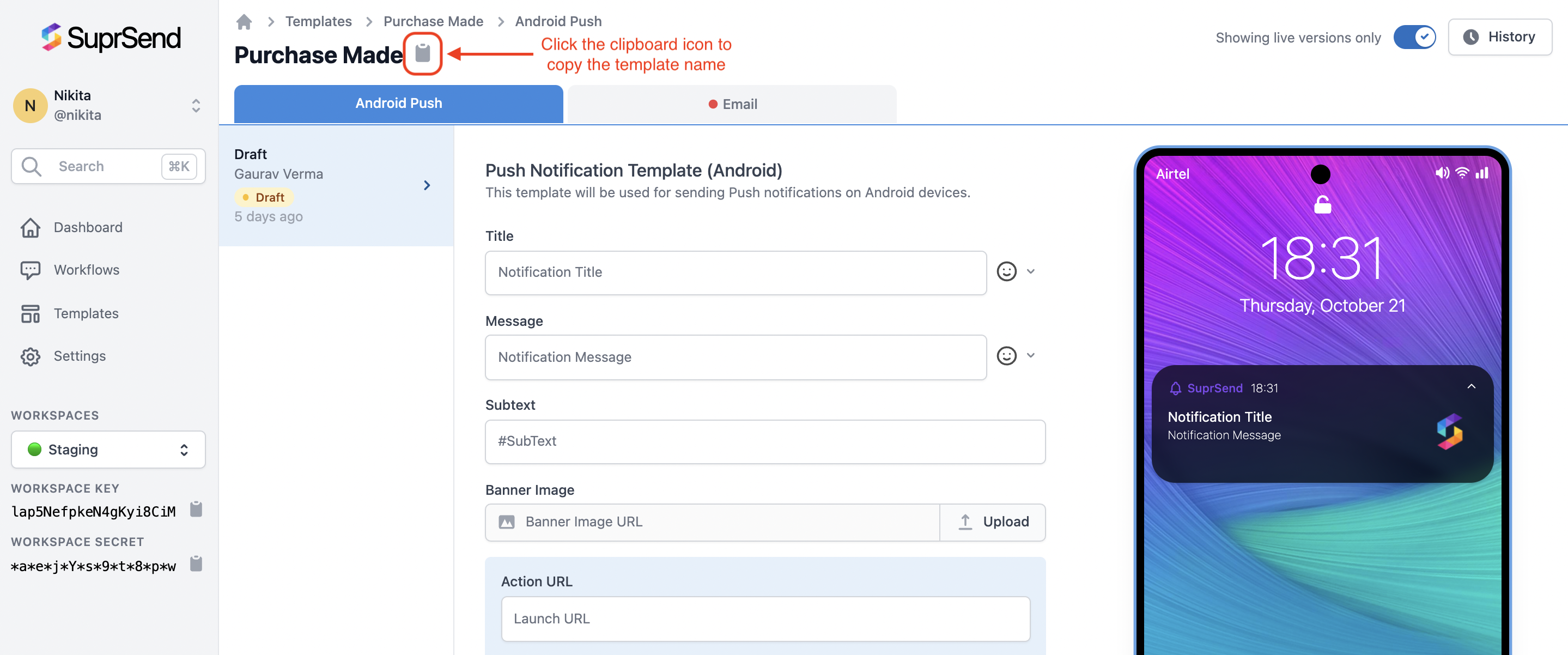
| **`template`** | It is the unique slug of the template created on the SuprSend platform. You can get this slug by clicking on the clipboard icon next to the Template name on the SuprSend templates page. It is the same for all channels. | **`slug name`** | *Mandatory* |
| **`notification_category`** | You can understand more about them in the [Preference Category](https://docs.suprsend.com/docs/notification-category) documentation. | `system / transactional / promotional` | *Mandatory* |
| **`delay`** | Workflow will be halted for the time mentioned in delay and becomes active once the delay period is over. | `**XX**d**XX**h**XX**m**XX**s` or if it's a number (`n`), then delay is in seconds (`n`). | *Optional* |
| **`trigger_at`** | Trigger workflow on a specific date-time. | Date string in ISO 8601 format for example `"2021-08-27T20:14:51.643Z"` | *Optional* |
| **`users`** | Array object of target users. At least 1 user mandatory.`distinct_id` for each user is mandatory. You can pass up to 100 entries in the users array. Channel information is non-mandatory. If you pass channel information here, then these channels will be used for sending notifications; otherwise, channels will be picked from the user profile. | `json"users": [ { "distinct_id": "value", "$channels": [], channel_information_dict #(optional) } ]` | *Mandatory* |
| **`delivery`** | Delivery instructions for the workflow. You can enable smart delivery by setting `"smart": True`.By default, the delivery instruction will be:`json"delivery": { "smart": False, "success": "seen" }`Further details are given in the [below section](https://docs.suprsend.com/docs/python-trigger-workflow-from-api#smart-delivery). | `json"delivery": { "smart": True/False, "success": "delivered/seen/interaction/", "time_to_live": "", "mandatory_channels": [] }` | *Optional* |
| **`data`** | JSON. To replace variables in the template, templates use the [`handlebars`](https://handlebarsjs.com/guide/) language. | `json "data": { "key": { "key": "value", "key": "value" } }` | *Optional* |
| **`brand_id`** | `Brand_id` of the tenant to trigger a notification on behalf of your tenants. | *string* | *Optional* |
| **`idempotency_key`** | Unique key in the request call for [idempotent requests](https://docs.suprsend.com/docs/python-trigger-workflow-from-api#idempotent-requests). | *string* | *Optional* |
**+CountryCode Required for SMS and Whatsapp:**
For setting `$sms` and `$whatsapp`, `+` is mandatory to send along with phone number. Eg: +1 for US
 #### Bulk API for triggering multiple workflows
Bulk API allows you to send multiple workflow requests in a single call. There isn't any limit on number-of-records that can be added to bulk\_workflows instance.
Use `.append()` on `bulk_workflows` instance to add however-many-records to call in bulk.
```python Request theme={"system"}
from suprsend import Workflow
bulk_ins = supr_client.bulk_workflows.new_instance()
# one or more workflow instances
workflow1 = Workflow(body={...}) # body must be a proper workflow request json/dict
workflow2 = Workflow(body={...}) # body must be a proper workflow request json/dict
# --- use .append on bulk instance to add one or more records
bulk_ins.append(workflow1)
bulk_ins.append(workflow2)
# OR
bulk_ins.append(workflow1, workflow2)
# -------
response = bulk_ins.trigger()
print(response)
```
```python Response theme={"system"}
{
status = "fail",
total = 10, # number of records sent in bulk
success = 0, # number of records succeeded
failure = 10, # number of records failed
failed_records = [{"record": {...}, "error": "error_str", "code": 500}]
}
```
***
#### Bulk API for triggering multiple workflows
Bulk API allows you to send multiple workflow requests in a single call. There isn't any limit on number-of-records that can be added to bulk\_workflows instance.
Use `.append()` on `bulk_workflows` instance to add however-many-records to call in bulk.
```python Request theme={"system"}
from suprsend import Workflow
bulk_ins = supr_client.bulk_workflows.new_instance()
# one or more workflow instances
workflow1 = Workflow(body={...}) # body must be a proper workflow request json/dict
workflow2 = Workflow(body={...}) # body must be a proper workflow request json/dict
# --- use .append on bulk instance to add one or more records
bulk_ins.append(workflow1)
bulk_ins.append(workflow2)
# OR
bulk_ins.append(workflow1, workflow2)
# -------
response = bulk_ins.trigger()
print(response)
```
```python Response theme={"system"}
{
status = "fail",
total = 10, # number of records sent in bulk
success = 0, # number of records succeeded
failure = 10, # number of records failed
failed_records = [{"record": {...}, "error": "error_str", "code": 500}]
}
```
***