> ## Documentation Index
> Fetch the complete documentation index at: https://docs.suprsend.com/llms.txt
> Use this file to discover all available pages before exploring further.
# iOS Push Setup
> Set up APNs iOS push notifications in your React Native app with capabilities, certificates, background modes, and SuprSend SDK token handling.
**Major Release (V 1.0.0)** 🚧
Starting from iOS version v1.0.0, we have introduced explicit push notification permission and option to add images in your notification. Also, introduced background mode for improved tracking of notification delivery.
If you are using an iOS version older than v1.0.0 and upgrading to the new version. Please ensure to use the latest integration steps, especially for below methods:
1. [Adding Background mode capability (point 3 of capabilities)](/docs/react-native-ios-push-integration)
2. [Calling registerPush method](/docs/react-native-ios-push-integration)
3. [Tracking delivery methods](/docs/react-native-ios-push-integration)
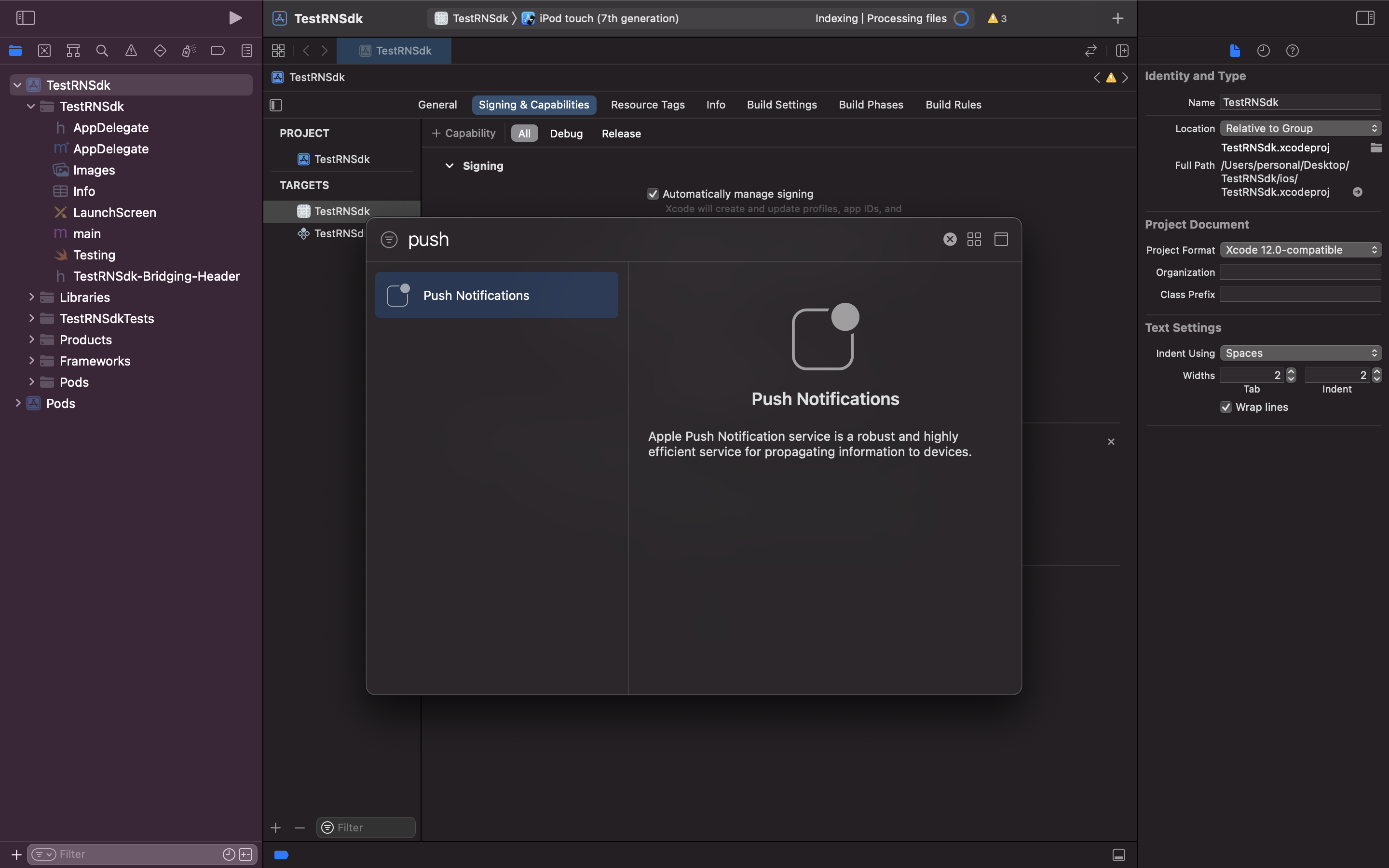
1. Inside Targets select **signing and capabilities**
2. Click on **+capabilities** and select **Push Notifications** and **Background Modes**
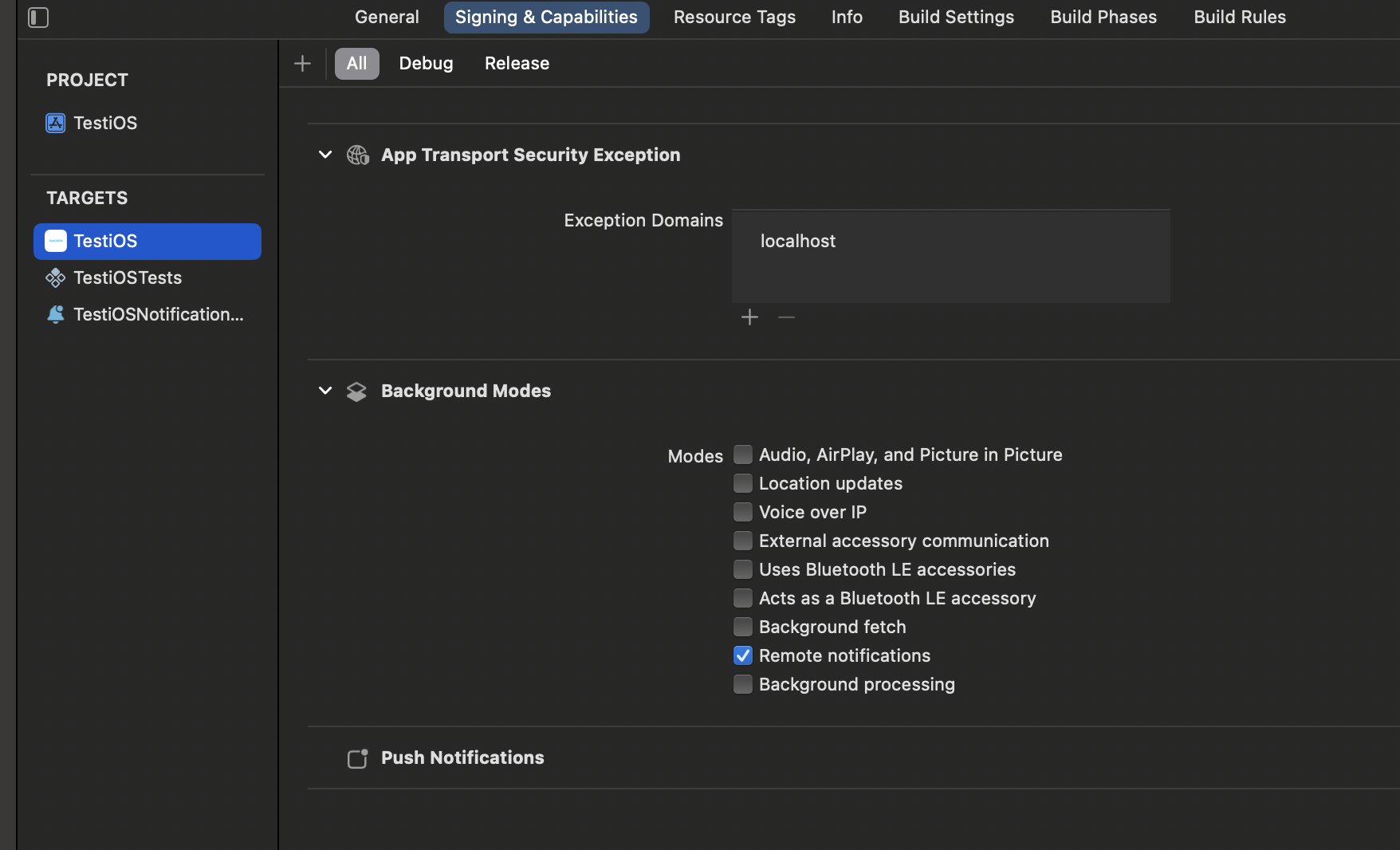
 In Background Modes, select Remote Notifications option. We use background notifications to receive delivery reports when your app is in quit and background state. Refer [doc](https://developer.apple.com/documentation/usernotifications/setting_up_a_remote_notification_server/pushing_background_updates_to_your_app) to know more about background notification
 Call *registerForPushNotifications* method below the SuprSend SDK initialised code which will register the iOS device for push service.
If you have AppDelegate.m file then make follow code changes given in AppDelegate.h and AppDelegate.m file. If you have AppDelegate.swift file then make follow code changes given in AppDelegate.swift file.
```objectivec AppDelegate.h theme={"system"}
#import // Add this
@interface AppDelegate : UIResponder // Add UNUserNotificationCenterDelegate in the already existing line
```
```objectivec AppDelegate.m theme={"system"}
#import // Add this
// ... existing code ...
[SuprSend.shared configureWithConfiguration:configuration launchOptions:launchOptions]; // init code which is already added at time of initialisation
UNAuthorizationOptions options = UNAuthorizationOptionAlert+UNAuthorizationOptionBadge+UNAuthorizationOptionSound; // Add this
[SuprSend.shared registerForPushNotificationsWithOptions:options]; // Add this
```
```swift AppDelegate.swift theme={"system"}
import UserNotifications // Add this
// extend AppDelegate with UNUserNotificationCenterDelegate
class AppDelegate: RCTAppDelegate, UNUserNotificationCenterDelegate {
override func application(_ application: UIApplication, didFinishLaunchingWithOptions launchOptions: [UIApplication.LaunchOptionsKey : Any]? = nil) -> Bool {
// ... existing code ...
SuprSend.shared.configureWith(configuration: suprSendConfiguration , launchOptions: launchOptions) // init code which is already added at time of initialisation
var options: UNAuthorizationOptions = [.badge, .alert, .sound] // Add this
SuprSend.shared.registerForPushNotifications(options: options) // Add this
}
}
```
There are 2 ways in which your app can prompt the users to allow push notifications on their device:
Explicit authorization allows you to display alerts, add a badge to the app icon, or play sounds whenever a notification is delivered. In this type of authorization, the request is made the first time user launches your app. If the user denies the request, you can't send subsequent prompts to send the notification.
Call *registerForPushNotifications* method below the SuprSend SDK initialised code which will register the iOS device for push service.
If you have AppDelegate.m file then make follow code changes given in AppDelegate.h and AppDelegate.m file. If you have AppDelegate.swift file then make follow code changes given in AppDelegate.swift file.
```objectivec AppDelegate.h theme={"system"}
#import // Add this
@interface AppDelegate : UIResponder // Add UNUserNotificationCenterDelegate in the already existing line
```
```objectivec AppDelegate.m theme={"system"}
#import // Add this
// ... existing code ...
[SuprSend.shared configureWithConfiguration:configuration launchOptions:launchOptions]; // init code which is already added at time of initialisation
UNAuthorizationOptions options = UNAuthorizationOptionAlert+UNAuthorizationOptionBadge+UNAuthorizationOptionSound; // Add this
[SuprSend.shared registerForPushNotificationsWithOptions:options]; // Add this
```
```swift AppDelegate.swift theme={"system"}
import UserNotifications // Add this
// extend AppDelegate with UNUserNotificationCenterDelegate
class AppDelegate: RCTAppDelegate, UNUserNotificationCenterDelegate {
override func application(_ application: UIApplication, didFinishLaunchingWithOptions launchOptions: [UIApplication.LaunchOptionsKey : Any]? = nil) -> Bool {
// ... existing code ...
SuprSend.shared.configureWith(configuration: suprSendConfiguration , launchOptions: launchOptions) // init code which is already added at time of initialisation
var options: UNAuthorizationOptions = [.badge, .alert, .sound] // Add this
SuprSend.shared.registerForPushNotifications(options: options) // Add this
}
}
```
There are 2 ways in which your app can prompt the users to allow push notifications on their device:
Explicit authorization allows you to display alerts, add a badge to the app icon, or play sounds whenever a notification is delivered. In this type of authorization, the request is made the first time user launches your app. If the user denies the request, you can't send subsequent prompts to send the notification.
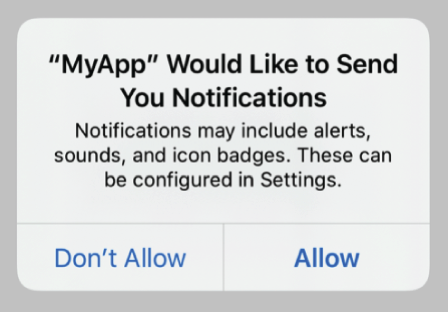 Explicit authorization is our default authorization method as it automatically sets alert, sound and badge as soon as the user allows this request.
Provisional notifications are sent quietly to the users -they don’t interrupt the user with a sound or banner. Also, they will not be shown when your app is in foreground. First time this type of notifications are sent, user is asked to "Keep" or "Turn off" the notifications. If they click on "Keep", the further notifications continue to be sent
Explicit authorization is our default authorization method as it automatically sets alert, sound and badge as soon as the user allows this request.
Provisional notifications are sent quietly to the users -they don’t interrupt the user with a sound or banner. Also, they will not be shown when your app is in foreground. First time this type of notifications are sent, user is asked to "Keep" or "Turn off" the notifications. If they click on "Keep", the further notifications continue to be sent
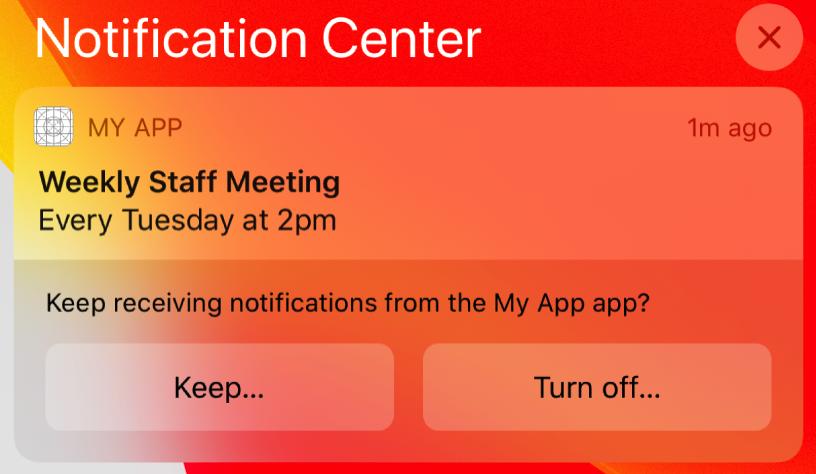 Add below code in `AppDelegate` file for provisional authorization.
```objectivec AppDelegate.m theme={"system"}
[SuprSend.shared configureWithConfiguration:configuration launchOptions:launchOptions]; // init code which is already added at time of initialisation
UNAuthorizationOptions options = UNAuthorizationOptionAlert+UNAuthorizationOptionBadge+UNAuthorizationOptionSound; // Add this
if (@available(iOS 12.0, *)) {
options = options | UNAuthorizationOptionProvisional;
}
[SuprSend.shared registerForPushNotificationsWithOptions:options]; // Add this
```
```swift AppDelegate.swift theme={"system"}
SuprSend.shared.configureWith(configuration: suprSendConfiguration , launchOptions: launchOptions) // init code which is already added at time of initialisation
var options: UNAuthorizationOptions = [.badge, .alert, .sound]
// If you want to use provisional authorization
if #available(iOS 12.0, *) {
options = [.badge, .alert, .sound, .provisional]
}
SuprSend.shared.registerForPushNotifications(options: options)
```
To enable sending iOS APNS token to SuprSend backend, delivery and tracking of push notification delivery/clicks/dismiss events, add below 4 methods in **AppDelegate file** after last existing method.
```objectivec AppDelegate.m theme={"system"}
- (void)application:(UIApplication *)application didRegisterForRemoteNotificationsWithDeviceToken:(NSData *)deviceToken {
NSUInteger dataLength = deviceToken.length;
if (dataLength == 0) {
return;
}
const unsigned char *dataBuffer = (const unsigned char *)deviceToken.bytes;
NSMutableString *hexString = [NSMutableString stringWithCapacity:(dataLength * 2)];
for (int i = 0; i < dataLength; ++i) {
[hexString appendFormat:@"%02x", dataBuffer[i]];
}
[SuprSend.shared setPushNotificationTokenWithToken:hexString];
}
- (void)userNotificationCenter:(UNUserNotificationCenter *)center willPresentNotification:(UNNotification *)notification withCompletionHandler:(void (^)(UNNotificationPresentationOptions options))completionHandler{
if (@available(iOS 14.0, *)) {
completionHandler(UNAuthorizationOptionSound | UNNotificationPresentationOptionBanner | UNAuthorizationOptionBadge);
} else {
completionHandler(UNAuthorizationOptionSound | UNAuthorizationOptionAlert | UNAuthorizationOptionBadge);
}
}
- (void)application:(UIApplication *)application didReceiveRemoteNotification:(NSDictionary *)userInfo fetchCompletionHandler:(void (^)(UIBackgroundFetchResult result))completionHandler API_AVAILABLE(ios(7.0)){
[SuprSend.shared application:application didReceiveRemoteNotification:userInfo];
completionHandler(UIBackgroundFetchResultNewData);
}
- (void)userNotificationCenter:(UNUserNotificationCenter *)center didReceiveNotificationResponse:(UNNotificationResponse *)response withCompletionHandler:(void(^)(void))completionHandler{
if ([response isSuprSendNotification]) {
[SuprSend.shared userNotificationCenter:center didReceive:response];
}
completionHandler();
}
@end // before this line
```
```swift AppDelegate.swift theme={"system"}
override func application(_ application: UIApplication, didRegisterForRemoteNotificationsWithDeviceToken deviceToken: Data) {
let tokenParts = deviceToken.map { data in String(format: "%02.2hhx", data) }
let token = tokenParts.joined()
SuprSend.shared.setPushNotificationToken(token: token) // Send APNS Token to SuprSend
}
@available(iOS 10.0, *)
func userNotificationCenter(
_ center: UNUserNotificationCenter,
didReceive response: UNNotificationResponse,
withCompletionHandler completionHandler: @escaping () -> Void
) {
if response.isSuprSendNotification() {
SuprSend.shared.userNotificationCenter(center, didReceive: response)
}
completionHandler()
}
override func application(_ application: UIApplication, didReceiveRemoteNotification userInfo: [AnyHashable : Any]){
SuprSend.shared.application(application, didReceiveRemoteNotification: userInfo)
}
@available(iOS 10.0, *)
func userNotificationCenter(_ center: UNUserNotificationCenter, willPresent notification: UNNotification, withCompletionHandler completionHandler: @escaping (UNNotificationPresentationOptions) -> Void) {
if #available(iOS 14.0, *) {
completionHandler([.banner, .badge, .sound])
} else {
completionHandler([.alert, .badge, .sound])
}
}
```
iOS Push notifications only work on real devices so while developing/testing use real device to test it instead of simulators
For better notification status (delivered, seen) tracking this step is needed.
1. In Xcode go to **File > New > Target**.
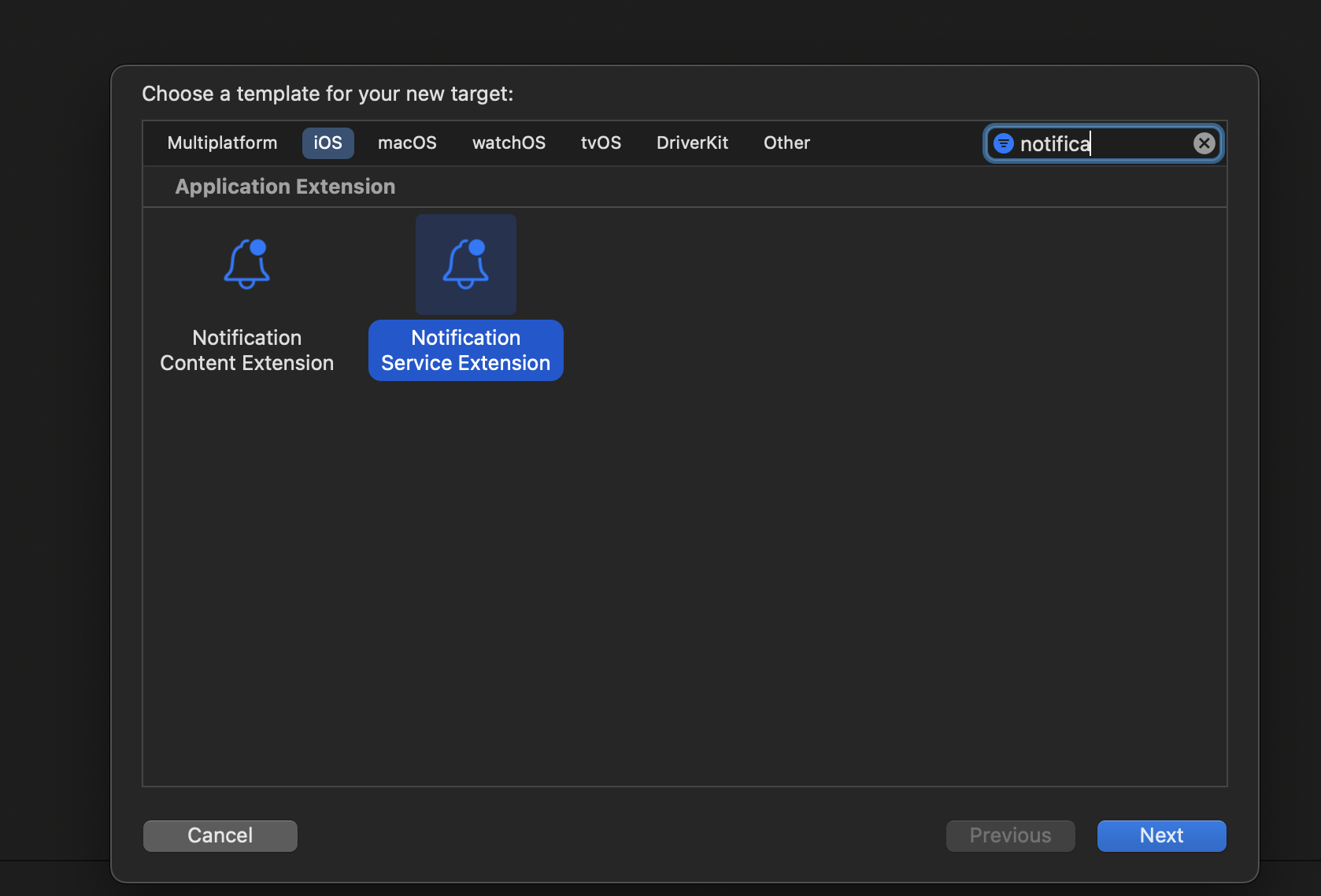
2. Select Notification Service Extension from the template list.
3. Then in Next popup give it any product name, select your team, select swift language and click finish.
Add below code in `AppDelegate` file for provisional authorization.
```objectivec AppDelegate.m theme={"system"}
[SuprSend.shared configureWithConfiguration:configuration launchOptions:launchOptions]; // init code which is already added at time of initialisation
UNAuthorizationOptions options = UNAuthorizationOptionAlert+UNAuthorizationOptionBadge+UNAuthorizationOptionSound; // Add this
if (@available(iOS 12.0, *)) {
options = options | UNAuthorizationOptionProvisional;
}
[SuprSend.shared registerForPushNotificationsWithOptions:options]; // Add this
```
```swift AppDelegate.swift theme={"system"}
SuprSend.shared.configureWith(configuration: suprSendConfiguration , launchOptions: launchOptions) // init code which is already added at time of initialisation
var options: UNAuthorizationOptions = [.badge, .alert, .sound]
// If you want to use provisional authorization
if #available(iOS 12.0, *) {
options = [.badge, .alert, .sound, .provisional]
}
SuprSend.shared.registerForPushNotifications(options: options)
```
To enable sending iOS APNS token to SuprSend backend, delivery and tracking of push notification delivery/clicks/dismiss events, add below 4 methods in **AppDelegate file** after last existing method.
```objectivec AppDelegate.m theme={"system"}
- (void)application:(UIApplication *)application didRegisterForRemoteNotificationsWithDeviceToken:(NSData *)deviceToken {
NSUInteger dataLength = deviceToken.length;
if (dataLength == 0) {
return;
}
const unsigned char *dataBuffer = (const unsigned char *)deviceToken.bytes;
NSMutableString *hexString = [NSMutableString stringWithCapacity:(dataLength * 2)];
for (int i = 0; i < dataLength; ++i) {
[hexString appendFormat:@"%02x", dataBuffer[i]];
}
[SuprSend.shared setPushNotificationTokenWithToken:hexString];
}
- (void)userNotificationCenter:(UNUserNotificationCenter *)center willPresentNotification:(UNNotification *)notification withCompletionHandler:(void (^)(UNNotificationPresentationOptions options))completionHandler{
if (@available(iOS 14.0, *)) {
completionHandler(UNAuthorizationOptionSound | UNNotificationPresentationOptionBanner | UNAuthorizationOptionBadge);
} else {
completionHandler(UNAuthorizationOptionSound | UNAuthorizationOptionAlert | UNAuthorizationOptionBadge);
}
}
- (void)application:(UIApplication *)application didReceiveRemoteNotification:(NSDictionary *)userInfo fetchCompletionHandler:(void (^)(UIBackgroundFetchResult result))completionHandler API_AVAILABLE(ios(7.0)){
[SuprSend.shared application:application didReceiveRemoteNotification:userInfo];
completionHandler(UIBackgroundFetchResultNewData);
}
- (void)userNotificationCenter:(UNUserNotificationCenter *)center didReceiveNotificationResponse:(UNNotificationResponse *)response withCompletionHandler:(void(^)(void))completionHandler{
if ([response isSuprSendNotification]) {
[SuprSend.shared userNotificationCenter:center didReceive:response];
}
completionHandler();
}
@end // before this line
```
```swift AppDelegate.swift theme={"system"}
override func application(_ application: UIApplication, didRegisterForRemoteNotificationsWithDeviceToken deviceToken: Data) {
let tokenParts = deviceToken.map { data in String(format: "%02.2hhx", data) }
let token = tokenParts.joined()
SuprSend.shared.setPushNotificationToken(token: token) // Send APNS Token to SuprSend
}
@available(iOS 10.0, *)
func userNotificationCenter(
_ center: UNUserNotificationCenter,
didReceive response: UNNotificationResponse,
withCompletionHandler completionHandler: @escaping () -> Void
) {
if response.isSuprSendNotification() {
SuprSend.shared.userNotificationCenter(center, didReceive: response)
}
completionHandler()
}
override func application(_ application: UIApplication, didReceiveRemoteNotification userInfo: [AnyHashable : Any]){
SuprSend.shared.application(application, didReceiveRemoteNotification: userInfo)
}
@available(iOS 10.0, *)
func userNotificationCenter(_ center: UNUserNotificationCenter, willPresent notification: UNNotification, withCompletionHandler completionHandler: @escaping (UNNotificationPresentationOptions) -> Void) {
if #available(iOS 14.0, *) {
completionHandler([.banner, .badge, .sound])
} else {
completionHandler([.alert, .badge, .sound])
}
}
```
iOS Push notifications only work on real devices so while developing/testing use real device to test it instead of simulators
For better notification status (delivered, seen) tracking this step is needed.
1. In Xcode go to **File > New > Target**.
2. Select Notification Service Extension from the template list.
3. Then in Next popup give it any product name, select your team, select swift language and click finish.
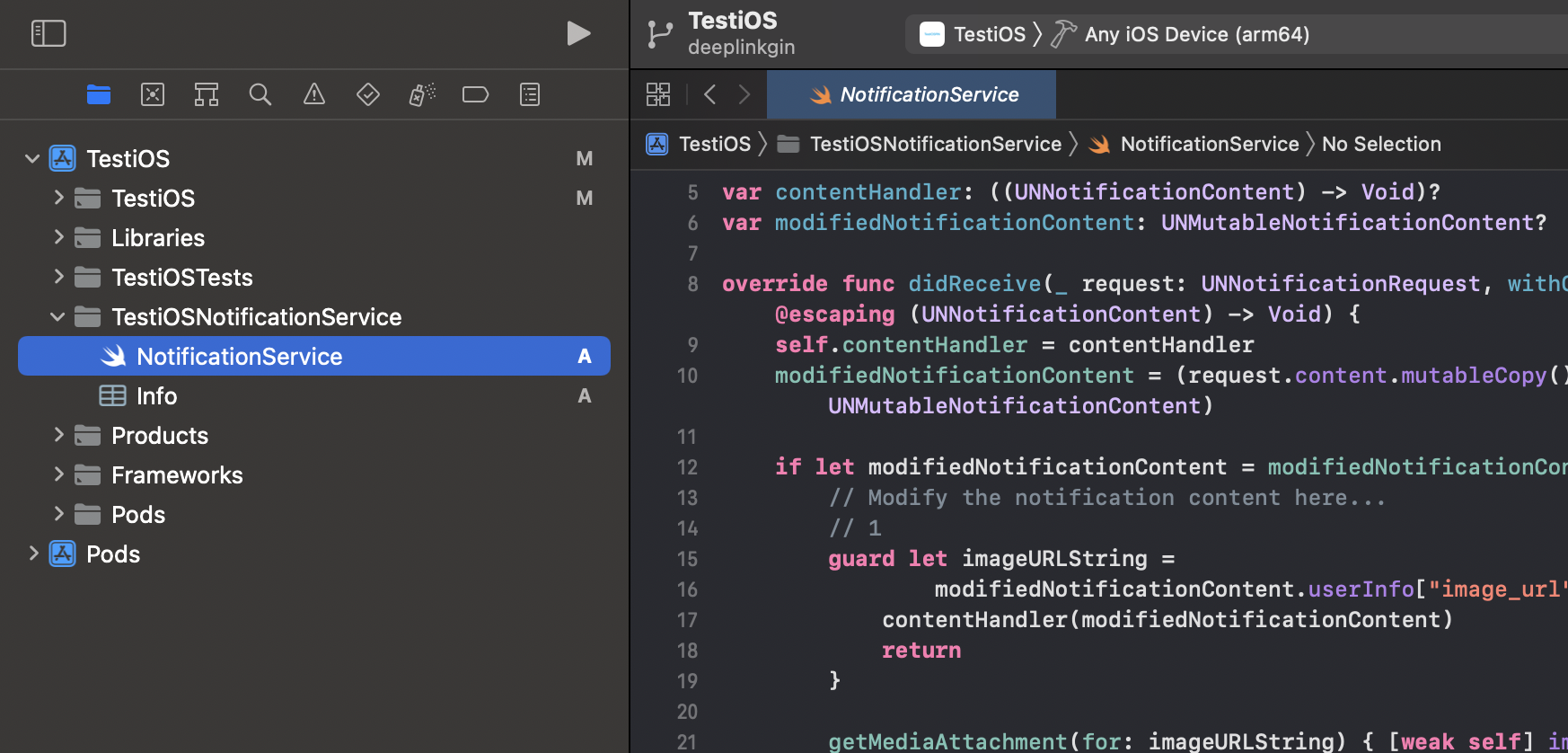
 After clicking on "Finish", a folder will be created with your given product name. Inside that there will be **NotificationService.swift** file like below.
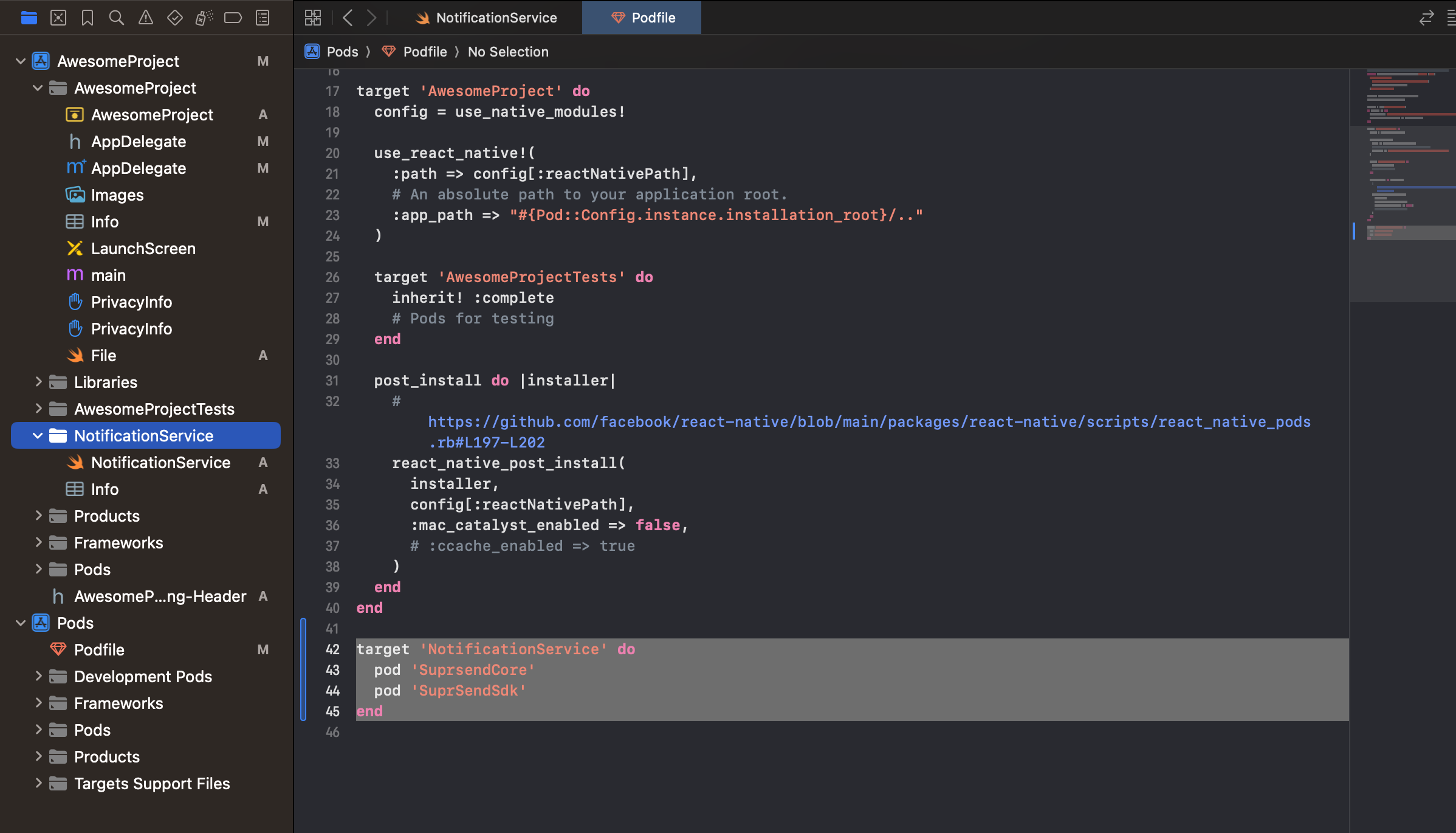
 In your project podFile add following snippet at the end of existing code like shown in image. Replace **\** with name you given to notification service while creating it. After that Run `pod install`.
```yaml podFile theme={"system"}
target '' do
pod 'SuprsendCore'
pod 'SuprSendSdk'
end
```
In your project podFile add following snippet at the end of existing code like shown in image. Replace **\** with name you given to notification service while creating it. After that Run `pod install`.
```yaml podFile theme={"system"}
target '' do
pod 'SuprsendCore'
pod 'SuprSendSdk'
end
```
 Replace the content in **NotificationService.swift** file with below code. In this snippet on line 11, 12 replace values with your workspace key and workspace secret.
```swift NotificationService.swift theme={"system"}
import UserNotifications
import UIKit
class NotificationService: UNNotificationServiceExtension {
var contentHandler: ((UNNotificationContent) -> Void)?
var modifiedNotificationContent: UNMutableNotificationContent?
private func track(request: UNNotificationRequest, withContentHandler contentHandler: @escaping (UNNotificationContent) -> Void) {
let suprSendConfiguration = SuprSendSDKConfiguration(
withKey: "your workspace key",
secret: "your workspace secret"
)
SuprSend.shared.configureWith(configuration: suprSendConfiguration , launchOptions: [:])
SuprSend.shared.didReceive(request, withContentHandler: contentHandler)
}
override func didReceive(_ request: UNNotificationRequest, withContentHandler contentHandler: @escaping (UNNotificationContent) -> Void) {
self.contentHandler = contentHandler
modifiedNotificationContent = (request.content.mutableCopy() as? UNMutableNotificationContent)
track(request: request, withContentHandler: contentHandler)
if let modifiedNotificationContent = modifiedNotificationContent {
// Modify the notification content here...
// 1
guard let imageURLString =
modifiedNotificationContent.userInfo["image_url"] as? String else {
contentHandler(modifiedNotificationContent)
return
}
getMediaAttachment(for: imageURLString) { [weak self] image in
guard let self = self, let image = image, let fileURL = self.saveImageAttachment(
image: image,
forIdentifier: "attachment.png")
else {
contentHandler(modifiedNotificationContent)
return
}
let imageAttachment = try? UNNotificationAttachment(
identifier: "image",
url: fileURL,
options: nil)
if let imageAttachment = imageAttachment {
modifiedNotificationContent.attachments = [imageAttachment]
}
contentHandler(modifiedNotificationContent)
}
}
}
override func serviceExtensionTimeWillExpire() {
// Called just before the extension will be terminated by the system.
// Use this as an opportunity to deliver your "best attempt" at modified content, otherwise the original push payload will be used.
if let contentHandler = contentHandler, let bestAttemptContent = modifiedNotificationContent {
contentHandler(bestAttemptContent)
}
}
}
extension NotificationService {
private func saveImageAttachment(image: UIImage, forIdentifier identifier: String
) -> URL? {
let tempDirectory = URL(fileURLWithPath: NSTemporaryDirectory())
let directoryPath = tempDirectory.appendingPathComponent(
ProcessInfo.processInfo.globallyUniqueString,
isDirectory: true)
do {
try FileManager.default.createDirectory(
at: directoryPath,
withIntermediateDirectories: true,
attributes: nil)
let fileURL = directoryPath.appendingPathComponent(identifier)
guard let imageData = image.pngData() else {
return nil
}
try imageData.write(to: fileURL)
return fileURL
} catch {
return nil
}
}
private func getMediaAttachment(for urlString: String, completion: @escaping (UIImage?) -> Void
) {
// 1
guard let url = URL(string: urlString) else {
completion(nil)
return
}
let task = URLSession.shared.dataTask(with: url) { data, response, error in
if error != nil {
completion(nil)
return
}
guard let data = data else {
completion(nil)
return
}
guard let image = UIImage(data: data) else {
completion(nil)
return
}
completion(image)
}
task.resume()
}
}
```
You are now all set to send push notifications. All you have to do is add [iOS vendor configuration](/docs/ios-push-vendor-integration) on SuprSend dashboard and your push notifications will be configured. Please refer [vendor integration guide](/docs/ios-push-vendor-integration) to integrate your apns push service
***
Replace the content in **NotificationService.swift** file with below code. In this snippet on line 11, 12 replace values with your workspace key and workspace secret.
```swift NotificationService.swift theme={"system"}
import UserNotifications
import UIKit
class NotificationService: UNNotificationServiceExtension {
var contentHandler: ((UNNotificationContent) -> Void)?
var modifiedNotificationContent: UNMutableNotificationContent?
private func track(request: UNNotificationRequest, withContentHandler contentHandler: @escaping (UNNotificationContent) -> Void) {
let suprSendConfiguration = SuprSendSDKConfiguration(
withKey: "your workspace key",
secret: "your workspace secret"
)
SuprSend.shared.configureWith(configuration: suprSendConfiguration , launchOptions: [:])
SuprSend.shared.didReceive(request, withContentHandler: contentHandler)
}
override func didReceive(_ request: UNNotificationRequest, withContentHandler contentHandler: @escaping (UNNotificationContent) -> Void) {
self.contentHandler = contentHandler
modifiedNotificationContent = (request.content.mutableCopy() as? UNMutableNotificationContent)
track(request: request, withContentHandler: contentHandler)
if let modifiedNotificationContent = modifiedNotificationContent {
// Modify the notification content here...
// 1
guard let imageURLString =
modifiedNotificationContent.userInfo["image_url"] as? String else {
contentHandler(modifiedNotificationContent)
return
}
getMediaAttachment(for: imageURLString) { [weak self] image in
guard let self = self, let image = image, let fileURL = self.saveImageAttachment(
image: image,
forIdentifier: "attachment.png")
else {
contentHandler(modifiedNotificationContent)
return
}
let imageAttachment = try? UNNotificationAttachment(
identifier: "image",
url: fileURL,
options: nil)
if let imageAttachment = imageAttachment {
modifiedNotificationContent.attachments = [imageAttachment]
}
contentHandler(modifiedNotificationContent)
}
}
}
override func serviceExtensionTimeWillExpire() {
// Called just before the extension will be terminated by the system.
// Use this as an opportunity to deliver your "best attempt" at modified content, otherwise the original push payload will be used.
if let contentHandler = contentHandler, let bestAttemptContent = modifiedNotificationContent {
contentHandler(bestAttemptContent)
}
}
}
extension NotificationService {
private func saveImageAttachment(image: UIImage, forIdentifier identifier: String
) -> URL? {
let tempDirectory = URL(fileURLWithPath: NSTemporaryDirectory())
let directoryPath = tempDirectory.appendingPathComponent(
ProcessInfo.processInfo.globallyUniqueString,
isDirectory: true)
do {
try FileManager.default.createDirectory(
at: directoryPath,
withIntermediateDirectories: true,
attributes: nil)
let fileURL = directoryPath.appendingPathComponent(identifier)
guard let imageData = image.pngData() else {
return nil
}
try imageData.write(to: fileURL)
return fileURL
} catch {
return nil
}
}
private func getMediaAttachment(for urlString: String, completion: @escaping (UIImage?) -> Void
) {
// 1
guard let url = URL(string: urlString) else {
completion(nil)
return
}
let task = URLSession.shared.dataTask(with: url) { data, response, error in
if error != nil {
completion(nil)
return
}
guard let data = data else {
completion(nil)
return
}
guard let image = UIImage(data: data) else {
completion(nil)
return
}
completion(image)
}
task.resume()
}
}
```
You are now all set to send push notifications. All you have to do is add [iOS vendor configuration](/docs/ios-push-vendor-integration) on SuprSend dashboard and your push notifications will be configured. Please refer [vendor integration guide](/docs/ios-push-vendor-integration) to integrate your apns push service
***