> ## Documentation Index
> Fetch the complete documentation index at: https://docs.suprsend.com/llms.txt
> Use this file to discover all available pages before exploring further.
# Introduction
> Deploy SuprSend on your own infrastructure to gain full control over data, networking, and scaling - while maintaining the same feature set as SuprSend Cloud.
Self-hosted deployment is supported under the Enterprise plan and is enabled via an enterprise license. Contact our sales team at [sales@suprsend.com](mailto:sales@suprsend.com) or reach out to our enterprise support team at [support@suprsend.com](mailto:support@suprsend.com) to get the license.
SuprSend’s **Self-Hosted** mode allows enterprises to deploy the full notification infrastructure within their own VPC or on-prem environment, ensuring data sovereignty, compliance, and custom integration flexibility.
It mirrors SuprSend’s cloud capabilities - including multi-channel delivery, preferences management, and workflow automation - but gives customers ownership of both the control plane and the data plane.
## When to Choose Self-Hosted
Self-hosting SuprSend is ideal for teams that need:
* Data residency or privacy compliance (GDPR, HIPAA, or enterprise IT policies)
* Integration with private systems (internal CRM, ERP, or on-prem alerting tools)
* Custom delivery infra (for example, using private SMTP, SMS gateways, or Kafka)
* Air-gapped or restricted network environments
* Scalability control for high-volume workloads (millions of events/day)
If you prefer a managed experience - automatic scaling, uptime SLAs, and managed upgrades - consider [SuprSend Cloud](https://app.suprsend.com/en/login).
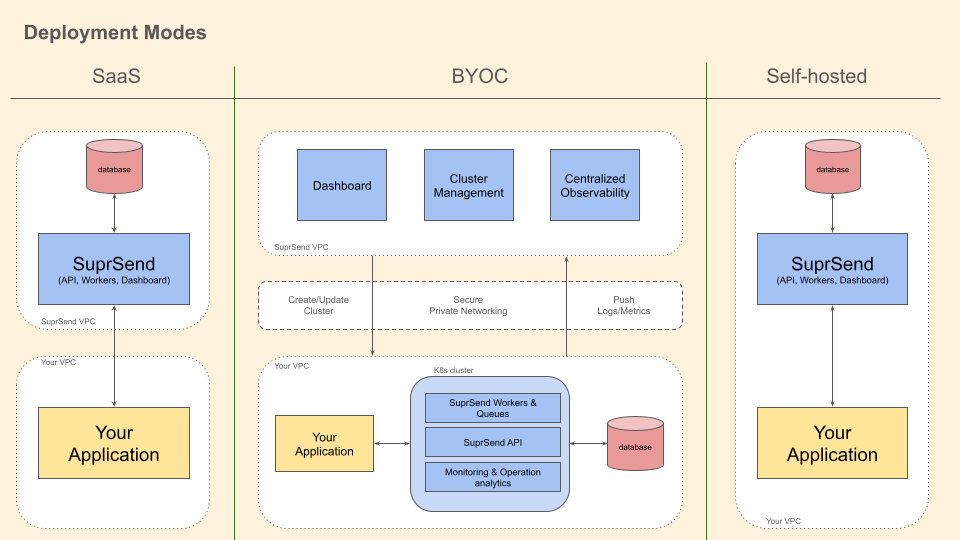
## Deployment Modes
SuprSend offers three deployment models:
| Attribute | SaaS | BYOC (Bring Your Own Cloud) | Self-Hosted |
| ----------------- | --------------------------- | --------------------------- | ----------------------------- |
| **Data Plane** | SuprSend | Customer | Customer |
| **Control Plane** | SuprSend | SuprSend | Customer |
| **Ease of Use** | Easiest - no setup required | Moderate setup | Complex setup & maintenance |
| **Scalability** | Managed by SuprSend | Scales via SuprSend app | Customer managed |
| **Maintenance** | Fully managed | Shared responsibility | Fully customer responsibility |
| **SLA** | ✅ Available | ❌ Not available | ❌ Not available |
In the Self-Hosted model, both the control plane and data plane are operated by the customer - ensuring complete isolation of data and operations
## Architecture
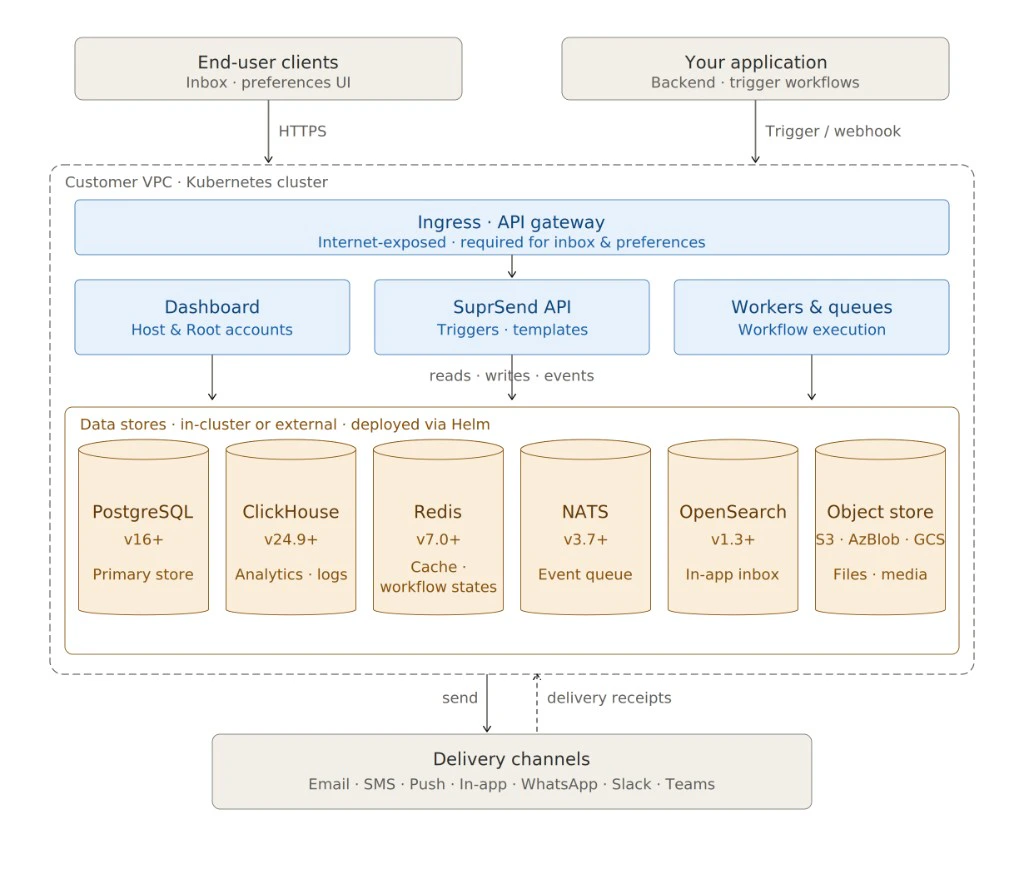
### High-Level Components
| Component | Description |
| ---------------- | -------------------------------------------------------------------------------------------------------------------------------------------------------------------------------------------------------------------------------------------------------------------- |
| SuprSend API | Core API gateway for receiving workflow triggers, managing templates, and handling user preferences. |
| Workers & Queues | Distributed background processors for executing notification workflows, handling retries, and managing delivery logic. |
| Dashboard | Web-based management interface for configuration, analytics, and debugging. You’ll access two dashboards - a Host Account (for internal product alerts) and a Root Account (for configuring customer-facing notifications). |
| PostgreSQL | Primary data store for users, templates, workflows, and notifications. |
| ClickHouse | Secondary data store to power analytics and logs. |
| Redis | Cache and transient state management layer. You’ll operate two Redis stores (both external) - one shared across all services and one dedicated to workflow state management. This separation ensures delays in any shared service do not affect workflow executions. |
| NATS | Message queue for scalable event ingestion. |
| OpenSearch | For powering In-app notifications |
SuprSend supports both single-cluster and multi-cluster topologies, depending on your scale and SLA requirements. You can run the entire system within your Kubernetes cluster, or keep stateful services (Postgres, Redis, ClickHouse) managed externally for better performance and resilience.
## System Requirements
All dependencies are open-source under permissible licenses:
| Component | Version | Recommended Deployment |
| --------------------- | ------- | ---------------------------------------------- |
| Kubernetes | v1.29+ | Required for orchestration |
| PostgreSQL | v16+ | Outside Kubernetes |
| ClickHouse | v24.9+ | Outside Kubernetes |
| Redis | v7.0+ | Dedicated deployment preferred |
| NATS | v3.7+ | Dedicated or in-cluster |
| OpenSearch (optional) | v1.3+ | For search/log indexing |
| SuprSend API Gateway | - | Must be Internet-exposed for Inbox/Preferences |
For best performance, deploy databases and queues outside the Kubernetes cluster.
## Networking & Observability
* **Secure Private Networking**: Self-hosted deployment supports secure private interconnects between SuprSend API, workers, and customer VPC.
* **Centralized Observability**: Logs and metrics can be pushed to your existing monitoring stack (for example, Prometheus, Grafana).
* **Cluster Management**: You can create, update, and monitor clusters using the SuprSend CLI or Terraform provider
## Promotion & Automation
You can install [SuprSend CLI](/reference/cli-intro) to promote assets and automate your deployment process in CI/CD pipeline. To connect the CLI to your self-hosted or BYOC deployment, see [Setting Up CLI Access](/docs/self-hosted/cli-profiles).
## Release Lifecycle & Versioning
* Stable Releases: Published every quarter.
* Patch Releases: Security or bug-fix updates.
* Version Format: vX.Y.Z (Semantic Versioning).
* Upgrade Policy: Minor versions are upgrade-safe; major versions may introduce migrations.
You can track all releases in [Self Hosted Changelog](/docs/self-hosted/changelog).