> ## Documentation Index
> Fetch the complete documentation index at: https://docs.suprsend.com/llms.txt
> Use this file to discover all available pages before exploring further.
# Managing Tenants
> Create, update, view, and delete tenants in SuprSend using the dashboard, MCP server, or backend SDK code, with examples and tenant property reference.
## Creating a Tenant
With the [SuprSend MCP server](/reference/mcp-overview) configured in your AI assistant (Claude, Cursor, etc.), just pass a simple prompt to create tenant:
```text theme={"system"}
Create a tenant in staging workspace for my company with ID - ``, pick name, logo, colors and social links from my website - ``
```
The MCP server calls the `upsert_suprsend_tenant` tool under the hood to create the tenant.
```curl curl theme={"system"}
curl --request POST \
--url https://hub.suprsend.com/v1/tenant/acme-corp \
--header 'Authorization: Bearer __api_key__' \
--header 'accept: application/json' \
--header 'content-type: application/json' \
--data '{
"tenant_name": "Acme Corp",
"logo": "https://acme.com/logo.png",
"primary_color": "#0055ff",
"social_links": {
"website": "https://acme.com"
}
}'
```
```python Python theme={"system"}
from suprsend import Suprsend
supr_client = Suprsend("workspace_key", "workspace_secret")
response = supr_client.tenants.upsert("acme-corp", {
"tenant_name": "Acme Corp",
"logo": "https://acme.com/logo.png",
"primary_color": "#0055ff",
"social_links": {
"website": "https://acme.com"
}
})
print(response)
```
```javascript Node.js theme={"system"}
const { Suprsend } = require("@suprsend/node-sdk");
const supr_client = new Suprsend("workspace_key", "workspace_secret");
const response = supr_client.tenants.upsert("acme-corp", {
tenant_name: "Acme Corp",
logo: "https://acme.com/logo.png",
primary_color: "#0055ff",
social_links: {
website: "https://acme.com"
}
});
response.then((res) => console.log(res));
```
```java Java theme={"system"}
import org.json.JSONObject;
import suprsend.Suprsend;
import suprsend.SuprsendAPIException;
Suprsend suprsendClient = new Suprsend("workspace_key", "workspace_secret");
JSONObject payload = new JSONObject()
.put("tenant_name", "Acme Corp")
.put("logo", "https://acme.com/logo.png")
.put("primary_color", "#0055ff")
.put("social_links", new JSONObject()
.put("website", "https://acme.com")
)
;
JSONObject response = suprsendClient.tenants.upsert("acme-corp", payload);
System.out.println(response);
```
```go Go theme={"system"}
suprClient, _ := suprsend.NewClient("workspace_key", "workspace_secret")
tenantPayload := &suprsend.Tenant{
TenantName: suprsend.String("Acme Corp"),
Logo: suprsend.String("https://acme.com/logo.png"),
PrimaryColor: suprsend.String("#0055ff"),
}
res, err := suprClient.Tenants.Upsert(context.Background(), "acme-corp", tenantPayload)
if err != nil {
log.Fatalln(err)
}
log.Println(res)
```
`upsert` creates the tenant if it doesn't exist, or updates it if it does. The Tenant ID cannot be changed after creation.
Select **Tenants** tab from the side navigation and click on **New Tenant**.
Enter a **Tenant ID**, generally the customer ID from your system and a **Tenant Name**, generally the company name, then confirm.
 On the tenant details page, set the logo, colors, social links, or other properties (address, paid/free) that you might need in your template or workflow for customization.
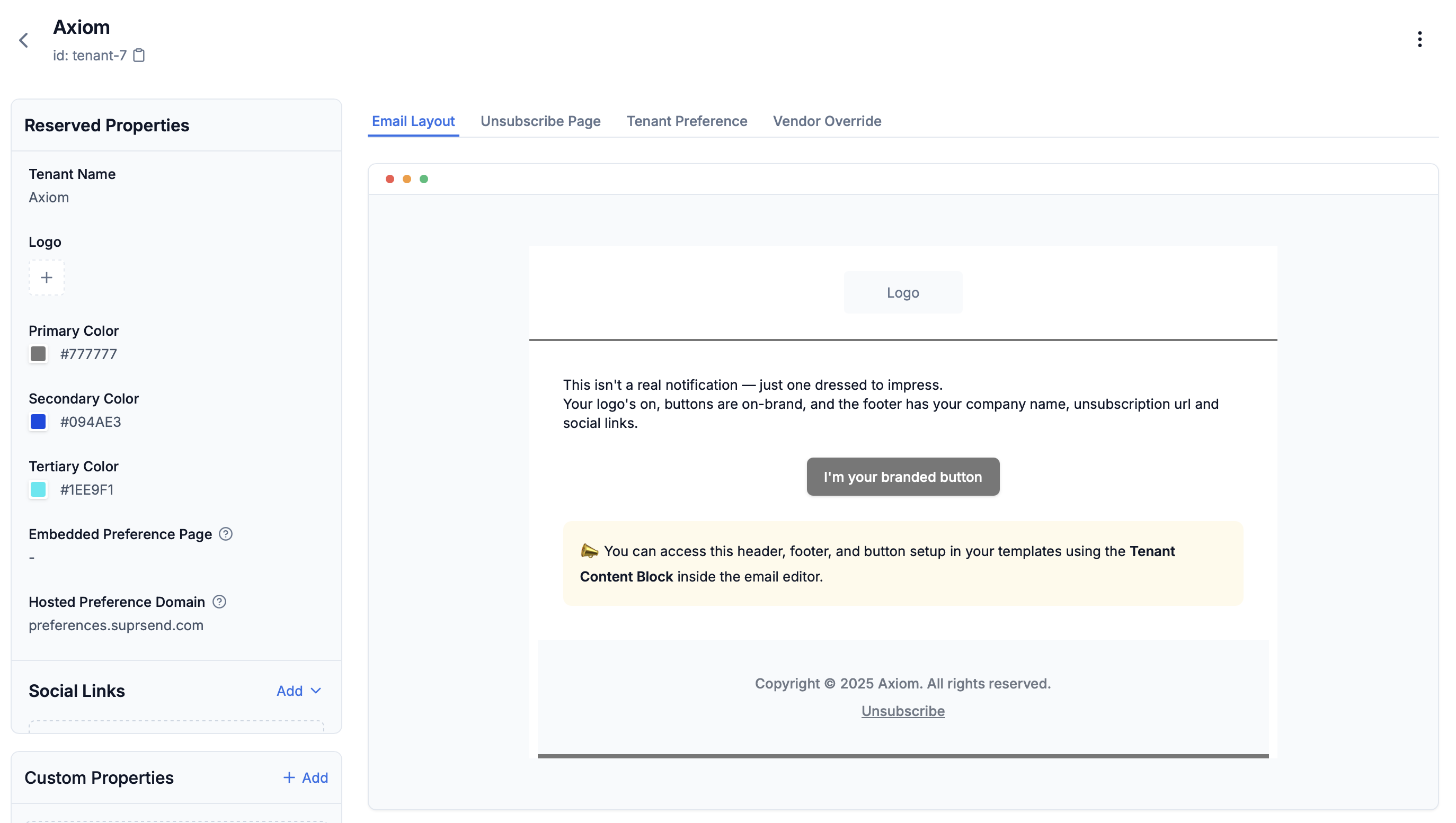 ***
### Tenant Properties
| Field | Type | Description | Variable Syntax |
| ---------------------------- | ----------------------------- | ------------------------------------------------------------------------------------------------------------------------------------------------------------------ | -------------------------------------------------------------------------------------------------- |
| **Tenant ID** | string (max 64 chars) | Unique identifier. Allowed: lowercase letters, numbers, hyphens, underscores (`[a-z0-9_-]`). Map to customer ID from your system. Cannot be changed after creation | |
| **Tenant Name** | string | Company or organization name | `$tenant.brand_name` (in workflow) / `$brand.brand_name` (in template) |
| **Logo** | image url (.png, .jpg, .jpeg) | Logo displayed in email header | `$tenant.logo` (in workflow) / `$brand.logo` (in template) |
| **Primary Color** | hex code | Used in buttons, headers, footer borders. Must be HEX values (for example, #ff0000). Falls back to default if not set | `$tenant.primary_color` (in workflow) / `$brand.primary_color` (in template) |
| **Secondary Color** | hex code | Additional color for customization. Must be HEX values (for example, #ff0000) | `$tenant.secondary_color` (in workflow) / `$brand.secondary_color` (in template) |
| **Tertiary Color** | hex code | Additional color for customization. Must be HEX values (for example, #ff0000) | `$tenant.tertiary_color` (in workflow) / `$brand.tertiary_color` (in template) |
| **Social Links** | URL | Social media URLs. Displayed in email footer | `$tenant.social_links.website` (in workflow) / `$brand.social_links.website` (in template) |
| **Embedded Preference Page** | URL | Unsubscribe page URL auto generated by SuprSend | `$tenant.embedded_preference_url` (in workflow) / `$brand.embedded_preference_url` (in template) |
| **Hosted Preference Domain** | URL | Preference page URL embedded inside your product to capture user preferences | `$tenant.hosted_preference_domain` (in workflow) / `$brand.hosted_preference_domain` (in template) |
| **Custom Properties** | JSON | Custom JSON metadata accessible via SDKs and APIs. Not directly available in templates. Ideal for storing metadata required for backend logic | `$tenant.properties.` (in workflow) / `$brand.properties.` (in template) |
## Managing Existing Tenants
Go to [Tenants](https://app.suprsend.com/tenants) from the side navigation, then click on any tenant to view and edit its details from UI.
Use below methods to manage tenants programmatically.
### View a Tenant
```curl curl theme={"system"}
curl --request GET \
--url 'https://hub.suprsend.com/v1/tenant/{tenant_id}' \
--header 'Authorization: Bearer __api_key__' \
--header 'accept: application/json'
```
```python Python theme={"system"}
tenant = supr_client.tenants.get("tenant_01")
print(tenant)
```
```javascript Node.js theme={"system"}
const tenant = await supr_client.tenants.get("tenant_01");
console.log(tenant);
```
```java Java theme={"system"}
JSONObject tenant = suprClient.tenants.get("tenant_01");
System.out.println(tenant);
```
```go Go theme={"system"}
tenant, err := suprClient.Tenants.Get(context.Background(), "tenant_01")
if err != nil {
log.Fatalln(err)
}
log.Println(tenant)
```
### List Tenants
```curl curl theme={"system"}
curl --request GET \
--url 'https://hub.suprsend.com/v1/tenant/?limit=20&offset=0' \
--header 'Authorization: Bearer __api_key__' \
--header 'accept: application/json'
```
```python Python theme={"system"}
tenants = supr_client.tenants.list()
print(tenants)
```
```javascript Node.js theme={"system"}
const tenants = await supr_client.tenants.list();
console.log(tenants);
```
```java Java theme={"system"}
JSONObject tenants = suprClient.tenants.list();
System.out.println(tenants);
```
```go Go theme={"system"}
tenants, err := suprClient.Tenants.List(context.Background())
if err != nil {
log.Fatalln(err)
}
log.Println(tenants)
```
### Update a Tenant
```curl curl theme={"system"}
curl --request POST \
--url https://hub.suprsend.com/v1/tenant/{tenant_id} \
--header 'Authorization: Bearer __api_key__' \
--header 'accept: application/json' \
--header 'content-type: application/json' \
--data '{
"tenant_name": "Updated Company Name",
"primary_color": "#00ff00"
}'
```
```python Python theme={"system"}
tenant_payload = {
"tenant_name": "Updated Company Name",
"primary_color": "#00ff00",
}
response = supr_client.tenants.upsert("tenant_01", tenant_payload)
print(response)
```
```javascript Node.js theme={"system"}
const tenant_payload = {
tenant_name: "Updated Company Name",
primary_color: "#00ff00",
};
const response = supr_client.tenants.upsert("tenant_01", tenant_payload);
response.then((res) => console.log("response", res));
```
```java Java theme={"system"}
import com.suprsend.Suprsend;
import com.suprsend.models.Tenant;
Suprsend suprClient = new Suprsend("workspace_key", "workspace_secret");
Tenant tenant = new Tenant()
.setTenantName("Updated Company Name")
.setPrimaryColor("#00ff00");
JSONObject response = suprClient.tenants.upsert("tenant_01", tenant);
System.out.println(response);
```
```go Go theme={"system"}
tenantPayload := &suprsend.Tenant{
TenantName: suprsend.String("Updated Company Name"),
PrimaryColor: suprsend.String("#00ff00"),
}
res, err := suprClient.Tenants.Upsert(context.Background(), "tenant_01", tenantPayload)
if err != nil {
log.Fatalln(err)
}
log.Println(res)
```
Tenant ID cannot be changed after creation.
### Delete a Tenant
Deleting a tenant is irreversible and removes all associated properties. It does not delete historical notification logs.
```curl curl theme={"system"}
curl --request DELETE \
--url https://hub.suprsend.com/v1/tenant/{tenant_id} \
--header 'Authorization: Bearer __api_key__' \
--header 'accept: application/json'
```
```python Python theme={"system"}
response = supr_client.tenants.delete("tenant_01")
print(response)
```
```javascript Node.js theme={"system"}
const response = await supr_client.tenants.delete("tenant_01");
console.log(response);
```
```java Java theme={"system"}
JSONObject response = suprClient.tenants.delete("tenant_01");
System.out.println(response);
```
```go Go theme={"system"}
err := suprClient.Tenants.Delete(context.Background(), "tenant_01")
if err != nil {
log.Fatalln(err)
}
```
## Next Steps
* **[Tenant Templates](/docs/tenant-templates)** - Use tenant properties in templates
* **[Tenant Workflows](/docs/tenant-workflows)** - Trigger notifications with tenant context
* **[Tenant Vendors](/docs/tenant-vendor)** - Configure tenant-specific vendor routing
* **[Tenant Preferences](/docs/tenant-preference)** - Set tenant-level notification preferences
***
### Tenant Properties
| Field | Type | Description | Variable Syntax |
| ---------------------------- | ----------------------------- | ------------------------------------------------------------------------------------------------------------------------------------------------------------------ | -------------------------------------------------------------------------------------------------- |
| **Tenant ID** | string (max 64 chars) | Unique identifier. Allowed: lowercase letters, numbers, hyphens, underscores (`[a-z0-9_-]`). Map to customer ID from your system. Cannot be changed after creation | |
| **Tenant Name** | string | Company or organization name | `$tenant.brand_name` (in workflow) / `$brand.brand_name` (in template) |
| **Logo** | image url (.png, .jpg, .jpeg) | Logo displayed in email header | `$tenant.logo` (in workflow) / `$brand.logo` (in template) |
| **Primary Color** | hex code | Used in buttons, headers, footer borders. Must be HEX values (for example, #ff0000). Falls back to default if not set | `$tenant.primary_color` (in workflow) / `$brand.primary_color` (in template) |
| **Secondary Color** | hex code | Additional color for customization. Must be HEX values (for example, #ff0000) | `$tenant.secondary_color` (in workflow) / `$brand.secondary_color` (in template) |
| **Tertiary Color** | hex code | Additional color for customization. Must be HEX values (for example, #ff0000) | `$tenant.tertiary_color` (in workflow) / `$brand.tertiary_color` (in template) |
| **Social Links** | URL | Social media URLs. Displayed in email footer | `$tenant.social_links.website` (in workflow) / `$brand.social_links.website` (in template) |
| **Embedded Preference Page** | URL | Unsubscribe page URL auto generated by SuprSend | `$tenant.embedded_preference_url` (in workflow) / `$brand.embedded_preference_url` (in template) |
| **Hosted Preference Domain** | URL | Preference page URL embedded inside your product to capture user preferences | `$tenant.hosted_preference_domain` (in workflow) / `$brand.hosted_preference_domain` (in template) |
| **Custom Properties** | JSON | Custom JSON metadata accessible via SDKs and APIs. Not directly available in templates. Ideal for storing metadata required for backend logic | `$tenant.properties.` (in workflow) / `$brand.properties.` (in template) |
## Managing Existing Tenants
Go to [Tenants](https://app.suprsend.com/tenants) from the side navigation, then click on any tenant to view and edit its details from UI.
Use below methods to manage tenants programmatically.
### View a Tenant
```curl curl theme={"system"}
curl --request GET \
--url 'https://hub.suprsend.com/v1/tenant/{tenant_id}' \
--header 'Authorization: Bearer __api_key__' \
--header 'accept: application/json'
```
```python Python theme={"system"}
tenant = supr_client.tenants.get("tenant_01")
print(tenant)
```
```javascript Node.js theme={"system"}
const tenant = await supr_client.tenants.get("tenant_01");
console.log(tenant);
```
```java Java theme={"system"}
JSONObject tenant = suprClient.tenants.get("tenant_01");
System.out.println(tenant);
```
```go Go theme={"system"}
tenant, err := suprClient.Tenants.Get(context.Background(), "tenant_01")
if err != nil {
log.Fatalln(err)
}
log.Println(tenant)
```
### List Tenants
```curl curl theme={"system"}
curl --request GET \
--url 'https://hub.suprsend.com/v1/tenant/?limit=20&offset=0' \
--header 'Authorization: Bearer __api_key__' \
--header 'accept: application/json'
```
```python Python theme={"system"}
tenants = supr_client.tenants.list()
print(tenants)
```
```javascript Node.js theme={"system"}
const tenants = await supr_client.tenants.list();
console.log(tenants);
```
```java Java theme={"system"}
JSONObject tenants = suprClient.tenants.list();
System.out.println(tenants);
```
```go Go theme={"system"}
tenants, err := suprClient.Tenants.List(context.Background())
if err != nil {
log.Fatalln(err)
}
log.Println(tenants)
```
### Update a Tenant
```curl curl theme={"system"}
curl --request POST \
--url https://hub.suprsend.com/v1/tenant/{tenant_id} \
--header 'Authorization: Bearer __api_key__' \
--header 'accept: application/json' \
--header 'content-type: application/json' \
--data '{
"tenant_name": "Updated Company Name",
"primary_color": "#00ff00"
}'
```
```python Python theme={"system"}
tenant_payload = {
"tenant_name": "Updated Company Name",
"primary_color": "#00ff00",
}
response = supr_client.tenants.upsert("tenant_01", tenant_payload)
print(response)
```
```javascript Node.js theme={"system"}
const tenant_payload = {
tenant_name: "Updated Company Name",
primary_color: "#00ff00",
};
const response = supr_client.tenants.upsert("tenant_01", tenant_payload);
response.then((res) => console.log("response", res));
```
```java Java theme={"system"}
import com.suprsend.Suprsend;
import com.suprsend.models.Tenant;
Suprsend suprClient = new Suprsend("workspace_key", "workspace_secret");
Tenant tenant = new Tenant()
.setTenantName("Updated Company Name")
.setPrimaryColor("#00ff00");
JSONObject response = suprClient.tenants.upsert("tenant_01", tenant);
System.out.println(response);
```
```go Go theme={"system"}
tenantPayload := &suprsend.Tenant{
TenantName: suprsend.String("Updated Company Name"),
PrimaryColor: suprsend.String("#00ff00"),
}
res, err := suprClient.Tenants.Upsert(context.Background(), "tenant_01", tenantPayload)
if err != nil {
log.Fatalln(err)
}
log.Println(res)
```
Tenant ID cannot be changed after creation.
### Delete a Tenant
Deleting a tenant is irreversible and removes all associated properties. It does not delete historical notification logs.
```curl curl theme={"system"}
curl --request DELETE \
--url https://hub.suprsend.com/v1/tenant/{tenant_id} \
--header 'Authorization: Bearer __api_key__' \
--header 'accept: application/json'
```
```python Python theme={"system"}
response = supr_client.tenants.delete("tenant_01")
print(response)
```
```javascript Node.js theme={"system"}
const response = await supr_client.tenants.delete("tenant_01");
console.log(response);
```
```java Java theme={"system"}
JSONObject response = suprClient.tenants.delete("tenant_01");
System.out.println(response);
```
```go Go theme={"system"}
err := suprClient.Tenants.Delete(context.Background(), "tenant_01")
if err != nil {
log.Fatalln(err)
}
```
## Next Steps
* **[Tenant Templates](/docs/tenant-templates)** - Use tenant properties in templates
* **[Tenant Workflows](/docs/tenant-workflows)** - Trigger notifications with tenant context
* **[Tenant Vendors](/docs/tenant-vendor)** - Configure tenant-specific vendor routing
* **[Tenant Preferences](/docs/tenant-preference)** - Set tenant-level notification preferences