> ## Documentation Index
> Fetch the complete documentation index at: https://docs.suprsend.com/llms.txt
> Use this file to discover all available pages before exploring further.
# Tenant Preferences
> Manage tenant-level notification preferences in SuprSend for B2B and multi-tenant SaaS products, letting admins control channels for users in their tenant.
Tenants (previously named as brands) represent a segment that users belong to. They can be organizations, teams within an organization, subsidiary companies, or different product lines in the same business. If you're a B2B application or a multi-tenant SaaS product, you can use tenant preferences to allow platform admins to control what tenants can access, or allow tenant admins to set default preferences for their users.
## How tenant preferences work
Tenant preferences sit between global category defaults and user preferences. They let platform admins restrict what a tenant can access, and let tenant admins override defaults for their users. Notifications are sent only if the category and channel are allowed at all three levels.
## Platform admin: Controlling tenant access
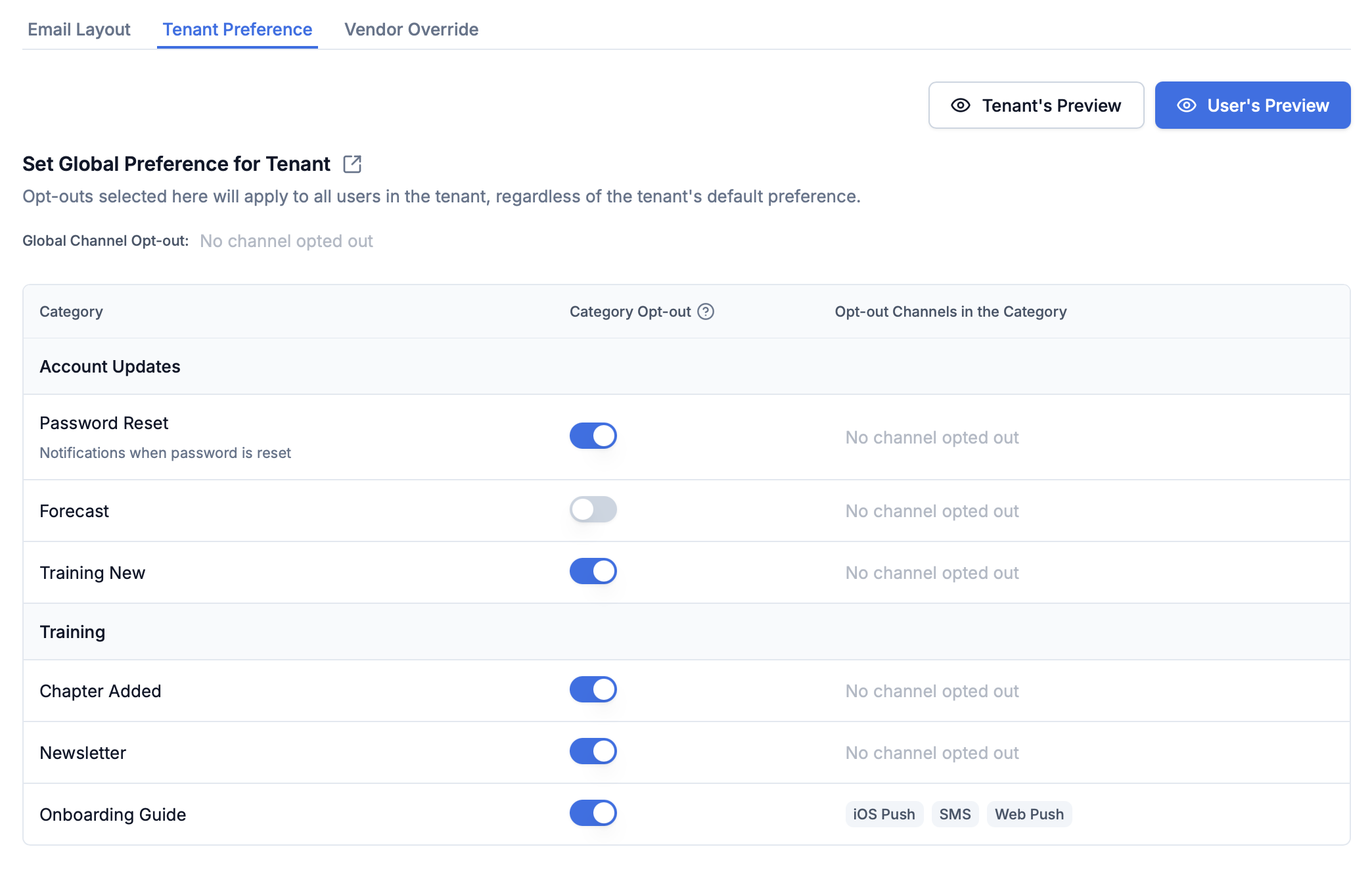
As a platform administrator, you can define which preference categories and channels are available to different tenants. For example, if you're a SaaS platform with paid features and some clients haven't subscribed to those features, you can hide preference categories related to the paid features for those tenants.
Go to the [tenant details page on SuprSend dashboard](https://app.suprsend.com/en/staging/tenants/default/tenant_preference)
Disable categories or set channels as opt-out that aren't valid for specific tenants
Tenants won't be able to set preferences in hidden categories, and notifications won't be sent to tenant users in those categories
 ## Tenant admin: Setting defaults for their users
Tenant administrators can set [default preferences](/reference/update-tenant-preference-single-category) for their end users and hide categories that aren't applicable to their users. This gives tenant admins control over which notifications are sent to their users and which categories appear on their users' preference pages.
Tenant admins can override category defaults and hide categories that don't apply to their users. These overrides apply only to that tenant and don't change global category defaults.
**Common scenarios:**
* Hide entire sections (for example, Sales section) from users' preference pages
* Override channel requirements (for example, make email mandatory for System categories)
* Hide specific categories while keeping others visible
You can set tenant defaults via API or through SuprSend dashboard.
Use the tenant preference API to programmatically manage preferences
Configure from the tenant details page → Tenant Preference tab
### Overriding digest schedule and condition defaults
If a sub-category has a [digest schedule](/docs/managing-notification-categories#configuring-digest-schedule) or [condition properties](/docs/managing-notification-categories#configuring-condition-properties), tenant admins can override their defaults for the tenant's users — for example, set a different default digest cadence or a different default condition value (such as a minimum severity) for everyone in the tenant.
These values resolve with the same **User → Tenant → Category default** precedence: a user's own selection wins, then the tenant default, then the category default. The available options themselves are still defined on the category — a tenant can change the default, not add or remove options.
#### Digest schedule
The [tenant preference API](/reference/get-tenant-preference-single-category) response includes `digest_schedule.options` (tenant-overridden defaults) and `digest_schedule.original_options` (category-level originals). Tenants can change which option is the default and override editable field values like `time`, but cannot add or remove options.
```json GET tenant preference response theme={"system"}
{
"digest_schedule": {
"options": [
{
"id": "daily-summary",
"label": "Daily summary at 9:00 AM",
"frequency": "daily",
"interval": 1,
"time": {
"edit_policy": "editable",
"default_value": "09:00"
},
"is_default": true
}
],
"original_options": [
{
"id": "instant",
"label": "Instant",
"frequency": "instantly",
"is_default": true
},
{
"id": "daily-summary",
"label": "Daily summary at 9:00 AM",
"frequency": "daily",
"interval": 1,
"time": {
"edit_policy": "editable",
"default_value": "00:00"
},
"is_default": false
}
]
}
}
```
```json Update tenant preference theme={"system"}
// PATCH /v1/tenant/{tenant_id}/preference/category/{category_slug}/
// Reference option by id, override default_value for editable fields
{
"digest_schedule": {
"options": [
{
"id": "daily-summary",
"time": {
"default_value": "09:00"
},
"is_default": true
}
]
}
}
```
Set `digest_schedule` to `null` in the update request to reset to category defaults.
#### Condition properties
The [tenant preference API](/reference/get-tenant-preference-single-category) response includes the `properties` array with the tenant's overridden values. `is_overridden` indicates whether the tenant has set a custom value.
```json GET tenant preference response theme={"system"}
{
"properties": [
{
"key": "threshold",
"label": "Minimum activity count",
"value_type": "integer",
"default_value": "10",
"is_optional": false,
"edit_policy": "editable",
"is_overridden": true,
"value": "100"
}
]
}
```
```json Update tenant preference theme={"system"}
// PATCH /v1/tenant/{tenant_id}/preference/category/{category_slug}/
// Only pass key and value for properties with edit_policy: "editable"
{
"properties": [
{
"key": "threshold",
"value": "100"
}
]
}
```
## Controlling preference UI for users
Tenants can control which categories appear on their users' preference pages and which notifications are sent.
* Turning off categories or channels for a tenant from the [tenant preference page](https://app.suprsend.com/en/demo/tenants/default/tenant_preference) automatically removes them from the user's preference view.
* Hidden categories won't send notifications to tenant users, even if they previously opted in.
* Tenants can't set preferences in categories disabled by the platform admin.
* Set `visible_to_subscriber: false` in [default tenant preferences](/reference/update-tenant-preference-single-category) to hide categories from tenant users' preference pages.
* This allows tenant admins to further limit visibility beyond platform-level settings.
* Hidden categories are removed from user preference APIs and UI view for that tenant's users.
* Categories hidden via `visible_to_subscriber: false` won't appear on preference pages
* Tenant-level category overrides take precedence over user preferences
* **Channel preferences:** If a platform admin disables a channel for a tenant, it cannot be re-enabled by the tenant or user
## Collecting preferences from tenant users
You can load user preferences for a tenant by passing `tenant_id` in REST APIs and [preference centre SDK](/docs/embedded-preference-centre). The hosted preference page automatically loads preferences corresponding to the tenant passed in the workflow trigger.
**Example API call:**
```bash theme={"system"}
GET /v1/user/{distinct_id}/preference/?tenant_id=acme-inc
```
Use preference APIs with `tenant_id` parameter
Embed preference center in your app
For implementation details, see [Capturing User Preferences](/docs/user-preferences#capturing-user-preferences).
## Triggering tenant workflows
You can trigger tenant workflows by passing `tenant_id` in your workflow trigger. Passing `tenant_id` ensures the workflow resolves `$tenant.*` variables (branding, preferences, routing) before sending notifications. This enables tenant-level customizations including template design, notification preferences, and vendor routing. [Read more about tenant workflows here](/docs/tenant-workflows).
## How tenant preferences are evaluated
When a workflow is triggered, preferences are evaluated for both the recipient and tenant before each delivery node. Notifications are sent only in categories and channels where both tenant and user preferences are `opt_in`.
The evaluation follows the precedence order: **User Preference → Tenant Default → Category Default**. Platform admin restrictions override all-if a platform admin disables a category or channel for a tenant, users will not receive notifications in that category, even if they previously opted in.
For detailed information on how preferences are evaluated at runtime, including debugging steps, see [Preference Evaluation](/docs/preference-evaluation).
***
## Tenant admin: Setting defaults for their users
Tenant administrators can set [default preferences](/reference/update-tenant-preference-single-category) for their end users and hide categories that aren't applicable to their users. This gives tenant admins control over which notifications are sent to their users and which categories appear on their users' preference pages.
Tenant admins can override category defaults and hide categories that don't apply to their users. These overrides apply only to that tenant and don't change global category defaults.
**Common scenarios:**
* Hide entire sections (for example, Sales section) from users' preference pages
* Override channel requirements (for example, make email mandatory for System categories)
* Hide specific categories while keeping others visible
You can set tenant defaults via API or through SuprSend dashboard.
Use the tenant preference API to programmatically manage preferences
Configure from the tenant details page → Tenant Preference tab
### Overriding digest schedule and condition defaults
If a sub-category has a [digest schedule](/docs/managing-notification-categories#configuring-digest-schedule) or [condition properties](/docs/managing-notification-categories#configuring-condition-properties), tenant admins can override their defaults for the tenant's users — for example, set a different default digest cadence or a different default condition value (such as a minimum severity) for everyone in the tenant.
These values resolve with the same **User → Tenant → Category default** precedence: a user's own selection wins, then the tenant default, then the category default. The available options themselves are still defined on the category — a tenant can change the default, not add or remove options.
#### Digest schedule
The [tenant preference API](/reference/get-tenant-preference-single-category) response includes `digest_schedule.options` (tenant-overridden defaults) and `digest_schedule.original_options` (category-level originals). Tenants can change which option is the default and override editable field values like `time`, but cannot add or remove options.
```json GET tenant preference response theme={"system"}
{
"digest_schedule": {
"options": [
{
"id": "daily-summary",
"label": "Daily summary at 9:00 AM",
"frequency": "daily",
"interval": 1,
"time": {
"edit_policy": "editable",
"default_value": "09:00"
},
"is_default": true
}
],
"original_options": [
{
"id": "instant",
"label": "Instant",
"frequency": "instantly",
"is_default": true
},
{
"id": "daily-summary",
"label": "Daily summary at 9:00 AM",
"frequency": "daily",
"interval": 1,
"time": {
"edit_policy": "editable",
"default_value": "00:00"
},
"is_default": false
}
]
}
}
```
```json Update tenant preference theme={"system"}
// PATCH /v1/tenant/{tenant_id}/preference/category/{category_slug}/
// Reference option by id, override default_value for editable fields
{
"digest_schedule": {
"options": [
{
"id": "daily-summary",
"time": {
"default_value": "09:00"
},
"is_default": true
}
]
}
}
```
Set `digest_schedule` to `null` in the update request to reset to category defaults.
#### Condition properties
The [tenant preference API](/reference/get-tenant-preference-single-category) response includes the `properties` array with the tenant's overridden values. `is_overridden` indicates whether the tenant has set a custom value.
```json GET tenant preference response theme={"system"}
{
"properties": [
{
"key": "threshold",
"label": "Minimum activity count",
"value_type": "integer",
"default_value": "10",
"is_optional": false,
"edit_policy": "editable",
"is_overridden": true,
"value": "100"
}
]
}
```
```json Update tenant preference theme={"system"}
// PATCH /v1/tenant/{tenant_id}/preference/category/{category_slug}/
// Only pass key and value for properties with edit_policy: "editable"
{
"properties": [
{
"key": "threshold",
"value": "100"
}
]
}
```
## Controlling preference UI for users
Tenants can control which categories appear on their users' preference pages and which notifications are sent.
* Turning off categories or channels for a tenant from the [tenant preference page](https://app.suprsend.com/en/demo/tenants/default/tenant_preference) automatically removes them from the user's preference view.
* Hidden categories won't send notifications to tenant users, even if they previously opted in.
* Tenants can't set preferences in categories disabled by the platform admin.
* Set `visible_to_subscriber: false` in [default tenant preferences](/reference/update-tenant-preference-single-category) to hide categories from tenant users' preference pages.
* This allows tenant admins to further limit visibility beyond platform-level settings.
* Hidden categories are removed from user preference APIs and UI view for that tenant's users.
* Categories hidden via `visible_to_subscriber: false` won't appear on preference pages
* Tenant-level category overrides take precedence over user preferences
* **Channel preferences:** If a platform admin disables a channel for a tenant, it cannot be re-enabled by the tenant or user
## Collecting preferences from tenant users
You can load user preferences for a tenant by passing `tenant_id` in REST APIs and [preference centre SDK](/docs/embedded-preference-centre). The hosted preference page automatically loads preferences corresponding to the tenant passed in the workflow trigger.
**Example API call:**
```bash theme={"system"}
GET /v1/user/{distinct_id}/preference/?tenant_id=acme-inc
```
Use preference APIs with `tenant_id` parameter
Embed preference center in your app
For implementation details, see [Capturing User Preferences](/docs/user-preferences#capturing-user-preferences).
## Triggering tenant workflows
You can trigger tenant workflows by passing `tenant_id` in your workflow trigger. Passing `tenant_id` ensures the workflow resolves `$tenant.*` variables (branding, preferences, routing) before sending notifications. This enables tenant-level customizations including template design, notification preferences, and vendor routing. [Read more about tenant workflows here](/docs/tenant-workflows).
## How tenant preferences are evaluated
When a workflow is triggered, preferences are evaluated for both the recipient and tenant before each delivery node. Notifications are sent only in categories and channels where both tenant and user preferences are `opt_in`.
The evaluation follows the precedence order: **User Preference → Tenant Default → Category Default**. Platform admin restrictions override all-if a platform admin disables a category or channel for a tenant, users will not receive notifications in that category, even if they previously opted in.
For detailed information on how preferences are evaluated at runtime, including debugging steps, see [Preference Evaluation](/docs/preference-evaluation).
***