> ## Documentation Index
> Fetch the complete documentation index at: https://docs.suprsend.com/llms.txt
> Use this file to discover all available pages before exploring further.
# Trigger Workflow
> Overview of the methods to trigger a SuprSend workflow, including event-based triggers, the direct workflow API, dashboard triggers, and SDK-based triggers.
You can trigger workflows designed on SuprSend dashboard via making a [direct call](/docs/trigger-workflow#triggering-workflow-via-api) to `workflows.trigger` endpoint or via [event trigger](/docs/trigger-workflow#event-based-trigger). In SuprSend, we refer events as user-initiated actions, such as social media interactions, or system-generated events like pending payments. User needs to be created beforehand for event based triggers.
[Direct API trigger](/docs/trigger-workflow#triggering-workflow-via-api) is a straightforward way to get started, as you can include recipient channel information directly in the API call and doesn't require prior user creation to initiate the notification.
## Triggering workflow via API
It is a unified API to trigger workflow and doesn't require user creation before hand to trigger notification. Recommended for platforms transitioning their existing notifications to SuprSend. If you are using our frontend SDKs to configure notifications and passing events and user properties from third-party data platforms like Segment, then [event-based trigger](/docs/trigger-workflow#event-based-trigger) would be a better choice.
It is a new workflow method and is available in below SDK versions (Python >= v0.11.0, Go >= v0.5.1, Node >= 1.10.0 and Java >= 0.7.0). Upgrade to the latest version if you are on older SDK versions.
Here is a list of integrations that you can use to trigger workflow over API:
### Sample payload
Here is a sample payload of direct API trigger
```python Python theme={"system"}
from suprsend import Event
from suprsend import WorkflowTriggerRequest
supr_client = Suprsend("_workspace_key_", "_workspace_secret_")
# Prepare workflow payload
w1 = WorkflowTriggerRequest(
body={
"workflow": "_workflow_slug_",
"actor": {
"distinct_id": "0fxxx8f74-xxxx-41c5-8752-xxxcb6911fb08",
"name": "actor_1",
"$skip_create": true,
},
"recipients": [
# notify user
{
"distinct_id": "0gxxx9f14-xxxx-23c5-1902-xxxcb6912ab09",
"$email": ["abc@example.com"],
"name": "recipient_1",
"$preferred_language": "en",
"$timezone": "America/New_York",
"$skip_create": true,
},
# notify object
{"object_type": "teams", "id": "finance", "$skip_create": true},
],
"data": {
"first_name": "User",
"invoice_amount": "$5000",
"invoice_id": "Invoice-1234",
},
},
tenant_id="tenant_id1",
idempotency_key="_unique_identifier_of_the_request_",
)
# Trigger workflow
response = supr_client.workflows.trigger(w1)
print(response)
```
```javascript Node theme={"system"}
const { Suprsend, WorkflowTriggerRequest } = require("@suprsend/node-sdk");
const supr_client = new Suprsend("_workspace_key_", "_workspace_secret_");
// Prepare workflow payload
const body = {
"workflow": "_workflow_slug_",
"actor": {
"distinct_id": "0fxxx8f74-xxxx-41c5-8752-xxxcb6911fb08",
"name": "actor_1",
"$skip_create": true
},
"recipients": [
// notify user
{
"distinct_id": "0gxxx9f14-xxxx-23c5-1902-xxxcb6912ab09",
"$email": ["abc@example.com"],
"name": "recipient_1",
"$preferred_language": "en",
"$timezone": "America/New_York",
"$skip_create": true
},
// notify object
{
"object_type": "teams",
"id": "finance",
"$skip_create": true
}
],
"data": {
"first_name": "User",
"invoice_amount": "$5000",
"invoice_id": "Invoice-1234"
}
};
// Create workflow instance
const w1 = new WorkflowTriggerRequest(body, {
tenant_id: "tenant_id1",
idempotency_key: "_unique_identifier_of_the_request_"
});
// Trigger workflow
const response = supr_client.workflows.trigger(w1);
response.then(res => console.log("response", res));
```
```go Go theme={"system"}
package main
import (
"log"
suprsend "github.com/suprsend/suprsend-go"
)
// Initialize SDK
func main() {
suprClient, err: = suprsend.NewClient("_workspace_key_", "_workspace_secret_")
if err != nil {
log.Println(err)
}
_ = suprClient
triggerWorkflowAPI(suprClient)
}
func triggerWorkflowAPI(suprClient * suprsend.Client) {
// Create WorkflowRequest body
wfReqBody: = map[string] interface {} {
"workflow": "_workflow_slug_",
"actor": map[string] interface {} {
"distinct_id": "0fxxx8f74-xxxx-41c5-8752-xxxcb6911fb08",
"name": "actor_1",
"$skip_create": true,
},
"recipients": [] map[string] interface {} {
// notify user
{
"distinct_id": "0gxxx9f14-xxxx-23c5-1902-xxxcb6912ab09",
"$email": [] string {
"abc@example.com"
},
"name": "recipient_1",
"$preferred_language": "en",
"$timezone": "America/New_York",
"$skip_create": true,
},
// notify object
{
"object_type": "teams",
"id": "finance",
"$skip_create": true,
},
},
// data can be any json/serializable map structure
"data": map[string] interface {} {
"first_name": "User",
"invoice_amount": "$5000",
"invoice_id": "Invoice-1234",
"spend_amount": "$10",
},
}
w1: = & suprsend.WorkflowTriggerRequest {
Body: wfReqBody,
TenantId: "tenant_id1",
IdempotencyKey: "_unique_identifier_of_the_request_",
}
// Call Workflows.Trigger to send request to Suprsend
resp,
err: = suprClient.Workflows.Trigger(w1)
if err != nil {
log.Fatalln(err)
}
log.Println(resp)
}
```
```java Java theme={"system"}
package test;
import java.io.IOException;
import java.io.UnsupportedEncodingException;
import java.util.Arrays;
import org.json.JSONArray;
import org.json.JSONObject;
import suprsend.Suprsend;
import suprsend.SuprsendException;
import suprsend.WorkflowTriggerRequest;
public class Workflow {
public static void main(String[] args) throws Exception {
WorkflowTrigger();
}
private static void WorkflowTrigger() throws SuprsendException, UnsupportedEncodingException {
Suprsend suprClient = Helper.getClientInstance();
// payload
JSONObject body = getWorkflowBody();
String idempotencyKey = "_unique_request_identifier";
String tenantId = "tenant_id1";
WorkflowTriggerRequest wf = new WorkflowTriggerRequest(body, idempotencyKey, tenantId);
//
JSONObject resp = suprClient.workflows.trigger(wf);
System.out.println(resp);
}
private static JSONObject getWorkflowBody() {
JSONObject body = new JSONObject()
.put("workflow", "__workflow_slug__")
.put("actor", new JSONObject()
.put("distinct_id", "0fxxx8f74-xxxx-41c5-8752-xxxcb6911fb08")
.put("name", "actor_1")
.put("$skip_create", true)
)
.put("recipients", new JSONArray()
// notify user
.put(new JSONObject()
.put("distinct_id", "0gxxx9f14-xxxx-23c5-1902-xxxcb6912ab09")
.put("$email", Arrays.asList("abc@example.com"))
.put("name", "recipient_1")
.put("$preferred_language", "en")
.put("$timezone", "America/New_York")
.put("$skip_create", true)
)
// notify object
.put(new JSONObject()
.put("object_type", "teams")
.put("id", "finance")
.put("$skip_create", true)
)
)
.put("data", new JSONObject()
.put("first_name", "User")
.put("invoice_amount", "$5000")
.put("invoice_id", "Invoice-1234")
);
return body;
}
}
```
```curl curl theme={"system"}
curl --request POST \
--url https://hub.suprsend.com/trigger/ \
--header 'Authorization: Bearer _API_key_' \
--header 'accept: application/json' \
--header 'content-type: application/json' \
--data '
{
"workflow": "_workflow_slug_",
"actor": {
"distinct_id": "0fxxx8f74-xxxx-41c5-8752-xxxcb6911fb08",
"name": "actor_1",
"$skip_create": true
},
"recipients": [
{
"distinct_id": "0gxxx9f14-xxxx-23c5-1902-xxxcb6912ab09",
"$email": ["abc@example.com"],
"name": "recipient_1",
"$preferred_language": "en",
"$timezone": "America/New_York",
"$skip_create": true
},
{
"object_type": "teams",
"id": "finance",
"$skip_create": true
}
],
"data": {
"first_name": "User",
"invoice_amount": "$5000",
"invoice_id": "Invoice-1234"
}
}
'
```
To prevent automatic creation of an actor, or recipient (user/object) in SuprSend (the case where they already exist in your system), you can use the `"$skip_create": true` flag.
This can be applied inside the actor, individual user recipient objects, or object recipient objects.
**Payload Schema**
| Property | Type | Description |
| ---------------------------------- | ---------------------------------- | -------------------------------------------------------------------------------------------------------------------------------------------------------------------------------------------------------------------------------------------------------------------------------------------------------------------------------------------------------------------------------------- |
| `workflow` | string | Slug of designed workflow on SuprSend dashboard. You'll get the slug from workflow settings. |
| `actor` (*optional*) | string / object | Includes distinct\_id and properties of the user who performed the action. You can use it for [cross-user notifications](/docs/trigger-workflow#sending-cross-user-notifications) where you need to include actor properties in notification template. Actor properties can be added as `$actor.`. |
| `recipients` | array of string / array of objects | List of users who need to be notified. You can add up to 100 recipients in a workflow trigger. You can either pass recipients as an array of `distinct_id` (if user is pre-synced in SuprSend database) or [define recipient information inline](/docs/trigger-workflow#identifying-recipients-inline). To notify [object](/docs/objects), pass object\_id and type in recipient JSON. |
| `data` | object | variable data required to render dynamic template content or workflow properties such as dynamic delay or channel override in send node. |
| `tenant_id` | string | unique identifier of the [brand / tenant](/docs/tenants) |
| `idempotency_key` | string | unique identifier of the request. We'll be returning idempotency\_key in our [outbound webhook response](/docs/outbound-webhook). You can use it to map notification statuses and replies in your system. |
| `recipients[].$timezone` | string | to set recipient's timezone. Used to send notification in user's local timezone. You can pass timezone in [IANA (TZ identifier)](https://en.wikipedia.org/wiki/List_of_tz_database_time_zones#List) format. |
| `recipients[].$preferred_language` | string | to set recipient's preferred language. This is to support localization in notification content. You can pass the language in `ISO 639-1 2-letter` format. [Refer all language codes here](https://github.com/suprsend/suprsend-py-sdk/blob/v0.12.0/src/suprsend/language_codes.py). |
| `$skip_create` | boolean | Optional flag that can be used inside `actor`, or recipient payloads including both `user`, or `object`. When set to `true`, SuprSend will **not create the user or object** if it doesn’t already exist in the system. |
### Identifying recipients inline
One of the benefits of using direct workflow trigger is that you can identify recipients inline. You can include recipient channel information, their channel preferences, and their user properties along with the workflow trigger. Upon triggering the workflow, the recipient will be automatically created in the SuprSend database in the background.
This facilitates dynamic synchronization of your user data within SuprSend and eliminates the need for any migration efforts on your end to start sending notifications from SuprSend. You can also use recipient properties in your template as `$recipient.`.
This is how the complete recipient payload with look like
```json json theme={"system"}
{
"distinct_id": "0gxxx9f14-xxxx-23c5-1902-xxxcb6912ab09",
"$email":["abc@example.com"],
"$channels":["email","inbox"],
"user_prop1":"value_1",
"$preferred_language":"en",
"$timezone": "America/New_York"
}
// Object will be identified by {object_type, id}. Rest of the payload will be same as user.
{
"object_type": "departments",
"id":"finance",
"$email":["abc@example.com"],
"user_prop1":"value_1"
}
```
| Property | Type | Description |
| ------------------------------------------- | ----------------------- | ------------------------------------------------------------------------------------------------------------------------------------------------------------------------------------------------------------------------------------------------------------------------------------------------------------------------------------------------------------------------------------------------------------------------------------------------------------------------------------------------------------------------------------------------------------------------------------------------------------------------------------------------------------------------------------------------------------------------------------------------------------------------------------------------------- |
| `distinct_id` | string | Unique identifier of the user to be notified. |
| communication channels ($email, $sms, etc). | array of string | You can pass user channel information using `$` key. This will override existing channel value from the user profile and use the channel value defined in the key for notification trigger. The same channel information will also be appended to user profile in the background Refer how different communication channels can be passed [here](/docs/trigger-workflow#add-user-communication-channel) |
| `$channels` | array of string / dicts | Use it to pass user's channel preference in the payload. You can always use our [in-build preference APIs](/docs/user-preferences) to maintain user notification preferences. Preferences defined within SuprSend will automatically apply with workflow trigger. By default, notifications will be sent to all channels defined in the workflow delivery node. However, if you have a scenario where user has specific channel preference for a notification (for example they only want to receive payment reminders via email), you can include that preference in the workflow payload. This will ensure that notifications are sent only to the channels specified in the \$channels key. The supported channel values are `email, sms, whatsapp, androidpush, iospush, slack, webpush, ms_teams`. |
| `$preferred_language` | string | to set recipient's preferred language. This is to support localization in notification content. You can pass the language in `ISO 639-1 2-letter` format. [Refer all language codes here](https://github.com/suprsend/suprsend-py-sdk/blob/v0.12.0/src/suprsend/language_codes.py) . |
| `$timezone` | string | to set recipient's timezone. Used to send notification in user's local timezone. You can pass timezone in [IANA (TZ identifier)](https://en.wikipedia.org/wiki/List_of_tz_database_time_zones#List) format. |
| \* | key-value pair | You can pass other user properties to render dynamic template content in key-value pair as `"user_prop1":"value1"` . Extra properties will be set in subscriber profile (as subscriber properties) which can then be used in the template as `$recipient.`. |
#### Add user communication channel
```json json theme={"system"}
"$email":["user@example.com"],
"$whatsapp":["+15555555555"],
"$sms":["+15555555555"],
"$androidpush": [{"token": "__android_push_token__", "provider": "fcm", "device_id": ""}],
"$iospush":[{"token": "__ios_push_token__", "provider": "apns", "device_id": ""}],
"$slack": [{
"email": "user@example.com",
"access_token": "xoxb-XXXXXXXX"
}] // slack using email
"$slack": [{
"user_id": "U/WXXXXXXXX",
"access_token": "xoxb-XXXXXX"
}] // slack using member_id
"$slack": [{
"channel": "CXXXXXXXX",
"access_token": "xoxb-XXXXXX"
}] // slack channel
"$slack": [{
"incoming_webhook": {
"url": "https://hooks.slack.com/services/TXXXX/BXXXX/XXXXXXX"
}
}] // slack incoming webhook
"$ms_teams": [{
"tenant_id": "c1981ab2-9aaf-xxxx-xxxx",
"service_url": "https://smba.trafficmanager.net/amer",
"conversation_id": "19:c1524d7c-a06f-456f-8abe-xxxx"
}] // MS teams user or channel using conversation_id
"$ms_teams": [{
"tenant_id": "c1981ab2-9aaf-xxxx-xxxx",
"service_url": "https://smba.trafficmanager.net/amer",
"user_id": "29:1nsLcmJ2RKtYH6Cxxxx-xxxx"
}] // MS teams user using user_id
"$ms_teams": [{
"incoming_webhook": {
"url": "https://wnk1z.webhook.office.com/webhookb2/XXXXXXXXX"
}
}] // MS teams incoming webhook
```
### Sending notification to multiple recipients
Recipients in workflow call is an array of `distinct_ids` or recipient objects. You can pass up to 100 recipients in a single workflow trigger. SuprSend will internally convert it into multiple workflow triggers, one for each recipient in the array.
```json json theme={"system"}
"recipients": [
{
"distinct_id": "id1",
"$email":["id1@example.com"],
"name":"recipient_1"
},
{
"distinct_id": "id1",
"$email":["id2@example.com"],
"name":"recipient_2"
}
]
---- OR ------
"recipients": ["id1","id2"]
```
We recommend you to use [lists](/docs/lists) and [broadcasts](/docs/broadcast) to send notifications to a user list larger than 1000 users. This approach allows for bulk processing within SuprSend, resulting in significantly faster delivery compared to individual workflow calls. Sending individual workflows to a large set of users may introduce delays in your notification queue and is not an optimized way of handling bulk trigger.
### Sending cross-user notifications
In scenarios where you need to notify a group of users based on another user's action, such as sending a notification to the document owner when someone comments on it, you can specify the actor in your workflow call. This allows you to use actor's name or other properties in your notification template. Actor properties can be included in the template as `$actor.`.
Sample template with actor and recipient properties:
```text text theme={"system"}
//handlebar template
Hi {{$recipient.name}}, {{$actor.name}} added {{length comments}} new comments on the {{doc_name}}.
//Rendered content
Hi recipient_1, actor_1 added 2 new comments on the annual IT report.
```
```json API request theme={"system"}
{
"workflow": "new_comment",
"actor": {
"distinct_id": "0fxxx8f74-xxxx-41c5-8752-xxxcb6911fb08",
"name":"actor_1"
},
"recipients": [
{
"distinct_id": "0gxxx9f14-xxxx-23c5-1902-xxxcb6912ab09",
"$email":["abc@example.com"],
"name":"recipient_1"
}
],
"data":{
"doc_name": "annual IT report",
"date": "2024-01-01",
"comments":["change the date","rest looks good"]
}
}
```
## Event based trigger
It is a cleaner way of triggering notifications where your user sync is separate and events are generated from multiple sources, backend systems, Frontend applications (user actions on the platform) or CDP platforms like Segment.
Please Note that the user profile should be created beforehand for `distinct_id` passed in your event call. If user is not present, it will discard the event call.
Object triggers are not currently supported in event. Please [get in touch](mailto:support@suprsend.com) if you have this requirement.
Below is a sample event call to trigger payment reminder workflow:
```python Python theme={"system"}
from suprsend import Event
# Track Event Example
distinct_id = "0fxxx8f74-xxxx-41c5-8752-xxxcb6911fb08"
event_name = "Payment Pending"
properties = {
"first_name": "User",
"invoice_amount": "$5000",
"invoice_id":"Invoice-1234"
}
event = Event(distinct_id=distinct_id, event_name=event_name, properties=properties)
# Track event
response = supr_client.track_event(event)
print(response)
```
```javascript Node.js theme={"system"}
const { Event } = require("@suprsend/node-sdk");
// Track Event Example
const distinct_id = "0fxxx8f74-xxxx-41c5-8752-xxxcb6911fb08"
const event_name = "Payment Pending"
const properties = {
"first_name": "User",
"invoice_amount": "$5000",
"invoice_id":"Invoice-1234"
}
const event = new Event(distinct_id, event_name, properties)
// Track event
const response = supr_client.track_event(event)
response.then((res) => console.log("response", res));
```
```java Java theme={"system"}
import org.json.JSONObject;
import suprsend.Suprsend;
import suprsend.Event;
public class Event {
public static void main(String[] args) throws Exception {
trackEvent();
}
private static Subscriber trackEvent() throws SuprsendException {
Suprsend suprsendClient = new Suprsend("_workspace_key_", "_workspace_secret_");
String distinctId = "0fxxx8f74-xxxx-41c5-8752-xxxcb6911fb08";
String eventName = "Payment Pending";
JSONObject eventProps = new JSONObject()
.put("first_name", "User")
.put("invoice_amount", "$5000");
.put("invoice_id", "Invoice-1234");
Event e = new Event(distinctId, eventName, eventProps);
// Track event
JSONObject response = suprClient.trackEvent(e);
System.out.println(response);
}
```
```go Go theme={"system"}
ev := &suprsend.Event{
EventName: "Payment Pending",
DistinctId: "0fxxx8f74-xxxx-41c5-8752-xxxcb6911fb08",
Properties: map[string]interface{}{
"first_name": "User",
"invoice_amount": "$5000",
"invoice_id":"Invoice-1234"
}
}
// Send event to Suprsend by calling .TrackEvent
_, err = suprClient.TrackEvent(ev)
if err != nil {
log.Fatalln(err)
}
```
```curl curl theme={"system"}
curl --request POST \
--url https://hub.suprsend.com/event/ \
--header 'Authorization: Bearer _API_key_' \
--header 'accept: application/json' \
--header 'content-type: application/json' \
--data '
{
"distinct_id": "0fxxx8f74-xxxx-41c5-8752-xxxcb6911fb08",
"event": "Payment Pending",
"properties": {
"first_name": "User",
"invoice_amount": "$5000",
"invoice_id":"Invoice-1234"
}
}
'
```
Here is a list of all integrations that you can use to trigger event:
(Web)
(Android)
(App)
(App)
Customer Data Platform (CDP)
## Triggering workflow using google sheets
Recommended for one-time notification trigger.
This can be used by growth or product teams to trigger one time notifications for lead generation, sales cold messaging or to send announcements and product updates. We do not recommend sending more than 10,000 notifications using google sheets as each row in google sheet trigger converts to 1 workflow request and might take a lot of time to process.
Also, since triggers via google sheets are generally promotional notifications, we recommend using one of the [promotional sub-categories](/docs/notification-category#creating-sub-categories-for-preference-management) to trigger this notification. [Read more about categories and how they impact your send latencies.](/docs/notification-category)
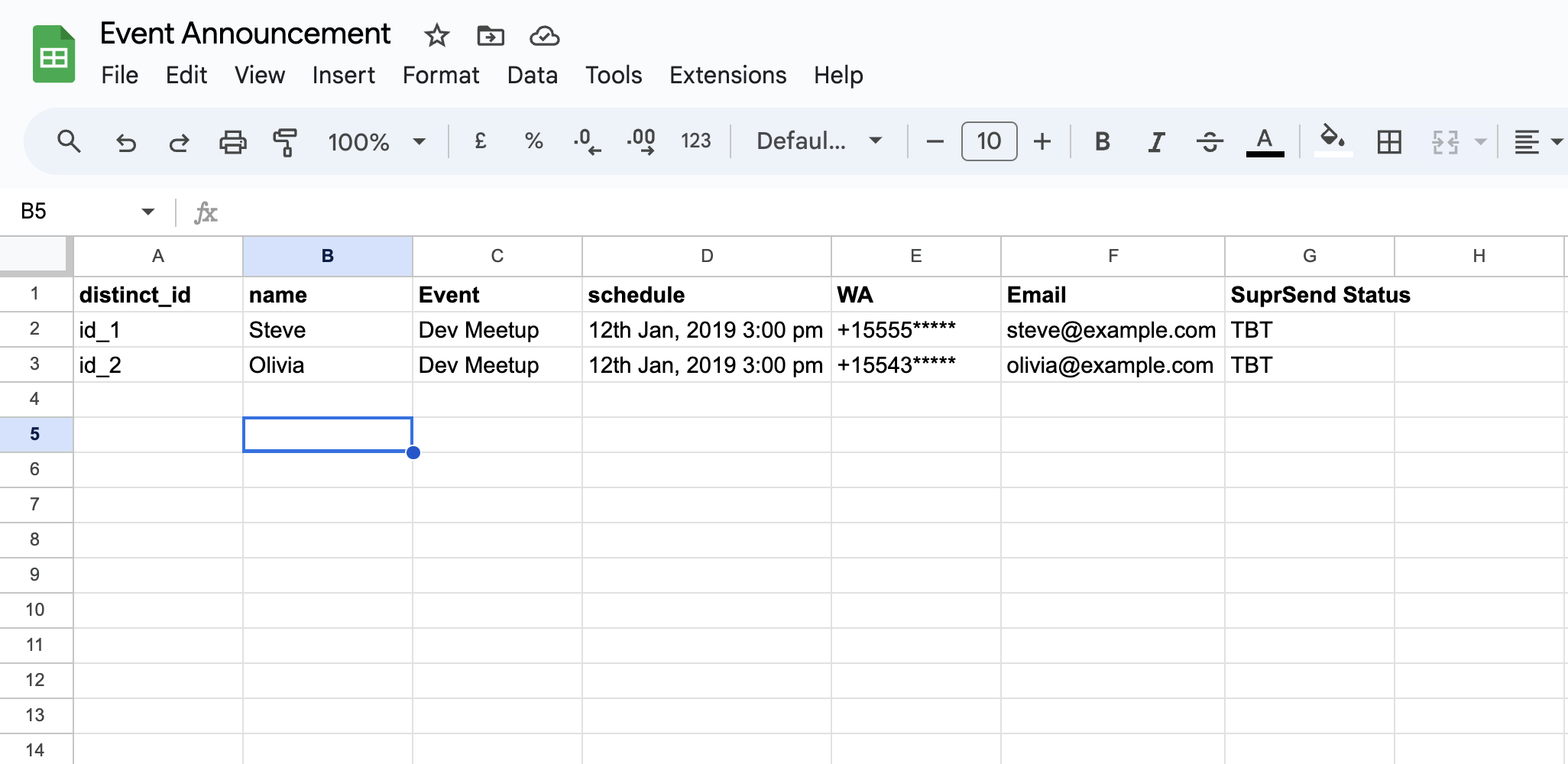
Here's a step-by-step guide on how to send notifications using google sheets:
All the static content can be designed on the template, and all the variable data defined within `{{...}}` will be passed from the Google Sheet at the time of trigger.
Each row in the sheet corresponds to one recipient.
* `distinct_id` **column**- this is the unique identifier of the user who needs to be notified.
* **Dynamic data columns**- you need to create one column each for the dynamic data (aka variables) in your template. Note that variable names are case sensitive. \
\
If this is the template content:`Hi {{name}}, your {{Event}} is scheduled at {{Schedule}}. See you there.` , you'll have to create a column for each template variable -`name` , `Event` , and `schedule` in your sheet.
* **User Channels columns**- Next, create columns for user channel details. These channel columns are necessary to pass channel information that may not be present in the user profile. \
It's always a good practice to include channel information if you're unsure of its presence in the user profile. You can pass channels as `WA` for whatsapp, `Email` for email and `SMS` for SMS. \
For Whatsapp and SMS, you need to enter country code in front of the mobile number as `+917123xxxxxx` .
* `SuprSend Status` **column**- Fill the value `TBT` in rows for which you want to trigger the notification. Once, the notification is triggered, the status changes to `OK` .\\
 📘 TIP:
Google Sheet doesn't allow to start a field with \*`+`\*\*. To enter in + format, use string function: `="+917123xxxxxx"`
In the Navbar of Google Sheets, click on `Extensions` and select `Apps Script`
📘 TIP:
Google Sheet doesn't allow to start a field with \*`+`\*\*. To enter in + format, use string function: `="+917123xxxxxx"`
In the Navbar of Google Sheets, click on `Extensions` and select `Apps Script`
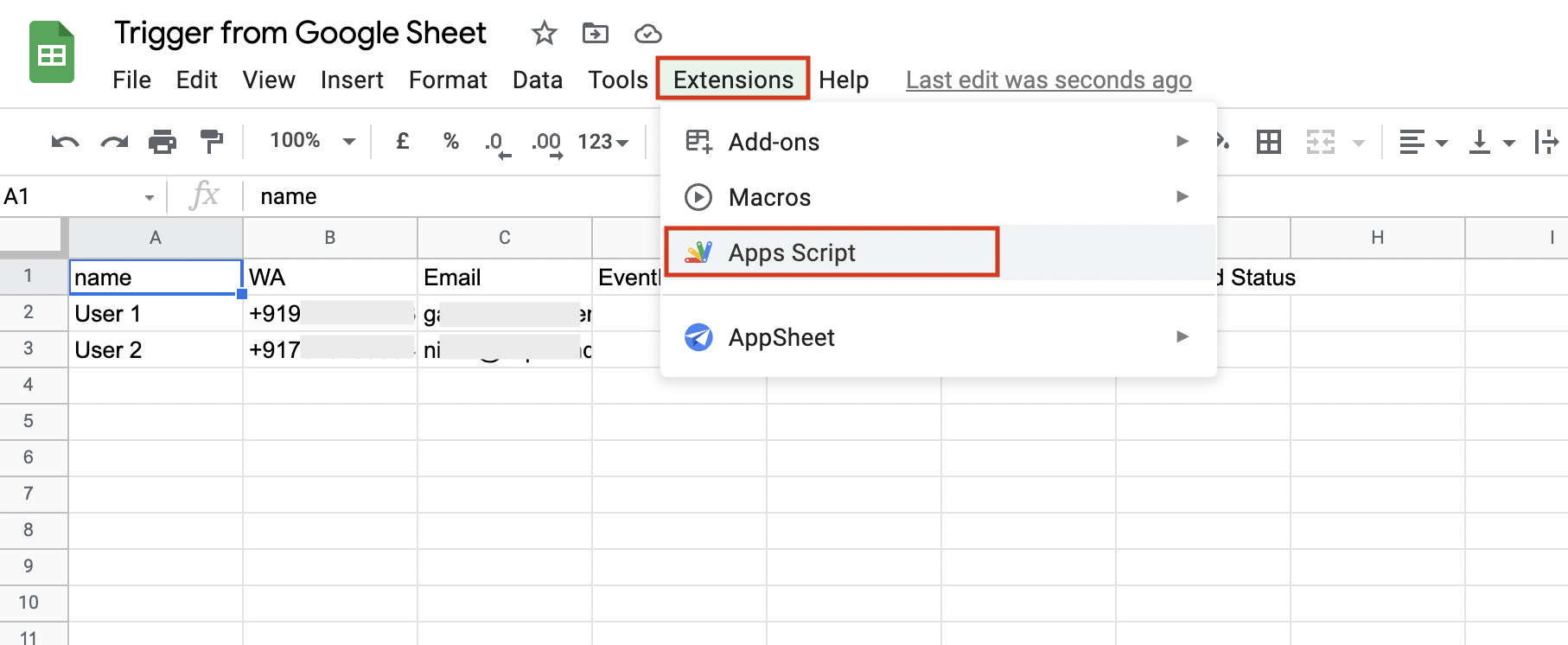 It will open Apps Script in a new tab. Remove the default information present in the editor, and copy-paste the following in the editor.
```json Appscript theme={"system"}
//Enter your workspace key, secret, template slug, workflow name & category
const workspace_key = "__API_KEY__";
const workspace_secret = "__API_SECRET__";
const template_slug = "__TEMPLATE_SLUG__";
const workflow_name = "__WORKFLOW_NAME__";
const category = "promotional"
// Map your column names to channels if need be
// Or ensure you use following names for your columns to directly map them to channels
// distinc_id for user's distinct id
// $sms for user's mobile number
// $email for user's email
// $whatsapp for user's WhatsApp
// If you have other names of your columns you can modify following two lines accordingly
const channel_col_names = {"WA":"$whatsapp","Email":"$email","SMS":"$sms"};
const distinct_id_col_name = 'distinct_id'
//--------- No Editing required below -----------------//
function Trigger_Workflows() {
var sheet = SpreadsheetApp.getActiveSheet();
var data = sheet.getDataRange().getValues();
var headers = data[0];
for (var i = 1; i < data.length; i++) {
var response = convert_row_to_payload(data[i], headers);
if (response.status === "TBT") {
make_api_request(
response.payload,
sheet.getRange(i + 1, parseInt(response.status_col) + 1)
);
}
}
}
function convert_row_to_payload(data, headers) {
let status = "";
let status_col = -1;
let user = {
distinct_id: null,
$email: [],
$sms: [],
$whatsapp: [],
};
let payload = {};
payload.data = {};
let private_channelkeys = ["$sms", "$whatsapp", "$email", "distinct_id"];
for (var i = 0; i < headers.length; i++) {
if (data[i].length !== 0) {
if (
channel_col_names[headers[i]] ||
private_channelkeys.includes(headers[i])
) {
if (headers[i] !== "distinct_id") {
if (user[channel_col_names[headers[i]]])
user[channel_col_names[headers[i]]].push(data[i]);
if (user[headers[i]]) user[headers[i]].push(data[i]);
} else {
user[headers[i]] = data[i];
}
}
if (headers[i] !== "SuprSend Status") {
payload.data[headers[i]] = data[i];
} else {
status = data[i];
status_col = i;
}
}
}
user["distinct_id"] = payload.data[distinct_id_col_name];
//user["is_transient"] = true; //Uncomment if user is temporary
payload.users = [user];
payload.name = workflow_name;
payload.notification_category = category;
payload.template = template_slug;
return {
payload: JSON.stringify(payload),
status: status,
status_col: status_col,
};
}
function make_api_request(payload, cell) {
const uri = "/" + workspace_key + "/trigger/";
const url = "https://hub.suprsend.com" + uri;
const md5 = MD5(payload);
const now = new Date().toISOString();
const message =
"POST" + "\n" + md5 + "\n" + "application/json" + "\n" + now + "\n" + uri;
const byteSignature = Utilities.computeHmacSha256Signature(
message,
workspace_secret
);
const signature = Utilities.base64Encode(byteSignature);
var options = {
method: "POST",
contentType: "application/json",
headers: {
Authorization: workspace_key + ":" + signature,
Date: now,
},
payload: payload,
muteHttpExceptions: true,
};
cell.setValue("Processing...");
try {
var response = UrlFetchApp.fetch(url, options);
cell.setValue(response.getContentText());
} catch (error) {
cell.setValue("Error : " + error);
}
}
function onOpen() {
var ui = SpreadsheetApp.getUi();
// Or DocumentApp or FormApp.
ui.createMenu("SuprSend")
.addItem("Trigger SuprSend Workflow", "Trigger_Workflows")
.addToUi();
}
function MD5(input, isShortMode) {
var isShortMode = !!isShortMode; // Be sure to be bool
var txtHash = "";
var rawHash = Utilities.computeDigest(
Utilities.DigestAlgorithm.MD5,
input,
Utilities.Charset.UTF_8
);
if (!isShortMode) {
for (i = 0; i < rawHash.length; i++) {
var hashVal = rawHash[i];
if (hashVal < 0) {
hashVal += 256;
}
if (hashVal.toString(16).length == 1) {
txtHash += "0";
}
txtHash += hashVal.toString(16);
}
} else {
for (j = 0; j < 16; j += 8) {
hashVal =
(rawHash[j] + rawHash[j + 1] + rawHash[j + 2] + rawHash[j + 3]) ^
(rawHash[j + 4] + rawHash[j + 5] + rawHash[j + 6] + rawHash[j + 7]);
if (hashVal < 0) {
hashVal += 1024;
}
if (hashVal.toString(36).length == 1) {
txtHash += "0";
}
txtHash += hashVal.toString(36);
}
}
// change below to "txtHash.toUpperCase()" if needed
return txtHash;
}
```
You'll find following information to be added in your script from SuprSend dashboard.
| Data | Description |
| --------------- | ------------------------------------------------------------------------------------------------------------------------------------------------------------------------------------------- |
| `api-key` | API Key for your workspace. From left navigation panel, select settings -> API Keys. |
| `api-secret` | API Key for your workspace. From left navigation panel, select settings -> API Keys. |
| `template-slug` | Add the template slug of the template that you want to trigger. You can copy the template slug by clicking on copy icon next to the template name on template details page. |
| `Workflow Name` | Give a name to identify your workflow. It'll help you locate the sent workflow on the workflow listing page. You can see the notification performance on **Workflow -> Analytics** page. |
| `category` | Provide preference category. We recommend using promotional sub-category for sending engagement notifications. You can read more [Preference Categories here](/docs/notification-category). |
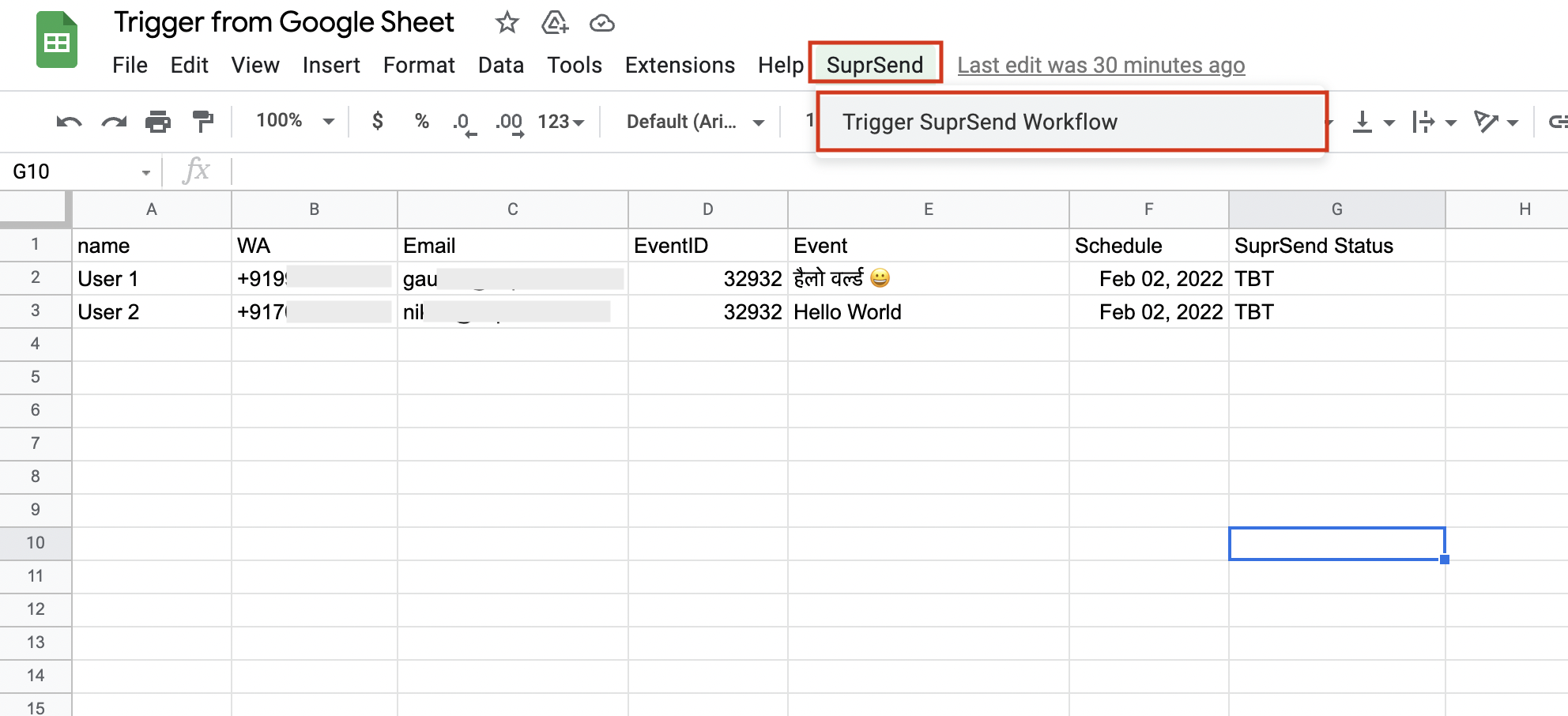
After reloading, you will find a new option named "**SuprSend**" in the navigation bar. On clicking it, you will see the option to **Trigger SuprSend Workflow**. On triggering, the script will pick up all the rows which have value
in the column name "**SuprSend Status**", and will make an API call to SuprSend. For the successful API call, the status will change to `OK`.
It will open Apps Script in a new tab. Remove the default information present in the editor, and copy-paste the following in the editor.
```json Appscript theme={"system"}
//Enter your workspace key, secret, template slug, workflow name & category
const workspace_key = "__API_KEY__";
const workspace_secret = "__API_SECRET__";
const template_slug = "__TEMPLATE_SLUG__";
const workflow_name = "__WORKFLOW_NAME__";
const category = "promotional"
// Map your column names to channels if need be
// Or ensure you use following names for your columns to directly map them to channels
// distinc_id for user's distinct id
// $sms for user's mobile number
// $email for user's email
// $whatsapp for user's WhatsApp
// If you have other names of your columns you can modify following two lines accordingly
const channel_col_names = {"WA":"$whatsapp","Email":"$email","SMS":"$sms"};
const distinct_id_col_name = 'distinct_id'
//--------- No Editing required below -----------------//
function Trigger_Workflows() {
var sheet = SpreadsheetApp.getActiveSheet();
var data = sheet.getDataRange().getValues();
var headers = data[0];
for (var i = 1; i < data.length; i++) {
var response = convert_row_to_payload(data[i], headers);
if (response.status === "TBT") {
make_api_request(
response.payload,
sheet.getRange(i + 1, parseInt(response.status_col) + 1)
);
}
}
}
function convert_row_to_payload(data, headers) {
let status = "";
let status_col = -1;
let user = {
distinct_id: null,
$email: [],
$sms: [],
$whatsapp: [],
};
let payload = {};
payload.data = {};
let private_channelkeys = ["$sms", "$whatsapp", "$email", "distinct_id"];
for (var i = 0; i < headers.length; i++) {
if (data[i].length !== 0) {
if (
channel_col_names[headers[i]] ||
private_channelkeys.includes(headers[i])
) {
if (headers[i] !== "distinct_id") {
if (user[channel_col_names[headers[i]]])
user[channel_col_names[headers[i]]].push(data[i]);
if (user[headers[i]]) user[headers[i]].push(data[i]);
} else {
user[headers[i]] = data[i];
}
}
if (headers[i] !== "SuprSend Status") {
payload.data[headers[i]] = data[i];
} else {
status = data[i];
status_col = i;
}
}
}
user["distinct_id"] = payload.data[distinct_id_col_name];
//user["is_transient"] = true; //Uncomment if user is temporary
payload.users = [user];
payload.name = workflow_name;
payload.notification_category = category;
payload.template = template_slug;
return {
payload: JSON.stringify(payload),
status: status,
status_col: status_col,
};
}
function make_api_request(payload, cell) {
const uri = "/" + workspace_key + "/trigger/";
const url = "https://hub.suprsend.com" + uri;
const md5 = MD5(payload);
const now = new Date().toISOString();
const message =
"POST" + "\n" + md5 + "\n" + "application/json" + "\n" + now + "\n" + uri;
const byteSignature = Utilities.computeHmacSha256Signature(
message,
workspace_secret
);
const signature = Utilities.base64Encode(byteSignature);
var options = {
method: "POST",
contentType: "application/json",
headers: {
Authorization: workspace_key + ":" + signature,
Date: now,
},
payload: payload,
muteHttpExceptions: true,
};
cell.setValue("Processing...");
try {
var response = UrlFetchApp.fetch(url, options);
cell.setValue(response.getContentText());
} catch (error) {
cell.setValue("Error : " + error);
}
}
function onOpen() {
var ui = SpreadsheetApp.getUi();
// Or DocumentApp or FormApp.
ui.createMenu("SuprSend")
.addItem("Trigger SuprSend Workflow", "Trigger_Workflows")
.addToUi();
}
function MD5(input, isShortMode) {
var isShortMode = !!isShortMode; // Be sure to be bool
var txtHash = "";
var rawHash = Utilities.computeDigest(
Utilities.DigestAlgorithm.MD5,
input,
Utilities.Charset.UTF_8
);
if (!isShortMode) {
for (i = 0; i < rawHash.length; i++) {
var hashVal = rawHash[i];
if (hashVal < 0) {
hashVal += 256;
}
if (hashVal.toString(16).length == 1) {
txtHash += "0";
}
txtHash += hashVal.toString(16);
}
} else {
for (j = 0; j < 16; j += 8) {
hashVal =
(rawHash[j] + rawHash[j + 1] + rawHash[j + 2] + rawHash[j + 3]) ^
(rawHash[j + 4] + rawHash[j + 5] + rawHash[j + 6] + rawHash[j + 7]);
if (hashVal < 0) {
hashVal += 1024;
}
if (hashVal.toString(36).length == 1) {
txtHash += "0";
}
txtHash += hashVal.toString(36);
}
}
// change below to "txtHash.toUpperCase()" if needed
return txtHash;
}
```
You'll find following information to be added in your script from SuprSend dashboard.
| Data | Description |
| --------------- | ------------------------------------------------------------------------------------------------------------------------------------------------------------------------------------------- |
| `api-key` | API Key for your workspace. From left navigation panel, select settings -> API Keys. |
| `api-secret` | API Key for your workspace. From left navigation panel, select settings -> API Keys. |
| `template-slug` | Add the template slug of the template that you want to trigger. You can copy the template slug by clicking on copy icon next to the template name on template details page. |
| `Workflow Name` | Give a name to identify your workflow. It'll help you locate the sent workflow on the workflow listing page. You can see the notification performance on **Workflow -> Analytics** page. |
| `category` | Provide preference category. We recommend using promotional sub-category for sending engagement notifications. You can read more [Preference Categories here](/docs/notification-category). |
After reloading, you will find a new option named "**SuprSend**" in the navigation bar. On clicking it, you will see the option to **Trigger SuprSend Workflow**. On triggering, the script will pick up all the rows which have value
in the column name "**SuprSend Status**", and will make an API call to SuprSend. For the successful API call, the status will change to `OK`.
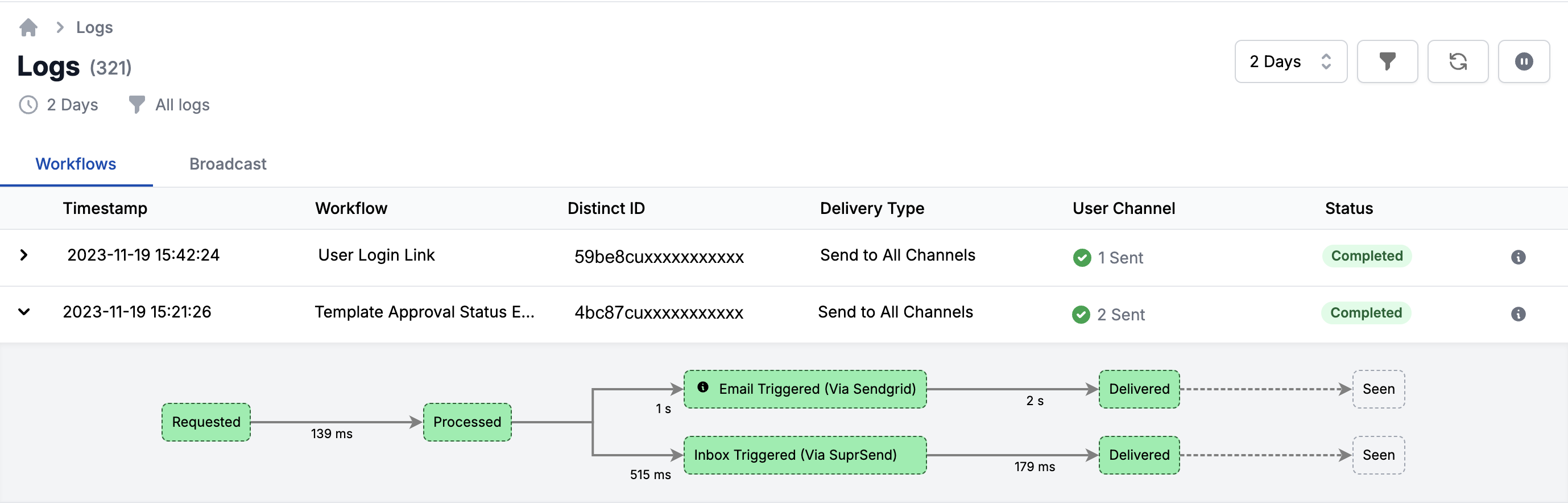
 You can check the status of your notification trigger on the `Logs` page.
 ***
***