> ## Documentation Index
> Fetch the complete documentation index at: https://docs.suprsend.com/llms.txt
> Use this file to discover all available pages before exploring further.
# Update User Profile
> Update User Profile within workflow based on event or condition.
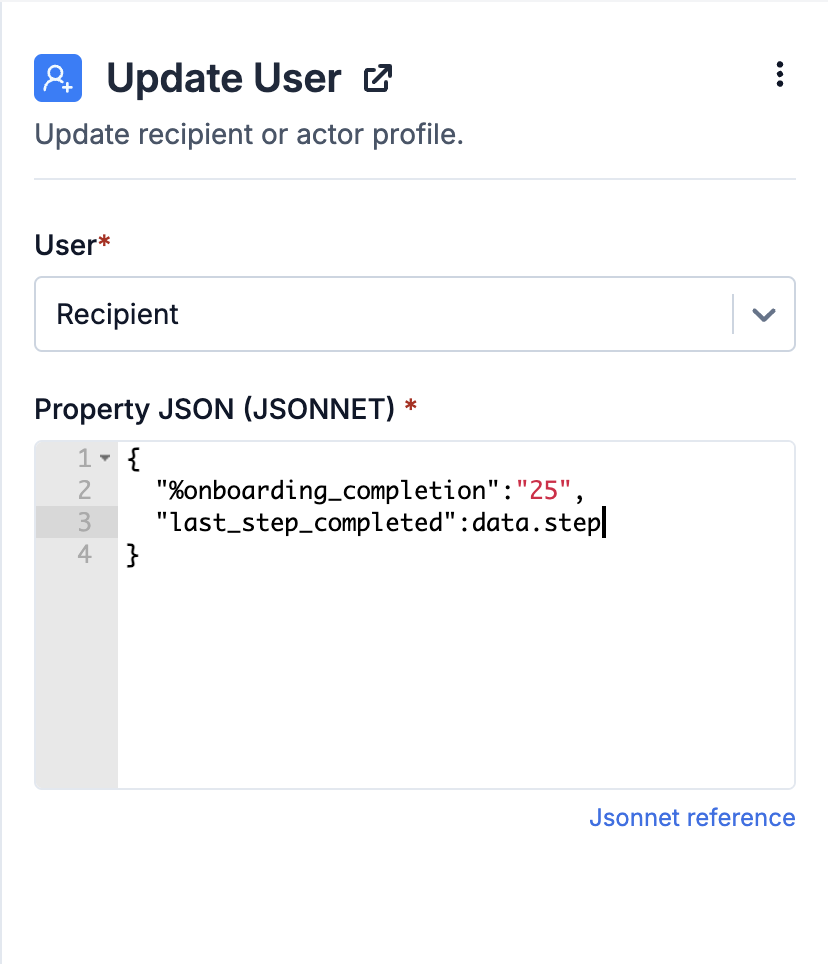
Use this node to update recipient or actor profile within the workflow. Common use cases include fetching data during the workflow to update the user profile or updating the profile when a user successfully completes a step. For instance, during onboarding, when a user completes a step, you can update their `%completion` in the profile and later use it in workflow condition or template content.
This functionality is especially powerful for event-based systems. If all updates, including user profile updates, are sent as events from your product or a third-party system, you can skip writing custom user update APIs in your codebase. Simply send events to SuprSend, and let the workflow handle user profile updation.
 ### Property JSON
User properties are passed in [JSONNET](https://jsonnet.org/ref/language.html) format. You can pass static or dynamic properties. Dynamic properties can refer to all data available at the node's input, including the ones added during workflow execution. e.g., if a profile update node follows a batch, fetch, or webhook node, it can access data modified or added by those nodes. The following data types are supported:
| Data Type | Referring in JSONNET | Description |
| ------------- | ------------------------------------------- | ------------------------------------------------------------------------------------------------------------------------------------------------------------------------------------------------------------------------------------ |
| Input Payload | pass as `data.` | This includes the data from your trigger payload and any data modified or added by nodes such as data transform, batch/digest, or webhook/fetch nodes before user update node. |
| Actor | pass as `data["$actor"].` | Actor properties. In case of event trigger, `distinct_id` works both as actor and recipient and for inline workflow trigger, it is the `distinct_id` in actor object. |
| Recipient | pass as `data["$recipient"].` | Recipient properties. It is the `distinct_id` in your event trigger or the key value defined in [override recipient](/docs/override-recipient-list) field. For inline workflow trigger, it is the `distinct_id` in recipient object. |
| Tenant | pass as`data["$brand"].` | Tenant properties corresponding to the tenant\_id passed in workflow trigger. |
***
Built with [Mintlify](https://mintlify.com).
### Property JSON
User properties are passed in [JSONNET](https://jsonnet.org/ref/language.html) format. You can pass static or dynamic properties. Dynamic properties can refer to all data available at the node's input, including the ones added during workflow execution. e.g., if a profile update node follows a batch, fetch, or webhook node, it can access data modified or added by those nodes. The following data types are supported:
| Data Type | Referring in JSONNET | Description |
| ------------- | ------------------------------------------- | ------------------------------------------------------------------------------------------------------------------------------------------------------------------------------------------------------------------------------------ |
| Input Payload | pass as `data.` | This includes the data from your trigger payload and any data modified or added by nodes such as data transform, batch/digest, or webhook/fetch nodes before user update node. |
| Actor | pass as `data["$actor"].` | Actor properties. In case of event trigger, `distinct_id` works both as actor and recipient and for inline workflow trigger, it is the `distinct_id` in actor object. |
| Recipient | pass as `data["$recipient"].` | Recipient properties. It is the `distinct_id` in your event trigger or the key value defined in [override recipient](/docs/override-recipient-list) field. For inline workflow trigger, it is the `distinct_id` in recipient object. |
| Tenant | pass as`data["$brand"].` | Tenant properties corresponding to the tenant\_id passed in workflow trigger. |
***
Built with [Mintlify](https://mintlify.com).