> ## Documentation Index
> Fetch the complete documentation index at: https://docs.suprsend.com/llms.txt
> Use this file to discover all available pages before exploring further.
# Customization options
> Customize the inbox feed styling, CSS, themes, and layout in Angular, Vue, and other non-React websites using SuprSend web components props and overrides.
## Customising tenant
By default `tenantId` prop is set to `default` tenant. If you use multi-tenant architecture and want to fetch inbox notifications of other tenant, you can pass `tenant_id` prop.
```javascript Inbox theme={"system"}
suprsendConfig = { inbox: { tenantId: "suprsend" } };
```
```javascript Feed theme={"system"}
suprsendConfig = { feed: { tenantId: "suprsend" } };
```
If you are passing `tenant_id` in feed, make sure to pass scope key while creating [userToken](https://docs.suprsend.com/docs/client-authentication#2-creating-signed-user-jwt-token) else 403 error will be thrown due to scope mismatching.
## Adding tabs
You can pass `stores` prop to add multiple tabs in feed. For each tab you can write your own logic to get notifications based on tags, preference categories and notification status like read, archived. Read more about it [here](https://docs.suprsend.com/docs/multi-tabs).
```javascript Inbox theme={"system"}
suprsendConfig = {
inbox: {
stores: [
{ storeId: "All", label: "all" },
{ storeId: "Archived", label: "archived", query: { archived: true } },
],
},
};
```
```javascript Feed theme={"system"}
suprsendConfig = {
feed: {
stores: [
{ storeId: "All", label: "all" },
{ storeId: "Archived", label: "archived", query: { archived: true } },
],
},
};
```
## Disable pagination
By default, feed supports infinite scrolling type pagination to get older notifications when you scroll through notifications list. If you want to remove infinite scroll, that is stop getting previous page notifications, you can set `pagination=false`.
```javascript Inbox theme={"system"}
suprsendConfig = { inbox: { pagination: false } };
```
```javascript Feed theme={"system"}
suprsendConfig = { feed: { pagination: false } };
```
## Enable dark mode
```javascript Inbox theme={"system"}
suprsendConfig = { inbox: { themeType: "dark/light" } };
```
```javascript Feed theme={"system"}
suprsendConfig = { feed: { themeType: "dark/light" } };
```
| Light Theme | Dark Theme |
| ---------------------------------------------- | ---------------------------------------------- |
| 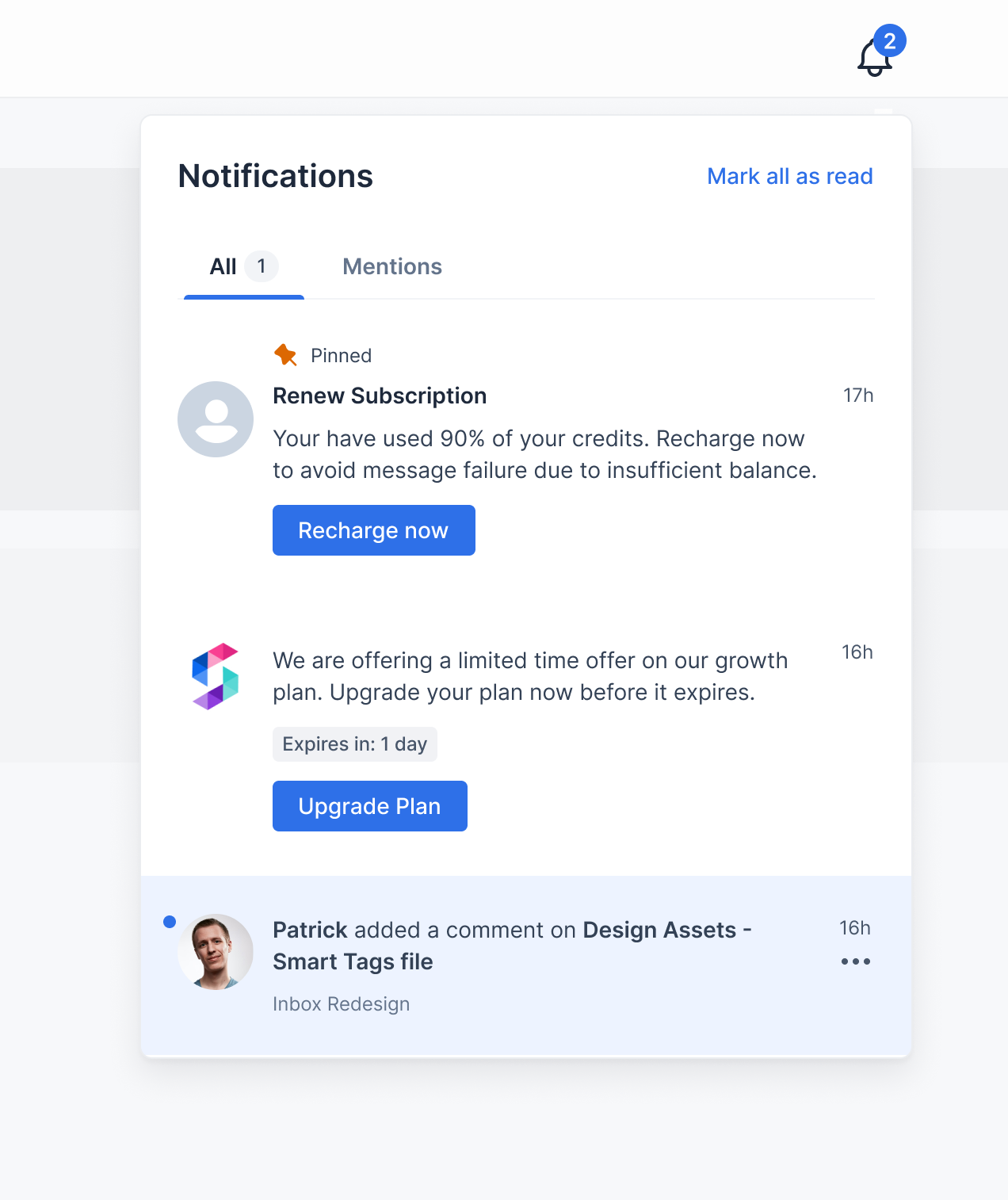 | 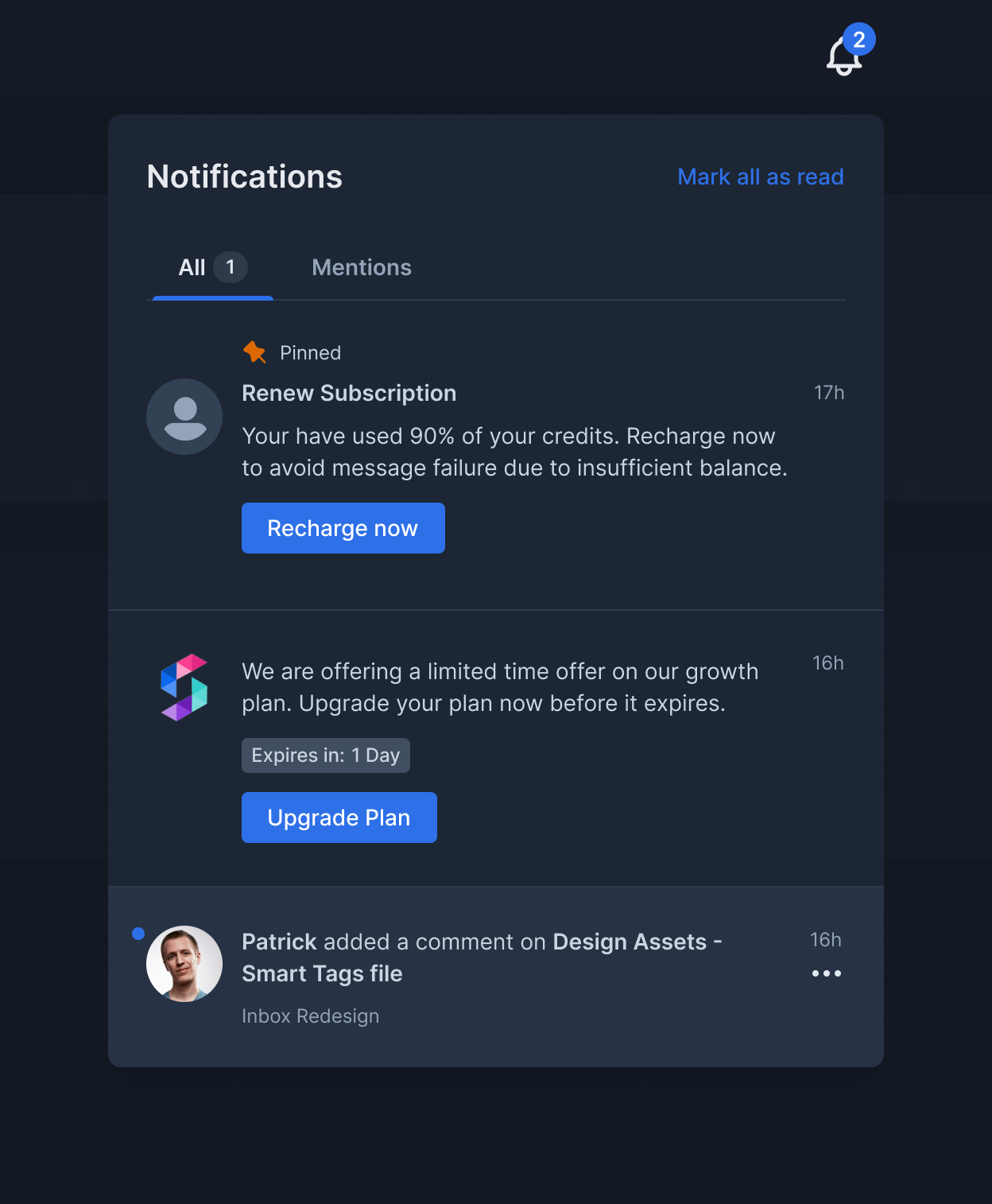 |
## Custom notification card click handler
Clicking on notification card will open the link if `Action URL` field is present in triggered inbox template. If you want to override this with your custom callback function you can pass `notificationClickHandler`.
```javascript Inbox theme={"system"}
suprsendConfig = {
inbox: {
notificationClickHandler: {
(notificationData: IRemoteNotification) => {
console.log("notification clicked", notificationData.n_id);
}
}
}
}
```
```javascript Feed theme={"system"}
suprsendConfig = {
feed: {
notificationClickHandler: {
(notificationData: IRemoteNotification) => {
console.log("notification clicked", notificationData.n_id);
}
}
}
}
```
## Custom action button click handlers
Clicking on action buttons in notification card will open link if you provide the URL on action button fields in triggered inbox template. If you want to override this with your custom action button callback functions you can pass `primaryActionClickHandler` and `secondaryActionClickHandler`.
```javascript Inbox theme={"system"}
suprsendConfig = {
inbox: {
primaryActionClickHandler = {
(notificationData: IRemoteNotification) => {
console.log('primary action button clicked', notificationData.n_id)
}
}
secondaryActionClickHandler = {
(notificationData: IRemoteNotification) => {
console.log('secondary action button clicked', notificationData.n_id)
}
}
}
}
```
```javascript Feed theme={"system"}
suprsendConfig = {
feed: {
primaryActionClickHandler = {
(notificationData: IRemoteNotification) => {
console.log('primary action button clicked', notificationData.n_id)
}
}
secondaryActionClickHandler = {
(notificationData: IRemoteNotification) => {
console.log('secondary action button clicked', notificationData.n_id)
}
}
}
}
```
## Popover position
Popover component is wrapper around NotificationFeed component and will be opened on click of bell icon. By default popover is shown at bottom, that is the inbox notifications popup list will be shown at bottom of the bell icon.
Example: Feed needs to be shown at bottom of left sidebar above profile icon, in that case on click of bell icon you would want to show notifications popover at right side.
```javascript Inbox theme={"system"}
suprsendConfig = {
inbox: {
popperPosition: "top / bottom / left / right"
}
}
```
## Customising CSS styles
You can customize the CSS of the provided components by passing `theme` prop. You can pass the styles for the following components:
```typescript Inbox theme={"system"}
interface ITheme {
bell ? : {
height ? : number | string;
width ? : number | string;
color ? : string;
};
badge ? : React.CSSProperties;
header ? : {
container ? : React.CSSProperties;
headerText ? : React.CSSProperties;
markAllReadText ? : React.CSSProperties;
}
tabs ? : {
color ? : string;
unselectedColor ? : string;
bottomColor ? : string;
badgeColor ? : string;
badgeText ? : string;
};
notificationsContainer ? : {
container ? : React.CSSProperties;
noNotificationsText ? : React.CSSProperties;
noNotificationsSubtext ? : React.CSSProperties;
loader ? : { color ? : string };
};
notification ? : {
container ? : React.CSSProperties & {
borderBottom ? : string | number;
readBackgroundColor ? : string;
unreadBackgroundColor ? : string;
hoverBackgroundColor ? : string;
};
pinnedIcon ? : {
height ? : number | string;
width ? : number | string;
color ? : string;
};
pinnedText ? : React.CSSProperties;
headerText ? : React.CSSProperties;
bodyText ? : React.CSSProperties & {
blockquoteColor ? : string;
tableBorderColor ? : string;
linkColor ? : string;
};
unseenDot ? : React.CSSProperties;
avatar ? : React.CSSProperties;
createdOnText ? : React.CSSProperties;
subtext ? : React.CSSProperties;
expiresText ? : React.CSSProperties & {
expiringBackgroundColor ? : string;
expiringColor ? : string;
};
actions ? : Array < {
text ? : React.CSSProperties;
container ? : React.CSSProperties & {
hoverBackgroundColor ? : string;
};
} > ;
actionsMenuIcon ? : {
hoverBackgroundColor ? : string;
height ? : number | string;
width ? : number | string;
color ? : string;
};
actionsMenu ? : React.CSSProperties;
actionsMenuItem ? : React.CSSProperties & {
hoverBackgroundColor ? : string;
};
actionsMenuItemIcon ? : {
height ? : number | string;
width ? : number | string;
color ? : string;
};
actionsMenuItemText ? : React.CSSProperties;
};
}
```
```typescript Feed theme={"system"}
interface INotificationFeedTheme {
header ? : {
container ? : React.CSSProperties;
headerText ? : React.CSSProperties;
markAllReadText ? : React.CSSProperties;
}
tabs ? : {
color ? : string;
unselectedColor ? : string;
bottomColor ? : string;
badgeColor ? : string;
badgeText ? : string;
};
notificationsContainer ? : {
container ? : React.CSSProperties;
noNotificationsText ? : React.CSSProperties;
noNotificationsSubtext ? : React.CSSProperties;
loader ? : {
color ? : string
};
};
notification ? : {
container ? : React.CSSProperties & {
borderBottom ? : string | number;
readBackgroundColor ? : string;
unreadBackgroundColor ? : string;
hoverBackgroundColor ? : string;
};
pinnedIcon ? : {
height ? : number | string;
width ? : number | string;
color ? : string;
};
pinnedText ? : React.CSSProperties;
headerText ? : React.CSSProperties;
bodyText ? : React.CSSProperties & {
blockquoteColor ? : string;
tableBorderColor ? : string;
linkColor ? : string;
};
unseenDot ? : React.CSSProperties;
avatar ? : React.CSSProperties;
createdOnText ? : React.CSSProperties;
subtext ? : React.CSSProperties;
expiresText ? : React.CSSProperties & {
expiringBackgroundColor ? : string;
expiringColor ? : string;
};
actions ? : Array < {
text ? : React.CSSProperties;
container ? : React.CSSProperties & {
hoverBackgroundColor ? : string;
};
} > ;
actionsMenuIcon ? : {
hoverBackgroundColor ? : string;
height ? : number | string;
width ? : number | string;
color ? : string;
};
actionsMenu ? : React.CSSProperties;
actionsMenuItem ? : React.CSSProperties & {
hoverBackgroundColor ? : string;
};
actionsMenuItemIcon ? : {
height ? : number | string;
width ? : number | string;
color ? : string;
};
actionsMenuItemText ? : React.CSSProperties;
};
}
```
```typescript Toast theme={"system"}
interface ToastNotificationCardTheme {
avatar ? : React.CSSProperties;
headerText ? : React.CSSProperties;
bodyText ? : React.CSSProperties & {
color ? : string;
blockquoteColor ? : string;
tableBorderColor ? : string;
linkColor ? : string;
};
container ? : React.CSSProperties;
}
```
## Internationalization
`locale` can be used to change language of feed. We support translations for below languages internally. If you want to use other languages that are not supported by us or to override strings of existing languages, you can pass `translations` object.
* `en` - [English](https://github.com/suprsend/suprsend-react-core/blob/main/src/i18n/languages/en.ts#L5) (default)
* `fr` - [French](https://github.com/suprsend/suprsend-react-core/blob/main/src/i18n/languages/fr.ts#L5)
* `de` - [German](https://github.com/suprsend/suprsend-react-core/blob/main/src/i18n/languages/de.ts#L5)
* `es` - [Spanish](https://github.com/suprsend/suprsend-react-core/blob/main/src/i18n/languages/es.ts#L5)
* `ar` - [Arabic](https://github.com/suprsend/suprsend-react-core/blob/main/src/i18n/languages/ar.ts#L5)
```javascript Inbox theme={"system"}
suprsendConfig = { locale: "fr" };
suprsendConfig = { translations: { "notifications": "All Notifications", "markAllAsRead": "Mark Read All" } };
```
```javascript Feed theme={"system"}
suprsendConfig = { locale: "fr" };
suprsendConfig = { translations: { "notifications": "All Notifications", "markAllAsRead": "Mark Read All" } };
```
```typescript Translations Object theme={"system"}
interface ITranslations {
notifications?: string;
markAllAsRead?: string;
noNotificationsTitle?: string;
noNotificationsDescription?: string;
pinned?: string;
markAsUnread?: string;
markAsRead?: string;
archive?: string;
expiresIn?: string;
minute?: string;
minutes?: string;
hour?: string;
hours?: string;
day?: string;
days?: string;
week?: string;
weeks?: string;
month?: string;
months?: string;
year?: string;
years?: string;
}
```