> ## Documentation Index
> Fetch the complete documentation index at: https://docs.suprsend.com/llms.txt
> Use this file to discover all available pages before exploring further.
# Agent
> Use SuprSend Agent in the dashboard to query your workspace, draft workflows, and debug notification delivery using a plain English chat interface.
Agent is a chat surface built into the SuprSend dashboard. Ask in plain English — *"show me everything about user [jane@acme.com](mailto:jane@acme.com)"*, *"draft a payment-reminder workflow"*, *"why didn't this notification deliver?"* — and it calls the right APIs against your workspace, returns the result, and helps you act on it.
It's scoped to your workspace and SuprSend's docs. Threads persist, so follow-ups don't need re-explanation.
Agent is in **beta** and runs on **credit-based pricing tied to your SuprSend plan**. Your plan's free credit allowance, overage rate, and ability to enable extra usage depend on the tier you're on — check your current plan and live credit usage in [AI & Agents](https://app.suprsend.com/en/account-settings/ai-agents). Pricing and limits may change before general availability.
***
## Launch Agent
Open Agent from anywhere in the dashboard:
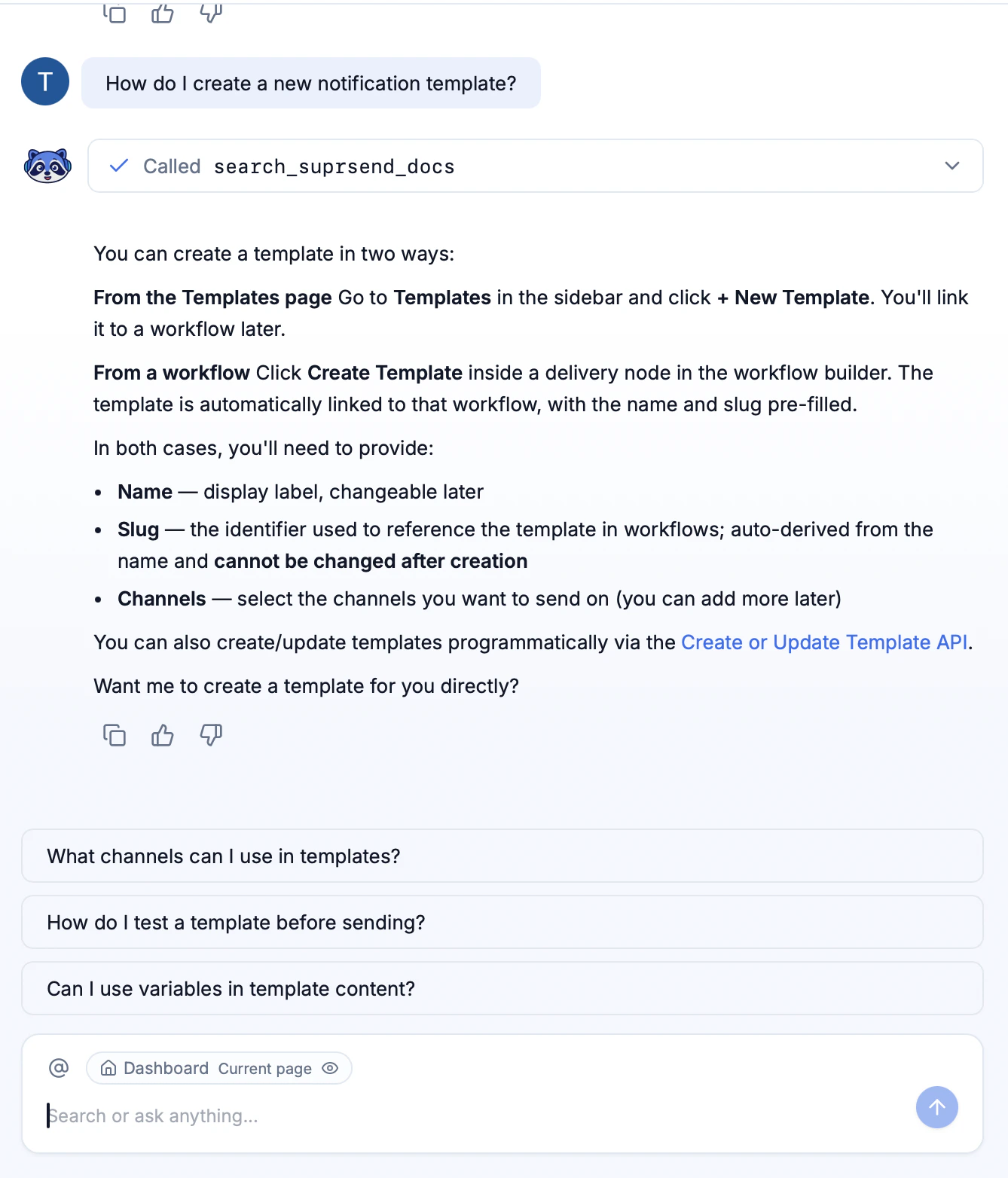
Press **`Cmd+/`** (Mac) or **`Ctrl+/`** (Windows / Linux) to slide Agent in from the right. Keep working in the dashboard while you chat.
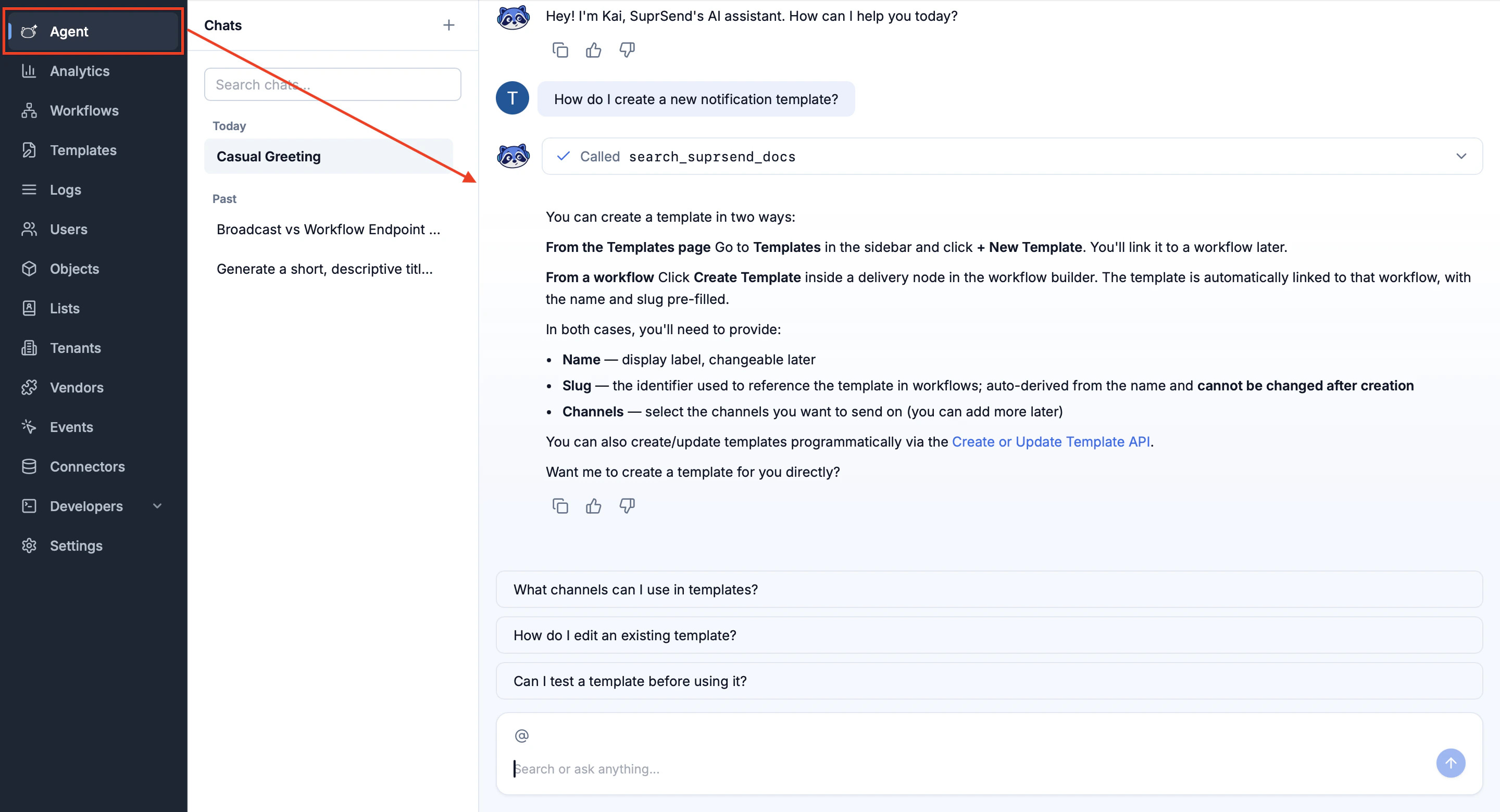
 Click the **Agent** tab in the left navbar for the full-page view — best for long conversations and multi-step builds.
 ***
## What Agent can do
Live state for users, preferences, workflows, tenants, lists, objects, and events.
Build users, tenants, objects, lists, categories, workflows, and templates from a conversation.
Describe a payload in English; Agent drafts the JSON schema and registers it.
Trace why a notification didn't land — channels, preferences, overrides, and execution logs in one explanation.
Delivery rates, engagement, channel performance, and segment breakdowns with context.
Fetch and explain execution, message, and request logs for any user, workflow, or time window.
***
## What you can ask
Paste any of these into Agent, swap in your own identifiers, and send.
**Analytics**
* What were our email delivery and open rates last week?
* Break down WhatsApp delivery by tenant for the last 30 days.
**Workflows and events**
* Is the `payment-reminder` workflow active? What category does it use?
* Trigger the `order-confirmation` workflow for user `jane@acme.com`.
* Create a workflow that sends email and falls back to SMS after 10 minutes.
**Users and preferences**
* Show me the full profile of user `jane@acme.com`.
* Why isn't user `john@acme.com` getting emails?
* Add `jane@acme.com` to `beta-testers` and subscribe her to `project-updates`.
**Tenants and objects**
* Show branding and config for tenant `enterprise-client`.
* For tenant `acme-corp`, turn off WhatsApp for all categories.
**Templates and schemas**
* Create an email template for `order-confirmation` with order ID, items, and total.
* Generate an event schema for `subscription-renewed`.
**Debugging**
* Trace the last delivery to `john@acme.com` and explain what happened.
* Which preference rule is blocking SMS for tenant `acme-corp`?
***
## Skills
Built-in, multi-step flows you can invoke with `/` inside the chat.
| Skill | What it does |
| --------------------- | -------------------------------------------------------------------------------------------------- |
| **Workflow creation** | Describe an outcome and Agent assembles a workflow with channels, branches, delays, and fallbacks. |
| **Schema generation** | Infers JSON schemas from English descriptions and registers them. |
| **Template creation** | Drafts email, SMS, push, WhatsApp, and inbox templates with variables and previews. |
***
## Settings
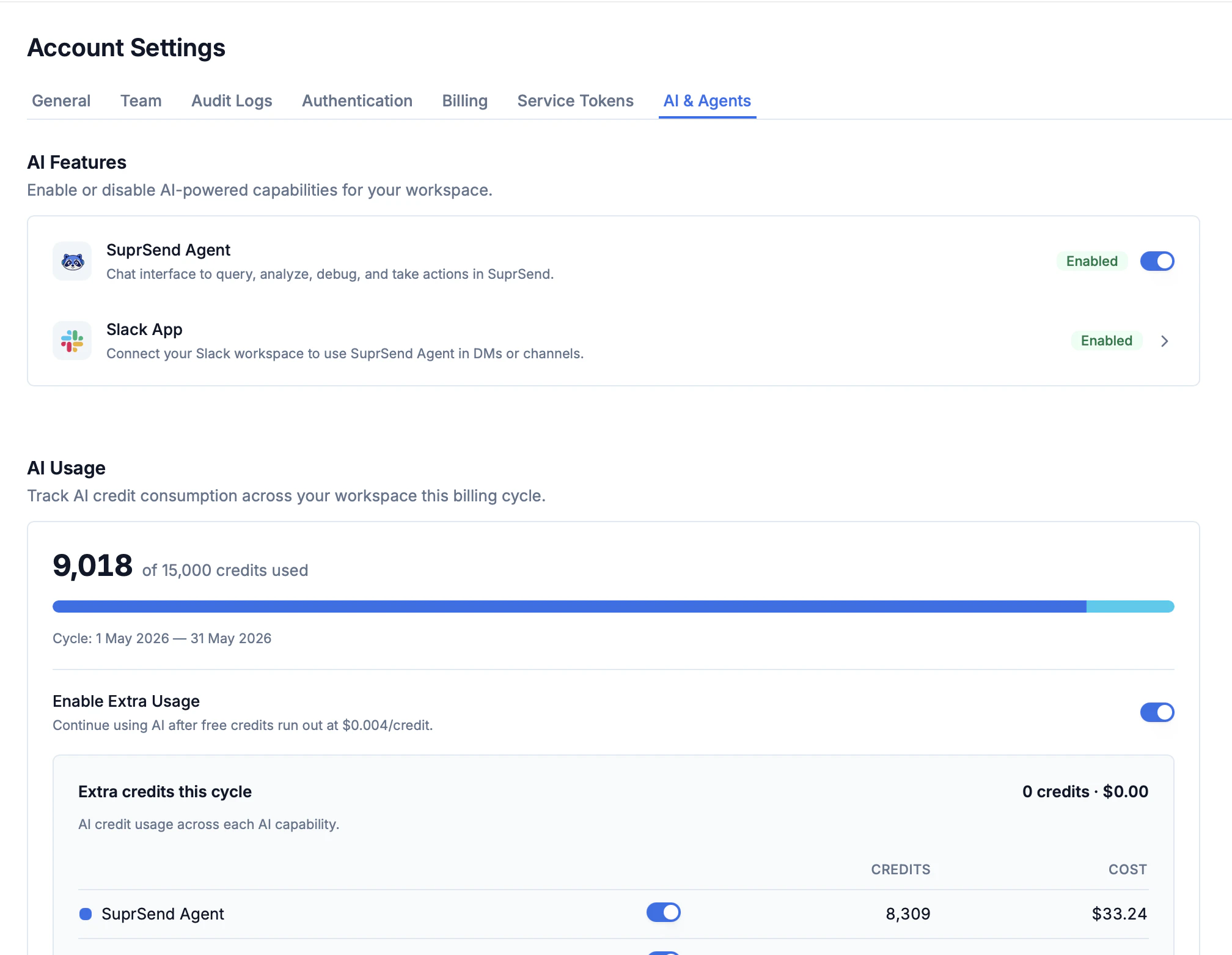
Everything Agent-related — enable/disable toggles, Slack install, credit usage, and overflow billing — lives on one page: **Account Settings → [AI & Agents](https://app.suprsend.com/en/account-settings/ai-agents)**.
***
## What Agent can do
Live state for users, preferences, workflows, tenants, lists, objects, and events.
Build users, tenants, objects, lists, categories, workflows, and templates from a conversation.
Describe a payload in English; Agent drafts the JSON schema and registers it.
Trace why a notification didn't land — channels, preferences, overrides, and execution logs in one explanation.
Delivery rates, engagement, channel performance, and segment breakdowns with context.
Fetch and explain execution, message, and request logs for any user, workflow, or time window.
***
## What you can ask
Paste any of these into Agent, swap in your own identifiers, and send.
**Analytics**
* What were our email delivery and open rates last week?
* Break down WhatsApp delivery by tenant for the last 30 days.
**Workflows and events**
* Is the `payment-reminder` workflow active? What category does it use?
* Trigger the `order-confirmation` workflow for user `jane@acme.com`.
* Create a workflow that sends email and falls back to SMS after 10 minutes.
**Users and preferences**
* Show me the full profile of user `jane@acme.com`.
* Why isn't user `john@acme.com` getting emails?
* Add `jane@acme.com` to `beta-testers` and subscribe her to `project-updates`.
**Tenants and objects**
* Show branding and config for tenant `enterprise-client`.
* For tenant `acme-corp`, turn off WhatsApp for all categories.
**Templates and schemas**
* Create an email template for `order-confirmation` with order ID, items, and total.
* Generate an event schema for `subscription-renewed`.
**Debugging**
* Trace the last delivery to `john@acme.com` and explain what happened.
* Which preference rule is blocking SMS for tenant `acme-corp`?
***
## Skills
Built-in, multi-step flows you can invoke with `/` inside the chat.
| Skill | What it does |
| --------------------- | -------------------------------------------------------------------------------------------------- |
| **Workflow creation** | Describe an outcome and Agent assembles a workflow with channels, branches, delays, and fallbacks. |
| **Schema generation** | Infers JSON schemas from English descriptions and registers them. |
| **Template creation** | Drafts email, SMS, push, WhatsApp, and inbox templates with variables and previews. |
***
## Settings
Everything Agent-related — enable/disable toggles, Slack install, credit usage, and overflow billing — lives on one page: **Account Settings → [AI & Agents](https://app.suprsend.com/en/account-settings/ai-agents)**.
 ### Enable Agent
Workspace admins control whether Agent is available to the rest of the team.
1. Open **Account Settings** from the user menu in the top-right of the dashboard.
2. Go to the **AI & Agents** tab.
3. Under **AI Features**, flip the **SuprSend Agent** toggle to **Enabled**.
4. Refresh the dashboard — the Agent tab appears in the left navbar and `Cmd+/` (or `Ctrl+/`) opens the side panel.
To turn Agent off, flip the same toggle to **Disabled**. The orb, the keyboard shortcut, and the navbar tab are hidden for every workspace member, and all tool calls are blocked at the API layer. Saved threads are preserved and reappear when you re-enable.
### AI Features
| Toggle | What it controls |
| ------------------ | ----------------------------------------------------------------------------------------------------------------------------------------------------------- |
| **SuprSend Agent** | The dashboard chat — query, analyze, debug, and take actions in SuprSend. |
| **Slack App** | Connects your Slack workspace so Agent works in DMs and channels. See the [Slack Agent](/reference/slack-agent) reference for setup and the Privacy Filter. |
### AI Usage and credits
Agent runs on a **credit-based** model and the specifics depend on the SuprSend plan your workspace is on:
* **Free allowance.** Every billing cycle, your plan includes a fixed number of Agent credits. The settings page shows the cycle dates, credits used vs. total, and a per-capability breakdown (dashboard Agent, Slack App, etc.).
* **Plan dependence.** Both the size of the allowance and the per-credit overage rate vary by plan. Check your current plan in **Billing** and your live credit count in **AI & Agents** before estimating monthly usage.
* **Enable Extra Usage.** Toggle this on to keep Agent working after free credits run out — overage is billed at **\$0.004 per credit** (or your plan's published rate). Leave it off if you want Agent to stop accepting new requests until the next cycle for hard cost predictability.
A few days into a cycle, check the credit bar to project usage. If you regularly approach the allowance, enabling Extra Usage avoids interruptions; if you want hard predictability, keep it off and let Agent pause until the next cycle.
### Bring Your Own Token · *Coming soon*
Use your own OpenAI or Anthropic API keys for **unlimited usage with a small platform fee**. You pay the model provider directly and SuprSend bills only the workspace tool calls.
Click **Get notified** on the BYOToken card in [AI & Agents](https://app.suprsend.com/en/account-settings/ai-agents) to be alerted when this is available.
***
## Tool reference
These are the workspace tools Agent can call. The same set is available through SuprSend's [MCP server](/reference/mcp-tool-list).
| Tool | Example prompt |
| --------------------------------- | --------------------------------------------------------------------------------------------------------- |
| `get_user` | Show me the full profile of user **[jane@acme.com](mailto:jane@acme.com)** |
| `create_user` | Create user **test-1** with email **[test@demo.com](mailto:test@demo.com)** and name **joe** |
| `update_user` | Add email to user **[jane@acme.com](mailto:jane@acme.com)** and set her timezone to **America/New\_York** |
| `get_user_preference` | Show me the notification preferences for **[jane@acme.com](mailto:jane@acme.com)** |
| `update_user_preference_category` | Opt user **[sarah@acme.com](mailto:sarah@acme.com)** out of the **product-updates** category |
| `update_user_preference_channel` | Turn off SMS notifications entirely for **[john@acme.com](mailto:john@acme.com)** |
| `get_user_list_subscriptions` | What lists is **[john@acme.com](mailto:john@acme.com)** part of? |
| `get_user_object_subscriptions` | What objects is **[john@acme.com](mailto:john@acme.com)** subscribed to? |
| Tool | Example prompt |
| ----------------------------------- | ------------------------------------------------------------------------------------------------------- |
| `get_tenant` | Show me branding and config for tenant **enterprise-client** |
| `upsert_tenant` | Create tenant "Globex Corp" with logo `https://globex.com/logo.png` and primary color `#1E40AF` |
| `get_tenant_preference` | What are the default preferences for tenant **acme-corp**? |
| `update_tenant_preference_category` | For tenant **acme-corp**, turn off WhatsApp for all categories and disable **product-updates** entirely |
| Tool | Example prompt |
| ----------------------------------- | ------------------------------------------------------------------------------------------------------ |
| `get_object` | Show me the `project-atlas` object and how many subscribers it has |
| `create_object` | Create object `design-reviews` and subscribe user `jane@acme.com` to it |
| `update_object` | Set the description of `project-atlas` to "Atlas project notifications" |
| `get_object_preference` | What are the notification preferences for the `alerts-channel` object? |
| `update_object_preference_category` | Turn off push notifications for the `alerts-channel` object and opt it out of the `marketing` category |
| `update_object_preference_channel` | Disable email for the `alerts-channel` object |
| `get_object_subscriptions` | Who is subscribed to the `project-atlas` object? |
| `add_object_subscription` | Subscribe user `jane@acme.com` to `design-reviews` and set role `project manager` |
| Tool | Example prompt |
| ---------------------------- | ---------------------------------------------------------------------------------------------- |
| `get_workflow` | Is the `payment-reminder` workflow active? What category does it use? |
| `list_workflows` | What workflows do I have? Summarize each one |
| `get_event_details` | Show me the schema for the `user-signed-up` event |
| `get_preference_categories` | What categories do I have and what are their defaults? |
| `update_preference_category` | Add a new `product-updates` category with default opt-in settings for email and inbox channels |
| `commit_preference_category` | Commit the category changes to make them live |
| Tool | Example prompt |
| ----------------------- | ----------------------------------------------------------------------------- |
| `get_translation` | Show me the French translation file |
| `update_translation` | Add French translations for the `weekly-digest` category name and description |
| `commit_translation` | Commit the translation updates |
| `add_user_to_list` | Add user `jane@acme.com` to the `beta-testers` list |
| `remove_user_from_list` | Remove `john@acme.com` from the `inactive-users` list |
***
**Coming soon**
* Bring Your Own Token (OpenAI / Anthropic API keys)
* Generate type definitions
* View billing plan and usage inside Agent
* Shared context across conversations
Want a new tool or have feedback? Let us know at [product@suprsend.com](mailto:product@suprsend.com).
### Enable Agent
Workspace admins control whether Agent is available to the rest of the team.
1. Open **Account Settings** from the user menu in the top-right of the dashboard.
2. Go to the **AI & Agents** tab.
3. Under **AI Features**, flip the **SuprSend Agent** toggle to **Enabled**.
4. Refresh the dashboard — the Agent tab appears in the left navbar and `Cmd+/` (or `Ctrl+/`) opens the side panel.
To turn Agent off, flip the same toggle to **Disabled**. The orb, the keyboard shortcut, and the navbar tab are hidden for every workspace member, and all tool calls are blocked at the API layer. Saved threads are preserved and reappear when you re-enable.
### AI Features
| Toggle | What it controls |
| ------------------ | ----------------------------------------------------------------------------------------------------------------------------------------------------------- |
| **SuprSend Agent** | The dashboard chat — query, analyze, debug, and take actions in SuprSend. |
| **Slack App** | Connects your Slack workspace so Agent works in DMs and channels. See the [Slack Agent](/reference/slack-agent) reference for setup and the Privacy Filter. |
### AI Usage and credits
Agent runs on a **credit-based** model and the specifics depend on the SuprSend plan your workspace is on:
* **Free allowance.** Every billing cycle, your plan includes a fixed number of Agent credits. The settings page shows the cycle dates, credits used vs. total, and a per-capability breakdown (dashboard Agent, Slack App, etc.).
* **Plan dependence.** Both the size of the allowance and the per-credit overage rate vary by plan. Check your current plan in **Billing** and your live credit count in **AI & Agents** before estimating monthly usage.
* **Enable Extra Usage.** Toggle this on to keep Agent working after free credits run out — overage is billed at **\$0.004 per credit** (or your plan's published rate). Leave it off if you want Agent to stop accepting new requests until the next cycle for hard cost predictability.
A few days into a cycle, check the credit bar to project usage. If you regularly approach the allowance, enabling Extra Usage avoids interruptions; if you want hard predictability, keep it off and let Agent pause until the next cycle.
### Bring Your Own Token · *Coming soon*
Use your own OpenAI or Anthropic API keys for **unlimited usage with a small platform fee**. You pay the model provider directly and SuprSend bills only the workspace tool calls.
Click **Get notified** on the BYOToken card in [AI & Agents](https://app.suprsend.com/en/account-settings/ai-agents) to be alerted when this is available.
***
## Tool reference
These are the workspace tools Agent can call. The same set is available through SuprSend's [MCP server](/reference/mcp-tool-list).
| Tool | Example prompt |
| --------------------------------- | --------------------------------------------------------------------------------------------------------- |
| `get_user` | Show me the full profile of user **[jane@acme.com](mailto:jane@acme.com)** |
| `create_user` | Create user **test-1** with email **[test@demo.com](mailto:test@demo.com)** and name **joe** |
| `update_user` | Add email to user **[jane@acme.com](mailto:jane@acme.com)** and set her timezone to **America/New\_York** |
| `get_user_preference` | Show me the notification preferences for **[jane@acme.com](mailto:jane@acme.com)** |
| `update_user_preference_category` | Opt user **[sarah@acme.com](mailto:sarah@acme.com)** out of the **product-updates** category |
| `update_user_preference_channel` | Turn off SMS notifications entirely for **[john@acme.com](mailto:john@acme.com)** |
| `get_user_list_subscriptions` | What lists is **[john@acme.com](mailto:john@acme.com)** part of? |
| `get_user_object_subscriptions` | What objects is **[john@acme.com](mailto:john@acme.com)** subscribed to? |
| Tool | Example prompt |
| ----------------------------------- | ------------------------------------------------------------------------------------------------------- |
| `get_tenant` | Show me branding and config for tenant **enterprise-client** |
| `upsert_tenant` | Create tenant "Globex Corp" with logo `https://globex.com/logo.png` and primary color `#1E40AF` |
| `get_tenant_preference` | What are the default preferences for tenant **acme-corp**? |
| `update_tenant_preference_category` | For tenant **acme-corp**, turn off WhatsApp for all categories and disable **product-updates** entirely |
| Tool | Example prompt |
| ----------------------------------- | ------------------------------------------------------------------------------------------------------ |
| `get_object` | Show me the `project-atlas` object and how many subscribers it has |
| `create_object` | Create object `design-reviews` and subscribe user `jane@acme.com` to it |
| `update_object` | Set the description of `project-atlas` to "Atlas project notifications" |
| `get_object_preference` | What are the notification preferences for the `alerts-channel` object? |
| `update_object_preference_category` | Turn off push notifications for the `alerts-channel` object and opt it out of the `marketing` category |
| `update_object_preference_channel` | Disable email for the `alerts-channel` object |
| `get_object_subscriptions` | Who is subscribed to the `project-atlas` object? |
| `add_object_subscription` | Subscribe user `jane@acme.com` to `design-reviews` and set role `project manager` |
| Tool | Example prompt |
| ---------------------------- | ---------------------------------------------------------------------------------------------- |
| `get_workflow` | Is the `payment-reminder` workflow active? What category does it use? |
| `list_workflows` | What workflows do I have? Summarize each one |
| `get_event_details` | Show me the schema for the `user-signed-up` event |
| `get_preference_categories` | What categories do I have and what are their defaults? |
| `update_preference_category` | Add a new `product-updates` category with default opt-in settings for email and inbox channels |
| `commit_preference_category` | Commit the category changes to make them live |
| Tool | Example prompt |
| ----------------------- | ----------------------------------------------------------------------------- |
| `get_translation` | Show me the French translation file |
| `update_translation` | Add French translations for the `weekly-digest` category name and description |
| `commit_translation` | Commit the translation updates |
| `add_user_to_list` | Add user `jane@acme.com` to the `beta-testers` list |
| `remove_user_from_list` | Remove `john@acme.com` from the `inactive-users` list |
***
**Coming soon**
* Bring Your Own Token (OpenAI / Anthropic API keys)
* Generate type definitions
* View billing plan and usage inside Agent
* Shared context across conversations
Want a new tool or have feedback? Let us know at [product@suprsend.com](mailto:product@suprsend.com).