
Self-hosted deployment is supported under the Enterprise plan and is enabled via an enterprise license. Contact our sales team at sales@suprsend.com or reach out to our enterprise support team at support@suprsend.com to get the license.
When to Choose Self-Hosted
Self-hosting SuprSend is ideal for teams that need:- Data residency or privacy compliance (GDPR, HIPAA, or enterprise IT policies)
- Integration with private systems (internal CRM, ERP, or on-prem alerting tools)
- Custom delivery infra (for example, using private SMTP, SMS gateways, or Kafka)
- Air-gapped or restricted network environments
- Scalability control for high-volume workloads (millions of events/day)
Deployment Modes
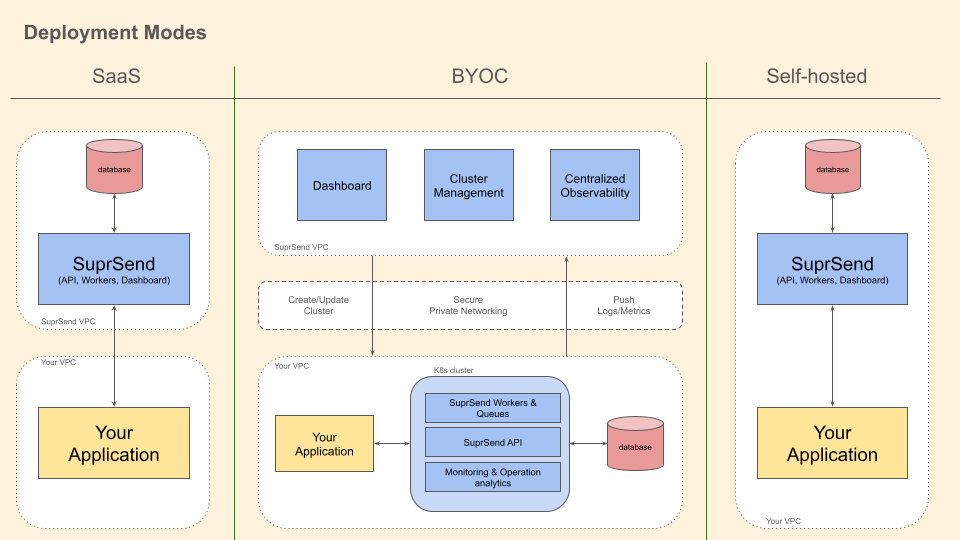
SuprSend deployment options
In the Self-Hosted model, both the control plane and data plane are operated by the customer - ensuring complete isolation of data and operations
Architecture
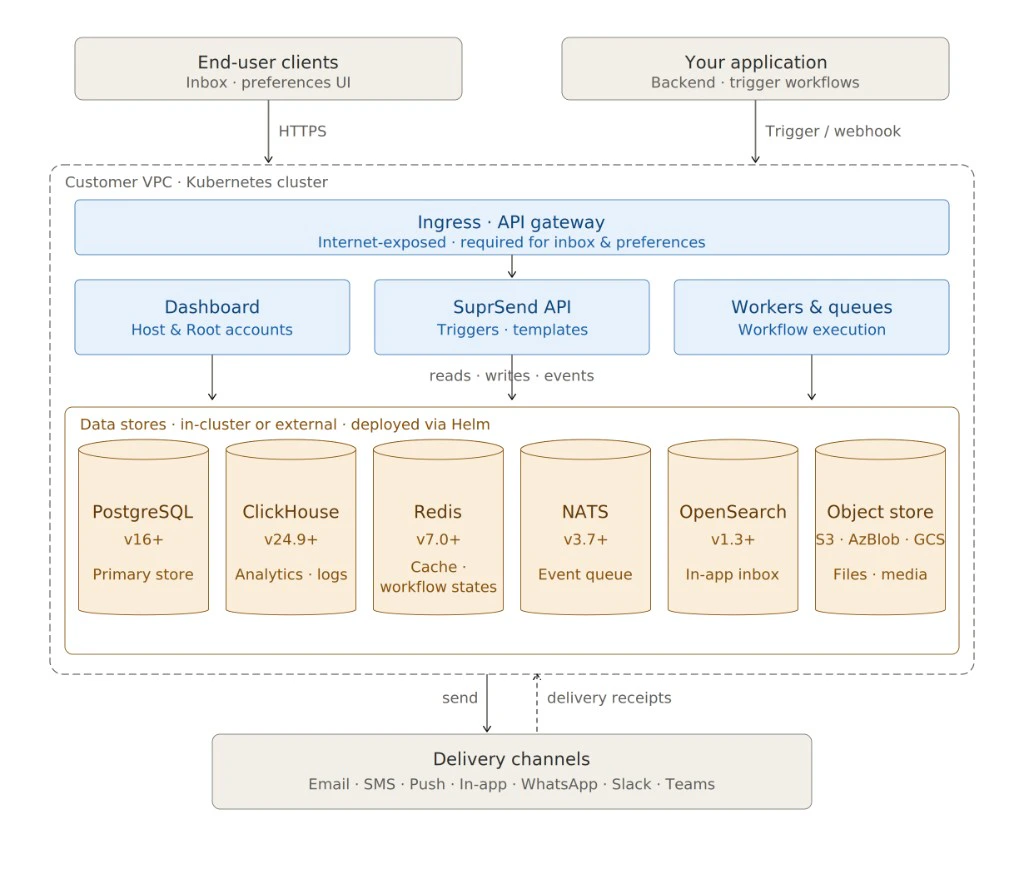
SuprSend self-hosted architecture
High-Level Components
SuprSend supports both single-cluster and multi-cluster topologies, depending on your scale and SLA requirements. You can run the entire system within your Kubernetes cluster, or keep stateful services (Postgres, Redis, ClickHouse) managed externally for better performance and resilience.
System Requirements
All dependencies are open-source under permissible licenses:For best performance, deploy databases and queues outside the Kubernetes cluster.
Networking & Observability
- Secure Private Networking: Self-hosted deployment supports secure private interconnects between SuprSend API, workers, and customer VPC.
- Centralized Observability: Logs and metrics can be pushed to your existing monitoring stack (for example, Prometheus, Grafana).
- Cluster Management: You can create, update, and monitor clusters using the SuprSend CLI or Terraform provider
Promotion & Automation
You can install SuprSend CLI to promote assets and automate your deployment process in CI/CD pipeline. To connect the CLI to your self-hosted or BYOC deployment, see Setting Up CLI Access.Release Lifecycle & Versioning
- Stable Releases: Published every quarter.
- Patch Releases: Security or bug-fix updates.
- Version Format: vX.Y.Z (Semantic Versioning).
- Upgrade Policy: Minor versions are upgrade-safe; major versions may introduce migrations.