
Two terms used throughout this guide:
- Customer — a business you serve.
- User — the person who receives a notification: one of your customer’s own people (their employees or their end users).
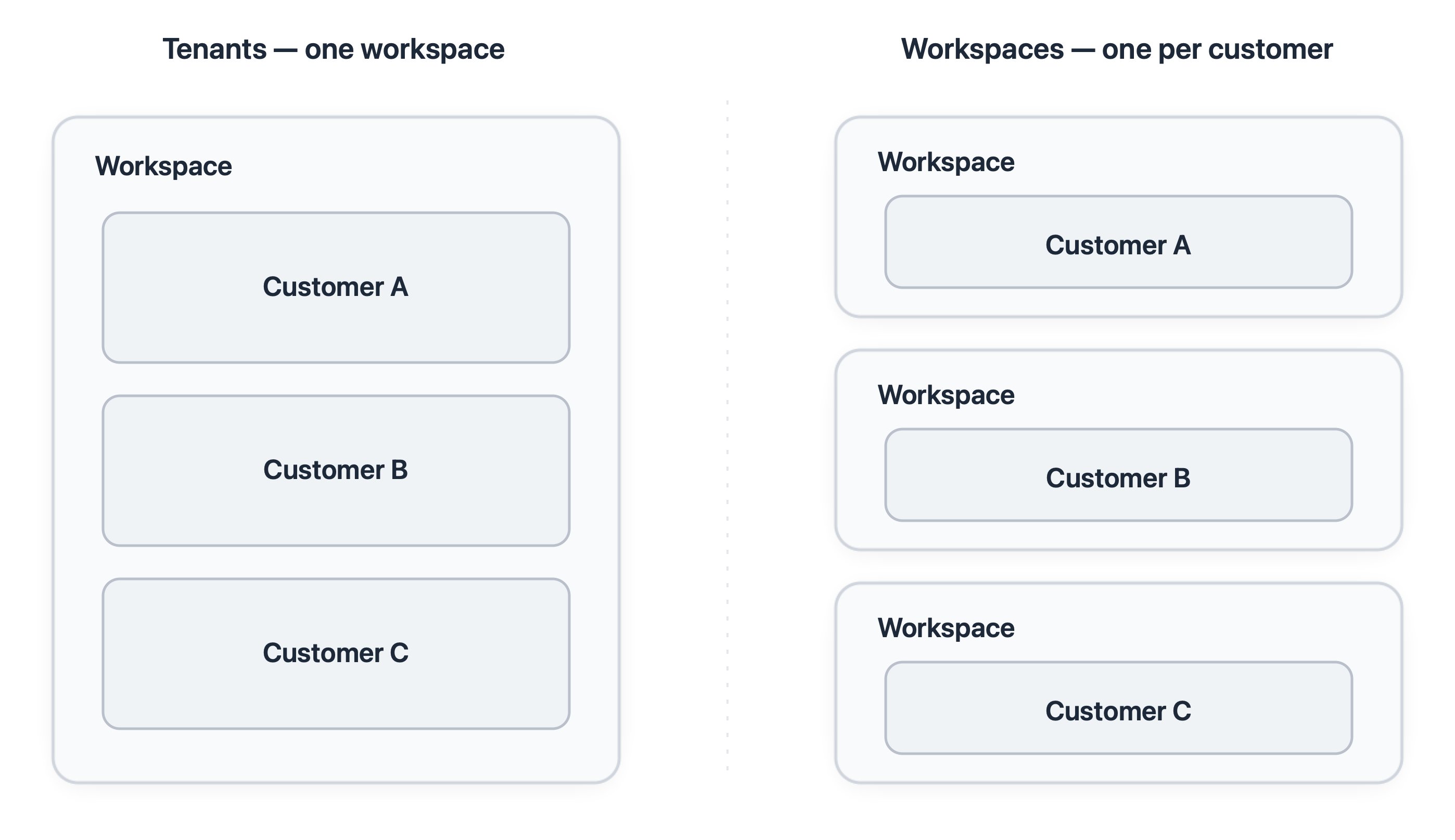
- Tenants — keep all customers in one shared workspace, each set up as a tenant.
- Workspaces — give each customer its own separate workspace.
Core concepts
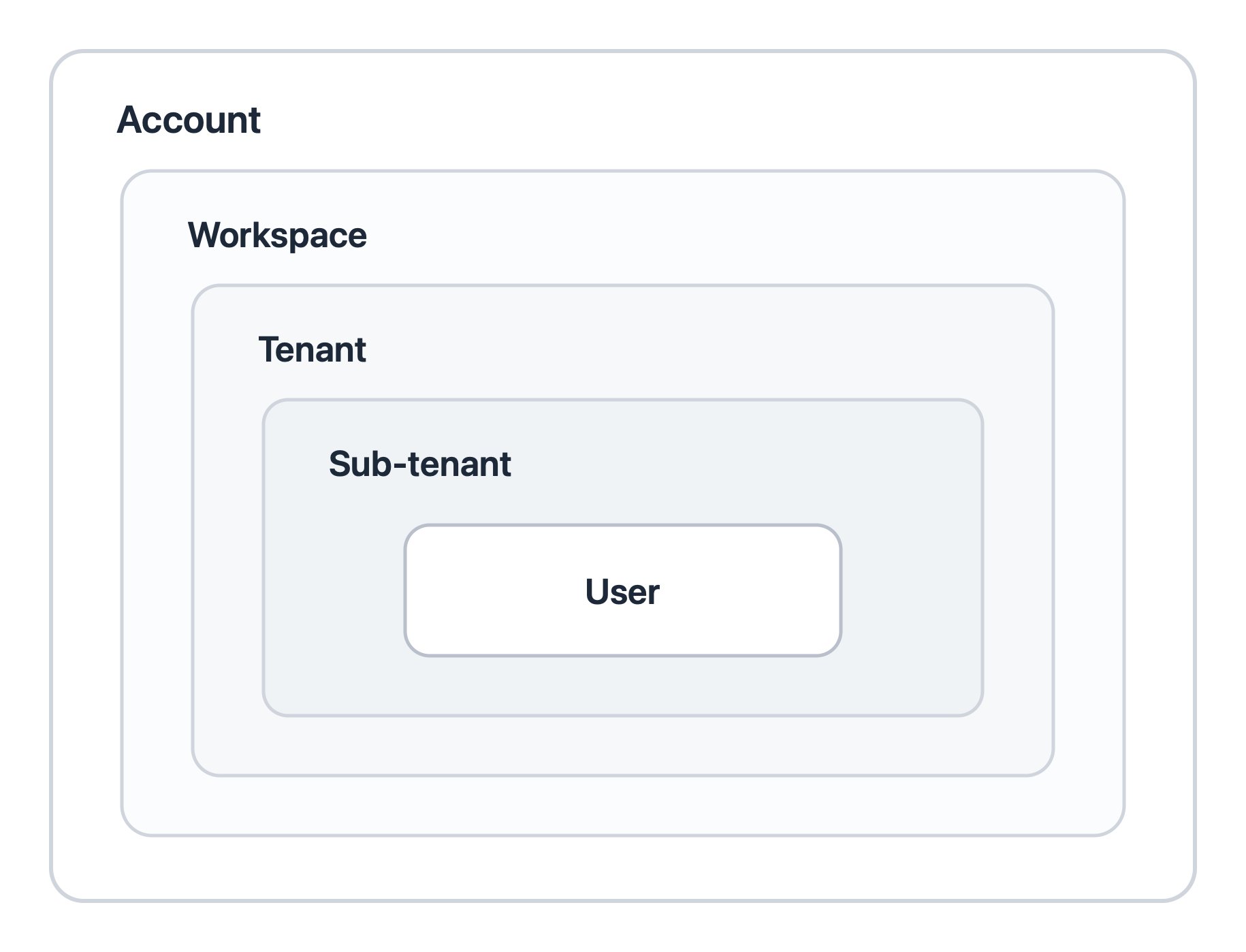
These concepts form the fundamental basis of both models. Workspace- A self-contained environment in SuprSend. It holds everything needed to send notifications: API keys, vendors, templates, workflows, notification categories, and users.
- Nothing is shared between workspaces, so they also serve as your separate environments — sandbox, testing, and production.
- A customer or segment that lives inside a workspace.
- You use tenants to give each customer its own notification experience — its branding, preferences, and delivery vendors — while sharing the same underlying templates and workflows.
- A group inside a tenant that needs its own settings — a division, region, or project of a customer.
- It inherits its parent tenant’s branding, preferences, and vendors and overrides only what it needs, so settings cascade down the levels (category default → tenant → sub-tenant → user).
Two ways to model a customer
You can model your customers in one of two ways: as tenants inside one shared workspace, or as separate workspaces. The models differ in what is shared between customers and what is kept isolated.Tenants — one workspace, many tenants
All customers live in a single workspace and share its templates, workflows, notification categories, and API keys.Each customer is a tenant that you customize on its own: its branding, its preferences, and its vendor routing. If you also need to customise the notification content for the customer, you can use template variants.
Workspaces — one workspace per customer
Each customer gets its own workspace with its own templates, workflows, categories, vendors, users, API keys, and analytics.Nothing is shared between customers, so a change you make for one customer never affects another.
How they differ
The table below compares where the two models actually differ.How to choose
Start from how much isolation each customer needs.Choose tenants if
- Your customers can use the same workflows, differing mainly in branding, content and preference rules.
- You want to manage templates and workflows centrally, so a single update applies to all customers.
- Your customers may share users, or you have multiple products or applications that can have common users.
Choose workspaces if
- A customer requires isolation from other customers — separate data, users, and API keys — often for security or compliance.
- A customer needs a structurally different workflow — different steps, delays, or branches — primarily due to different types of workflows (eg. marketing campaigns built by customers themselves).
Rule of thumb: default to tenants when customers share the same notifications and you manage them centrally; choose workspaces when a customer must be isolated or needs its own workflow logic.
FAQ
Can a customer have its own branding and delivery vendors without its own workspace?
Can a customer have its own branding and delivery vendors without its own workspace?
Yes. In the tenants model, each customer can have its own branding and its own delivery vendors while sharing the workspace. You only need a separate workspace when a customer requires isolation or its own notifications logic that is not shared with other customers.
How do I handle groups inside a single customer, such as its divisions, regions, or projects?
How do I handle groups inside a single customer, such as its divisions, regions, or projects?
It depends on what the group needs.
- The group needs its own settings (branding, preferences, or vendors): when the customer is a tenant, model its groups as sub-tenants, which inherit the customer’s settings and override only what they need; when the customer has its own workspace, model its groups as tenants inside that workspace.
- You only need to notify everyone in the group (for example, all members or certain members of a project): use an object. Subscribe the members to the object (object subscriptions), then trigger on the object and it reaches all current subscribers. Objects work in either model.
Can I use both models across my customers?
Can I use both models across my customers?
Yes. Keep customers that require isolation in their own workspaces, and model the rest as tenants in a shared workspace.
Does the number of workspaces affect cost?
Does the number of workspaces affect cost?
No. SuprSend bills by notification volume across your whole account, so the number of workspaces does not change the bill. Unlimited workspaces come in Enterprise plan.
Next steps
Follow a deep-dive — each walks through setup end to end with a working example app.Designing notifications for B2B2C applications
The workspaces model in depth: one workspace per customer, with isolation, credentials, and asset sync with the CLI.
Designing notifications for B2B applications
A single organization modelled with its projects inside one workspace.