
How tenant preferences work
Tenant preferences sit between global category defaults and user preferences. They let platform admins restrict what a tenant can access, and let tenant admins override defaults for their users. Notifications are sent only if the category and channel are allowed at all three levels.Platform admin: Controlling tenant access
As a platform administrator, you can define which preference categories and channels are available to different tenants. For example, if you’re a SaaS platform with paid features and some clients haven’t subscribed to those features, you can hide preference categories related to the paid features for those tenants.1
Access tenant settings
2
Disable categories or channels
Disable categories or set channels as opt-out that aren’t valid for specific tenants
3
Save changes
Tenants won’t be able to set preferences in hidden categories, and notifications won’t be sent to tenant users in those categories
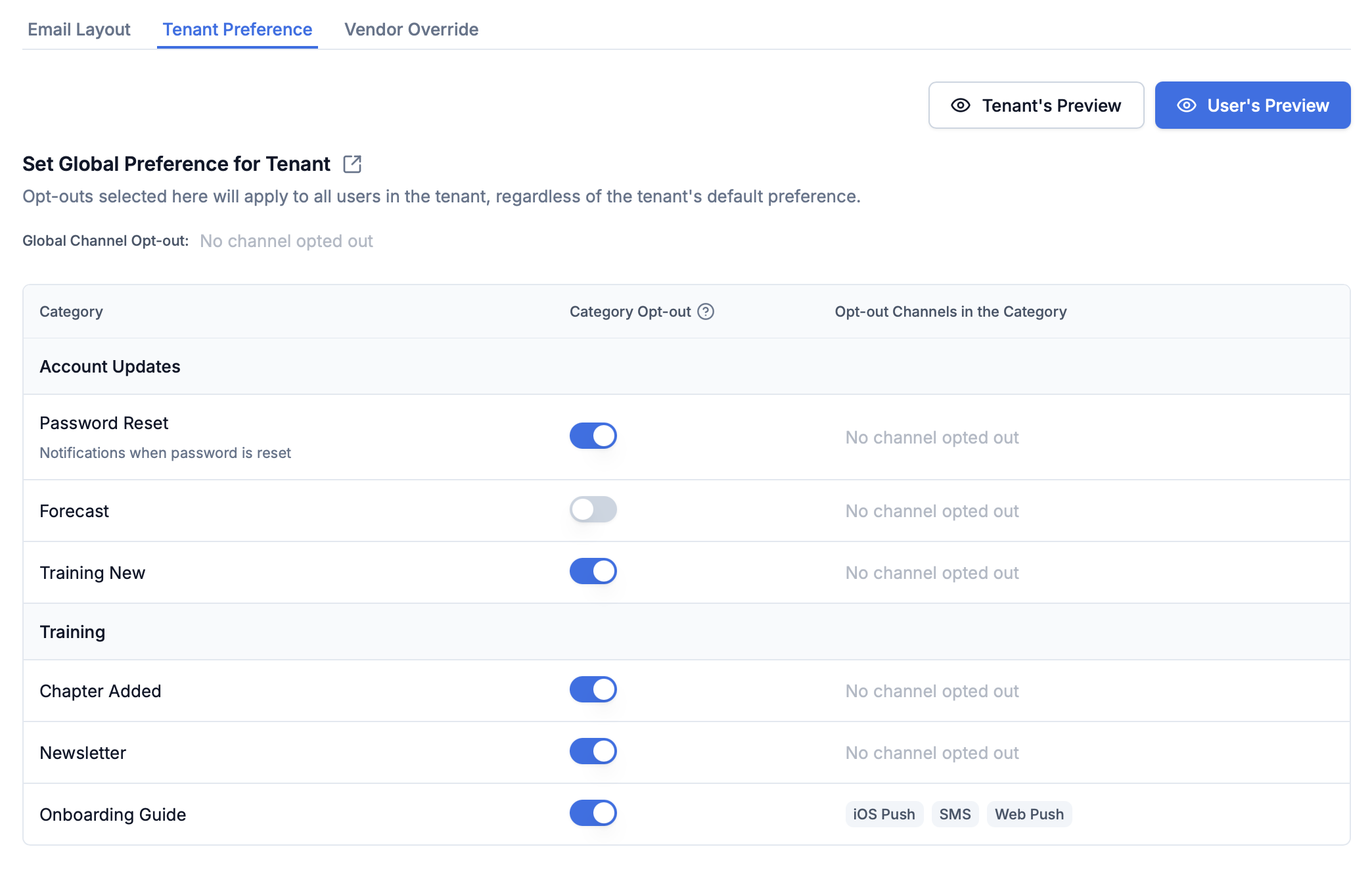
Tenant preference controls in the SuprSend dashboard
Tenant admin: Setting defaults for their users
Tenant administrators can set default preferences for their end users and hide categories that aren’t applicable to their users. This gives tenant admins control over which notifications are sent to their users and which categories appear on their users’ preference pages. Tenant admins can override category defaults and hide categories that don’t apply to their users. These overrides apply only to that tenant and don’t change global category defaults. Common scenarios:- Hide entire sections (for example, Sales section) from users’ preference pages
- Override channel requirements (for example, make email mandatory for System categories)
- Hide specific categories while keeping others visible
Via API
Use the tenant preference API to programmatically manage preferences
Via Dashboard
Configure from the tenant details page → Tenant Preference tab
Overriding digest schedule and condition defaults
If a sub-category has a digest schedule or condition properties, tenant admins can override their defaults for the tenant’s users — for example, set a different default digest cadence or a different default condition value (such as a minimum severity) for everyone in the tenant. These values resolve with the same User → Tenant → Category default precedence: a user’s own selection wins, then the tenant default, then the category default. The available options themselves are still defined on the category — a tenant can change the default, not add or remove options.Digest schedule
The tenant preference API response includesdigest_schedule.options (tenant-overridden defaults) and digest_schedule.original_options (category-level originals). Tenants can change which option is the default and override editable field values like time, but cannot add or remove options.
digest_schedule to null in the update request to reset to category defaults.
Condition properties
The tenant preference API response includes theproperties array with the tenant’s overridden values. is_overridden indicates whether the tenant has set a custom value.
Controlling preference UI for users
Tenants can control which categories appear on their users’ preference pages and which notifications are sent.- Platform Admin Actions
- Tenant Admin Actions
- Impact & Precedence
- Turning off categories or channels for a tenant from the tenant preference page automatically removes them from the user’s preference view.
- Hidden categories won’t send notifications to tenant users, even if they previously opted in.
- Tenants can’t set preferences in categories disabled by the platform admin.
Collecting preferences from tenant users
You can load user preferences for a tenant by passingtenant_id in REST APIs and preference centre SDK. The hosted preference page automatically loads preferences corresponding to the tenant passed in the workflow trigger.
Example API call:
REST APIs
Use preference APIs with
tenant_id parameterPreference Center SDK
Embed preference center in your app
Triggering tenant workflows
You can trigger tenant workflows by passingtenant_id in your workflow trigger. Passing tenant_id ensures the workflow resolves $tenant.* variables (branding, preferences, routing) before sending notifications. This enables tenant-level customizations including template design, notification preferences, and vendor routing. Read more about tenant workflows here.
How tenant preferences are evaluated
When a workflow is triggered, preferences are evaluated for both the recipient and tenant before each delivery node. Notifications are sent only in categories and channels where both tenant and user preferences areopt_in.
The evaluation follows the precedence order: User Preference → Tenant Default → Category Default. Platform admin restrictions override all-if a platform admin disables a category or channel for a tenant, users will not receive notifications in that category, even if they previously opted in.
For detailed information on how preferences are evaluated at runtime, including debugging steps, see Preference Evaluation.