Serve tenant-specific notifications from one template — use brand variables for white-labelling logos and colors, or template variants for tenant-specific content, layout, and channels.
You have two ways to make a template render differently per tenant, both driven by the tenant_id passed at trigger time:
Brand variables — one shared template with tenant values substituted at runtime ({{$tenant.logo}}, {{$tenant.primary_color}}, {{$tenant.name}}). Best for white-labelling — the content is the same, only branding and tenant-specific values change.
Template variants — the same template with different content, layout, or channels enabled per tenant, using a variant condition on tenant_id. Best when tenant differences go beyond variable substitution — a different call to action, an extra section, a tenant-specific footer, or an entirely different channel set.
Most workspaces use variables broadly and reserve variants for the handful of tenants that need genuinely different content. The two approaches compose: a tenant-specific variant can still reference {{$tenant.*}} variables inside it.
White-labelling — same content, different tenant values
Custom content — different message, layout, or channels per tenant
What changes
Logos, colors, brand name, social links, custom string properties
Subject line, body copy, structure, CTAs, enabled channels
Setup effort
Update template once, populate tenant properties
Create a variant per tenant that needs different content
Scale
Any number of tenants share one template
One variant per tenant that diverges; the default template covers everyone else
Use when
”Every tenant sees their own logo and primary color in the same welcome email"
"Enterprise-tier customers need a compliance disclaimer at the bottom of every notification” or “Acme Corp wants their password-reset email in a completely different layout”
Use tenant properties inside your template to render tenant-specific branding at runtime. One template works for every tenant — SuprSend substitutes the values when the workflow is triggered with a tenant_id.
Inside the email template designer, you get pre-built tenant components that auto-render the branded header, footer, and buttons for the tenant.
1
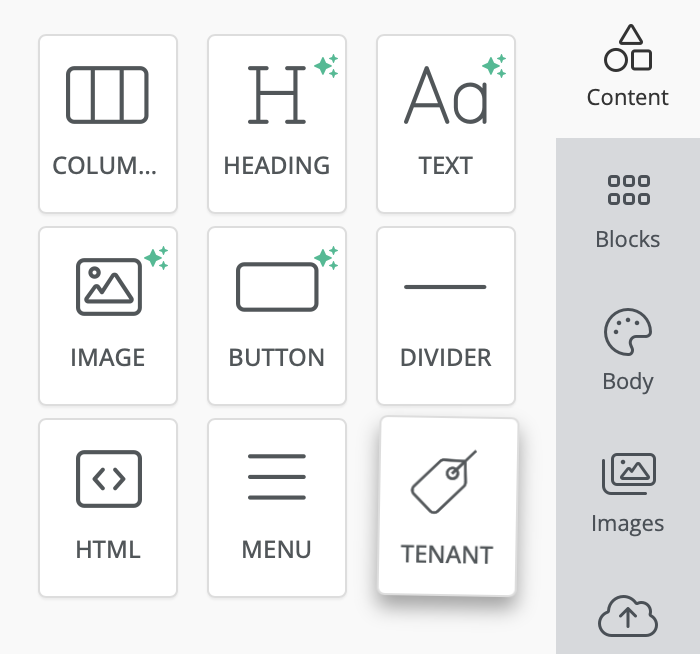
Find and add the tenant component
Inside the email template designer, find the tenant component in the right-side content menu and add it to your template.
Find and add tenant component in template editor
2
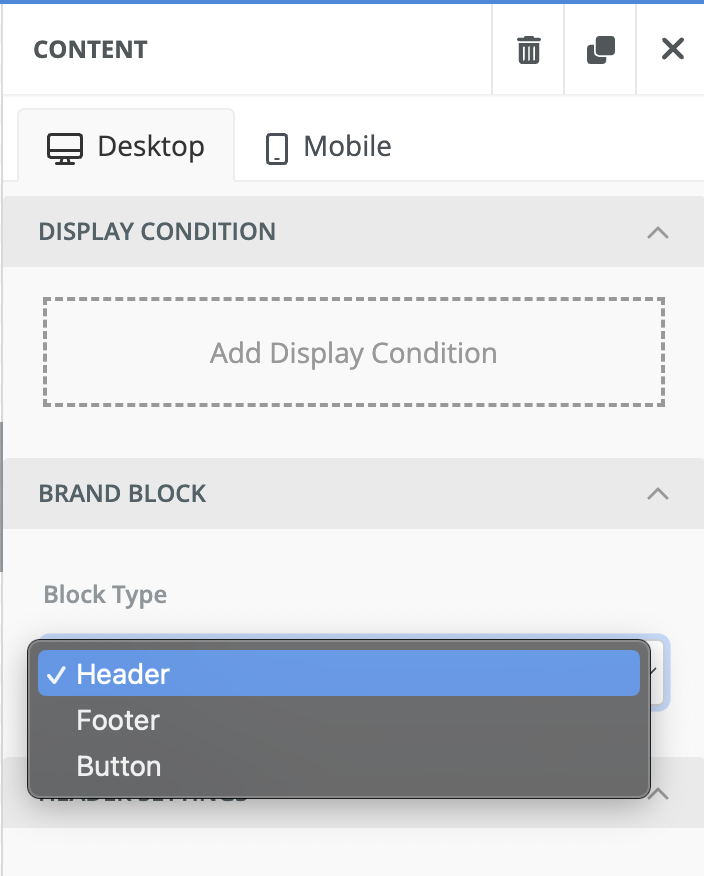
Select the relevant block type
Select the relevant block type (header, footer, buttons) from the right panel.
Select relevant block type
3
Customize the selected block
Tenant blocks use the tenant’s primary color and logo by default. Click any block to customize colors, padding, and styling from the right panel. To insert tenant variables anywhere in a block, use {{$tenant.<property>}}. See the full list of available variables.
For SMS, WhatsApp, push, Slack, MS Teams, in-app inbox, and webhook templates, reference tenant properties directly in the template body using {{$tenant.<property>}}. There are no visual designer components for these channels — the substitution happens at render time regardless.
Use {{$tenant.<property>}} in Handlebars templates and data["$tenant"].<property> in JSONNET templates. Variables are replaced at runtime with the tenant’s properties (from the tenant_id passed when sending).Basic
Variable
Description
$tenant.name
Display name for the tenant.
$tenant.logo
URL of the tenant’s logo image.
Colors
Variable
Description
$tenant.primary_color
Primary brand color (hex).
$tenant.secondary_color
Secondary brand color (hex).
$tenant.tertiary_color
Tertiary brand color (hex).
Social links
Variable
Description
$tenant.social_links.website
Website URL.
$tenant.social_links.facebook
Facebook profile or page URL.
$tenant.social_links.twitter
Twitter/X profile URL.
$tenant.social_links.instagram
Instagram profile URL.
Custom properties
Variable
Description
$tenant.properties.<key>
Any custom property set on the tenant (for example $tenant.properties.support_email).
When variable substitution isn’t enough — a tenant needs a different subject line, an extra body section, a different CTA, or a completely different set of channels — create a template variant with a tenant_id condition. SuprSend evaluates variants top-to-bottom at send time and picks the first one whose condition matches; if no variant matches, the default template is used.Because the default template is the fallback, you can add a variant for one specific tenant without touching how anyone else receives the notification.
Tenant-specific content — the enterprise-tier tenant needs a compliance disclaimer in every notification; add a variant with tenant_id equals enterprise-corp and put the disclaimer in the body.
Tenant-specific channels — one tenant wants Slack messages disabled but everyone else keeps them; enable/disable channels inside that tenant’s variant.
Completely different layout — a strategic customer wants their password-reset email to match their brand’s structure, not yours; the variant can override the full email HTML while still using {{$tenant.*}} variables inside.
Combined tenant + language — a variant condition can reference tenant_id alongside $preferred_language, trigger data, or user properties, so you can layer tenant customization on top of multi-lingual templates.
In the template editor’s left panel, click the + next to All Variants and choose New Variant.
2
Add a tenant condition
In the Create Variant modal, add a condition like tenant_id equals <your-tenant-id>. Pick the channels this variant applies to.
3
Edit the variant's content
Edit the subject, body, or channel-specific content the same way you would the default template. Brand variables still work inside the variant.
4
Commit and test
Commit the template, then trigger the workflow with a tenant_id matching the variant to see it render. Tenants whose tenant_id doesn’t match will continue to see the default template.
Keep the default template as the canonical content and treat variants as focused overrides — this keeps maintenance predictable. If two tenants need the same override, use a condition like tenant_id in [acme-corp, globex] rather than duplicating the variant.
See Template Variants for the full variant reference — condition operators, evaluation order, and variant limits.
Should I use brand variables or a template variant?
Use $tenant.* variables when the content is the same and only tenant-specific values change (logo, primary color, product name, support email) — one shared template stays maintainable and every new tenant just needs its properties populated. Use a template variant when the content itself differs — a different CTA, an extra section, a tenant-specific layout, or a legal footer only one tenant needs.
What happens if a tenant doesn't have a matching variant?
SuprSend evaluates variants top-to-bottom and picks the first one whose condition matches. If no variant matches, the default template is used — so you can safely add a variant for one tenant without affecting anyone else.
Do brand variables still work inside a variant?
Yes. {{$tenant.*}} variables substitute in every variant, including the default. A variant overrides the content, not the variable resolution — so a tenant variant can still render {{$tenant.logo}} and get the tenant’s logo.
Can a variant enable a different set of channels than the default template?
Yes. When you create a variant, you pick the channels it applies to. If a tenant’s variant enables only Email + In-App Inbox, sends for that tenant will skip the other channels defined on the default template.
Can I combine tenant conditions with language or user-property conditions?
Yes. A variant condition can reference tenant_id, the user’s $preferred_language, trigger data properties, or any combination. Common pattern: one variant per tenant for content differences, plus multi-lingual translations inside each variant for language differences.