
When are preferences evaluated?
SuprSend evaluates category-level preference opt-outs at trigger time — before the workflow run starts. If a user has opted out of the preference category linked to the workflow, the workflow is not executed for that user, avoiding unnecessary workflow runs and saving compute. Channel-level preferences (which specific channels the user has opted into within a category) are still evaluated at each delivery node, since the workflow needs to reach the send step to determine eligible channels.Workflows with side effects keep the check at the delivery node. If a workflow contains a webhook node (external API call) or a data update node (update user profile, add/remove user from list, subscribe/unsubscribe to object), the category opt-out check remains at the delivery node instead of the trigger. This ensures that side effects like API calls and data updates still execute even when the user has opted out of receiving notifications.
Test triggers from the dashboard check preferences at the send node. When you test a workflow using the Test button in the workflow editor on the SuprSend dashboard, the category opt-out check happens at the delivery node instead of the trigger. This lets you run the entire workflow logic end-to-end and verify that every step executes correctly, including preference evaluation at each send node, without the workflow being short-circuited at the trigger.
How preferences are resolved
1
Evaluating Recipient preferences
If user preferences aren’t set, the system picks the default preference setting. Once a user sets a preference for a category, future changes to default preferences do not override the user’s choice.
2
Factoring in tenant preferences
If you are triggering notifications for a tenant, tenant default preferences override category-level default preferences.
3
Resolving preference conflicts
The order of precedence is always
user > tenant > category default. However, if you turn off notifications in a category from the tenant page, users will not receive notifications in that category, even if they previously opted in.4
Debugging preference evaluation
User preferences may change over time. When debugging, you can inspect the exact preferences that were active at that moment.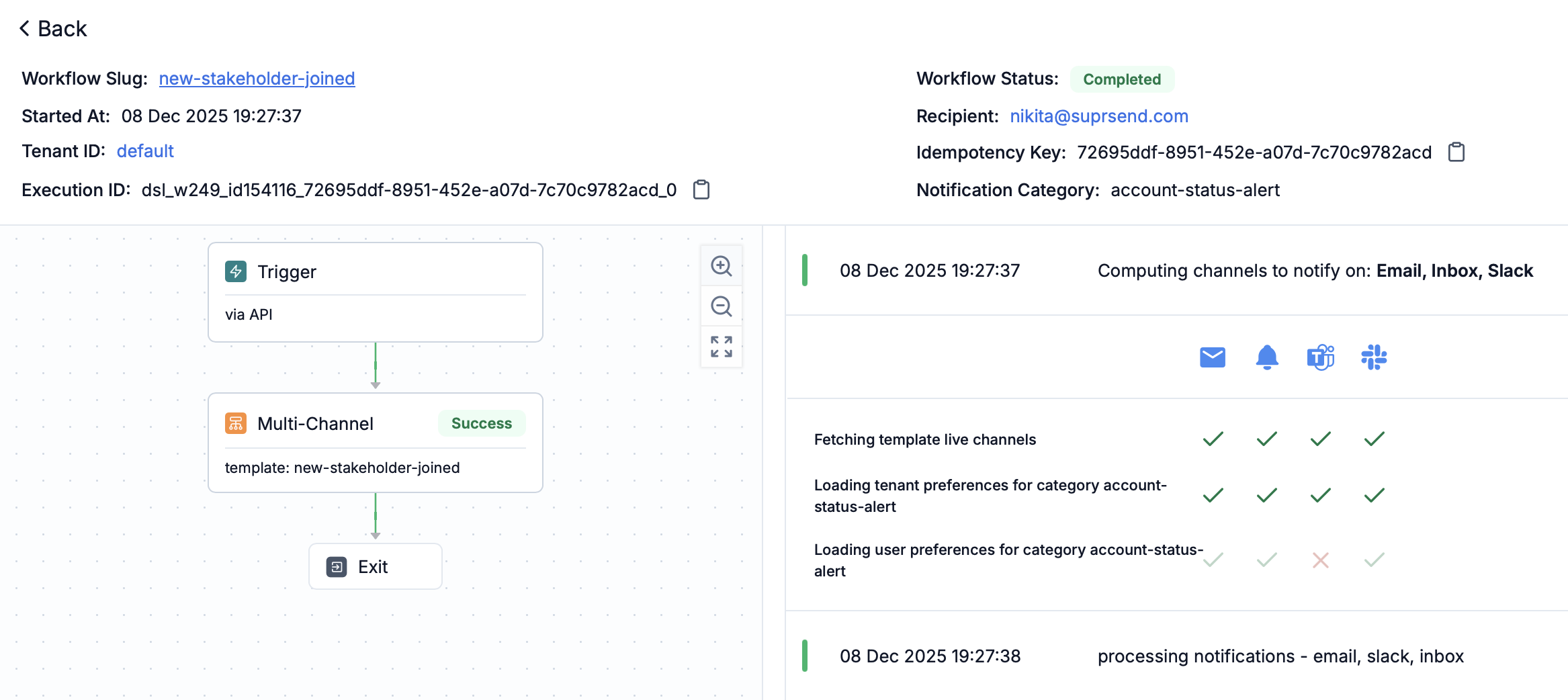
- Trigger-level opt-out: If a user was opted out at trigger time, the workflow execution log will show that the workflow was skipped due to category preference opt-out.
- Delivery-node-level check: For channel-level preferences or workflows with side effects, you can view the preference evaluation using the step-by-step debugger in workflow executions.
Use the “Preference Evaluation” panel in each workflow step to see what preference blocked or allowed the notification.
Subscriber preference update in request logs.Preference precedence order
The system evaluates preferences in this order:- User preference - Individual user’s explicit preference setting
- Tenant default preference - Default preference set at tenant level
- Category default preference - Default preference set at the category level
Channel-level opt-outs (for example, email unsubscribe, SMS STOP, mobile OS push opt-out) override all category and tenant preferences.
Resolving digest schedule and condition values
When a workflow references a category’s digest schedule or a condition property, SuprSend resolves the value at trigger time using the same precedence as preferences:- User value — the option or value the recipient selected.
- Tenant default — the tenant-level override, if the user hasn’t set one.
- Category default — the default configured on the sub-category.
- Digest schedule: a Digest node with schedule type
category_digest_schedulebatches each recipient’s notifications on their resolved cadence, in the recipient’s timezone. If the category has no digest schedule enabled, the notification is sent immediately without batching. - Condition properties: referenced in branch conditions as
$category.properties.<key>, the resolved value is used to decide which branch a recipient takes. If a dynamic condition has no value at runtime, it resolves tonull— handle that case in your branch logic.