Documentation Index Fetch the complete documentation index at: https://docs.suprsend.com/llms.txt
Use this file to discover all available pages before exploring further.
JSONNET is a data templating language that extends JSON with variables, conditionals, and functions. SuprSend uses JSONNET as the templating language for rich Slack Block Kit and MS Teams Adaptive Card templates.
All trigger payload data, recipient properties, tenant properties, and batched event data are available under the data object.
Variable syntax
Variable type Syntax Example Top-level key data.keydata.order_idNested object data.parent.childdata.order.address.citySpecial characters or spaces in key data['key']data['$recipient'].name, data.event['first name']Array element at index data.array[index]data.items[0].product_nameRecipient property data['$recipient'].keydata['$recipient'].nameActor property data['$actor'].keydata['$actor'].nameTenant property data['$brand'].keydata['$brand'].brand_nameBatched event count data['$batched_events_count']Batched event item data['$batched_events'][0].keydata['$batched_events'][0].title
The {{variable}} Handlebars syntax does not work in JSONNET editors. Use data.key syntax only. Similarly, the Adaptive Card ${variable} syntax is not supported — use data.key instead.
Iterating over arrays
Use JSONNET for loops to repeat blocks for each item in an array:
[
{
"type" : "section" ,
"fields" : [
{
"type" : "plain_text" ,
"text" : item.name + ": " + item.description
}
for item in data.items
]
}
]
For batched events (from batch or digest nodes):
[
{
"type" : "section" ,
"fields" : [
{
"type" : "plain_text" ,
"text" : event.title + " (" + event.status + ")"
}
for event in data [ "$batched_events" ]
]
}
]
Conditional logic
Use if/then/else for conditional content:
{
"type" : "section" ,
"text" : {
"type" : "mrkdwn" ,
"text" : if "is_new_org" in data then
"New Organization"
else
"Existing Organization"
}
}
JSONNET supports Python-style string interpolation with %:
{
"type" : "section" ,
"text" : {
"type" : "mrkdwn" ,
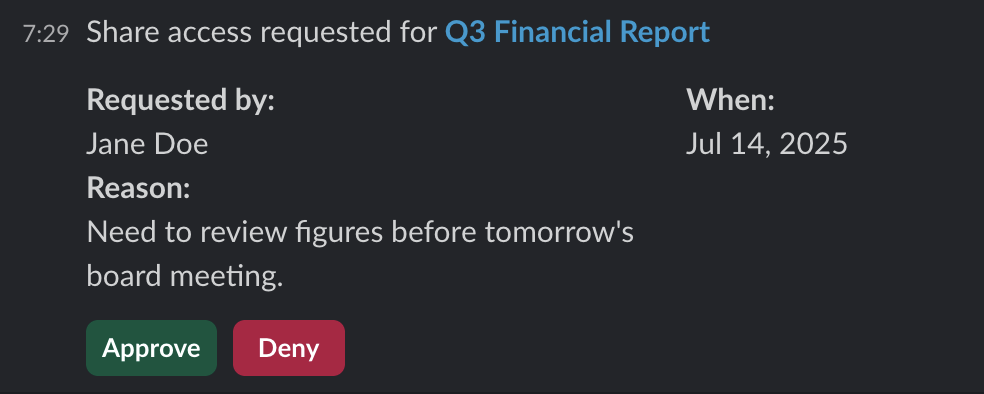
"text" : "*<%(link)s|%(name)s>* requested by %(requester)s" % {
link : data.document_link ,
name : data.document_name ,
requester : data.requester_name
}
}
}
Or use string concatenation with +:
"text" : "Order " + data.order_id + " has shipped to " + data[ '$recipient' ].name
Slack Block Kit examples
Design visually in the Slack Block Kit Builder , then adapt the JSON into JSONNET by replacing hardcoded values with data.key references.
JSONNET Template
Mock Data
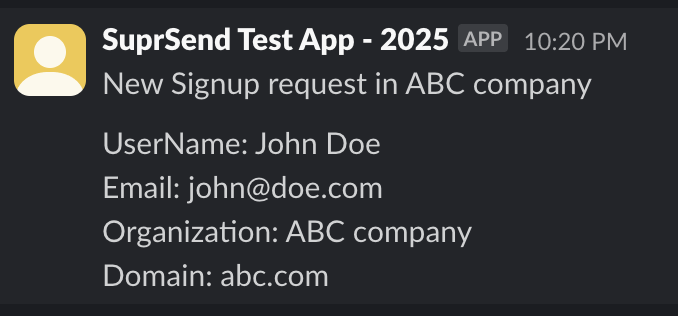
[
{
"type" : "section" ,
"text" : {
"type" : "mrkdwn" ,
"text" : "New Signup on ABC company"
}
},
{
"type" : "section" ,
"text" : {
"type" : "mrkdwn" ,
"text" : ">_UserName_: *%(user_name)s* \n >_Email_: *%(email)s* \n >_Organization_: *%(org_name)s* \n >_Domain_: *%(domain)s*" % {
user_name : data.user_name ,
email : data.user_email ,
org_name : data.org.name ,
domain : data.org.domain
}
}
},
{
"type" : "divider"
}
]
Approval request with buttons
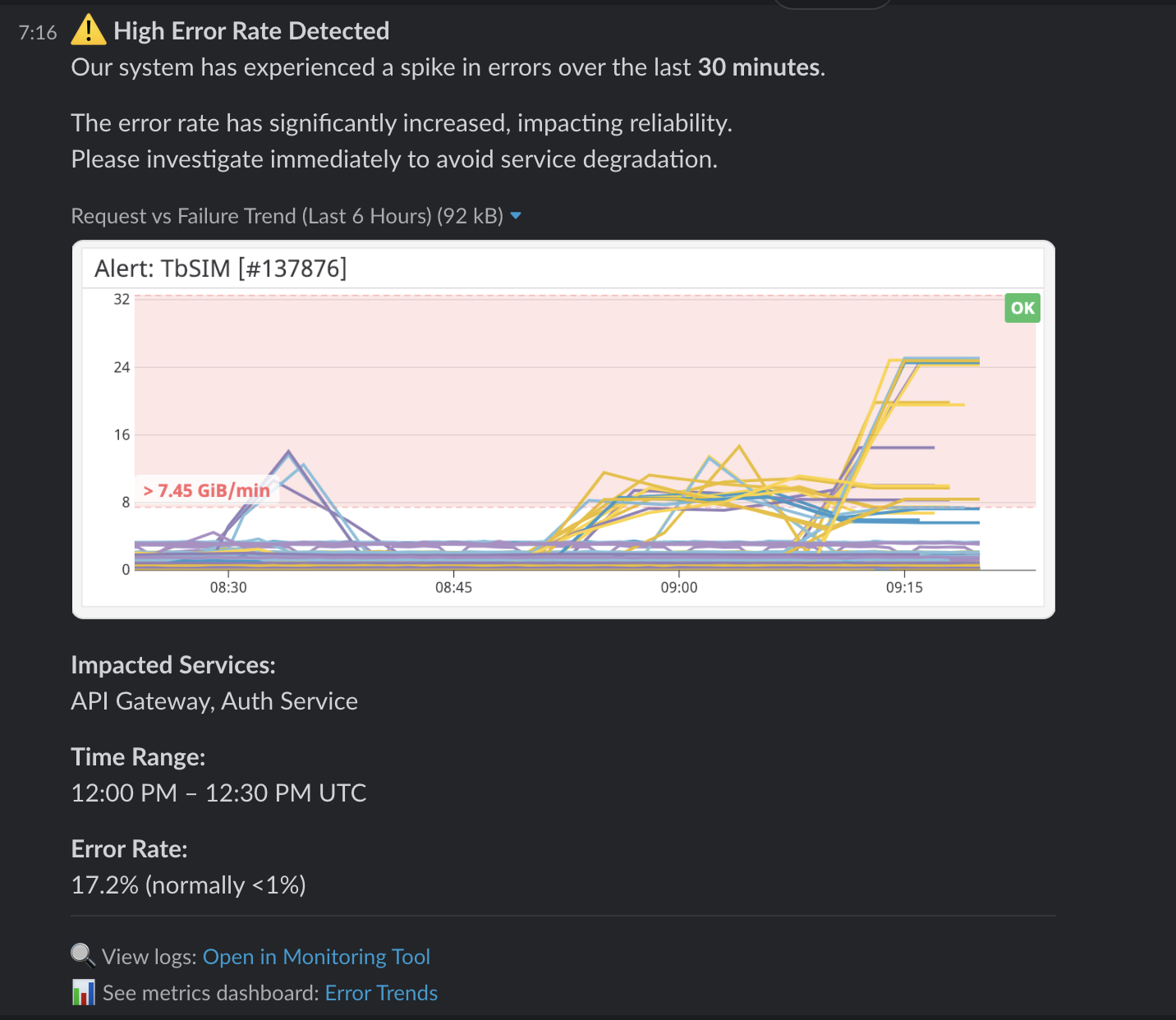
[
{
"type" : "section" ,
"text" : {
"type" : "mrkdwn" ,
"text" : ":warning: *High Error Rate Detected* \n Our system has experienced a spike in errors over the last *30 minutes*."
}
},
{
"type" : "image" ,
"title" : { "type" : "plain_text" , "text" : "Request vs Failure Trend (Last 6 Hours)" },
"image_url" : data.image_url ,
"alt_text" : "Graph showing high error rate spike"
},
{
"type" : "section" ,
"fields" : [
{ "type" : "mrkdwn" , "text" : "*Impacted Services:* \n " + data.impacted_services },
{ "type" : "mrkdwn" , "text" : "*Error Rate:* \n " + data.error_rate }
]
},
{
"type" : "context" ,
"elements" : [
{
"type" : "mrkdwn" ,
"text" : ":mag: View logs: <%(log_url)s|Open in Monitoring Tool>" % { log_url : data.log_url }
}
]
}
]
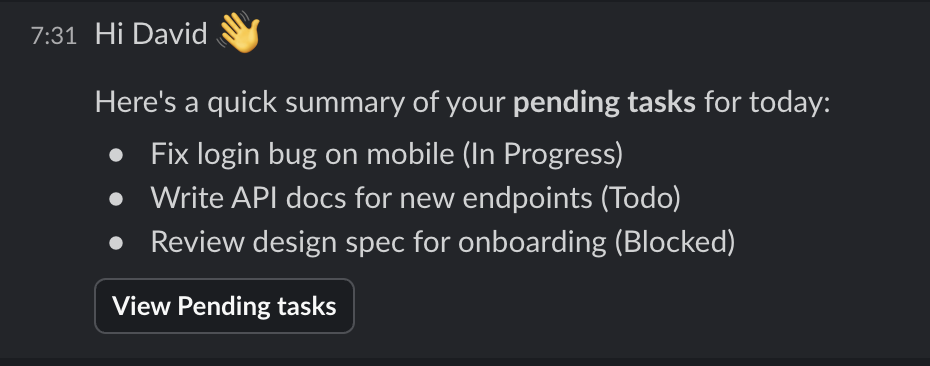
[
{
"type" : "section" ,
"text" : {
"type" : "mrkdwn" ,
"text" : "Hi " + data [ "$recipient" ] .name + " :wave: \n You have " + data [ "$batched_events_count" ] + " *pending tasks* for today:"
}
},
{
"type" : "rich_text" ,
"elements" : [
{
"type" : "rich_text_list" ,
"style" : "bullet" ,
"elements" : [
{
"type" : "rich_text_section" ,
"elements" : [
{ "type" : "text" , "text" : task.title + " (" + task.status + ")" }
]
}
for task in data [ "$batched_events" ]
]
}
]
},
{
"type" : "actions" ,
"elements" : [
{
"type" : "button" ,
"text" : { "type" : "plain_text" , "text" : "View Pending tasks" },
"url" : "https://app.company.com/tasks"
}
]
}
]
MS Teams Adaptive Card examples
Design visually in the Adaptive Cards Designer , then adapt the JSON into JSONNET.
Approval request with FactSet and buttons
Dynamic list with for loop
{
"$schema" : "http://adaptivecards.io/schemas/adaptive-card.json" ,
"type" : "AdaptiveCard" ,
"version" : "1.6" ,
"body" : [
{
"text" : product.name + " at " + product.price ,
"type" : "TextBlock" ,
"wrap" : true
}
for product in data.products
]
}
Debugging
Preview not loading — ensure all data.key variables have values in the Variables panel. Missing mock data causes render errors.
Syntax error in preview — check for missing commas, unmatched brackets, or using {{}} instead of data.key.
Slack silently drops blocks — validate your output in the Block Kit Builder before committing.
Teams renders differently than designer — always test in an actual Teams chat. The Adaptive Cards Designer is an approximation, not exact.
AI prompt — debug JSONNET: “Fix this JSONNET error from the SuprSend editor. Error: [paste error]. Code: [paste JSONNET]. Variables are accessed as data.key or data[‘$special_key’].”