
$androidpush / $iospush token per mobile app under the same workspace. When you trigger with tenant_id, SuprSend resolves the user against that tenant’s overrides layered on top of their global profile.
How it works
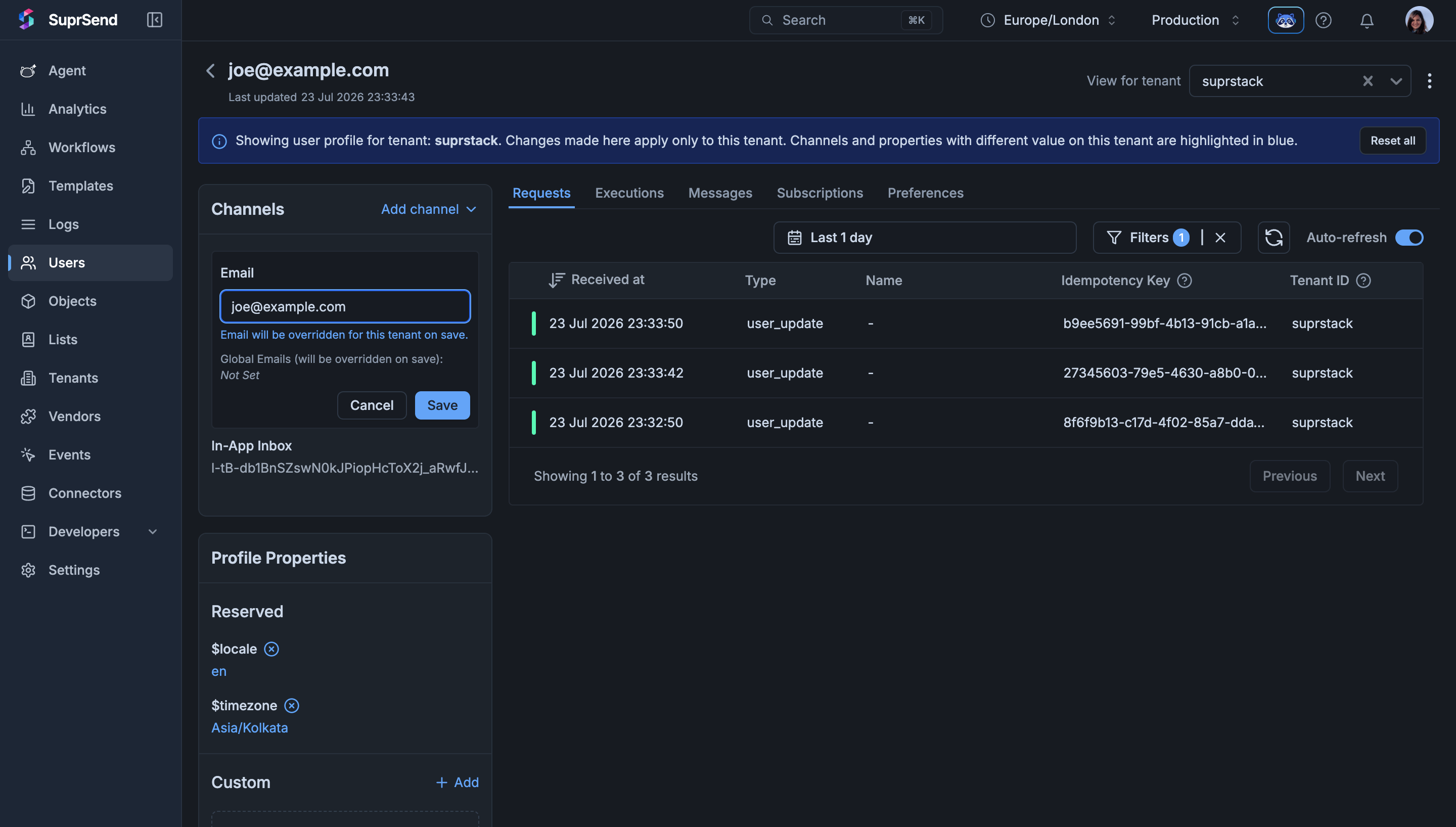
Every user still has a global profile — the one you create today by calling the user API without atenant_id. On top of that, you can now create a per-tenant profile for any tenant the user is associated with. At send time, SuprSend produces the effective profile by shallow-merging the two: per-tenant values win, and any key not set at the tenant level is picked from global.
The merge is shallow — one level deep, per key. If a key exists in the per-tenant profile it replaces the global value entirely; if it doesn’t, the global value is used. This applies to both properties (custom keys like role, plan) and channel identities ($email, $slack, $androidpush, etc.).
A trigger without
tenant_id continues to resolve to the global profile exactly as before — no behavior change for existing customers who don’t adopt this feature.When to use it
Reach for user-tenant mapping when a singledistinct_id legitimately represents the same person across multiple tenants, but their notification setup differs per tenant. Common scenarios:
- Same user, different push tokens per app. A workspace runs multiple mobile apps (each a tenant); the user has separate
$androidpush/$iospushtokens per app install, and a push for one app should never be routed to another app’s token. - Tenant-scoped role or plan properties. The user is “admin” on
projectAand “viewer” onprojectB— template branches onrole. - Different work email per business line.
$emailon the global profile is the personal address; per-tenant$emailis the tenant-specific work address.
When NOT to use it — user-tenant mapping vs neighboring approaches
If you only need per-tenant branding (logo, colors, template variables), you don’t need user-tenant mapping — see Tenants and Tenant Templates.
User tenancy mode — shared vs exclusive
A workspace-level setting,user_tenancy_mode, controls whether a user can belong to more than one tenant. Configure it under Settings → General → Multi-Tenant User Mapping in the dashboard, or via the workspace config API (PATCH /v1/workspace/{workspace_slug}/config/).
Defaults:
shared for workspaces created before this feature shipped, exclusive for new workspaces.
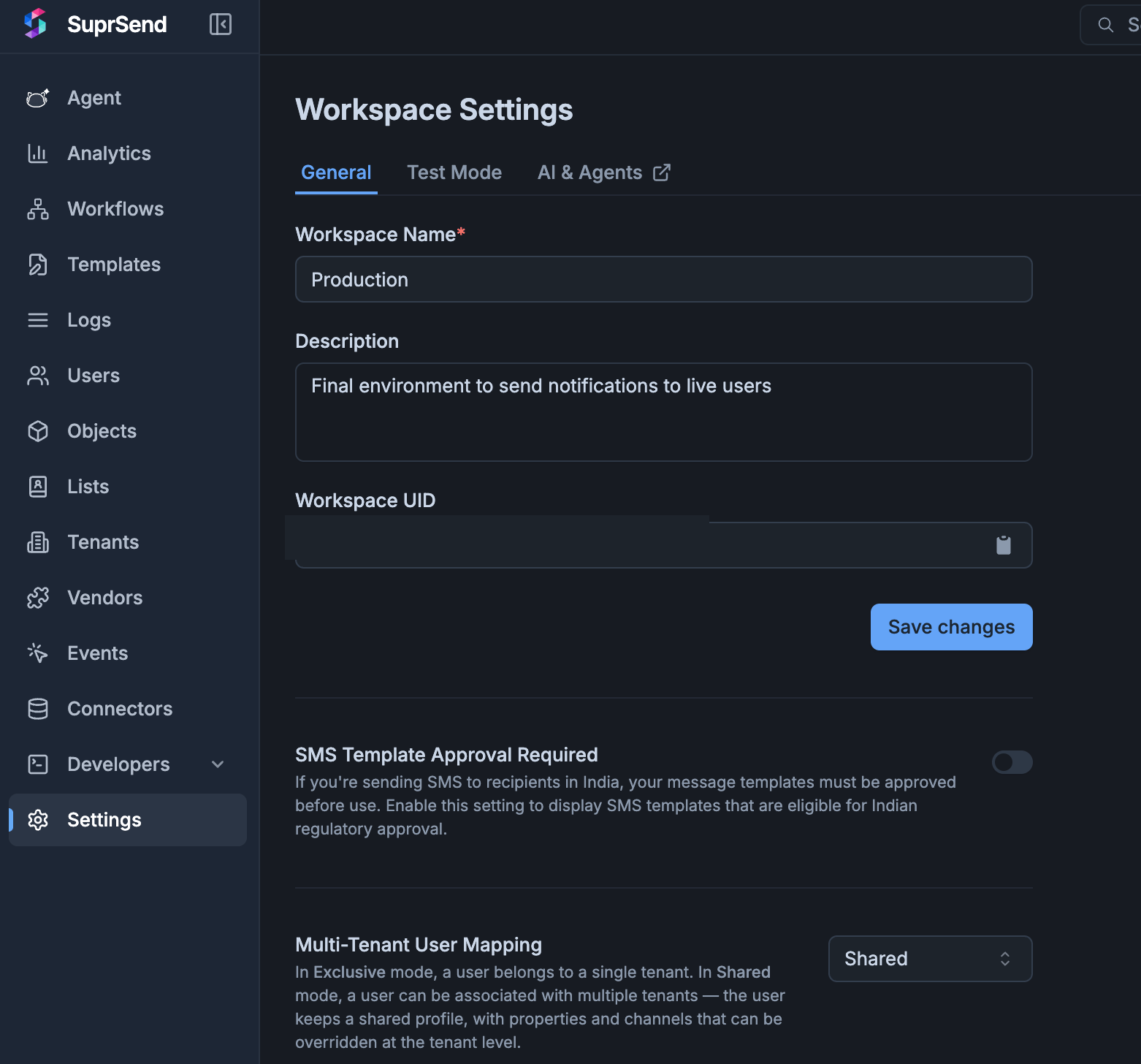
Limiting certain channels to not fallback to global profile
The shallow merge is convenient but leaky. If a user has$androidpush on their global profile and only overrides $email on the suprstack tenant, a push send under suprstack still uses the global Android token — which is exactly what you don’t want when the two tenants are separate mobile apps installed on the same device.
Channel fallback is the workspace-level control that decides which channels are allowed to fall back to the global profile when the tenant profile has no override. Configure it under Settings → General → Multi-Tenant User Mapping or via PATCH /v1/workspace//config/.
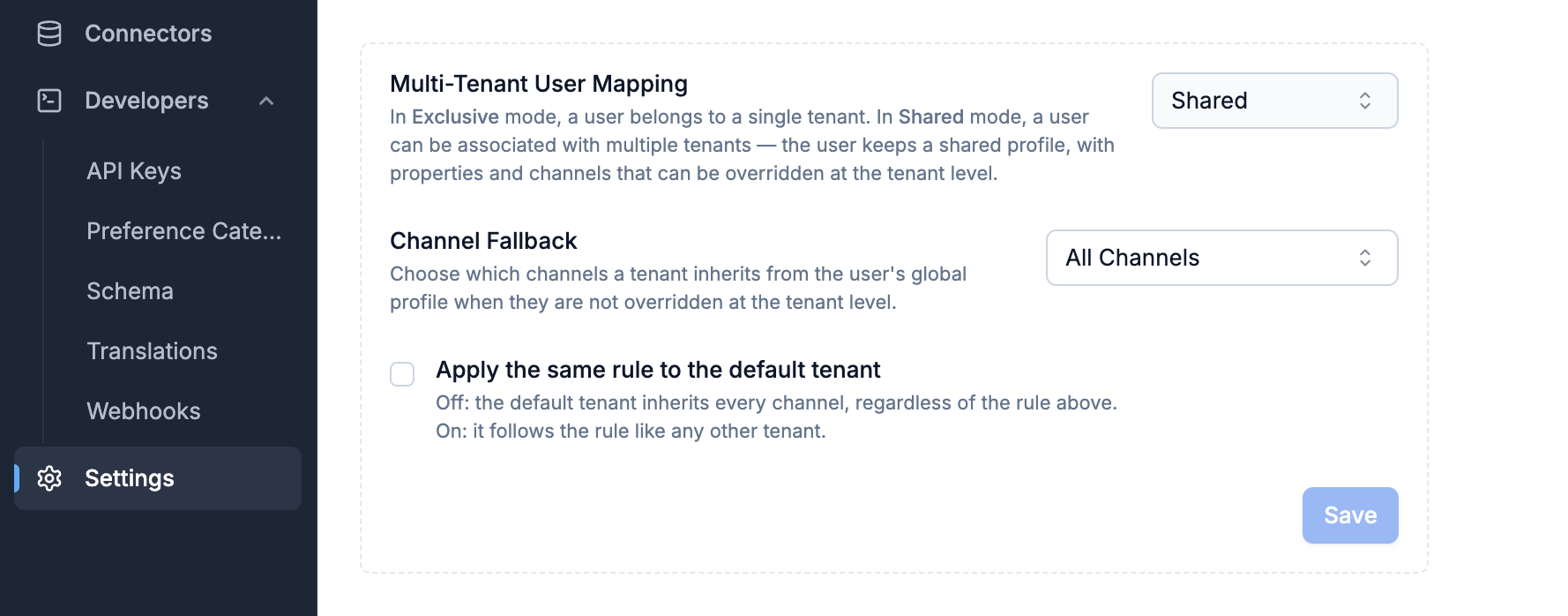
Typical setup for isolated mobile apps:
allowlist mode with ["email", "sms", "whatsapp"] — safe channels fall back, while androidpush, iospush, webpush, and slack are dropped unless the tenant profile carries its own value. Inbox always falls back.
Default-tenant exemption
A trigger withtenant_id = null (or no tenant_id at all) uses the default-tenant path. By default, this path is exempt from the fallback rule — every channel falls back, since the default tenant represents “no scoping.” Set user_tenancy_channel_fallback_applies_to_default_tenant: true if you want the same allowlist to govern default-tenant sends too (useful when the default tenant is treated as a real customer environment rather than a catch-all).
Associating a user to a tenant
Every route below writes to the same per-tenant profile store — pick whichever fits your flow. The body accepts the same fields as Create / Update Users (channels, properties,$timezone, $locale, $preferred_language).
- Dashboard
- REST API
1
Open the tenant's Associated Users tab
Go to Tenants → tenant_id → Associated Users. The tab lists every user already mapped to this tenant, with Channels Overridden and Properties Overridden columns so you can see at a glance which fields diverge from the user’s global profile.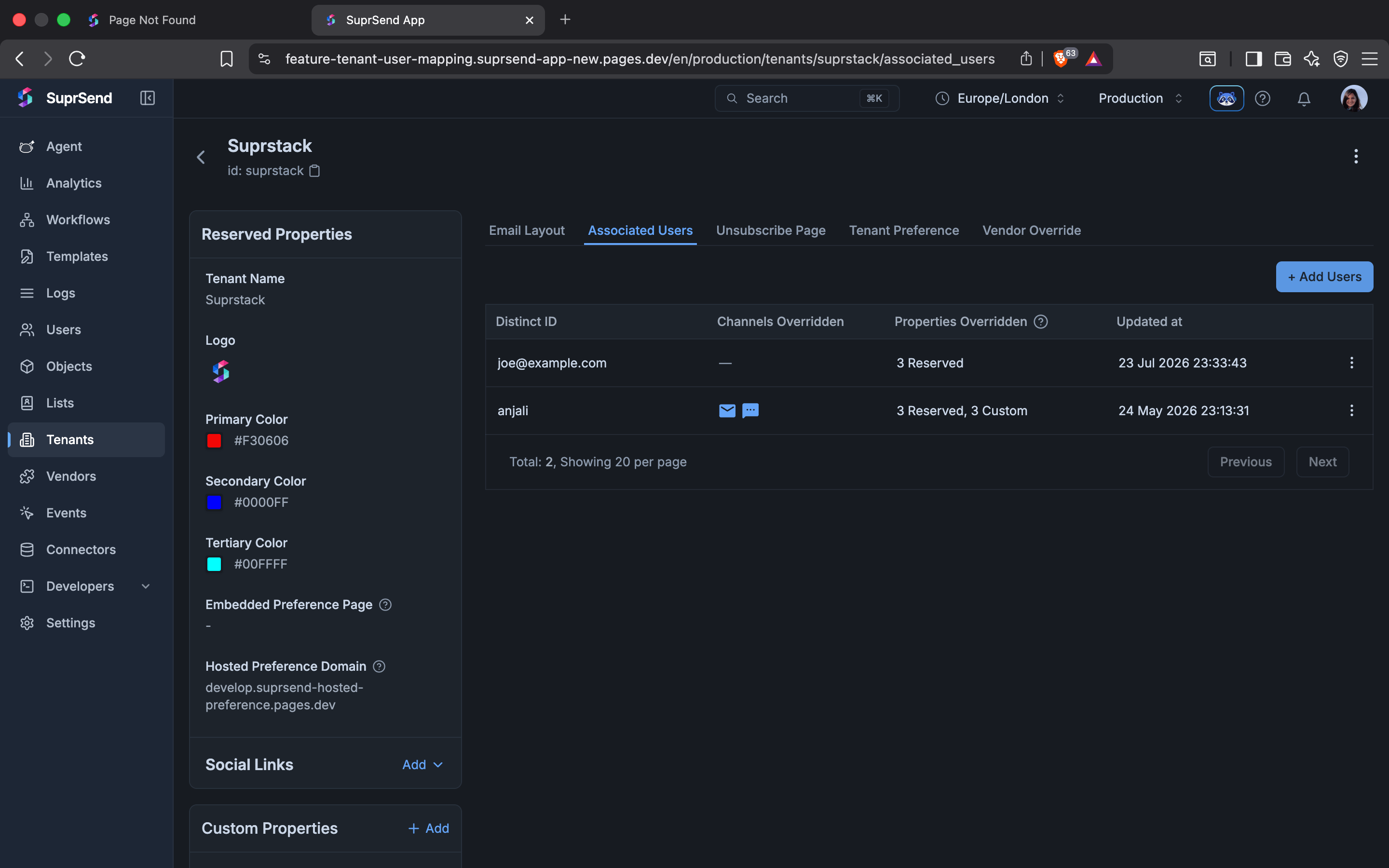
2
Add the user
Click + Add Users. In the side sheet, pick the user from the User dropdown, then add per-tenant channels and properties. Every field you enter here writes to the per-tenant profile, not the global one.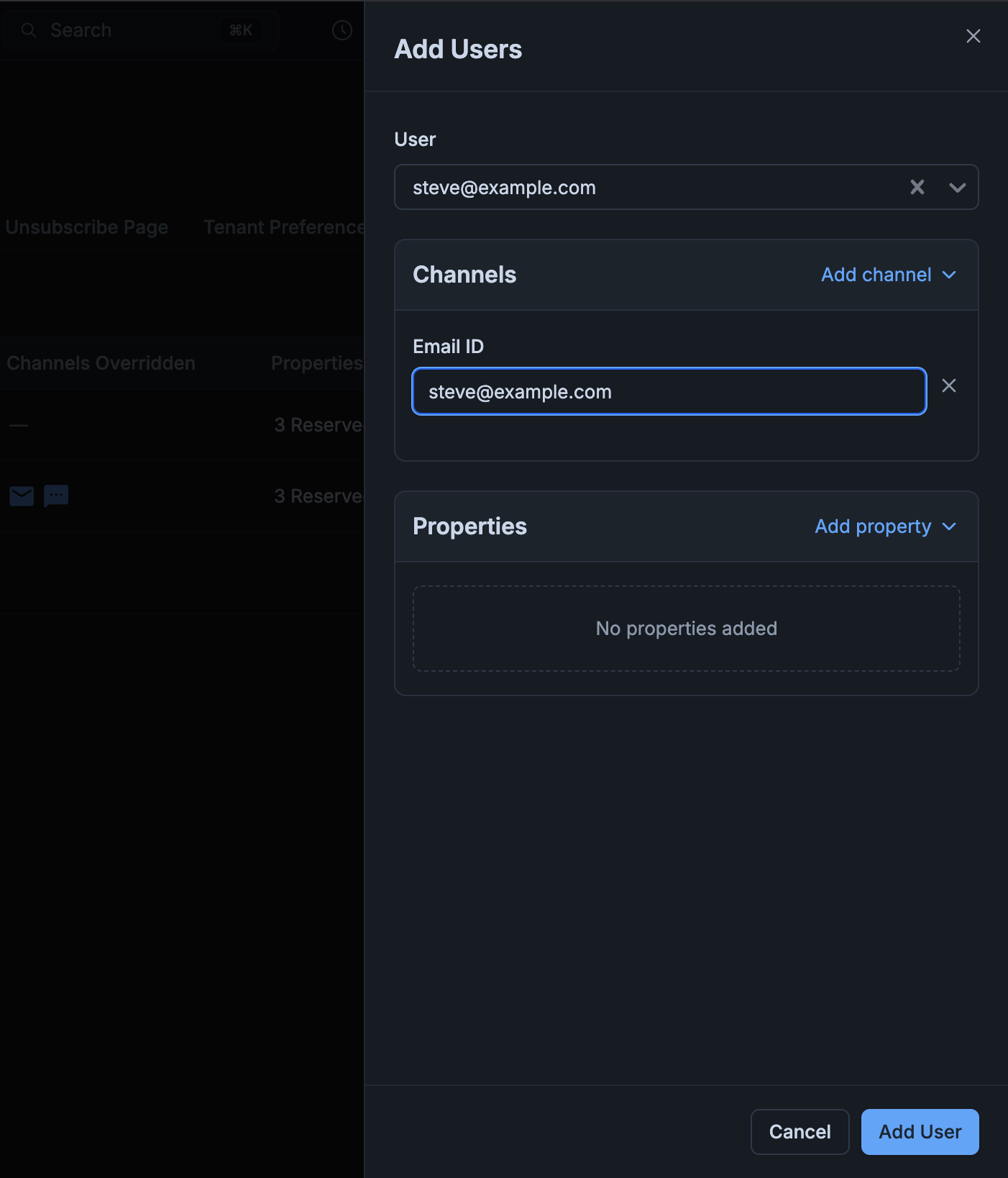
3
Save
Click Add User. The user now appears on the Associated Users tab with the channels and properties you overrode.
Under
exclusive mode, calling this on a user already mapped to a different tenant returns 400 with a message like [Exclusive-tenancy-mode] subscriber '<distinct_id>' belongs to a different tenant. Delete the first mapping before creating the new one.?tenant_id=<tenant_id> — the response includes each user’s tenant-scoped properties and channel overrides alongside their global profile.
Triggering a workflow with tenant context
Any trigger — workflow API, event, broadcast, or object fan-out — accepts tenant context and produces the effective profile before evaluating the workflow. Settenant_id at the top level of the trigger. It applies to every recipient and the actor:
$email, $sms, properties) to be written against a specific tenant rather than the user’s global profile, add $context.tenant_id on that recipient.
tenant_id at the trigger level is the send-time tenant context. It does not need to match a tenant the user is already associated with — under shared, an unrelated tenant_id simply resolves to the global profile since there’s nothing to merge. Under exclusive, if the user is already mapped to a different tenant, that recipient is skipped with an [Exclusive-tenancy-mode] ... belongs to a different tenant error.
Deleting a user-tenant mapping
Removes the per-tenant profile fragment for that user-tenant pair. The global profile is untouched, and the user remains in the workspace. Delete it either from the dashboard or via API.- Dashboard
- REST API
Go to Tenants → tenant_id → Associated Users, click the row menu on the user you want to unmap, and choose Delete. A confirmation modal appears before the mapping is deleted.
Key behaviors and constraints
- Global profile is untouched — creating per-tenant profiles never modifies the global one. A user with no per-tenant profile behaves identically to today.
- Shallow merge, per-tenant wins — object-typed values are replaced, not deep-merged. If
properties.addressexists on both profiles, the per-tenant object replaces the global one entirely. - Isolation is per-workspace —
user_tenancy_modeapplies to every tenant in the workspace; it can’t be set per tenant. - Fallback is per-channel — governed by the workspace-level
user_tenancy_channel_fallback_mode+user_tenancy_channel_fallbacklist; not settable per tenant or per user. - The default tenant behaves like global on the trigger path — unless
user_tenancy_channel_fallback_applies_to_default_tenantis enabled. - Preferences are separate — per-tenant user preferences already exist and are governed by the preference APIs. User-tenant mapping stores properties and channel identities, not preferences.
Troubleshooting
400 — 'subscriber belongs to a different tenant'
400 — 'subscriber belongs to a different tenant'
Your workspace is in
exclusive mode and this user already has a per-tenant profile on another tenant. Either delete the existing mapping first, switch the workspace to shared (Settings → General → Multi-Tenant User Mapping or the workspace config API; this is one-way, so you can’t switch back to exclusive yourself), or use a different distinct_id for the new tenant.404 — 'tenant not found' on the upsert call
404 — 'tenant not found' on the upsert call
The
tenant_id in the URL doesn’t exist in the workspace. Create the tenant first via Managing Tenants, then retry.Notification went to the wrong push device or channel identity
Notification went to the wrong push device or channel identity
The per-tenant profile doesn’t have that channel set, so the shallow merge fell back to the global identity. Add the correct tenant-scoped identity (for example, the tenant’s
$androidpush token or $email) to the per-tenant profile so it wins during the merge.Trigger with tenant_id silently used the global profile
Trigger with tenant_id silently used the global profile
Under
shared mode, an unrelated tenant_id (one the user isn’t mapped to) simply falls through to the global profile — there’s nothing to merge. Double-check the tenant_id spelling and confirm the user is actually associated with that tenant on the Associated Users tab. If you want sends to skip users already mapped to a different tenant, use exclusive mode.Merged profile in the dashboard doesn't match what got sent
Merged profile in the dashboard doesn't match what got sent
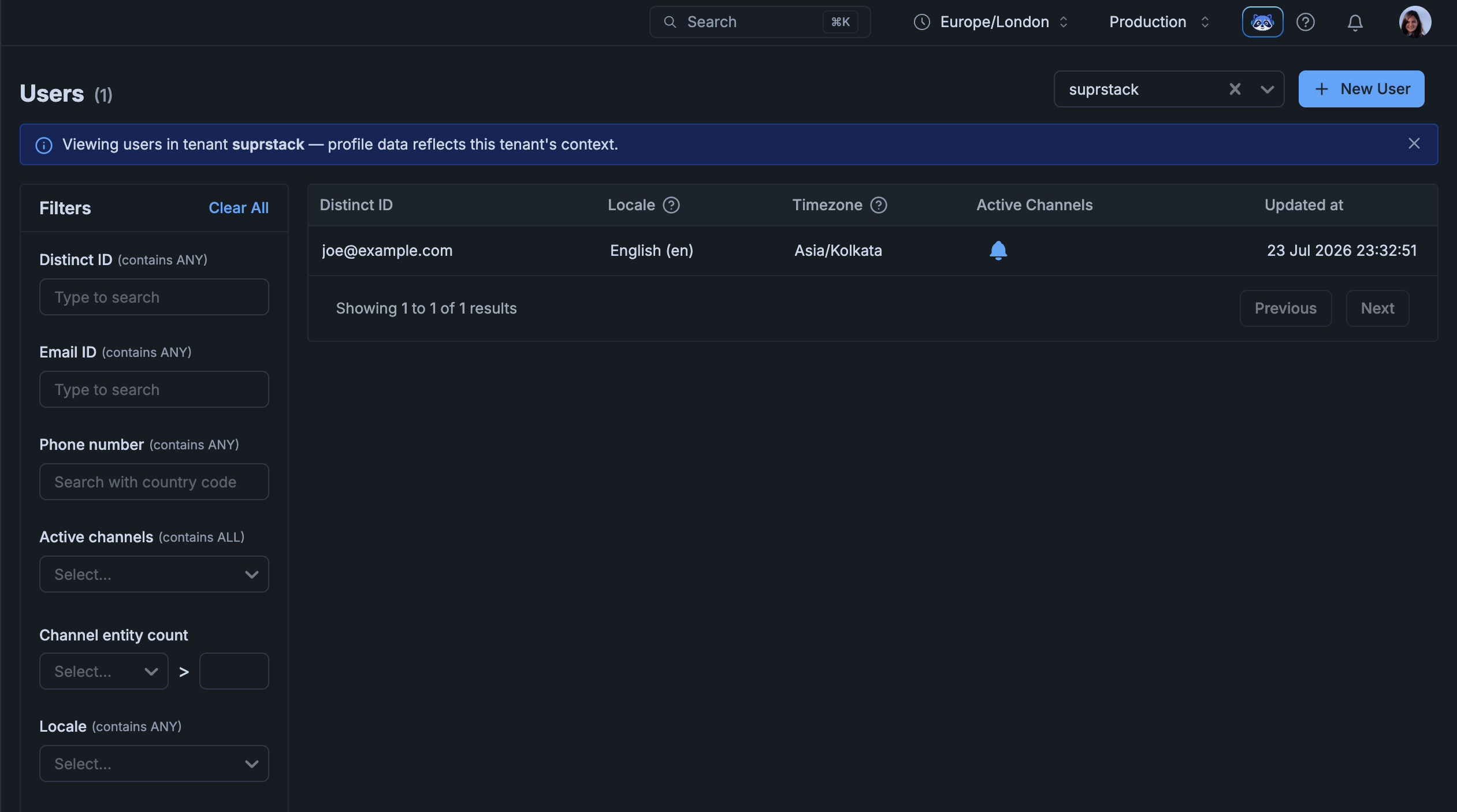
Confirm the User detail page’s View for tenant dropdown is set to the same
tenant_id you passed in the trigger — a mismatched tenant filter shows a different merged profile than the send actually used.FAQ
Do I have to map every user to a tenant?
Do I have to map every user to a tenant?
No. Users without any per-tenant profile continue to resolve to the global profile for every send. Mapping is opt-in per user.
What happens if I trigger with a tenant_id the user isn't associated with?
What happens if I trigger with a tenant_id the user isn't associated with?
Under
shared, the send resolves against the user’s global profile (nothing to merge). Under exclusive, the same applies if the user isn’t mapped to any tenant; if the user is mapped to a different tenant, that recipient is skipped with an error.How does this interact with tenant properties like logo and colors?
How does this interact with tenant properties like logo and colors?
Tenant branding (
$tenant.logo, $tenant.primary_color, etc.) is unchanged — it comes from the tenant object itself, not from the user’s per-tenant profile. See Tenants.Does deleting a user's tenant mapping delete the user?
Does deleting a user's tenant mapping delete the user?
No. Deleting the mapping removes the per-tenant profile for that user-tenant pair. The global profile stays intact.
Does deleting a tenant remove all its user mappings?
Does deleting a tenant remove all its user mappings?
Yes. When a tenant is deleted, every per-tenant profile scoped to that tenant is removed. Global profiles remain intact.
What if I use Segment group calls?
What if I use Segment group calls?
The Segment connector doesn’t support
group calls (they return 501), and identify calls update the user’s global profile — they don’t carry tenant context. Use the Upsert user-tenant profile API to write per-tenant profiles.Can I auto-detect the tenant for a user with only one association?
Can I auto-detect the tenant for a user with only one association?
Not today. Every trigger, get, and update call that needs tenant context must pass
tenant_id (or omit it to use the global profile).Next steps
Upsert user-tenant profile
POST endpoint to create or update the per-tenant profile for a user.
List user tenant profiles
List every tenant the user is associated with, with the merged and override profiles.
Multi-tenant modelling guide
End-to-end architecture example for a B2B2X notification service.
Tenants overview
Learn what tenants are and the other customizations they enable.