
- Payment received — A payment-received event triggers a workflow whose Cancel Workflow node stops the invoice reminders for that invoice and customer. (Filters: Workflow Slug + Recipient + Cancellation Key.)
- Slot change — A booking slot moves. The slot-change event triggers a workflow whose Cancel Workflow node stops the old slot’s reminders, and a fresh workflow starts reminders for the new slot. (Filters: Recipient + Cancellation Key.)
- Approval received — A purchase request needs approval from any one of several admins. One workflow sends recurring reminders to every approver (one execution per admin, all tagged with the same
request_id). One admin approves, triggering a workflow whose Cancel Workflow node stops every reminder execution matching thatrequest_id, so the remaining admins stop being reminded. (Filter: Cancellation Key only.)
How it works
- You drag a Cancel Workflow node from the Functions group onto the canvas (next to Invoke Workflow).
- In the config panel, you add one or more filters — Workflow Slug, Recipient(s), Cancellation Key. All filters are ANDed: a running execution must match every filter you added.
- On the target workflow’s Trigger node, you set an optional Cancellation Key (a JSONNET expression such as
data.booking_id), or pass a literalcancellation_keystring in the workflow trigger payload. SuprSend stores the resolved value on the running execution, so the Cancel Workflow node can match against it. - At runtime, when execution reaches the Cancel Workflow node, SuprSend finds every running execution matching all the filters and cancels them. If zero executions match, it’s a silent success — the cancelling workflow carries on to the next node.
- Messages that already left SuprSend are not recalled. Cancellation stops the currently running execution — nodes that have already run stay run, and the messages they sent stay sent.
The Cancel Workflow node is fire-and-forget — it doesn’t branch on how many executions were cancelled. The cancelling workflow continues regardless, and the result is recorded in execution logs on both sides.
Configuring the Cancel Workflow node
Open the Cancel Workflow node’s config panel and click + Add Filter. Add one filter at a time; every filter you add gets ANDed with the others. At least one filter is required — SuprSend won’t let you save the node with none. You can combine up to three.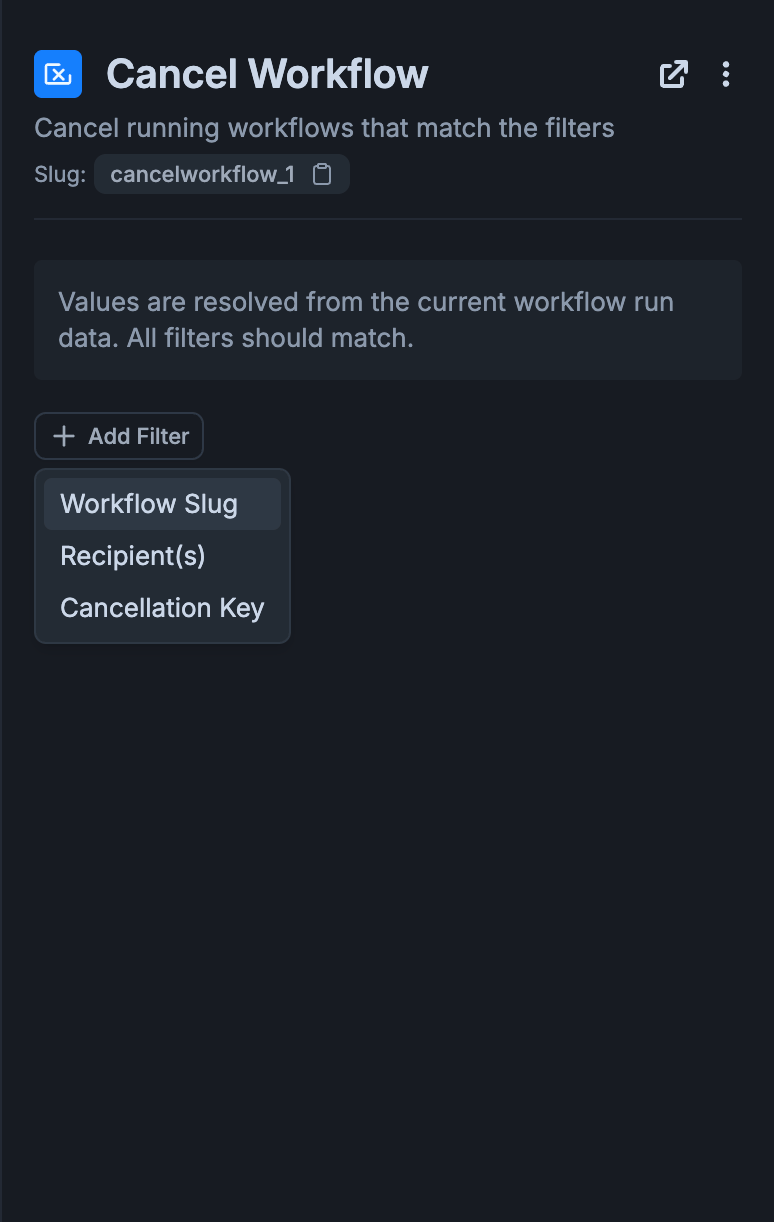
Adding a filter in the Cancel Workflow config panel
Values are resolved from the current workflow run data. All filters you add must match for an execution to be cancelled.
JSONNET expression format
Where a filter takes a JSONNET expression (the Recipient’s Input Payload option and the Cancellation Key), reference workflow data as follows — the same format used across other workflow fields such as Invoke Workflow.
For the full language reference, see the Jsonnet reference.
Common filter combinations
Which filters you combine depends on how precisely you need to target what to cancel. Two common shapes: 1. Workflow Slug + Recipient(s) — cancel one user’s runs of a workflow. Useful when a user hits the goal a drip was pushing them towards and the remaining nudges no longer make sense for that user specifically. For example, when a user completes onboarding, anonboarding_completed event fires and triggers a workflow that stops the onboarding reminders for that user.
Only that user’s running executions of
onboarding-sequence are halted. Every other user still in the sequence keeps going, and every other workflow the user is in (billing emails, product notifications) is untouched.
2. Cancellation Key only — cancel every workflow tied to a specific entity. Useful when an entity has gone away and you want everything keyed to it to stop, across every workflow at once — for example a booking is cancelled, and reminders, confirmations, and follow-up workflows all keyed to the same booking_id should all halt.
Every running execution — in any workflow — whose stored cancellation key equals the current run’s
data.booking_id is halted. For this to work, each target workflow has to have set its cancellation_key on the Trigger node (or had one passed in the workflow trigger API payload) so the match has something to compare against.
Setting the Cancellation Key on the target workflow
For a Cancel Workflow node to match on something more specific than slug + recipient — for example “cancel the reminders for this booking” — the target workflow has to declare what makes one of its runs cancellable. You do that on the Trigger node of the target workflow, in the Cancellation Key field at the bottom of the form.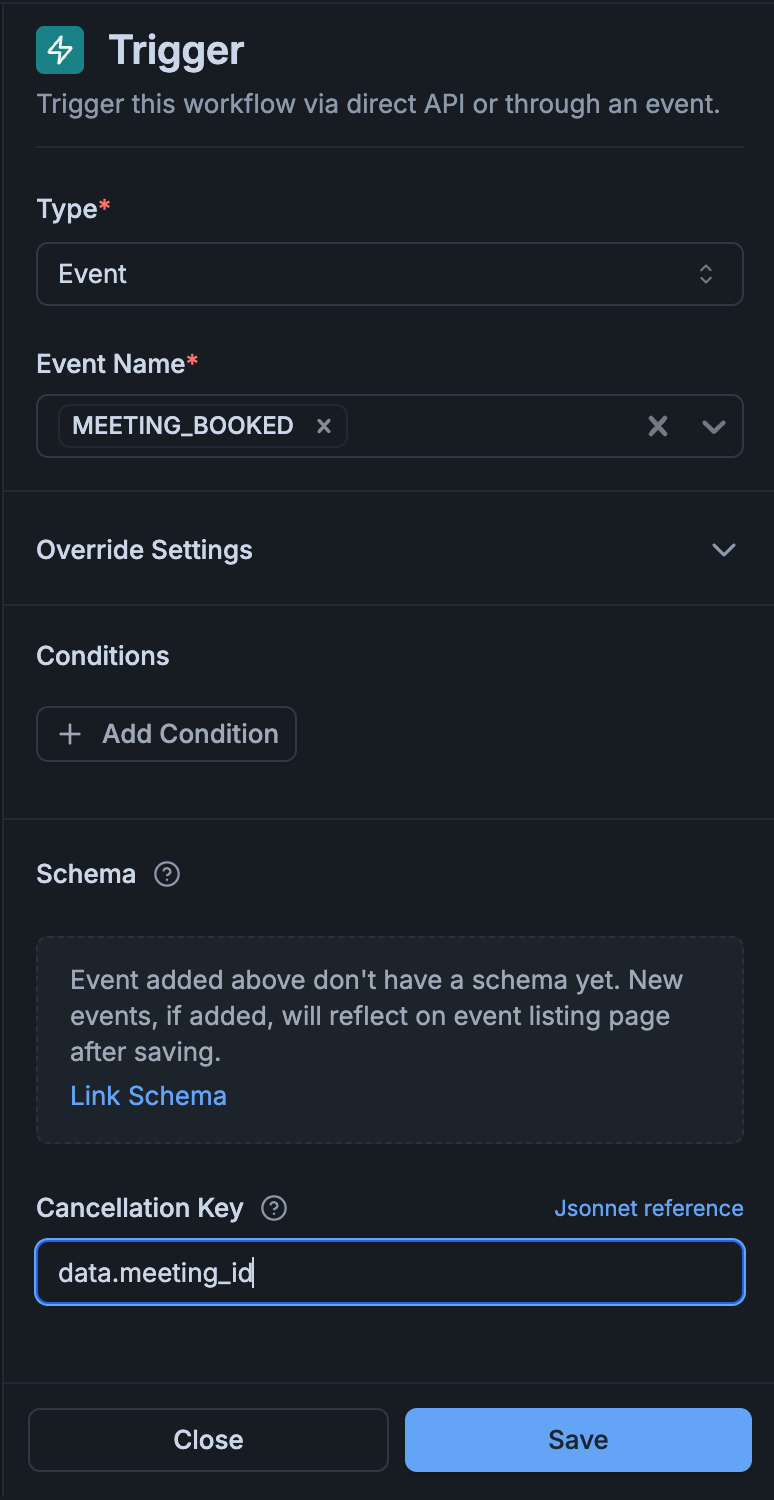
Cancellation Key field on the target workflow's Trigger node
If the expression fails to evaluate — for example, the referenced field is missing from the payload — the execution still runs. The failure is captured as a warning on the execution, and the stored cancellation key is left empty, so later Cancel Workflow nodes matching on that key won’t find this execution.
data.booking_id— cancel one booking’s reminders.data.request_id— cancel all approver reminders for one request.data.order_id— cancel the post-purchase nudges for one order.
The Cancellation Key is optional. If a Cancel Workflow node can target what you want using Workflow Slug and Recipient(s) alone, you don’t need to set one on the Trigger node.
Passing a cancellation key directly in the trigger payload
Instead of setting an expression on the Trigger node, you can pass a literalcancellation_key string at the top level of any trigger payload — direct workflow trigger, event trigger, list broadcast, and workflow test run all accept it. See the workflow trigger payload schema.
cancellation_key, SuprSend uses it as-is. Only when the payload doesn’t carry one does SuprSend evaluate the JSONNET expression on the Trigger node. The resolved value (whichever source) is stored on the execution and max 512 characters long; longer values are truncated.
Execution behaviour
What gets cancelled
- Nodes that haven’t started yet — don’t execute.
- Nodes in a waiting state (delay, batch, digest, time window) — are interrupted immediately. The execution’s status moves to
cancelled. - Messages already dispatched are not recalled. Cancellation stops the currently running execution; steps that have already completed stay completed.
Logs on the cancelling workflow
On the canvas, the Cancel Workflow node shows a one-line “Cancels: ” subtitle so you can see what it targets without opening the panel. Once the node runs, its execution history records how many executions it matched and lists their ids.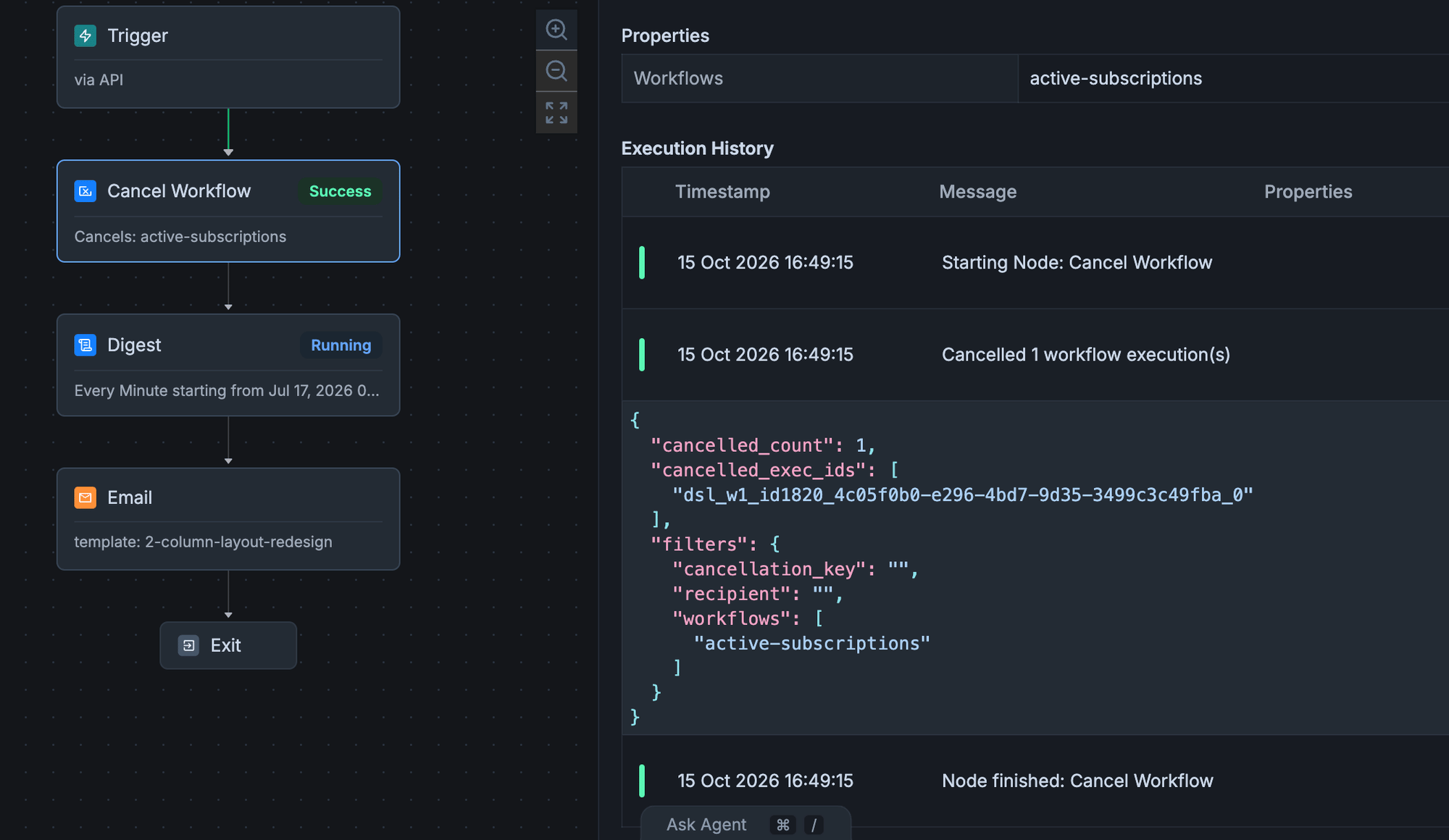
Execution history for a Cancel Workflow node — summary line, matched execution ids, and the filters used
Whether
cancelled_count is zero or many, the cancelling workflow continues to the next node — the Cancel Workflow node is fire-and-forget.
Logs on the cancelled workflow
Each execution that got cancelled shows:- Execution status:
cancelled(terminal). - Interrupted node: if a delay, batch, digest, or time window was open when the cancel landed, the log records how much time was remaining when it was interrupted.
cancelled_exec_ids field on the Cancel Workflow node lists every execution it stopped.
Patterns and edge cases
Frequently Asked Questions
Does cancellation stop messages that have already been sent?
Does cancellation stop messages that have already been sent?
No. Cancellation stops the currently running execution — nodes not yet started don’t run and nodes already waiting (delay, batch, digest, time window) are interrupted — but anything already completed stays completed. An email that already left the vendor, a push that already reached the device, or an inbox message that’s already live is not recalled.
What happens if the cancel node matches zero executions?
What happens if the cancel node matches zero executions?
Silent success. The execution log records
cancelled_count: 0 with an empty cancelled_exec_ids list, and the cancelling workflow continues to the next node. There’s no error branch — the cancel node is fire-and-forget.Do I always need to set a Cancellation Key on the target workflow's Trigger node?
Do I always need to set a Cancellation Key on the target workflow's Trigger node?
No. The Cancellation Key is only needed when Workflow Slug and Recipient(s) alone can’t uniquely target what you want to cancel. For example, if a user has three concurrent runs of the same workflow (one per booking) and you want to cancel just one, set
data.booking_id as the Cancellation Key on the Trigger node and match on it in the Cancel Workflow node.You can also skip the Trigger-node field and pass a literal cancellation_key string in the workflow trigger API payload instead. When both are present, the payload value wins.Can I cancel the workflow I'm currently in?
Can I cancel the workflow I'm currently in?
No. SuprSend blocks you at save time if a Cancel Workflow node’s Workflow Slug filter contains the current workflow’s slug. If you need to stop the current execution conditionally, use a branch with no further nodes on the exit path instead.
If I cancel a workflow that itself has Cancel Workflow nodes, do those nodes still fire?
If I cancel a workflow that itself has Cancel Workflow nodes, do those nodes still fire?
No. Cancellation halts the cancelled workflow’s un-executed nodes — including any cancel nodes it was going to run — so cancellation does not cascade through them.
Can the cancel node branch on how many executions it stopped?
Can the cancel node branch on how many executions it stopped?
Not in v1. The cancel node is fire-and-forget: it reports the count in the execution log, but the workflow continues to the next node regardless of whether it matched zero or many executions.