
api-prod service, two things should happen in their Teams:
- The on-call engineer gets a DM from your bot.
#incidentsgets the same alert, so the rest of the team can see it.
Key concepts
1. Create the Teams app
Follow Create a Teams app and add the vendor to register the bot, build the app package, and save its credentials on the Microsoft Teams vendor in SuprSend.You set up the vendor once, with your bot’s App ID, secret, App Type, and home Tenant ID. That single vendor serves every customer who installs your app — nothing on it changes per customer, and the customer’s Entra ID never goes on this form. The customer’s directory is identified by the
tenant_id on each recipient’s $ms_teams entry.2. Make your app installable by customers
When you create the Teams app, set Supported account types to Multiple Entra ID tenants (step 4 on that page) so customer admins can consent. Then add the bot scopes you’ll use to the manifest — personal for DMs, team for channel posts:3. Install the app in the customer’s tenant
A Teams admin on the customer’s side does this, in two stages: the app is added to their organization, then it’s given permission to DM users and post in channels.Expose your app for install
Your customer’s admin installs your Teams app in their workspace. Three ways to offer it:
Whichever option you use, an administrator in the customer’s organization has to approve the app — end users can’t consent on their own until your app registration has a verified publisher.
Publishing to the Teams Store
Publishing to the Teams Store
Store listing is a Microsoft process, separate from SuprSend. Budget a few weeks for the first submission.
- Complete the app package in the Developer Portal — name, icons, descriptions, privacy and terms URLs, bot scopes and permissions.
- Register in Microsoft Partner Center and get a Publisher ID for your company. Store apps need a verified publisher.
- Submit for validation from the Developer Portal (Publish → Publish to the Teams Store) or directly in Partner Center. Microsoft runs automated checks and a manual review against its Teams app validation guidelines.
- Fix and resubmit if the review raises issues. One or two rounds is normal.
- Once approved, the app is listed. Customer admins find it under Apps in Teams and add it — no
.zipfrom you. Every app update goes through the same review.
.zip upload until the Store listing is live.Give the app permission to send DMs and post in channels
Adding the app to the org catalog doesn’t put it in front of anyone yet. The bot can only DM people who have the app installed, and only post in channels of teams the app is added to. You can get there manually, which is fine for testing, or automate it from your product, which is what you’ll want in production.Option A: manual, in Teams — good for testing
The customer’s admin does two things:- Enable DMs — in Teams admin center → Teams apps → Setup policies, edit the Global policy (or one assigned to the relevant users) and add your app under Installed apps. Teams installs it in personal scope for everyone the policy covers, so any of them can receive DMs.
- Enable channel posts — @mention the bot once in each channel you’ll post in. That adds the bot to the channel and, if needed, installs the app in the team.
Option B: automated from your product — recommended
After the admin grants consent, your product installs the app where it’s needed through Graph, so “Connect Teams” finishes in your UI without the admin clicking around in Teams:- Channel posts — install the app in the team that owns the channel. The bot can then post to any standard channel in that team. Private and shared channels need the app added to that channel specifically.
- DMs — install the app for each user when they enable Teams notifications in your product.
Automate with Graph (optional)
To finish install from inside your product, first send the admin to the consent URL:$TEAMS_APP_ID is the catalog id returned by the upload — different from your Entra client id.
For DMs, install the app for the user when they enable Teams notifications in your product, or right before their first DM. If the app is already installed for them (for example through a setup policy), Graph returns 409 Conflict — treat that as success:
$USER_ID is the person’s Entra object ID — the same value you store as user_id on their $ms_teams entry. See Users under In production, fetch the IDs automatically with Graph in step 4 for how to obtain it.
These calls need application permissions on your app registration, granted through the admin consent above: AppCatalog.ReadWrite.All for the upload, TeamsAppInstallation.ReadWriteForTeam.All for the team install, and TeamsAppInstallation.ReadWriteForUser.All for the user install.
4. Save Teams channels and users in SuprSend
Every recipient needs an$ms_teams entry with the customer’s Entra tenant_id and either a channel’s conversation_id or a person’s user_id. For a first test, copy them by hand. In production, your product collects them through Graph after the app is installed and writes them to SuprSend.
For a first test, copy the IDs by hand
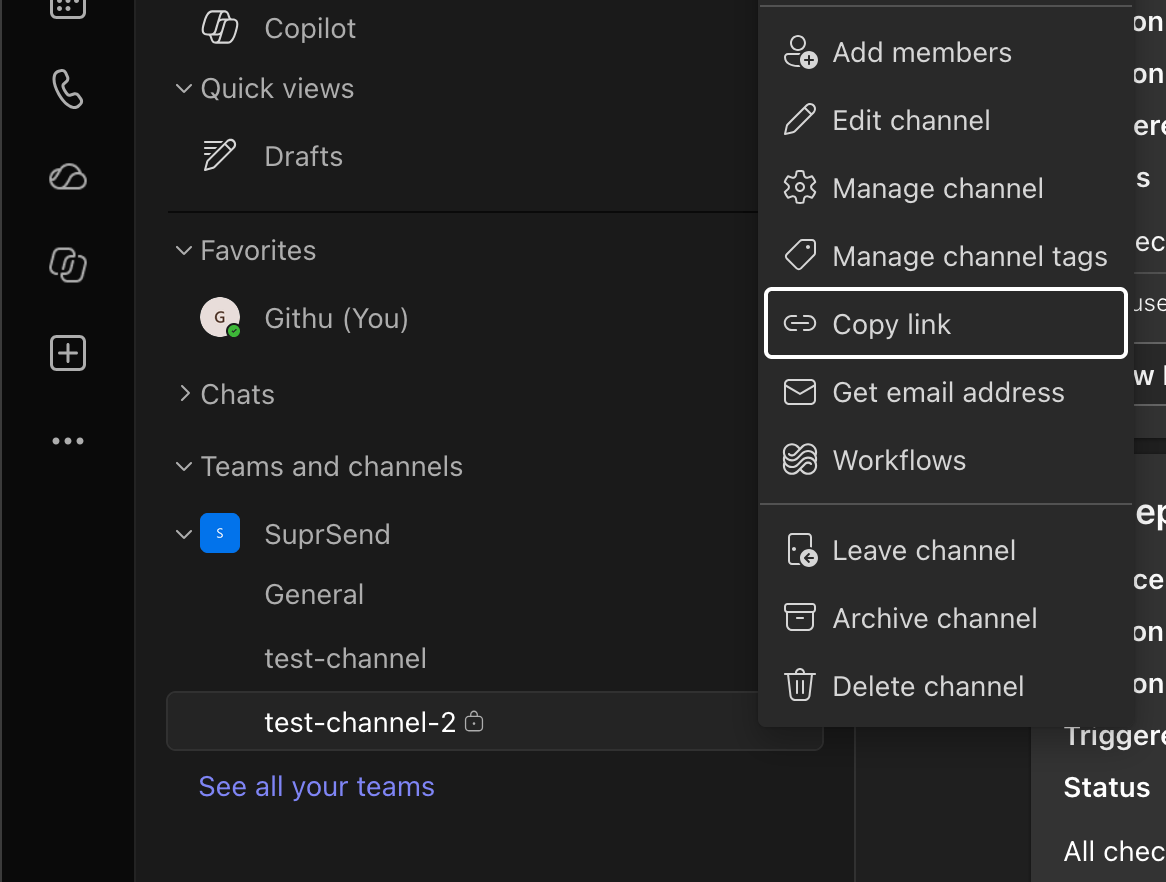
To prove the bot can post in the customer’s tenant, a channel post is enough. Grab the two IDs from a channel link:- In the customer’s Teams, hover the channel → ⋯ → Copy link.
- Decode
%3A→:and%40→@. That’sconversation_id. - The link’s
tenantId=query parameter is the customer’s Entratenant_id.
$ms_teams entry on a test user, then trigger a test with that user as the recipient. A conversation_id works for a personal chat too — copy the link from the chat instead of a channel. The object form is in Save the IDs in SuprSend below.
In production, fetch the IDs automatically with Graph
Once the admin has consented, your product can look up everything it needs in the customer’s tenant:-
Entra tenant ID — comes back as the
tenantquery parameter on the admin consent redirect. If users sign in to your product with Microsoft, it’s also thetidclaim on their ID token. Store it against the customer account; you’ll write it astenant_idon every entry. -
Channels — list the teams, let the customer pick one, then list its channels and show them as a picker:
Each channel’s
idis theconversation_idyou store, already decoded. NeedsTeam.ReadBasic.AllandChannel.ReadBasic.All. -
Users — the
user_idyou store is the person’s Entra object ID, a stable GUID in the customer’s directory. Three ways to get it:-
From Microsoft sign-in. If users log in to your product with Entra ID, the ID token’s
oidclaim is the object ID (andtidis the tenant ID). You have it the moment they sign in — no extra call. -
Look it up by email. Your product already knows the user’s work email:
The
idfield in the response is the object ID. NeedsUser.Read.All. -
From the team roster.
GET /teams/$TEAM_ID/membersreturns each member’suserId— useful for a “choose who to DM” picker scoped to a team. NeedsTeamMember.Read.All.
29:...id the Bot Framework roster returns. It’s tied to this bot registration and breaks if you recreate the bot. -
From Microsoft sign-in. If users log in to your product with Entra ID, the ID token’s
Save the IDs in SuprSend
When the customer picks a channel for a service, save it on the object. When a user turns on Teams DMs, save their identity on their user — on the per-tenant profile if they belong to more than one customer./v1/user/{distinct_id}/ without the /tenant/{tenant_id}/ segment writes the global profile instead, which is used across all tenant sends.
service_url is optional. Omit it for commercial Microsoft 365 tenants; set it only if the customer is on a Microsoft US Government cloud (GCC High or DoD), which uses its own endpoints.
5. Trigger a workflow
Create a workflow (for examplenew-incident) with either a multi-channel node or an MS Teams node, and connect it to a Teams template.
$ms_teams entry on each recipient: the object’s conversation_id becomes the channel post and the user’s user_id becomes the DM.
If everything works, the channel shows the post and the on-call engineer gets a DM. You can also check Logs → Messages in SuprSend for the delivery and later statuses.
FAQs
Can the bot DM someone who hasn't installed the app?
Can the bot DM someone who hasn't installed the app?
No. The app has to be in the user’s personal scope first — either through a Teams setup policy that installs it for everyone, or a per-user Graph install when they enable Teams notifications in your product. Until then the DM fails.
Do I have to @mention the bot in every channel?
Do I have to @mention the bot in every channel?
Only if you didn’t install the app in the team through Graph. The @mention is just another way of installing it in the team. Once the app is in the team, the bot can post to any standard channel there. Private and shared channels are the exception — the app has to be added to those channels specifically.
It works in my tenant but fails in the customer's
It works in my tenant but fails in the customer's
Either the app isn’t installed in their tenant, or
$ms_teams.tenant_id is missing or still points to your own directory. Write the customer’s Entra tenant ID as tenant_id on the entry.What does BotNotInConversationRoster mean?
What does BotNotInConversationRoster mean?
The app is in the customer’s tenant but not installed in the team that owns that channel. Install it in the team through Graph, or have someone @mention the bot once in the channel — either one fixes it.
user_id values starting with 29: stopped working
user_id values starting with 29: stopped working
Those are Bot Framework roster ids, tied to the bot registration. If you recreate the bot they stop resolving. Switch to Entra object IDs as
user_id — see Users under In production, fetch the IDs automatically with Graph.